
JS框架_(JQuery.js)上传进度条
百度云盘 传送门 密码: 1pou
纯CSS上传进度条效果:
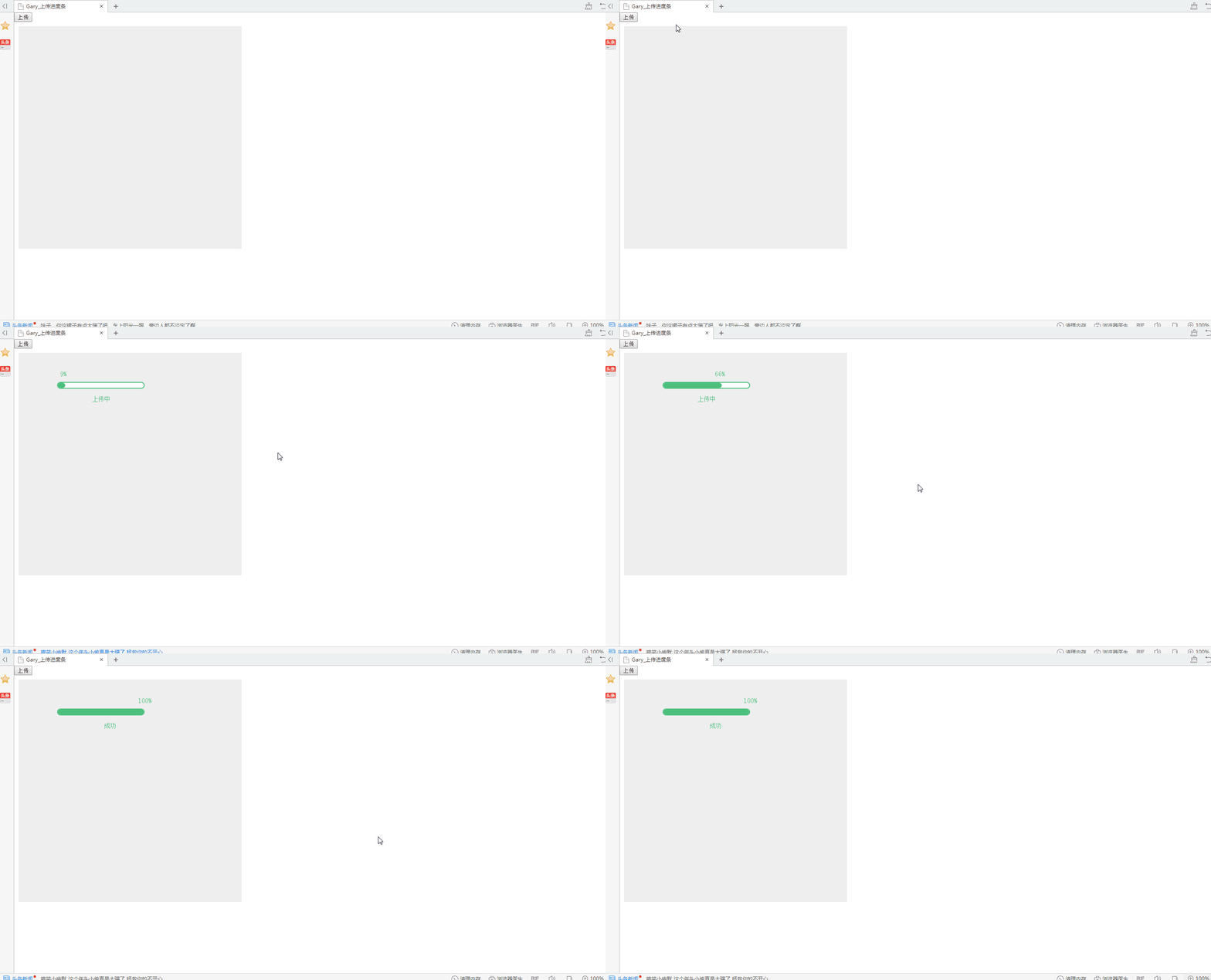
<!DOCTYPE html PUBLIC "-//W3C//DTD XHTML 1.0 Transitional//EN" "http://www.w3.org/TR/xhtml1/DTD/xhtml1-transitional.dtd">
<html xmlns="http://www.w3.org/1999/xhtml">
<head>
<meta http-equiv="Content-Type" content="text/html; charset=utf-8" />
<title>Gary_ </title>
</head> <link rel="stylesheet" type="text/css" href="css/css.css" /> <script src="js/jquery.min.js" type="text/javascript"></script> <body> <button type="button" onClick="processerbar(3000)">上传</button> <!--进度条区域-->
<div style="margin:10px;padding:10px;width:500px;height:500px;background:#EEE;"> <!-- 进度条 -->
<div class="barline" id="probar">
<div id="percent"></div>
<div id="line" w="100" style="width:0px;"></div>
<div id="msg" style=""></div>
</div> </div> <script language="javascript">
function processerbar(time){
document.getElementById('probar').style.display="block";
$("#line").each(function(i,item){
var a=parseInt($(item).attr("w"));
$(item).animate({
width: a+"%"
},time);
}); var si = window.setInterval(
function(){
a=$("#line").width();
b=(a/200*100).toFixed(0);
document.getElementById('percent').innerHTML=b+"%";
document.getElementById('percent').style.left=a-12+"px";
document.getElementById('msg').innerHTML="上传中";
if(document.getElementById('percent').innerHTML=="100%") {
clearInterval(si);
document.getElementById('msg').innerHTML=" 成功";
}
},900);
};
</script> </body>
</html>
index.html
@charset "utf-8";

body,h1,h2,h3,h4,h5,h6,p,ul,ol,li,form,img,dl,dt,dd,table,th,td,blockquote,fieldset,strong,label,em{margin:0;padding:0;border:0;}

ul,ol,li{list-style:none;}

.barline{

float:left;

width:200px;

background:#FFF;

border:2px solid #4DBF7D;

height:12px;

display:inline-block;

border-radius:8px;

display:none;

position:absolute;left:100px;top:100px;

}

.barline #percent{position:absolute;left:0px;top:-30px;display:inline-block;color:#4DBF7D;font-size:16px;}

.barline #line{float:left;height:12px;overflow:hidden;background:#4DBF7D;border-radius:8px;}

.barline #msg{position:absolute;left:80px;top:30px;display:inline-block;color:#4DBF7D;font-size:14px;}<!---->
css.css
实现过程:
一、进度条CSS属性
1、位置
.barline{

float:left;

width:200px;

background:#FFF;

border:2px solid #4DBF7D;

height:12px;

display:inline-block;

border-radius:8px;

display:none;

position:absolute;left:100px;top:100px;

}
display:block就是将元素显示为块级元素.

  block元素的特点是:

  总是在新行上开始;

  高度,行高以及顶和底边距都可控制;

  宽度缺省是它的容器的100%,除非设定一个宽度

  <div>, <p>, <h1>, <form>, <ul> 和 <li>是块元素的例子。

  display:inline就是将元素显示为行内元素.

  inline元素的特点是:

  和其他元素都在一行上;

  高,行高及顶和底边距不可改变;

  宽度就是它的文字或图片的宽度,不可改变。

  <span>, <a>, <label>, <input>, <img>, <strong> 和<em>是inline元素的例子。

  inline和block可以控制一个元素的行宽高等特性,需要切换的情况如下:

  让一个inline元素从新行开始;

  让块元素和其他元素保持在一行上;

  控制inline元素的宽度(对导航条特别有用);

  控制inline元素的高度;

  无须设定宽度即可为一个块元素设定与文字同宽的背景色。

  display:inline-block将对象呈递为内联对象,但是对象的内容作为块对象呈递。旁边的内联对象会被呈递在同一行内,允许空格。

  inline-block的元素特点:

  将对象呈递为内联对象,但是对象的内容作为块对象呈递。旁边的内联对象会被呈递在同一行内,允许空格。(准确地说,应用此特性的元素呈现为内联对象,周围元素保持在同一行,但可以设置宽度和高度地块元素的属性)
display属性inline、block、inline-block的区别
2、进度条动画效果
<!--提示文字上传进度-->

.barline #percent{position:absolute;left:0px;top:-30px;display:inline-block;color:#4DBF7D;font-size:16px;}

<!--填充进度条上传百分比-->

.barline #line{float:left;height:12px;overflow:hidden;background:#4DBF7D;border-radius:8px;}

<!--提示文字上传状态-->

.barline #msg{position:absolute;left:80px;top:30px;display:inline-block;color:#4DBF7D;font-size:14px;}
二、响应事件
<button type="button" onClick="processerbar(3000)">上传</button>
<script language="javascript">
function processerbar(time){
<!--获取进度条ID-->
document.getElementById('probar').style.display="block";
<!--block此元素将显示为块级元素,此元素前后会带有换行符-->
<!--进度条填充触发的事件-->
$("#line").each(function(i,item){
<!--attr()方法设置进度条的填充多少-->
var a=parseInt($(item).attr("w"));
<!--animate()方法执行动画
$(item).animate({
width: a+"%"
},time);
}); <!-- clearInterval()方法创建执行定时操作时要使用全局变量:-->
var si = window.setInterval(
function(){
a=$("#line").width();
b=(a/200*100).toFixed(0);
<!--提示上传进度-->
document.getElementById('percent').innerHTML=b+"%";
<!--填充进度条上传百分比-->
document.getElementById('percent').style.left=a-12+"px";
<!--提示上传状态-->
document.getElementById('msg').innerHTML="上传中";
<!--当上传进度完成时调用下面方法-->
if(document.getElementById('percent').innerHTML=="100%") {
<!--通过 clearInterval() 方法来停止执行window.setInterval-->
clearInterval(si);
<!--提示上传成功-->
document.getElementById('msg').innerHTML=" 成功";
}
},70);
};
</script>
(每一步都有自己的说明,选择插入代码发现没有高亮显示Js注解的,∑(= = !)。。。)
JS框架_(JQuery.js)上传进度条的更多相关文章
- JS框架_(JQuery.js)纯css3进度条动画
百度云盘 传送门 密码:wirc 进度条动画效果: <!DOCTYPE html> <html lang="zh"> <head> <me ...
- JS框架_(JQuery.js)绚丽的3D星空动画
百度云盘: 传送门 密码:8ft8 绚丽的3D星空动画效果(纯CSS) (3D星空动画可以用作网页背景,Gary为文本文字) <!doctype html> <html lang=& ...
- JS框架_(JQuery.js)Tooltip弹出式按钮插件
百度云盘 传送门 密码:7eh5 弹出式按钮效果 <!DOCTYPE html> <html > <head> <meta charset="UTF ...
- JS框架_(JQuery.js)圆形多选菜单选项
百度云盘 传送门 密码:zb1c 圆形多选菜单选项效果: <!DOCTYPE html> <html lang="en" > <head> &l ...
- jQuery实现上传进度条效果
效果:(点击上传按钮) See the Pen pjGNJr by moyu (@MoYu1991) on CodePen. html代码: <!DOCTYPE html> <h ...
- JS框架_(JQuery.js)动画效果鼠标跟随
百度云盘 传送门 密码 :4n9u 火狐浏览器上纯CSS_动画效果鼠标跟随效果: (作者:lily_lcj 传送门) <!DOCTYPE html PUBLIC "-//W3C//DT ...
- JS框架_(JQuery.js)图片相册掀开切换效果
百度云盘 传送门 密码:y0dk 图片掀开切换效果: <!DOCTYPE html PUBLIC "-//W3C//DTD XHTML 1.0 Transitional//EN&quo ...
- JS框架_(JQuery.js)夜晚天空满天星星闪烁动画
百度云盘 传送门 密码:xftr 满天星星闪烁动画效果: (可用星空动画来作为页面背景,白色文字改为文章或者其他的O(∩_∩)O) <!doctype html> <html> ...
- JS框架_(JQuery.js)模拟刮奖
百度云盘:传送门 密码:6p5q 纯CSS模拟刮奖效果 <!DOCTYPE html> <html lang="en"> <head> < ...
随机推荐
- EM 算法(三)-GMM
高斯混合模型 混合模型,顾名思义就是几个概率分布密度混合在一起,而高斯混合模型是最常见的混合模型: GMM,全称 Gaussian Mixture Model,中文名高斯混合模型,也就是由多个高斯分布 ...
- [转载]十六进制数的两种不同表示:0x和H
来源:https://blog.csdn.net/u013773644/article/details/519811860x是16进制的前缀,H是16进制的后缀 都是表示十六进制数,意义上没有什么区别 ...
- 【lucene】一个简单的招聘网站的建立
1.建立索引库: 核心代码如下 package com.tabchanj.job.index; import java.util.ArrayList; import java.util.HashMap ...
- 阿里云服务器配置https
第一步 在阿里云控制台找到申请ssl证书的地址(我申请的是阿里云免费的证书,申请完要等申请通过,可能要等待一两天) 第二步下载ssl nginx版本的证书 第三步上传证书(包含.key, .pem这两 ...
- dedecms 调用全部导航+二级导航
{dede:channelartlist row=5 typeid='top'} <li><a class="hide" href="{dede:fie ...
- 基于DIGI WR21的PLC数据采集
通过路由器,使用python脚本读取数据,转发到后台golang数据采集平台,数据采集平台通过数据清洗,然后把数据清洗成标准数据,通过gRpc传输到分析平台.后期会写一点golang 基于grpc的微 ...
- zabbix 启到不起来:active check configuration update from [127.0.0.1:10051] started to fail (cannot connect to [[127.0.0.1]:10051]: [111] Connection refused)
cat /var/log/zabbix_agent_log 查看日记出现报错:active check configuration update from [127.0.0.1:10051] star ...
- docker_facenet_image在Docker容器中运行Facenet环境搭建
对开发和运维人员来说,可能最梦寐以求的就是一次性地创建或配置,可以在任意环境.任意时间让应用正常运行.而Docker恰恰是可以实现这一终极目标的瑞士军刀. 具体来说,Docker在开发和运维过程中,具 ...
- (转)Linux传输大文件(分割传输)
1.分拆为多个文件的命令: cat workspace_2018.tar.gz | split -b 1G - workspace_2018.tar.gz. 命令解释: workspace_2018. ...
- Powerful array CodeForces - 86D (莫队算法)
An array of positive integers a1, a2, ..., an is given. Let us consider its arbitrary subarray al, a ...