
JS框架_(JQuery.js)模拟刮奖
百度云盘:传送门 密码:6p5q
纯CSS模拟刮奖效果
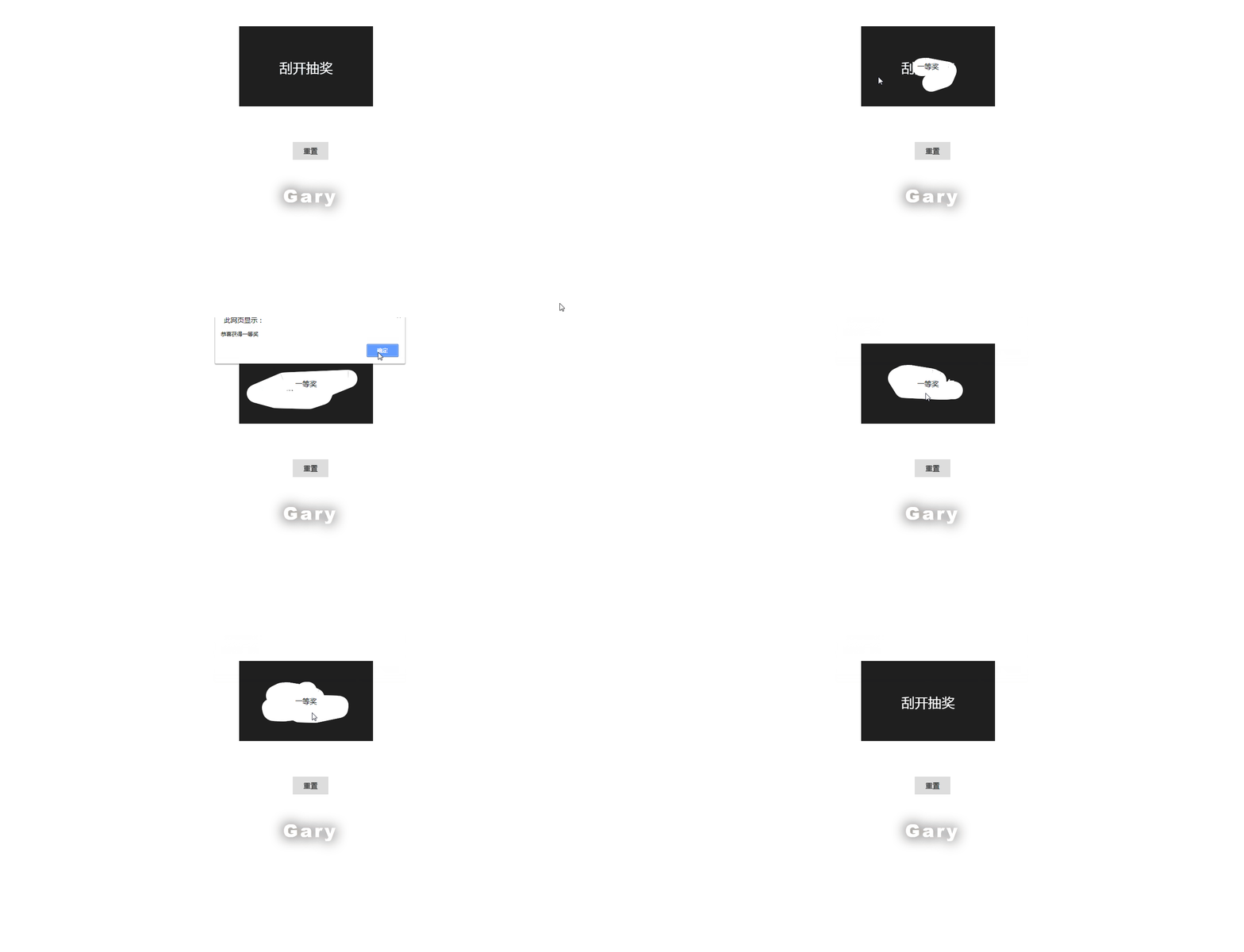
<!DOCTYPE html>

<html lang="en">

<head>

    <meta charset="UTF-8">

    <meta name="viewport" content="width=device-width, initial-scale=1.0">

    <meta http-equiv="X-UA-Compatible" content="ie=edge">

    <title>Document</title>

</head>

<style>

        *{

            margin: 0;

            padding: 0;

        }

        p {

          position: fixed;

          top: 60%;

          left: 0;

          right: 0;

          text-align: center;

          transform: translateY(-50%);

          font-size: 40px;

          font-weight: 900;

          color: white;

          text-shadow: 0 0 50px black;

          text-transform: capitalize;

          font-family: 'Roboto','Helvetica','Arial',sans-serif;

          letter-spacing: 5px;

        }

        .box{

            margin: 80px;

            position: relative;

            width: 300px;

            height: 180px;

            left: 460px;

        }

        #canvas{

            position: absolute;

            top: 0;

            left: 0;

            z-index: 5;

        }

        .bk{

            width: 300px;

            height: 180px;

            background: #fff;

            position: absolute;

            top: 0;

            left: 0;

            text-align: center;

            line-height: 180px;

        }

        #freshBtn{

            margin-left: 660px;

            user-select: none;

            background: #ddd;

            width: 80px;

            height: 40px;

            text-align: center;

            line-height: 40px;

        }

    </style>

<body>

<p>Gary</p>

    <div class="box">

        <div class="bk">

            一等奖

        </div>

        <canvas id="canvas"></canvas>

    </div>

    <div id="freshBtn">重置</div>

</body>

<script src="./js/canvas.js"></script>

<script>

    var canvas = new canvasInit({

        id: 'canvas',

        text: '刮开抽奖',

        cover: '#1f1f1f',

        coverType: 'color',

        width: 300,

        height: 180,

        drawPercentCallback: (num) => {

            if(num > 30) {

                alert('恭喜获得一等奖')

                canvas.fresh() // 重置

            }

        }

    })

</script>

</html>
index.html
class canvasClass {

    constructor (id,text,cover,coverType,width,height,drawPercentCallback) {

        this.conId = id; /*canvasID */

        this.conNode = document.getElementById(this.conId);

        this.ctx = this.conNode.getContext('2d');

        this.coverText = text;

        this.cover = cover; /**图层颜色或图片 */

        this.coverType = coverType; /**图层类型(image/color) */

        this.width = width;

        this.height = height;

        this.drawPercentCallback = drawPercentCallback

        this.clientRect = null;

        this.isMouseDown = false;

    }

    /**

     * 绘制canvas

     */

    fillCanvas () {

        this.conNode.setAttribute('width', this.width);

        this.conNode.setAttribute('height', this.height);

        if (this.coverType == 'color') {

            this.ctx.save();

            this.ctx.fillStyle = this.cover;

            this.ctx.fillRect(0, 0, this.width, this.height);

            this.ctx.restore();

            this.ctx.save();

            var fontSize = 30;

            this.ctx.font = '30px Arial';

            this.ctx.textAlign = 'center';

            this.ctx.fillStyle = '#fff';

            this.ctx.fillText(this.coverText, this.width/2, this.height/2+fontSize/2);

            this.ctx.restore();

            this.ctx.globalCompositeOperation = 'destination-out';

        } else if (this.coverType == 'image') {

            var image = new Image(this.width, this.height)

            image.onload = () => {

                this.ctx.drawImage(image, 0, 0, this.width, this.height);

            }

            image.src = this.cover;

        }

        this.clientRect = this.conNode ? this.conNode.getBoundingClientRect() : null

    }

    /**

     * 事件监听

     */

    bindEvent () {

        /**移动端检测 */

        var device = (/android|webos|iphone|ipad|ipod|blackberry|iemobile|opera mini/i.test(navigator.userAgent.toLowerCase()));

        var clickEvt = device ? 'touchstart' : 'mousedown';

        var moveEvt = device ? 'touchmove' : 'mousemove';

        var x1,y1,x2,y2;

        if (!device) {

            document.addEventListener('mouseup', (e) => {

                this.isMouseDown = false;

            })

        } else {

            document.addEventListener("touchmove", (e) => {

                if (this.isMouseDown) {

                    e.preventDefault();

                }

            })

            document.addEventListener("touchend", (e) => {

                this.isMouseDown = false;

            })

        }

        /**添加监听 */

        this.conNode.addEventListener(clickEvt, (e) => {

            this.isMouseDown = true;

            x1 = device ? e.touches[0].offsetX : e.offsetX;

            y1 = device ? e.touches[0].offsetY : e.offsetY;

            this.drawPoint(x1, y1)

        })

        this.conNode.addEventListener(moveEvt, (e) => {

            if (!device && !this.isMouseDown) {

                return false;

            }

            this.isMouseDown = true;

            x2 = device ? e.touches[0].offsetX : e.offsetX;

            y2 = device ? e.touches[0].offsetY : e.offsetY;

            this.drawPoint(x1, y1, x2, y2)

            // console.log(x1,x2,y1,y2)

            x1 = x2

            y1 = y2

            // [x1, y1] = [x2, y2]

        })

    }

    /**

     * 抹去, 返回百分比

     */

    drawPoint (x1, y1, x2, y2) {

        var bar = 20; // 半径

        this.ctx.beginPath();

        if (x2) {

            /**

             * 优化绘制路径

             */

            var asin = bar*Math.sin(Math.atan((y2-y1)/(x2-x1)));

            var acos = bar*Math.cos(Math.atan((y2-y1)/(x2-x1)))

            var x3 = x1+asin;

            var y3 = y1-acos;

            var x4 = x1-asin;

            var y4 = y1+acos;

            var x5 = x2+asin;

            var y5 = y2-acos;

            var x6 = x2-asin;

            var y6 = y2+acos;

            this.ctx.save();

            this.ctx.beginPath();

            this.ctx.moveTo(x3,y3);

            this.ctx.lineTo(x5,y5);

            this.ctx.lineTo(x6,y6);

            this.ctx.lineTo(x4,y4);

            this.ctx.closePath();

            this.ctx.clip();

            this.ctx.clearRect(0,0,this.width,this.height);

            this.ctx.restore();

            this.ctx.arc(x2, y2, bar, 0, Math.PI*2, true);

        } else {

            this.ctx.arc(x1, y1, bar, 0, Math.PI*2, true);

        }

        this.ctx.fill();

        if (this.drawPercentCallback) {

            this.drawPercentCallback(this.getTransparentPercent());

        }

    }

    getTransparentPercent () {

        var imgData = this.ctx.getImageData(0, 0, this.width, this.height),

            pixles = imgData.data,

            transPixs = [];

        for (var i = 0, j = pixles.length; i < j; i += 4) {

            var a = pixles[i + 3];

            if (a < 128) {

                transPixs.push(i);

            }

        }

        return (transPixs.length / (pixles.length / 4) * 100).toFixed(2);

    }

}

function canvasInit(json) {

    var arr = []

    for (let item in json) {

        arr.push(json[item])

    }

    this.init = new canvasClass(...arr)

    this.init.fillCanvas()

    this.init.bindEvent()

    var btn = document.querySelector('#freshBtn');

    btn.addEventListener('click', (e) => {

        this.init.fillCanvas()

    });

}

canvasInit.prototype.fresh = function () {

    console.log(this.init)

    this.init.fillCanvas()

    this.init.isMouseDown = false

}
canvas.css
(直接复制就可以使用了O(∩_∩)O~ ES6编写)
=>是es6语法中的arrow function(箭头函数)
举例:
(x) => x + 6
相当于
function(x){
return x + 6;
}
实现过程
CSS
画板.class
class canvasClass {

    constructor (id,text,cover,coverType,width,height,drawPercentCallback) {

        this.conId = id; /*canvasID */

        this.conNode = document.getElementById(this.conId);

        this.ctx = this.conNode.getContext('2d');

        this.coverText = text;

        this.cover = cover; /**图层颜色或图片 */

        this.coverType = coverType; /**图层类型(image/color) */

        this.width = width;

        this.height = height;

        this.drawPercentCallback = drawPercentCallback

        this.clientRect = null;

        this.isMouseDown = false;

    }

    /**

     * 绘制canvas

     */

    fillCanvas () {

        this.conNode.setAttribute('width', this.width);

        this.conNode.setAttribute('height', this.height);

        if (this.coverType == 'color') {

            this.ctx.save();

            this.ctx.fillStyle = this.cover;

            this.ctx.fillRect(0, 0, this.width, this.height);

            this.ctx.restore();

            this.ctx.save();

            var fontSize = 30;

            this.ctx.font = '30px Arial';

            this.ctx.textAlign = 'center';

            this.ctx.fillStyle = '#fff';

            this.ctx.fillText(this.coverText, this.width/2, this.height/2+fontSize/2);

            this.ctx.restore();

            this.ctx.globalCompositeOperation = 'destination-out';

        } else if (this.coverType == 'image') {

            var image = new Image(this.width, this.height)

            image.onload = () => {

                this.ctx.drawImage(image, 0, 0, this.width, this.height);

            }

            image.src = this.cover;

        }

        this.clientRect = this.conNode ? this.conNode.getBoundingClientRect() : null

    }

    /**

     * 事件监听

     */

    bindEvent () {

        /**移动端检测 */

        var device = (/android|webos|iphone|ipad|ipod|blackberry|iemobile|opera mini/i.test(navigator.userAgent.toLowerCase()));

        var clickEvt = device ? 'touchstart' : 'mousedown';

        var moveEvt = device ? 'touchmove' : 'mousemove';

        var x1,y1,x2,y2;

        if (!device) {

            document.addEventListener('mouseup', (e) => {

                this.isMouseDown = false;

            })

        } else {

            document.addEventListener("touchmove", (e) => {

                if (this.isMouseDown) {

                    e.preventDefault();

                }

            })

            document.addEventListener("touchend", (e) => {

                this.isMouseDown = false;

            })

        }

        /**添加监听 */

        this.conNode.addEventListener(clickEvt, (e) => {

            this.isMouseDown = true;

            x1 = device ? e.touches[0].offsetX : e.offsetX;

            y1 = device ? e.touches[0].offsetY : e.offsetY;

            this.drawPoint(x1, y1)

        })

        this.conNode.addEventListener(moveEvt, (e) => {

            if (!device && !this.isMouseDown) {

                return false;

            }

            this.isMouseDown = true;

            x2 = device ? e.touches[0].offsetX : e.offsetX;

            y2 = device ? e.touches[0].offsetY : e.offsetY;

            this.drawPoint(x1, y1, x2, y2)

            // console.log(x1,x2,y1,y2)

            x1 = x2

            y1 = y2

            // [x1, y1] = [x2, y2]

        })

    }

    /**

     * 抹去, 返回百分比

     */

    drawPoint (x1, y1, x2, y2) {

        var bar = 20; // 半径

        this.ctx.beginPath();

        if (x2) {

            /**

             * 优化绘制路径

             */

            var asin = bar*Math.sin(Math.atan((y2-y1)/(x2-x1)));

            var acos = bar*Math.cos(Math.atan((y2-y1)/(x2-x1)))

            var x3 = x1+asin;

            var y3 = y1-acos;

            var x4 = x1-asin;

            var y4 = y1+acos;

            var x5 = x2+asin;

            var y5 = y2-acos;

            var x6 = x2-asin;

            var y6 = y2+acos;

            this.ctx.save();

            this.ctx.beginPath();

            this.ctx.moveTo(x3,y3);

            this.ctx.lineTo(x5,y5);

            this.ctx.lineTo(x6,y6);

            this.ctx.lineTo(x4,y4);

            this.ctx.closePath();

            this.ctx.clip();

            this.ctx.clearRect(0,0,this.width,this.height);

            this.ctx.restore();

            this.ctx.arc(x2, y2, bar, 0, Math.PI*2, true);

        } else {

            this.ctx.arc(x1, y1, bar, 0, Math.PI*2, true);

        }

        this.ctx.fill();

        if (this.drawPercentCallback) {

            this.drawPercentCallback(this.getTransparentPercent());

        }

    }

    getTransparentPercent () {

        var imgData = this.ctx.getImageData(0, 0, this.width, this.height),

            pixles = imgData.data,

            transPixs = [];

        for (var i = 0, j = pixles.length; i < j; i += 4) {

            var a = pixles[i + 3];

            if (a < 128) {

                transPixs.push(i);

            }

        }

        return (transPixs.length / (pixles.length / 4) * 100).toFixed(2);

    }

}
class canvasClass
1、绘制canvas画布
2、添加事件监听
3、刮奖效果
构造函数省略...
1、绘制canvas画布
    fillCanvas () {

        this.conNode.setAttribute('width', this.width);

        this.conNode.setAttribute('height', this.height);

        if (this.coverType == 'color') {

            this.ctx.save();

            this.ctx.fillStyle = this.cover;

            this.ctx.fillRect(0, 0, this.width, this.height);

            this.ctx.restore();

            this.ctx.save();

            var fontSize = 30;

            this.ctx.font = '30px Arial';

            this.ctx.textAlign = 'center';

            this.ctx.fillStyle = '#fff';

            this.ctx.fillText(this.coverText, this.width/2, this.height/2+fontSize/2);

            this.ctx.restore();

            this.ctx.globalCompositeOperation = 'destination-out';

        } else if (this.coverType == 'image') {

            var image = new Image(this.width, this.height)

            image.onload = () => {

                this.ctx.drawImage(image, 0, 0, this.width, this.height);

            }

            image.src = this.cover;

        }

        this.clientRect = this.conNode ? this.conNode.getBoundingClientRect() : null

    }
2、添加事件监听
 bindEvent () {

        /**移动端检测 */

        var device = (/android|webos|iphone|ipad|ipod|blackberry|iemobile|opera mini/i.test(navigator.userAgent.toLowerCase()));

        var clickEvt = device ? 'touchstart' : 'mousedown';

        var moveEvt = device ? 'touchmove' : 'mousemove';

        var x1,y1,x2,y2;

        if (!device) {

            document.addEventListener('mouseup', (e) => {

                this.isMouseDown = false;

            })

        } else {

            document.addEventListener("touchmove", (e) => {

                if (this.isMouseDown) {

                    e.preventDefault();

                }

            })

            document.addEventListener("touchend", (e) => {

                this.isMouseDown = false;

            })

        }

        /**添加监听 */

        this.conNode.addEventListener(clickEvt, (e) => {

            this.isMouseDown = true;

            x1 = device ? e.touches[0].offsetX : e.offsetX;

            y1 = device ? e.touches[0].offsetY : e.offsetY;

            this.drawPoint(x1, y1)

        })

        this.conNode.addEventListener(moveEvt, (e) => {

            if (!device && !this.isMouseDown) {

                return false;

            }

            this.isMouseDown = true;

            x2 = device ? e.touches[0].offsetX : e.offsetX;

            y2 = device ? e.touches[0].offsetY : e.offsetY;

            this.drawPoint(x1, y1, x2, y2)

            // console.log(x1,x2,y1,y2)

            x1 = x2

            y1 = y2

            // [x1, y1] = [x2, y2]

        })

    }
3、刮奖效果
    drawPoint (x1, y1, x2, y2) {

        var bar = 20; // 半径

        this.ctx.beginPath();

        if (x2) {

            /**

             * 优化绘制路径

             */

            var asin = bar*Math.sin(Math.atan((y2-y1)/(x2-x1)));

            var acos = bar*Math.cos(Math.atan((y2-y1)/(x2-x1)))

            var x3 = x1+asin;

            var y3 = y1-acos;

            var x4 = x1-asin;

            var y4 = y1+acos;

            var x5 = x2+asin;

            var y5 = y2-acos;

            var x6 = x2-asin;

            var y6 = y2+acos;

            this.ctx.save();

            this.ctx.beginPath();

            this.ctx.moveTo(x3,y3);

            this.ctx.lineTo(x5,y5);

            this.ctx.lineTo(x6,y6);

            this.ctx.lineTo(x4,y4);

            this.ctx.closePath();

            this.ctx.clip();

            this.ctx.clearRect(0,0,this.width,this.height);

            this.ctx.restore();

            this.ctx.arc(x2, y2, bar, 0, Math.PI*2, true);

        } else {

            this.ctx.arc(x1, y1, bar, 0, Math.PI*2, true);

        }

        this.ctx.fill();

        if (this.drawPercentCallback) {

            this.drawPercentCallback(this.getTransparentPercent());

        }

    }
初始化canvas.class画布
function canvasInit(json) {

    var arr = []

    for (let item in json) {

        arr.push(json[item])

    }

    this.init = new canvasClass(...arr)

    this.init.fillCanvas()

    this.init.bindEvent()

    var btn = document.querySelector('#freshBtn');

    btn.addEventListener('click', (e) => {

        this.init.fillCanvas()

    });

}
按钮
        #freshBtn{

            margin-left: 660px;

            user-select: none;

            background: #ddd;

            width: 80px;

            height: 40px;

            text-align: center;

            line-height: 40px;

        }
刮奖区域
        .box{

            margin: 80px;

            position: relative;

            width: 300px;

            height: 180px;

            left: 460px;

        }
DOM
设置文档内容和显示文本
    <div class="box">

        <div class="bk">

            一等奖

        </div>

        <canvas id="canvas"></canvas>

    </div>

    <div id="freshBtn">重置</div>
模拟抽奖效果时bk中文字可以用随机
给canvas.class画布传参
<script>

    var canvas = new canvasInit({

        id: 'canvas',

        text: '刮开抽奖',

        cover: '#1f1f1f',

        coverType: 'color',

        width: 300,

        height: 180,

        drawPercentCallback: (num) => {

            if(num > 30) {

                alert('恭喜获得一等奖')

                canvas.fresh() // 重置

            }

        }

    })

</script>
JS框架_(JQuery.js)模拟刮奖的更多相关文章
- JS框架_(JQuery.js)绚丽的3D星空动画
百度云盘: 传送门 密码:8ft8 绚丽的3D星空动画效果(纯CSS) (3D星空动画可以用作网页背景,Gary为文本文字) <!doctype html> <html lang=& ...
- JS框架_(JQuery.js)圆形多选菜单选项
百度云盘 传送门 密码:zb1c 圆形多选菜单选项效果: <!DOCTYPE html> <html lang="en" > <head> &l ...
- JS框架_(JQuery.js)Tooltip弹出式按钮插件
百度云盘 传送门 密码:7eh5 弹出式按钮效果 <!DOCTYPE html> <html > <head> <meta charset="UTF ...
- JS框架_(JQuery.js)夜晚天空满天星星闪烁动画
百度云盘 传送门 密码:xftr 满天星星闪烁动画效果: (可用星空动画来作为页面背景,白色文字改为文章或者其他的O(∩_∩)O) <!doctype html> <html> ...
- JS框架_(JQuery.js)文章全屏动画切换
百度云盘 传送门 密码:anap 文章全屏动画切换效果 <!doctype html> <html lang="zh"> <head> < ...
- JS框架_(JQuery.js)动画效果鼠标跟随
百度云盘 传送门 密码 :4n9u 火狐浏览器上纯CSS_动画效果鼠标跟随效果: (作者:lily_lcj 传送门) <!DOCTYPE html PUBLIC "-//W3C//DT ...
- JS框架_(JQuery.js)点赞按钮动画
百度云盘 传送门 密码: 0ihy 点赞按钮动画效果: (点击一次随机生成一颗小爱心,作为点赞动画~) <!doctype html> <html lang="en&quo ...
- JS框架_(JQuery.js)图片相册掀开切换效果
百度云盘 传送门 密码:y0dk 图片掀开切换效果: <!DOCTYPE html PUBLIC "-//W3C//DTD XHTML 1.0 Transitional//EN&quo ...
- JS框架_(JQuery.js)上传进度条
百度云盘 传送门 密码: 1pou 纯CSS上传进度条效果: <!DOCTYPE html PUBLIC "-//W3C//DTD XHTML 1.0 Transitional//EN ...
随机推荐
- 如何在云服务器上使用Docker部署easy-mock
部署Easy-mock 安装Docker Ubuntu下安装Docker 安装Docker-compose Ubuntu下安装docker-compose 使用Docker部署 Easy-Mock D ...
- 第二章 单表查询 T-SQL语言基础(3)
单表查询(3) 2.6 处理字符数据 字符数据的查询处理,内容包括:类型,排序规则,运算符和函数,以及模式匹配. 2.6.1 数据类型 SQL Server支持两种字符数据类型----普通字符和Uni ...
- 一、redis学习(基础)
redis 持久化 rdb aof
- linux之信息查看
在使用Linux操作系统的时候,有时候会需要了解当前使用的系统版本信息,特别是在给别人进行服务器部署运维的时候,准确的系统版本信息至关重要 查看linux内核版本信息: cat /proc/vers ...
- replace函数更换表中字段的域名
网站域名更换后,数据库很多链接都是存的绝对路径,这时候需要修改表里字段的路径,使用replace函数更改域名 update 表名 set 字段名 =replace(字段名 ,'旧域名','新域名') ...
- C# 之 String.Empty
.NET Framework 类库,表示空字符串,此字段为只读,命名空间:System.程序集:mscorlib(在 mscorlib.dll 中). EG:protected string lo ...
- Java 计算两点间的全部路径(二)
一.有向线段,存储开始点与结束点 /** * 有方向的线段 * * @author Gm * */ public class DirectionLine implements Cloneable { ...
- win7-32位安装mysql-5.7.27
下载 https://dev.mysql.com/downloads/mysql/5.7.html#downloads 参考链接 https://blog.csdn.net/qq_41307443/a ...
- zabbix-server、proxy、agent的分布式部署步骤
1.准备工作 关闭防火墙和SELinux防火墙,因为他们会限制一些访问权限,如果服务器不能关闭就需要手动设置规则,这里测试用就直接关闭了 service firewalld stop; setenfo ...
- server version for the right syntax to use near 'USING BTREE 数据库文件版本不合导致的错误
MySQL 返回:#1064 - You have an error in your SQL syntax; check the manual that corresponds to your MyS ...