
Unity NGUI实现序列帧动画播放
如题,要实现序列帧的播放导入图片的时候需要注意:
(1)图片的命名要连续,如图:
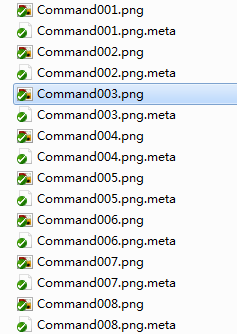
(2)将这些图片在NGUI中打包成Altas图集的时候图片应该在同一个Altas中;
这里以播放特效为例,满足条件时播放特效,不满足条件时不播放特效。接下来可以创建一个Sprite,然后用代码控制序列帧特效的播放和停止:
播放:
if (something == false)

{

    this._power_effect_sprite.GetComponent<UISprite>().enabled = true;

    UISpriteAnimation uiAnim = _power_effect_sprite.AddComponent<UISpriteAnimation>();

    // 设置图片的大小是否更改

    uiAnim.Snap = false;

    uiAnim.framesPerSecond = ;

    this.isPlayAnimation = true;

}
停止:
if (this.isPlayAnimation == true)

{
  Destroy(_power_effect_sprite.GetComponent<UISpriteAnimation>());

  UISprite ui = _power_effect_sprite.GetComponent<UISprite>();

  ui.spriteName = ui.atlas.spriteList[].name;

  this._power_effect_sprite.GetComponent<UISprite>().enabled = false;

}
_power_effect_sprite表示创建的sprite,当满足条件时,代码会添加为sprite添加一个UISpriteAnimation.cs脚本来控制图片的按序播放,注意播放代码中的设置图片的大小是否更改的代码:
uiAnim.Snap = false;
这是按需求更改了NGUI的UISpriteAnimation.cs的脚本代码,为脚本中的mSnap变量添加了设置接口,可以比较原代码和更改后的UISpriteAnimation代码:
原UISpriteAnimation代码:
//----------------------------------------------

//            NGUI: Next-Gen UI kit

// Copyright © 2011-2014 Tasharen Entertainment

//----------------------------------------------

using UnityEngine;

using System.Collections.Generic;

/// <summary>

/// Very simple sprite animation. Attach to a sprite and specify a common prefix such as "idle" and it will cycle through them.

/// </summary>

[ExecuteInEditMode]

[RequireComponent(typeof(UISprite))]

[AddComponentMenu("NGUI/UI/Sprite Animation")]

public class UISpriteAnimation : MonoBehaviour

{

    [HideInInspector][SerializeField] protected int mFPS = ;

    [HideInInspector][SerializeField] protected string mPrefix = "";

    [HideInInspector][SerializeField] protected bool mLoop = true;

    [HideInInspector][SerializeField] protected bool mSnap = true;

    protected UISprite mSprite;

    protected float mDelta = 0f;

    protected int mIndex = ;

    protected bool mActive = true;

    protected List<string> mSpriteNames = new List<string>();

    /// <summary>

    /// Number of frames in the animation.

    /// </summary>

    public int frames { get { return mSpriteNames.Count; } }

    /// <summary>

    /// Animation framerate.

    /// </summary>

    public int framesPerSecond { get { return mFPS; } set { mFPS = value; } }

    /// <summary>

    /// Set the name prefix used to filter sprites from the atlas.

    /// </summary>

    public string namePrefix { get { return mPrefix; } set { if (mPrefix != value) { mPrefix = value; RebuildSpriteList(); } } }

    /// <summary>

    /// Set the animation to be looping or not

    /// </summary>

    public bool loop { get { return mLoop; } set { mLoop = value; } }

    /// <summary>

    /// Returns is the animation is still playing or not

    /// </summary>

    public bool isPlaying { get { return mActive; } }

    /// <summary>

    /// Rebuild the sprite list first thing.

    /// </summary>

    protected virtual void Start ()

    {

        RebuildSpriteList(); }

    /// <summary>

    /// Advance the sprite animation process.

    /// </summary>

    protected virtual void Update ()

    {

        if (mActive && mSpriteNames.Count >  && Application.isPlaying && mFPS > 0f)

        {

            mDelta += RealTime.deltaTime;

            float rate = 1f / mFPS;

            if (rate < mDelta)

            {

                mDelta = (rate > 0f) ? mDelta - rate : 0f;

                if (++mIndex >= mSpriteNames.Count)

                {

                    mIndex = ;

                    mActive = loop;

                }

                if (mActive)

                {

                    mSprite.spriteName = mSpriteNames[mIndex];

                    if (mSnap)

                    {

                        mSprite.MakePixelPerfect();

                    }

                }

            }

        }

    }

    /// <summary>

    /// Rebuild the sprite list after changing the sprite name.

    /// </summary>

    public void RebuildSpriteList ()

    {

        if (mSprite == null) mSprite = GetComponent<UISprite>();

        mSpriteNames.Clear();

        if (mSprite != null && mSprite.atlas != null)

        {

            List<UISpriteData> sprites = mSprite.atlas.spriteList;

            for (int i = , imax = sprites.Count; i < imax; ++i)

            {

                UISpriteData sprite = sprites[i];

                if (string.IsNullOrEmpty(mPrefix) || sprite.name.StartsWith(mPrefix))

                {

                    mSpriteNames.Add(sprite.name);

                }

            }

            mSpriteNames.Sort();

        }

    }

    /// <summary>

    /// Reset the animation to frame 0 and activate it.

    /// </summary>

    public void Reset()

    {

        mActive = true;

        mIndex = ;

        if (mSprite != null && mSpriteNames.Count > )

        {

            mSprite.spriteName = mSpriteNames[mIndex];

            if (mSnap) mSprite.MakePixelPerfect();

        }

    }

}
更改后的UISpriteAnimation代码:
 //----------------------------------------------

 //            NGUI: Next-Gen UI kit

 // Copyright © 2011-2014 Tasharen Entertainment

 //----------------------------------------------

 using UnityEngine;

 using System.Collections.Generic;

 /// <summary>

 /// Very simple sprite animation. Attach to a sprite and specify a common prefix such as "idle" and it will cycle through them.

 /// </summary>

 [ExecuteInEditMode]

 [RequireComponent(typeof(UISprite))]

 [AddComponentMenu("NGUI/UI/Sprite Animation")]

 public class UISpriteAnimation : MonoBehaviour

 {

     [HideInInspector][SerializeField] protected int mFPS = ;

     [HideInInspector][SerializeField] protected string mPrefix = "";

     [HideInInspector][SerializeField] protected bool mLoop = true;

     [HideInInspector][SerializeField] protected bool mSnap = true;

     protected UISprite mSprite;

     protected float mDelta = 0f;

     protected int mIndex = ;

     protected bool mActive = true;

     protected List<string> mSpriteNames = new List<string>();

     /// <summary>

     /// Number of frames in the animation.

     /// </summary>

     public int frames { get { return mSpriteNames.Count; } }

     /// <summary>

     /// Animation framerate.

     /// </summary>

     public int framesPerSecond { get { return mFPS; } set { mFPS = value; } }

     /// <summary>

     /// Set the name prefix used to filter sprites from the atlas.

     /// </summary>

     public string namePrefix { get { return mPrefix; } set { if (mPrefix != value) { mPrefix = value; RebuildSpriteList(); } } }

     /// <summary>

     /// Set the animation to be looping or not

     /// </summary>

     public bool loop { get { return mLoop; } set { mLoop = value; } }

     /// <summary>

     /// Returns is the animation is still playing or not

     /// </summary>

     public bool isPlaying { get { return mActive; } }

     /// <summary>

     /// Rebuild the sprite list first thing.

     /// </summary>

     // 设置是否让图片显示原来大小还是按设置的大小进行缩放——vitah

     public bool Snap

     {

         get

         {

             return this.mSnap;

         }

         set

         {

             this.mSnap = value;

         }

     }

     protected virtual void Start ()

     {

         RebuildSpriteList(); }

     /// <summary>

     /// Advance the sprite animation process.

     /// </summary>

     protected virtual void Update ()

     {

         if (mActive && mSpriteNames.Count >  && Application.isPlaying && mFPS > 0f)

         {

             mDelta += RealTime.deltaTime;

             float rate = 1f / mFPS;

             if (rate < mDelta)

             {

                 mDelta = (rate > 0f) ? mDelta - rate : 0f;

                 if (++mIndex >= mSpriteNames.Count)

                 {

                     mIndex = ;

                     mActive = loop;

                 }

                 if (mActive)

                 {

                     mSprite.spriteName = mSpriteNames[mIndex];

                     if (mSnap)

                     {

                         mSprite.MakePixelPerfect();

                     }

                 }

             }

         }

     }

     /// <summary>

     /// Rebuild the sprite list after changing the sprite name.

     /// </summary>

     public void RebuildSpriteList ()

     {

         if (mSprite == null) mSprite = GetComponent<UISprite>();

         mSpriteNames.Clear();

         if (mSprite != null && mSprite.atlas != null)

         {

             List<UISpriteData> sprites = mSprite.atlas.spriteList;

             for (int i = , imax = sprites.Count; i < imax; ++i)

             {

                 UISpriteData sprite = sprites[i];

                 if (string.IsNullOrEmpty(mPrefix) || sprite.name.StartsWith(mPrefix))

                 {

                     mSpriteNames.Add(sprite.name);

                 }

             }

             mSpriteNames.Sort();

         }

     }

     /// <summary>

     /// Reset the animation to frame 0 and activate it.

     /// </summary>

     public void Reset()

     {

         mActive = true;

         mIndex = ;

         if (mSprite != null && mSpriteNames.Count > )

         {

             mSprite.spriteName = mSpriteNames[mIndex];

             if (mSnap) mSprite.MakePixelPerfect();

         }

     }

 }
新增的代码在63行位置,设置图片的大小是否更改的意思就是你导入的图片大小假定是600*100,但是你这时候sprite想显示的大小是300*100,假如不设置mSnap = false,NGUI会默认为true,这样每次播放动画的时候它会以图片的大小为显示大小,即最后显示在程序中的是600*100,设置mSnap = true;时,它就按你设定的大小进行缩放,最后显示的300*100的大小。
Unity NGUI实现序列帧动画播放的更多相关文章
- (转)NGUI系列教程七(序列帧动画UITexture 和 UIsprit)
NGUI系列教程七(序列帧动画) 今天我给大家讲一下如何使用NGUI做序列帧动画.本节主要包括两方面内容,分别是使用UIspirit和使用UITexture 做序列帧动画.废话不说了,下面开始.还 ...
- NGUI系列教程七(序列帧动画)
今天我给大家讲一下如何使用NGUI做序列帧动画.本节主要包括两方面内容,分别是使用UIspirit和使用UITexture 做序列帧动画.废话不说了,下面开始.还要在啰嗦一句,首先大家要准备一些序列帧 ...
- Unity NGUI实现按钮点击播放Aniamtion
unity版本:4.5 NGUI版本:3.6.5 参考链接:http://www.colabug.com/thread-1029974-1-1.html,作者:COLABUG.COM 橘虞 1.怎么创 ...
- Unity Shader序列帧动画学习笔记
Unity Shader序列帧动画学习笔记 关于无限播放序列帧动画的一点问题 在学shader的序列帧动画时,书上写了这样一段代码: fixed4 frag(v2f i){ // 获得整数时间 flo ...
- unity shader序列帧动画代码,顺便吐槽一下unity shader系统
一.看到UNITY论坛里有些人求unity shader序列帧动画,写shader我擅长啊,就顺势写了个CG的shader.代码很简单,就是变换UV采样序列帧贴图,美术配置行数列数以及变换速度. Sh ...
- Unity Shader 序列帧动画
shader中的序列帧动画属于纹理动画中的一种,主要原理是将给定的纹理进行等分,再根据时间的变化循环播放等分中的一部分. Unity Shader 内置时间变量 名称 类型 描述 _Time floa ...
- Unity NGUI 描点控件的位移动画
要让一个描点的控件动画移动到一个Position,能够用TweenPosition.可是这个仅仅能用在Position是固定的情况下.并且不能依据分辨率适配来进行移动. 以NGUI自带的 ...
- 【转】unity Animator 怎么判断一个动画播放结束
关于unity Animator 怎么判断一个动画播放结束这里有几种方法.希望对大家有帮助.还有其他办法的可以分享一下 第一种方法:在动画结束帧后面加个动画事件,调用下含这个变量的函数接口不是可以了? ...
- Cocos2d-x动画播放(序列帧)
简介 Cocos2d-x中,动画的具体内容是依靠精灵显示出来的,为了显示动态图片,我们需要不停切换精灵显示的内容,通过把静态的精灵变为动画播放器从而实现动画效果.动画由帧组成,每一帧都是一个纹理,我们 ...
随机推荐
- [Android 中级]Voip之CSipSimple类库的编绎
CSipSimple是什么?是一款基于pjsip的Android客户端,相信想要研究VOIP通讯的朋友一定不会陌生,这里我就把如何编译CSipSimple写下来. 首先从CSipSimple官方网站上 ...
- objective c 学习(一)
问题一:我在程序中看到大量的减号.中括号和NS****这种东西,他们是什么玩意儿? 1 减号(或者加号) 减号表示一个函数.或者方法.或者消息的开始,怎么说都行. 比如c#中,一个方法的写法可能是: ...
- 常用的 css 命名规则
头:header 内容:content/container 尾:footer 导航:nav 侧栏:sidebar 栏目:column 页面外围控制整体布局宽度:wrapper 左右中:left rig ...
- 微信分享 分享icon和分享标题的简单设置
前几天做的一个活动,用到微信分享功能,分享的icon.分享的标题和内容是自定义的.我上网查了一下,好多是注册微信公众号,使用微信api来实现的,注册微信号比较麻烦,最简单的方法就是 页面的title改 ...
- Axiom3D学习日记 4.地形,天空,雾
首先需要引用Axiom.SceneManagers.Octree.dll. 地形: 载入地形配置,从一个文件中. scene.LoadWorldGeometry( "Terrain.xml& ...
- selenium+eclipse+python环境
1.下载并安装jdk,配置环境变量: 2.下载并安装python,配置path系统环境变量:D:\Program Files\python34: 3.安装selenium,在安装好的python路径D ...
- .Net framework.
Figure 1 - .Net Framework The Common Language Runtime (CLR) is the mechanism through which .NET code ...
- xctool工具
xctool [1]xctool的特性: 原文:http://www.infoq.com/cn/news/2013/05/Facebook-buck-xctool-build xctool是Faceb ...
- Alljoyn 概述(3)
开发工具 • scons:一个 Python写的自动化构建工具,是对 gnu make 改进的替代工具 • D-Feet:一个D-Bus调试工具 • C++ Code Generator Tool ( ...
- java基础之抽象类与接口的区别
在学习java的过程中,或者是在找工作笔试或面试的时候,如果你是java岗位,那么抽象类与接口的区别无疑是一个大热点,是各大公司都想要考的一个小知识点,下面是我为了9月份秋招自己总结的,若有不对的地方 ...