
吴裕雄 数据挖掘与分析案例实战(7)——岭回归与LASSO回归模型
# 导入第三方模块
import pandas as pd
import numpy as np
import matplotlib.pyplot as plt
from sklearn import model_selection
from sklearn.linear_model import Ridge,RidgeCV
# 读取糖尿病数据集
diabetes = pd.read_excel(r'F:\\python_Data_analysis_and_mining\\08\\diabetes.xlsx', sep = '')
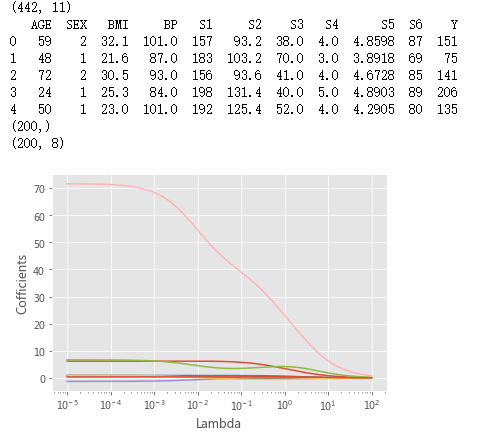
print(diabetes.shape)
print(diabetes.head())
# 构造自变量(剔除患者性别、年龄和因变量)
predictors = diabetes.columns[2:-1]
# 将数据集拆分为训练集和测试集
X_train, X_test, y_train, y_test = model_selection.train_test_split(diabetes[predictors], diabetes['Y'],test_size = 0.2, random_state = 1234 )
# 构造不同的Lambda值
Lambdas = np.logspace(-5, 2, 200)
print(Lambdas.shape)
# 构造空列表,用于存储模型的偏回归系数
ridge_cofficients = []
# 循环迭代不同的Lambda值
for Lambda in Lambdas:
ridge = Ridge(alpha = Lambda, normalize=True)
ridge.fit(X_train, y_train)
ridge_cofficients.append(ridge.coef_)
print(np.shape(ridge_cofficients))
# 绘制Lambda与回归系数的关系
# 中文乱码和坐标轴负号的处理
plt.rcParams['font.sans-serif'] = ['Microsoft YaHei']
plt.rcParams['axes.unicode_minus'] = False
# 设置绘图风格
plt.style.use('ggplot')
plt.plot(Lambdas, ridge_cofficients)
# 对x轴作对数变换
plt.xscale('log')
# 设置折线图x轴和y轴标签
plt.xlabel('Lambda')
plt.ylabel('Cofficients')
# 图形显示
plt.show()
# 岭回归模型的交叉验证
# 设置交叉验证的参数,对于每一个Lambda值,都执行10重交叉验证
ridge_cv = RidgeCV(alphas = Lambdas, normalize=True, scoring='neg_mean_squared_error', cv = 10)
print(ridge_cv)
# 模型拟合
ridge_cv.fit(X_train, y_train)
# 返回最佳的lambda值
ridge_best_Lambda = ridge_cv.alpha_
print(ridge_best_Lambda)

# 导入第三方包中的函数
from sklearn.metrics import mean_squared_error
# 基于最佳的Lambda值建模
ridge = Ridge(alpha = ridge_best_Lambda, normalize=True)
ridge.fit(X_train, y_train)
# 返回岭回归系数
pd.Series(index = ['Intercept'] + X_train.columns.tolist(),data = [ridge.intercept_] + ridge.coef_.tolist())
# 预测
ridge_predict = ridge.predict(X_test)
# 预测效果验证
RMSE = np.sqrt(mean_squared_error(y_test,ridge_predict))
print(RMSE)

# 导入第三方模块中的函数
from sklearn.linear_model import Lasso,LassoCV
# 构造空列表,用于存储模型的偏回归系数
lasso_cofficients = []
for Lambda in Lambdas:
lasso = Lasso(alpha = Lambda, normalize=True, max_iter=10000)
lasso.fit(X_train, y_train)
lasso_cofficients.append(lasso.coef_)
# 绘制Lambda与回归系数的关系
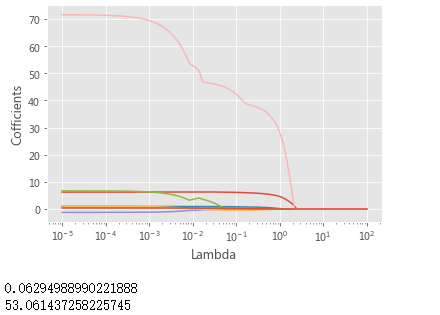
plt.plot(Lambdas, lasso_cofficients)
# 对x轴作对数变换
plt.xscale('log')
# 设置折线图x轴和y轴标签
plt.xlabel('Lambda')
plt.ylabel('Cofficients')
# 显示图形
plt.show()
# LASSO回归模型的交叉验证
lasso_cv = LassoCV(alphas = Lambdas, normalize=True, cv = 10, max_iter=10000)
lasso_cv.fit(X_train, y_train)
# 输出最佳的lambda值
lasso_best_alpha = lasso_cv.alpha_
print(lasso_best_alpha)
# 基于最佳的lambda值建模
lasso = Lasso(alpha = lasso_best_alpha, normalize=True, max_iter=10000)
lasso.fit(X_train, y_train)
# 返回LASSO回归的系数
pd.Series(index = ['Intercept'] + X_train.columns.tolist(),data = [lasso.intercept_] + lasso.coef_.tolist())
# 预测
lasso_predict = lasso.predict(X_test)
# 预测效果验证
RMSE = np.sqrt(mean_squared_error(y_test,lasso_predict))
print(RMSE)
# 导入第三方模块
from statsmodels import api as sms
# 为自变量X添加常数列1,用于拟合截距项
X_train2 = sms.add_constant(X_train)
X_test2 = sms.add_constant(X_test)
# 构建多元线性回归模型
linear = sms.formula.OLS(y_train, X_train2).fit()
# 返回线性回归模型的系数
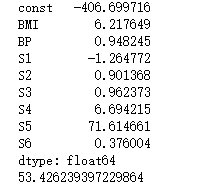
print(linear.params)
# 模型的预测
linear_predict = linear.predict(X_test2)
# 预测效果验证
RMSE = np.sqrt(mean_squared_error(y_test,linear_predict))
print(RMSE)
吴裕雄 数据挖掘与分析案例实战(7)——岭回归与LASSO回归模型的更多相关文章
- 吴裕雄 数据挖掘与分析案例实战(15)——DBSCAN与层次聚类分析
# 导入第三方模块import pandas as pdimport numpy as npimport matplotlib.pyplot as pltimport seaborn as snsfr ...
- 吴裕雄 数据挖掘与分析案例实战(14)——Kmeans聚类分析
# 导入第三方包import pandas as pdimport numpy as np import matplotlib.pyplot as pltfrom sklearn.cluster im ...
- 吴裕雄 数据挖掘与分析案例实战(13)——GBDT模型的应用
# 导入第三方包import pandas as pdimport matplotlib.pyplot as plt # 读入数据default = pd.read_excel(r'F:\\pytho ...
- 吴裕雄 数据挖掘与分析案例实战(12)——SVM模型的应用
import pandas as pd # 导入第三方模块from sklearn import svmfrom sklearn import model_selectionfrom sklearn ...
- 吴裕雄 数据挖掘与分析案例实战(10)——KNN模型的应用
# 导入第三方包import pandas as pd # 导入数据Knowledge = pd.read_excel(r'F:\\python_Data_analysis_and_mining\\1 ...
- 吴裕雄 数据挖掘与分析案例实战(8)——Logistic回归分类模型
import numpy as npimport pandas as pdimport matplotlib.pyplot as plt # 自定义绘制ks曲线的函数def plot_ks(y_tes ...
- 吴裕雄 数据挖掘与分析案例实战(5)——python数据可视化
# 饼图的绘制# 导入第三方模块import matplotlibimport matplotlib.pyplot as plt plt.rcParams['font.sans-serif']=['S ...
- 吴裕雄 数据挖掘与分析案例实战(4)——python数据处理工具:Pandas
# 导入模块import pandas as pdimport numpy as np # 构造序列gdp1 = pd.Series([2.8,3.01,8.99,8.59,5.18])print(g ...
- 吴裕雄 数据挖掘与分析案例实战(3)——python数值计算工具:Numpy
# 导入模块,并重命名为npimport numpy as np# 单个列表创建一维数组arr1 = np.array([3,10,8,7,34,11,28,72])print('一维数组:\n',a ...
随机推荐
- struts中指定编码(使用Filter后仍然乱码)
https://www.cnblogs.com/oldinaction/p/5167481.html 概述: Tomcat默认是 ISO编码,不支持中文.尝试过自己写 Filter,在web.xml中 ...
- c#操作xml的代码(插入节点、修改节点、删除节点等)
bookstore.xml文件内容: 复制代码代码示例: <?xml version="1.0" encoding="gb2312"?><bo ...
- Fix Visual Studio 2013 Razor CSHTML Intellisense in Class Library or Console Application
https://mhusseini.wordpress.com/2015/02/05/fix-visual-studio-2013-razor-cshtml-intellisense-in-class ...
- 【Spring学习笔记-2】Myeclipse下第一个Spring程序-通过ClassPathXmlApplicationContext加载配置文件
*.hl_mark_KMSmartTagPinkImg{background-color:#ffaaff;}*.hl_mark_KMSmartTagBlueImg{background-color:# ...
- mac电脑链接安卓手机的方法
https://blog.csdn.net/liubin9043/article/details/78928253/ 我用了个爱莫 不错 http://web.airmore.com
- 【HTTP】Fiddler 抓包工具
[HTTP]Fiddler(一) - Fiddler简介 [HTTP]Fiddler(二) - 使用Fiddler做抓包分析 [HTTP]Fiddler(三)- Fiddler命令行和HTTP断点调试
- java.lang.IllegalStateException: Fragment bb{42261900} not attached to Activity
A.处理异常java.lang.IllegalStateException: Fragment bb{42261900} not attached to Activity处理方式:由于在线程中调用Fr ...
- 解决thinkphp设置session周期无效的问题
thinkphp的session设置周期是无效的:直接的影响就是无法保留用户的登陆状态:用thinkphp开发的项目:关闭浏览器后用户就退出了:即便设置了session周期也没作用:这个bug存在很久 ...
- sql编程中流程控制 IF ……THEN……ELSEIF……THEN………END IF
写mysql存储过程应注意的几点: 1.声明变量(declare)时要注意字符集,用变量存储表字段时,表字段与变量的字符编码要一致. 2.mysql的字符合并不能用‘+’号,必须用concat函数. ...
- Spring 基础使用
1 id 和 name 的区别 id:不可重复,不可包含特殊字符 name:可以重复,可以包含特殊字符 2 scope singleton:配置单例模式(默认),在容器启动时创建对象,而且只创建一个 ...