
【Unity3D】摇杆
1 需求实现
1)需求实现
- 鼠标拖拽摇杆球控制坦克移动;
- 上下左右按键也可以控制坦克移动,并且摇杆球也同步移动;
- 鼠标右键滑动,控制坦克转向;
- 相机在玩家后上方的位置,始终跟随玩家,朝玩家正前方看;
- 单击鼠标左键或按空格键控制坦克发射炮弹。
2)涉及技术栈
本文代码资源见 → Unity3D 摇杆控制物体运动。
2 游戏对象
1)游戏界面

2)游戏对象层级结构

3)Transform组件参数
1. 玩家 Transform 组件参数
| Name | Type | Position | Rotation | Scale | Color/Texture |
|---|---|---|---|---|---|
| Player | Empty | (0, 0.25, -5) | (0, 0, 0) | (1, 1, 1) | #228439FF |
| Botton | Cube | (0, 0, 0) | (0, 0, 0) | (2, 0.5, 2) | #228439FF |
| Top | Cube | (0, 0.5, 0) | (0, 0, 0) | (1, 0.5, 1) | #228439FF |
| Gun | Cylinder | (0, 0, 1.5) | (90, 0, 0) | (0.2, 1, 0.4) | #228439FF |
| FirePoint | Empty | (0, 1.15, 0) | (0, 0, 0) | (1, 1, 1) | —— |
补充:Player 游戏对象添加了刚体组件。
2. 地面和炮弹 Transform 组件参数
| Name | Type | Position | Rotation | Scale | Color/Texture |
|---|---|---|---|---|---|
| Plane | Plane | (0, 0, 0) | (0, 0, 0) | (10, 10, 10) | GrassRockyAlbedo |
| Bullet | Sphere | (0, 0.5, -5) | (0, 0, 0) | (0.3, 0.3, 0.3) | #228439FF |
补充:炮弹作为预设体拖拽到 Assets/Resources/Prefabs 目录下,并且添加了刚体组件。
3. 摇杆 RectTransform 组件参数
| Name | Type | Width/Height | Pos | Anchors |
|---|---|---|---|---|
| Stick | Canvas | —— | —— | —— |
| Background | Image | (100, 100) | (75, 75, 0) | (0, 0), (0, 0) |
| Ball | Image | (40, 40) | (75, 75, 0) | (0, 0), (0, 0) |
3 脚本组件
1)CameraController
CameraController.cs
using UnityEngine;

public class CameraController : MonoBehaviour {

	private Transform player; // 玩家

	private Vector3 relaPlayerPos; // 相机在玩家坐标系中的位置

	private float targetDistance = 15f; // 相机看向玩家前方的位置

	private void Start() {

		relaPlayerPos = new Vector3(0, 4, -8);

		player = GameObject.Find("Player/Top").transform;

	}

	private void LateUpdate() {

		CompCameraPos();

	}

	private void CompCameraPos() { // 计算相机坐标

		Vector3 target = player.position + player.forward * targetDistance;

		transform.position = transformVecter(relaPlayerPos, player.position, player.right, player.up, player.forward);

		transform.rotation = Quaternion.LookRotation(target - transform.position);

	}

	// 求以origin为原点, locX, locY, locZ 为坐标轴的本地坐标系中的向量 vec 在世界坐标系中对应的向量

	private Vector3 transformVecter(Vector3 vec, Vector3 origin, Vector3 locX,  Vector3 locY,  Vector3 locZ) {

		return vec.x * locX + vec.y * locY + vec.z * locZ + origin;

	}

}
说明: CameraController 脚本组件挂在 MainCamera 游戏对象上。
2)PlayerController
PlayerController.cs
using System;

using UnityEngine;

public class PlayerController : MonoBehaviour {

	private Transform firePoint; // 开火点

	private GameObject bulletPrefab; // 炮弹预设体

	private StickController stick; // 摇杆控制器

	private float tankMoveSpeed = 4f; // 坦克移动速度

	private float tankRotateSpeed = 2f; // 坦克转向速度

	private Vector3 predownMousePoint; // 鼠标按下时的位置

	private Vector3 currMousePoint; // 当前鼠标位置

	private float fireWaitTime = float.MaxValue; // 距离上次开火已等待的时间

	private float bulletCoolTime = 0.15f; // 炮弹冷却时间

 	private void Start() {

		firePoint = transform.Find("Top/Gun/FirePoint");

		bulletPrefab = (GameObject) Resources.Load("Prefabs/Bullet");

		stick = GameObject.Find("Stick/Ball").GetComponent<StickController>();

	}

	private void Update() {

		Move();

		Rotate();

		Fire();

	}

	private void Move() { // 坦克移动

		float hor = Input.GetAxis("Horizontal");

        float ver = Input.GetAxis("Vertical");

		Move(hor, ver);

	}

	public void Move(float hor, float ver) { // 坦克移动

		if (Mathf.Abs(hor) > float.Epsilon || Mathf.Abs(ver) > float.Epsilon) {

			Vector3 vec = transform.forward * ver + transform.right * hor;

			GetComponent<Rigidbody>().velocity = vec * tankMoveSpeed;

			// stick.UpdateStick(new Vector3(hor, 0, ver));

			Vector3 dire = new Vector3(hor, ver, 0);

			dire =  dire.normalized * Mathf.Min(dire.magnitude, 1);

			stick.UpdateStick(dire);

		}

	}

	private void Rotate() { // 坦克旋转

		if (Input.GetMouseButtonDown(1)) {

			predownMousePoint = Input.mousePosition;

		} else if (Input.GetMouseButton(1)) {

			currMousePoint = Input.mousePosition;

			Vector3 vec = currMousePoint - predownMousePoint;

			GetComponent<Rigidbody>().angularVelocity = Vector3.up * tankRotateSpeed * vec.x;

			predownMousePoint = currMousePoint;

		}

	}

	private void Fire() { // 坦克开炮

		fireWaitTime += Time.deltaTime;

		if (Input.GetMouseButtonDown(0) && !IsMouseInUIArea() || Input.GetKeyDown(KeyCode.Space)) {

			if (fireWaitTime > bulletCoolTime) {

				BulletInfo bulletInfo = new BulletInfo("PlayerBullet", Color.red, transform.forward, 10f, 15f);

				GameObject bullet = Instantiate(bulletPrefab, firePoint.position, Quaternion.identity);

				bullet.AddComponent<BulletController>().SetBulletInfo(bulletInfo);

				fireWaitTime = 0f;

			}

		}

	}

	private bool IsMouseInUIArea() { // 鼠标在UI控件区域

		Vector3 pos = Input.mousePosition;

		return pos.x < 150 && pos.y < 150;

	}

}
说明: PlayerController 脚本组件挂在 Player 游戏对象上。
3)StickController
StickController.cs
using UnityEngine;

using UnityEngine.UI;

using UnityEngine.EventSystems;

public class StickController : MonoBehaviour, IDragHandler, IEndDragHandler {

	private Vector3 originPos; // 鼠标开始拖拽时位置

	private Vector3 currPos; // 鼠标当前位置

	private float radius; // 遥杆半径

	private PlayerController player; // 玩家控制器

	private Vector3 dire = Vector3.zero; // 摇杆球的方位

	private void Start () {

		originPos = transform.position;

		radius = 50;

		player = GameObject.Find("Player").GetComponent<PlayerController>();

	}

	private void Update () {

		player.Move(dire.x, dire.y);

	}

	public void OnDrag(PointerEventData eventData) {

		Vector3 vec = Input.mousePosition - originPos;

		dire = vec.normalized * Mathf.Min(vec.magnitude / radius, 1);

		UpdateStick(dire);

	}

	public void OnEndDrag(PointerEventData eventData) {

		transform.position = originPos;

		dire = Vector3.zero;

	}

	public void UpdateStick(Vector3 dire) { // 更新摇杆位置

		transform.position = originPos + dire * radius;

	}

}
说明: StickController 脚本组件挂在 Ball 游戏对象上。
4)BulletController
BulletController.cs
using UnityEngine;

using UnityEngine.UI;

public class BulletController : MonoBehaviour {

	private BulletInfo bulletInfo; // 炮弹信息

	private void Start () {

		gameObject.name = bulletInfo.name;

		GetComponent<MeshRenderer>().material.color = bulletInfo.color;

		float lifeTime = bulletInfo.fireRange / bulletInfo.speed; // 存活时间

		Destroy(gameObject, lifeTime);

	}

	private void Update () {

		transform.GetComponent<Rigidbody>().velocity = bulletInfo.flyDir * bulletInfo.speed;

	}

	public void SetBulletInfo(BulletInfo bulletInfo) {

		this.bulletInfo = bulletInfo;

	}

}
说明: BulletController 脚本组件挂在 Bullet 游戏对象上(代码里动态添加)。
5)BulletInfo
BulletInfo.cs
using UnityEngine;

public class BulletInfo {

	public string name; // 炮弹名

	public Color color; // 炮弹颜色

	public Vector3 flyDir; // 炮弹飞出方向

	public float speed; // 炮弹飞行速度

	public float fireRange; // 炮弹射程

	public BulletInfo(string name, Color color, Vector3 flyDir, float speed, float fireRange) {

		this.name = name;

		this.color = color;

		this.flyDir = flyDir;

		this.speed = speed;

		this.fireRange = fireRange;

	}

}
4 运行效果
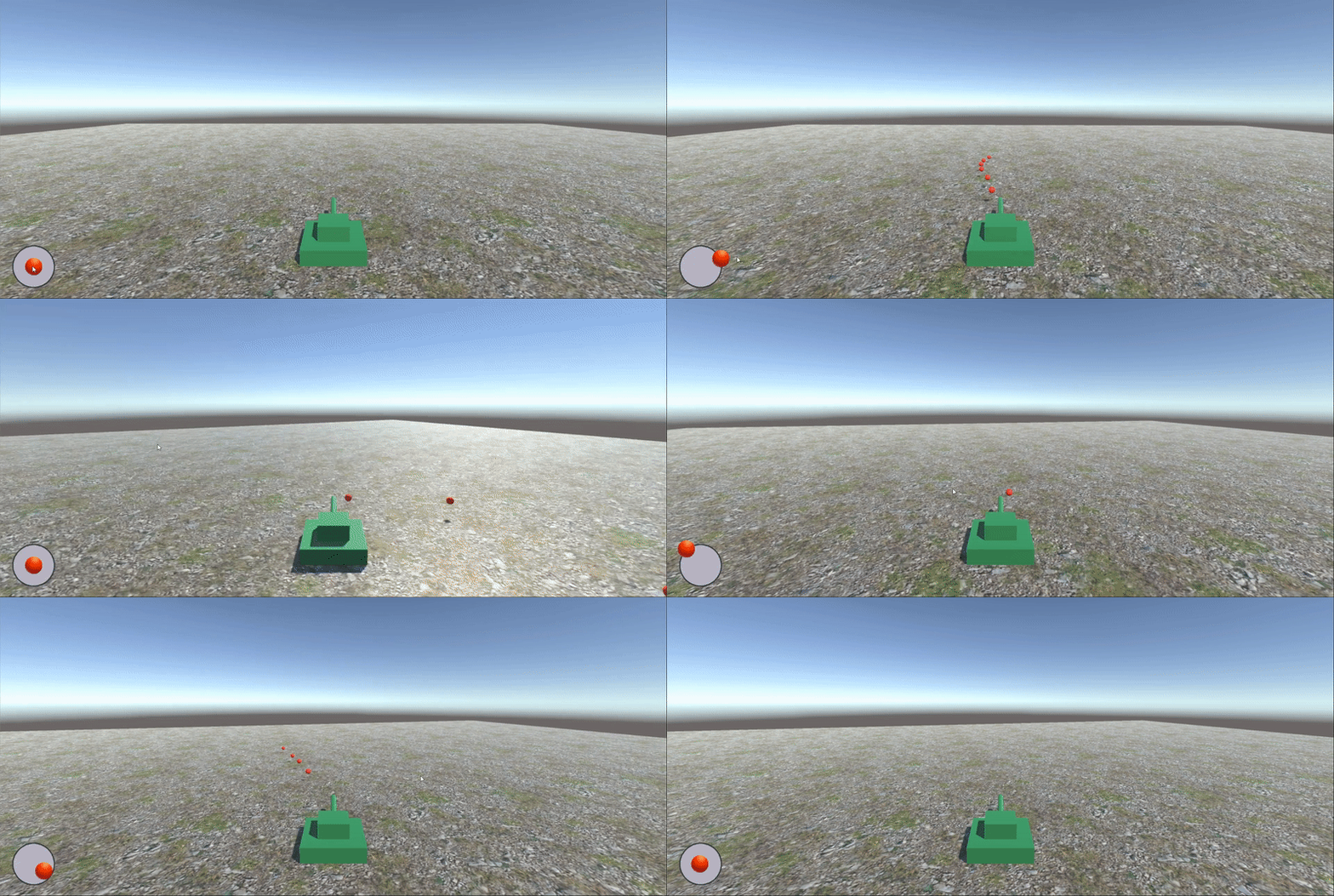
声明:本文转自【Unity3D】摇杆
【Unity3D】摇杆的更多相关文章
- Unity3d 摇杆奖励
单个单元: publicclass RockerSingle : MonoBehaviour { // 枚举.类别 RockerType rockerType; //是否有效,最上面的为无效,即为f ...
- [Unity3D]Unity3D游戏开发之使用EasyTouch虚拟摇杆控制人物移动
大家好,欢迎大家关注我的博客,我是秦元培,我的博客地址是blog.csdn.net/qinyuanpei.今天呢,我们来一起学习在Unity3D中使用EasyTouch虚拟摇杆来控制人物移动.虽然Un ...
- Unity3D学习(三):利用NGUI实现一个简单的左右摇杆
前言 小游戏Konster在测试的时候有热心玩家反馈左右移动手感不是很好,最主要的问题是:手指一旦按在手机屏幕的一个方向按钮上,向反方向滑动到另一个方向按钮上是不会改变玩家移动方向的. 具体如下图: ...
- Unity3d项目入门之虚拟摇杆
Unity本身不提供摇杆的组件,开发者可以使用牛逼的EasyTouch插件或者应用NGUI实现相关的需求,下面本文通过Unity自身的UGUI属性,实现虚拟摇杆的功能. 主参考 <Unity:使 ...
- 【转载】Unity3D研究院之IOS自定义游戏摇杆与飞机平滑的移动
移动开发游戏中使用到的触摸游戏摇杆在iPhone上是非常普遍的,毕竟是全触摸屏手机,今天MOMO 通过一个小例子和大家讨论Unity3D 中如何自定义一个漂亮的全触摸游戏摇杆. 值得高兴 ...
- Unity3D 摄像机的Transform通过摇杆输出的方向
要解决的问题是:摄像机的方向不固定,当摇杆向前(0,1)推时,主角要往摄像机的朝向(忽略Y方向)走,当摇杆往右(1,0)推的时,主角朝摄像机的右方向 /// <summary> /// 摄 ...
- Unity3D学习笔记(二十三):事件接口、虚拟摇杆、层级管理和背包系统
事件接口 IDragHandler(常用):鼠标按下拖动时执行(只要鼠标在拖动就一直执行) IDropHandler:对象拖动结束时,如果鼠标在物体的范围内,执行一次(依赖于IDragHandler存 ...
- unity3d easytouch计算摇杆旋转角度以及摇杆八方向控制角色
在写第三人称控制的时候,一开始在电脑测试是用WASD控制角色 后来需要发布到手机上,于是就加了一个摇杆 键盘控制角色的代码已经写好了,角色八方向移动 如果按照传统的大众思路来控制的话,是达不到我想要的 ...
- 【转】Unity3D学习日记(二)使用UGUI制作虚拟摇杆控制摄像机
http://blog.csdn.net/begonia__z/article/details/51178907 前天撸了一个简单的UGUI虚拟摇杆,今天我就利用前天做的虚拟摇杆做了一个简单的摄像机控 ...
- 【转】Unity3D学习日记(一)使用UGUI制作虚拟摇杆
http://blog.csdn.net/begonia__z/article/details/51170059 如今手机游戏玩法多种多样,尤其使用虚拟摇杆进行格斗类游戏开发或者是MMORPG成为了主 ...
随机推荐
- DDP运行报错(单卡无错):ERROR:torch.distributed.elastic.multiprocessing.api:failed (exitcode: 1)
使用DDP时出现错误,但是单卡跑无错误. 错误记录如下: RuntimeError: Expected to have finished reduction in the prior iteratio ...
- WebApi使用Swagger
services.AddSwaggerGen(c => { c.SwaggerDoc("v1", new OpenApiInfo { Title = "My API ...
- [转帖]JVM系列之:再谈java中的safepoint
https://zhuanlan.zhihu.com/p/171625395 safepoint是什么 java程序里面有很多很多的java线程,每个java线程又有自己的stack,并且共享了hea ...
- [转帖]Linux下非oracle用户如何使用系统认证方式登陆数据
https://www.cnblogs.com/kerrycode/p/17772866.html Linux系统中,DBA一般使用oracle用户登陆/访问Linux操作系统,然后使用sqlplus ...
- [转帖]SQL Server 2008~2022版本序列号/密钥/激活码 汇总
https://www.cnblogs.com/cqpanda/p/16148822.html SQL Server 2022# Enterprise: J4V48-P8MM4-9N3J9-HD97X ...
- [转帖]命令行非明文密码连接 TiDB
https://tidb.net/blog/6794a34b#%E6%96%B9%E5%BC%8F%E4%B8%80%EF%BC%9A%E5%91%BD%E4%BB%A4%E8%A1%8C%E8%BE ...
- [转帖]INSERT IGNORE INTO 与 INSERT INTO
INSERT IGNORE INTO 会忽略数据库中已经存在 的数据,如果数据库没有数据,就插入新的数据,如果有数据的话就跳过当前插入的这条数据.这样就可以保留数据库中已经存在数据,达到在间隙中插入数 ...
- [转帖]Mysql 常用命令行,持续补充
https://www.cnblogs.com/wzj1223/p/13152446.html 1.常用命令行 # 登录Mysql mysql -uroot -proot # 查看所有数据库 show ...
- [转帖]使用Transformers推理
https://github.com/ymcui/Chinese-LLaMA-Alpaca/wiki/%E4%BD%BF%E7%94%A8Transformers%E6%8E%A8%E7%90%86 ...
- 记录一次RPC服务有损上线的分析过程
1. 问题背景 某应用在启动完提供JSF服务后,短时间内出现了大量的空指针异常. 分析日志,发现是服务依赖的藏经阁配置数据未加载完成导致.即所谓的有损上线或者是直接发布,当应用启动时,service还 ...