
python开发_tkinter_菜单的不同选项
python的tkinter模块中,菜单也可以由你自定义你的风格
下面是我做的demo
运行效果:
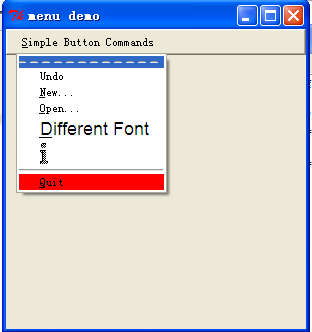
======================================
代码部分:
======================================
 from tkinter import *

 '''

     菜单选项的不同形式

 '''

 #global var

 number = 0

 # some miscellaneous callbacks

 def new_file():

     global number

     number += 1

     tk = Tk()

     tk.geometry('300x300')

     tk.title('Demo %s'%number)

 def open_file():

     print("opening OLD file")

 def print_something():

     print("picked a menu item")

 def makeCommandMenu():

     # make menu button

     Command_button = Menubutton(mBar, text='Simple Button Commands',

                                 underline=0)

     Command_button.pack(side=LEFT, padx="2m")

     # make the pulldown part of the File menu. The parameter passed is the master.

     # we attach it to the button as a python attribute called "menu" by convention.

     # hopefully this isn't too confusing...

     Command_button.menu = Menu(Command_button)

     # just to be cute, let's disable the undo option:

     Command_button.menu.add_command(label="Undo")

     # undo is the 0th entry...

     Command_button.menu.entryconfig(0, state=DISABLED)

     Command_button.menu.add_command(label='New...', underline=0,

                                     command=new_file)

     Command_button.menu.add_command(label='Open...', underline=0,

                                     command=open_file)

     Command_button.menu.add_command(label='Different Font', underline=0,

                                     font='-*-helvetica-*-r-*-*-*-180-*-*-*-*-*-*',

                                     command=print_something)

     # we can make bitmaps be menu entries too. File format is X11 bitmap.

     # if you use XV, save it under X11 bitmap format. duh-uh.,..

     Command_button.menu.add_command(

         bitmap="info")

         #bitmap='@/home/mjc4y/dilbert/project.status.is.doomed.last.panel.bm')

     # this is just a line

     Command_button.menu.add('separator')

     # change the color

     Command_button.menu.add_command(label='Quit', underline=0,

                                     background='red',

                                     activebackground='green',

                                     command=Command_button.quit)

     # set up a pointer from the file menubutton back to the file menu

     Command_button['menu'] = Command_button.menu

     return Command_button

 #################################################

 #### Main starts here ...

 root = Tk()

 root.geometry('300x300')

 # make a menu bar

 mBar = Frame(root, relief=RAISED, borderwidth=2)

 mBar.pack(fill=X)

 Command_button = makeCommandMenu()

 # finally, install the buttons in the menu bar.

 # This allows for scanning from one menubutton to the next.

 mBar.tk_menuBar(Command_button)

 root.title('menu demo')

 root.iconname('menu demo')

 root.mainloop()
========================================================
More reading,and english is important.
I'm Hongten
大哥哥大姐姐,觉得有用打赏点哦!多多少少没关系,一分也是对我的支持和鼓励。谢谢。
Hongten博客排名在100名以内。粉丝过千。
Hongten出品,必是精品。
E | hongtenzone@foxmail.com B | http://www.cnblogs.com/hongten
========================================================
python开发_tkinter_菜单的不同选项的更多相关文章
- python开发_tkinter_菜单选项中英文切换_菜单选项不可用操作_博主推荐
我使用的python版本为:3.3.2 如果你对python中tkinter模块的菜单操作不是很了解,你可以看看: python开发_tkinter_窗口控件_自己制作的Python IDEL_博主推 ...
- python开发_tkinter_多级子菜单
在之前的blog中有提到python的tkinter中的菜单操作 python开发_tkinter_窗口控件_自己制作的Python IDEL_博主推荐 python开发_tkinter_窗口控件_自 ...
- python开发_tkinter_单选菜单_不可用菜单操作
在之前的blog中有提到python的tkinter中的菜单操作 python开发_tkinter_窗口控件_自己制作的Python IDEL_博主推荐 python开发_tkinter_窗口控件_自 ...
- python开发_tkinter_复选菜单
在之前的blog中有提到python的tkinter中的菜单操作 python开发_tkinter_窗口控件_自己制作的Python IDEL_博主推荐 python开发_tkinter_窗口控件_自 ...
- python开发_tkinter_获取文本框内容_给文本框添加键盘输入事件
在之前的blog中有提到python的tkinter中的菜单操作 python开发_tkinter_窗口控件_自己制作的Python IDEL_博主推荐 python开发_tkinter_窗口控件_自 ...
- python开发_tkinter_获取单选菜单值
在之前的blog中有提到python的tkinter中的菜单操作 python开发_tkinter_窗口控件_自己制作的Python IDEL_博主推荐 python开发_tkinter_窗口控件_自 ...
- python开发_tkinter_窗口控件_自己制作的Python IDEL_博主推荐(二)
在上一篇blog:python开发_tkinter_窗口控件_自己制作的Python IDEL_博主推荐 中介绍了python中的tkinter的一些东西,你可能对tkinter有一定的了解了.这篇b ...
- python开发_tkinter_小球完全弹性碰撞游戏
python开发_tkinter_小球完全弹性碰撞游戏 完成这个小球的完全弹性碰撞游戏灵感来自于: 下面是我花了一周下班时间所编写的一个小球完全弹性碰撞游戏: 游戏初始化状态: 最下面的游标和修改 ...
- python开发_tkinter_窗口控件_自己制作的Python IDEL_博主推荐
在了解python中的tkinter模块的时候,你需要了解一些tkinter的相关知识 下面是python的API文档中的一个简单例子: import tkinter as tk class Appl ...
随机推荐
- STL容器基本功能与分类
STL有7中容器. 分别为: vector 向量 <vector>(头文件) 随机访问容器.顺序容器 deque 双端队列 <deque> 随机访问容器.顺序容器 list ...
- Mysql转换成SqlServer数据库,以及SqlServer转换成Mysql数据库
Windows XP sp2 MS SQL Server 2OOO sp1 MySql 5.0.41 1:MSSQLServer数据库导入到MySql数据库 步骤: 1.安装mysql数据库的ODBC ...
- openstack发展历程及其架构简介
1.0 Openstack介绍 OpenStack既是一个社区,也是一个项目和一个开源软件,它提供了一个部署云的操作平台或工具集.其宗旨在于,帮助组织运行为虚拟计算或存储服务的云,为公有云.私有云,也 ...
- 10 The Go Programming Language Specification go语言规范 重点
The Go Programming Language Specification go语言规范 Version of May 9, 2018 Introduction 介绍 Notation 符号 ...
- 数据库-mysql视图
视图是一个虚拟表(非真实存在),其本质是[根据SQL语句获取动态的数据集,并为其命名],用户使用时只需使用[名称]即可获取结果集,并可以将其当作表来使用 一:创建视图 create view view ...
- python网络编程-协程(协程说明,greenlet,gevent)
一:什么是协程 协程(Coroutine):,又称微线程.协程是一种用户态的轻量级线程.是由用户自己控制,CPU根本不知道协程存在. 协程拥有自己的寄存器上下文和栈. 协程调度切换时,将寄存器上下文和 ...
- acm专题---KMP模板
KMP的子串长n,模式串长m,复杂度o(m+n),朴素做法的复杂度o((n-m+1)*m) 觉得大话数据结果上面这个讲得特别好 改进版本的KMP leetcode 28. Implement strS ...
- 2017 MoveIt!更新 ros indigo
First MoveIt! Update in 2017. Using it on NEXTAGE pt.1 2017 MoveIt! update pt.2; Stopping motion on ...
- CVE-2010-0249 极光
传说中的极光漏洞 Microsoft Internet Explorer非法事件操作内存破坏漏洞 Microsoft Internet Explorer是微软Windows操作系统中默认捆绑的WEB浏 ...
- google浏览器打开新的标签页显示http://www.google.com.hk/url?sa=p&hl=zh-CN&……
chrome的版本:51.0.2704.106 m使用该版本的chrome后,每次打开新标签页,都会提示“无法访问此网站”.并自动跳转到一个地址“http://www.google.com.hk/ur ...