
(七十四)c#Winform自定义控件-金字塔图表
官网
前提
入行已经7,8年了,一直想做一套漂亮点的自定义控件,于是就有了本系列文章。
GitHub:https://github.com/kwwwvagaa/NetWinformControl
码云:https://gitee.com/kwwwvagaa/net_winform_custom_control.git
如果觉得写的还行,请点个 star 支持一下吧
欢迎前来交流探讨: 企鹅群568015492 
来都来了,点个【推荐】再走吧,谢谢
NuGet
Install-Package HZH_Controls
目录
https://www.cnblogs.com/bfyx/p/11364884.html
用处及效果
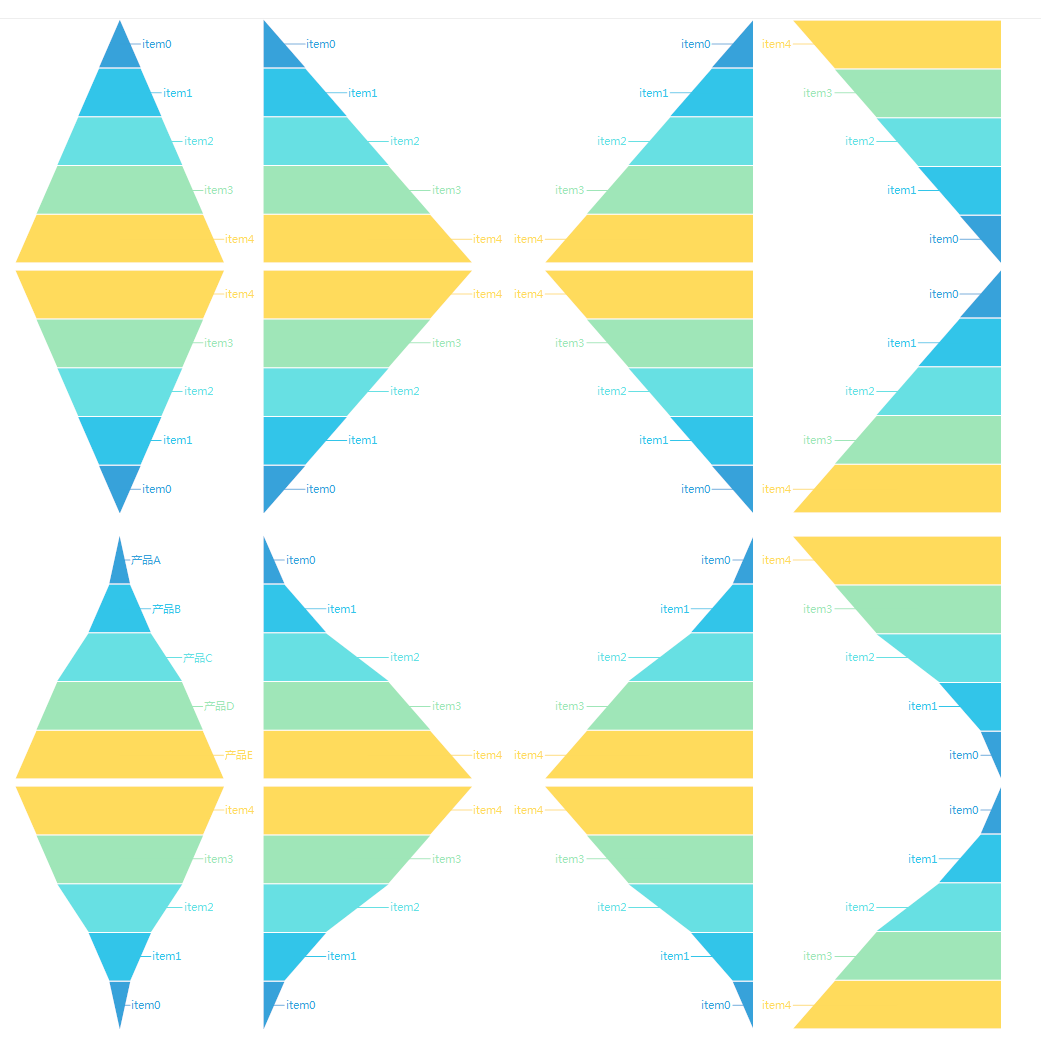
准备工作
依然使用GDI+画图,不懂的先百度了解下
开始
添加一些枚举
  public enum FunelChartAlignment

     {

         /// <summary>

         /// The left

         /// </summary>

         Left,

         /// <summary>

         /// The center

         /// </summary>

         Center,

         /// <summary>

         /// The right

         /// </summary>

         Right

     }

  public enum FunelChartDirection

     {

         /// <summary>

         /// Up

         /// </summary>

         UP,

         /// <summary>

         /// Down

         /// </summary>

         Down

     }
添加一个项实体
   public class FunelChartItem

     {

         /// <summary>

         /// Gets or sets the text.

         /// </summary>

         /// <value>The text.</value>

         public string Text { get; set; }

         /// <summary>

         /// Gets or sets the value.

         /// </summary>

         /// <value>The value.</value>

         public float Value { get; set; }

         /// <summary>

         /// Gets or sets the color of the value.

         /// </summary>

         /// <value>The color of the value.</value>

         public System.Drawing.Color? ValueColor { get; set; }

         /// <summary>

         /// Gets or sets the color of the text fore.

         /// </summary>

         /// <value>The color of the text fore.</value>

         public System.Drawing.Color? TextForeColor { get; set; }

     }
添加一个类UCFunnelChart ,继承UserControl
添加一些控制属性
 /// <summary>

         /// The title

         /// </summary>

         private string title;

         /// <summary>

         /// Gets or sets the title.

         /// </summary>

         /// <value>The title.</value>

         [Browsable(true)]

         [Category("自定义")]

         [Description("获取或设置标题")]

         public string Title

         {

             get { return title; }

             set

             {

                 title = value;

                 ResetTitleSize();

                 Invalidate();

             }

         }

         /// <summary>

         /// The title font

         /// </summary>

         private Font titleFont = new Font("微软雅黑", );

         /// <summary>

         /// Gets or sets the title font.

         /// </summary>

         /// <value>The title font.</value>

         [Browsable(true)]

         [Category("自定义")]

         [Description("获取或设置标题字体")]

         public Font TitleFont

         {

             get { return titleFont; }

             set

             {

                 titleFont = value;

                 ResetTitleSize();

                 Invalidate();

             }

         }

         /// <summary>

         /// The title fore color

         /// </summary>

         private Color titleForeColor = Color.Black;

         /// <summary>

         /// Gets or sets the color of the title fore.

         /// </summary>

         /// <value>The color of the title fore.</value>

         [Browsable(true)]

         [Category("自定义")]

         [Description("获取或设置标题文字颜色")]

         public Color TitleForeColor

         {

             get { return titleForeColor; }

             set

             {

                 titleForeColor = value;

                 Invalidate();

             }

         }

         /// <summary>

         /// The items

         /// </summary>

         private FunelChartItem[] items;

         /// <summary>

         /// Gets or sets the items.

         /// </summary>

         /// <value>The items.</value>

         [Browsable(true)]

         [Category("自定义")]

         [Description("获取或设置项目")]

         public FunelChartItem[] Items

         {

             get { return items; }

             set

             {

                 items = value;

                 Invalidate();

             }

         }

         /// <summary>

         /// The direction

         /// </summary>

         private FunelChartDirection direction = FunelChartDirection.UP;

         /// <summary>

         /// Gets or sets the direction.

         /// </summary>

         /// <value>The direction.</value>

         [Browsable(true)]

         [Category("自定义")]

         [Description("获取或设置方向")]

         public FunelChartDirection Direction

         {

             get { return direction; }

             set

             {

                 direction = value;

                 Invalidate();

             }

         }

         /// <summary>

         /// The alignment

         /// </summary>

         private FunelChartAlignment alignment = FunelChartAlignment.Center;

         /// <summary>

         /// Gets or sets the alignment.

         /// </summary>

         /// <value>The alignment.</value>

         [Browsable(true)]

         [Category("自定义")]

         [Description("获取或设置对齐方式")]

         public FunelChartAlignment Alignment

         {

             get { return alignment; }

             set

             {

                 alignment = value;

                 Invalidate();

             }

         }

         /// <summary>

         /// The item text align

         /// </summary>

         private FunelChartAlignment itemTextAlign = FunelChartAlignment.Center;

         /// <summary>

         /// Gets or sets the item text align.

         /// </summary>

         /// <value>The item text align.</value>

         [Browsable(true)]

         [Category("自定义")]

         [Description("获取或设置文字位置")]

         public FunelChartAlignment ItemTextAlign

         {

             get { return itemTextAlign; }

             set

             {

                 itemTextAlign = value;

                 ResetWorkingRect();

                 Invalidate();

             }

         }

         /// <summary>

         /// The show value

         /// </summary>

         private bool showValue = false;

         /// <summary>

         /// Gets or sets a value indicating whether [show value].

         /// </summary>

         /// <value><c>true</c> if [show value]; otherwise, <c>false</c>.</value>

         [Browsable(true)]

         [Category("自定义")]

         [Description("获取或设置是否显示值")]

         public bool ShowValue

         {

             get { return showValue; }

             set

             {

                 showValue = value;

                 Invalidate();

             }

         }

         /// <summary>

         /// The value format

         /// </summary>

         private string valueFormat = "0.##";

         /// <summary>

         /// Gets or sets the value format.

         /// </summary>

         /// <value>The value format.</value>

         [Browsable(true)]

         [Category("自定义")]

         [Description("获取或设置值格式化")]

         public string ValueFormat

         {

             get { return valueFormat; }

             set

             {

                 valueFormat = value;

                 Invalidate();

             }

         }

         /// <summary>

         /// The m rect working

         /// </summary>

         RectangleF m_rectWorking;

         /// <summary>

         /// The m title size

         /// </summary>

         SizeF m_titleSize = SizeF.Empty;

         /// <summary>

         /// The int split width

         /// </summary>

         int intSplitWidth = ;
构造函数初始化
  public UCFunnelChart()

         {

             this.SetStyle(ControlStyles.AllPaintingInWmPaint, true);

             this.SetStyle(ControlStyles.DoubleBuffer, true);

             this.SetStyle(ControlStyles.ResizeRedraw, true);

             this.SetStyle(ControlStyles.Selectable, true);

             this.SetStyle(ControlStyles.SupportsTransparentBackColor, true);

             this.SetStyle(ControlStyles.UserPaint, true);

             this.FontChanged += UCFunnelChart_FontChanged;

             Font = new Font("微软雅黑", );

             this.AutoScaleMode = System.Windows.Forms.AutoScaleMode.None;

             this.SizeChanged += UCFunnelChart_SizeChanged;

             Size = new System.Drawing.Size(, );

             items = new FunelChartItem[];

             if (ControlHelper.IsDesignMode())

             {

                 items = new FunelChartItem[];

                 for (int i = ; i < ; i++)

                 {

                     items[i] = new FunelChartItem()

                     {

                         Text = "item" + i,

                         Value =  * (i + )

                     };

                 }

             }

         }
当大小及状态改变时 重新计算工作区域
   void UCFunnelChart_FontChanged(object sender, EventArgs e)

         {

             ResetWorkingRect();

         }

         /// <summary>

         /// Handles the SizeChanged event of the UCFunnelChart control.

         /// </summary>

         /// <param name="sender">The source of the event.</param>

         /// <param name="e">The <see cref="EventArgs"/> instance containing the event data.</param>

         void UCFunnelChart_SizeChanged(object sender, EventArgs e)

         {

             ResetWorkingRect();

         }

         /// <summary>

         /// Resets the working rect.

         /// </summary>

         private void ResetWorkingRect()

         {

             if (itemTextAlign == FunelChartAlignment.Center)

             {

                 m_rectWorking = new RectangleF(, m_titleSize.Height ==  ?  : (m_titleSize.Height + ), this.Width, this.Height - (m_titleSize.Height ==  ?  : (m_titleSize.Height + )));

             }

             else if (itemTextAlign == FunelChartAlignment.Left)

             {

                 float fltMax = ;

                 if (items != null && items.Length > )

                 {

                     using (Graphics g = this.CreateGraphics())

                     {

                         fltMax = items.Max(p => g.MeasureString(p.Text, Font).Width);

                     }

                 }

                 m_rectWorking = new RectangleF(fltMax, m_titleSize.Height ==  ?  : (m_titleSize.Height + ), this.Width - fltMax, this.Height - (m_titleSize.Height ==  ?  : (m_titleSize.Height + )));

             }

             else

             {

                 float fltMax = ;

                 if (items != null && items.Length > )

                 {

                     using (Graphics g = this.CreateGraphics())

                     {

                         fltMax = items.Max(p => g.MeasureString(p.Text, Font).Width);

                     }

                 }

                 m_rectWorking = new RectangleF(, m_titleSize.Height ==  ?  : (m_titleSize.Height + ), this.Width - fltMax, this.Height - (m_titleSize.Height ==  ?  : (m_titleSize.Height + )));

             }

         }

         /// <summary>

         /// Resets the size of the title.

         /// </summary>

         private void ResetTitleSize()

         {

             if (string.IsNullOrEmpty(title))

             {

                 m_titleSize = SizeF.Empty;

             }

             else

             {

                 using (Graphics g = this.CreateGraphics())

                 {

                     m_titleSize = g.MeasureString(title, titleFont);

                     m_titleSize.Height += ;

                 }

             }

             ResetWorkingRect();

         }
重绘
 protected override void OnPaint(PaintEventArgs e)

         {

             base.OnPaint(e);

             var g = e.Graphics;

             g.SetGDIHigh();

             if (!string.IsNullOrEmpty(title))

             {

                 g.DrawString(title, titleFont, new SolidBrush(titleForeColor), new RectangleF(, , this.Width, m_titleSize.Height), new StringFormat() { Alignment = StringAlignment.Center, LineAlignment = StringAlignment.Center });

             }

             if (items == null || items.Length <= )

             {

                 g.DrawString("没有数据", Font, new SolidBrush(Color.Black), this.m_rectWorking, new StringFormat() { Alignment = StringAlignment.Center, LineAlignment = StringAlignment.Center });

                 return;

             }

             List<FunelChartItem> lstItems;

             if (direction == FunelChartDirection.UP)

             {

                 lstItems = items.OrderBy(p => p.Value).ToList();

             }

             else

             {

                 lstItems = items.OrderByDescending(p => p.Value).ToList();

             }

             List<RectangleF> lstRects = new List<RectangleF>();

             List<GraphicsPath> lstPaths = new List<GraphicsPath>();

             float maxValue = lstItems.Max(p => p.Value);

             float dblSplitHeight = m_rectWorking.Height / lstItems.Count;

             for (int i = ; i < lstItems.Count; i++)

             {

                 FunelChartItem item = lstItems[i];

                 if (item.ValueColor == null || item.ValueColor == Color.Empty || item.ValueColor == Color.Transparent)

                     item.ValueColor = ControlHelper.Colors[i];

                 switch (alignment)

                 {

                     case FunelChartAlignment.Left:

                         lstRects.Add(new RectangleF(m_rectWorking.Left, m_rectWorking.Top + dblSplitHeight * i, item.Value / maxValue * m_rectWorking.Width, dblSplitHeight));

                         break;

                     case FunelChartAlignment.Center:

                         lstRects.Add(new RectangleF(m_rectWorking.Left + (m_rectWorking.Width - (item.Value / maxValue * m_rectWorking.Width)) / , m_rectWorking.Top + dblSplitHeight * i, item.Value / maxValue * m_rectWorking.Width, dblSplitHeight));

                         break;

                     case FunelChartAlignment.Right:

                         lstRects.Add(new RectangleF(m_rectWorking.Right - (item.Value / maxValue * m_rectWorking.Width), m_rectWorking.Top + dblSplitHeight * i, item.Value / maxValue * m_rectWorking.Width, dblSplitHeight));

                         break;

                 }

             }

             for (int i = ; i < lstRects.Count; i++)

             {

                 var rect = lstRects[i];

                 GraphicsPath path = new GraphicsPath();

                 List<PointF> lstPoints = new List<PointF>();

                 if (direction == FunelChartDirection.UP)

                 {

                     switch (alignment)

                     {

                         case FunelChartAlignment.Left:

                             lstPoints.Add(new PointF(rect.Left, rect.Top));

                             if (i != )

                             {

                                 lstPoints.Add(new PointF(lstRects[i - ].Right, rect.Top));

                             }

                             break;

                         case FunelChartAlignment.Center:

                             if (i == )

                             {

                                 lstPoints.Add(new PointF(rect.Left + rect.Width / , rect.Top));

                             }

                             else

                             {

                                 lstPoints.Add(new PointF(lstRects[i - ].Left, rect.Top));

                                 lstPoints.Add(new PointF(lstRects[i - ].Right, rect.Top));

                             }

                             break;

                         case FunelChartAlignment.Right:

                             if (i == )

                             {

                                 lstPoints.Add(new PointF(rect.Right, rect.Top));

                             }

                             else

                             {

                                 lstPoints.Add(new PointF(rect.Right - lstRects[i - ].Width, rect.Top));

                                 lstPoints.Add(new PointF(rect.Right, rect.Top));

                             }

                             break;

                     }

                     lstPoints.Add(new PointF(rect.Right, rect.Bottom - intSplitWidth));

                     lstPoints.Add(new PointF(rect.Left, rect.Bottom - intSplitWidth));

                 }

                 else

                 {

                     lstPoints.Add(new PointF(rect.Left, rect.Top + intSplitWidth));

                     lstPoints.Add(new PointF(rect.Right, rect.Top + intSplitWidth));

                     switch (alignment)

                     {

                         case FunelChartAlignment.Left:

                             if (i == lstRects.Count - )

                             {

                                 lstPoints.Add(new PointF(rect.Left, rect.Bottom));

                             }

                             else

                             {

                                 lstPoints.Add(new PointF(lstRects[i + ].Right, rect.Bottom));

                                 lstPoints.Add(new PointF(rect.Left, rect.Bottom));

                             }

                             break;

                         case FunelChartAlignment.Center:

                             if (i == lstRects.Count - )

                             {

                                 lstPoints.Add(new PointF(rect.Left + rect.Width / , rect.Bottom));

                             }

                             else

                             {

                                 lstPoints.Add(new PointF(lstRects[i + ].Right, rect.Bottom));

                                 lstPoints.Add(new PointF(lstRects[i + ].Left, rect.Bottom));

                             }

                             break;

                         case FunelChartAlignment.Right:

                             if (i == lstRects.Count - )

                             {

                                 lstPoints.Add(new PointF(rect.Right, rect.Bottom));

                             }

                             else

                             {

                                 lstPoints.Add(new PointF(rect.Right, rect.Bottom));

                                 lstPoints.Add(new PointF(lstRects[i + ].Left, rect.Bottom));

                             }

                             break;

                     }

                 }

                 path.AddLines(lstPoints.ToArray());

                 path.CloseAllFigures();

                 // g.DrawPath(new Pen(new SolidBrush(lstItems[i].ValueColor.Value)), path);

                 g.FillPath(new SolidBrush(lstItems[i].ValueColor.Value), path);

                 //写字

                 if (itemTextAlign == FunelChartAlignment.Center)

                 {

                     g.DrawString(lstItems[i].Text + (ShowValue ? lstItems[i].Value.ToString("\n" + valueFormat) : ""), Font, new SolidBrush((lstItems[i].TextForeColor == null || lstItems[i].TextForeColor == Color.Empty || lstItems[i].TextForeColor == Color.Transparent) ? Color.White : lstItems[i].TextForeColor.Value), rect, new StringFormat() { Alignment = StringAlignment.Center, LineAlignment = StringAlignment.Center });

                 }

                 else if (itemTextAlign == FunelChartAlignment.Left)

                 {

                     g.DrawString(lstItems[i].Text + (ShowValue ? lstItems[i].Value.ToString("\n" + valueFormat) : ""), Font, new SolidBrush((lstItems[i].TextForeColor == null || lstItems[i].TextForeColor == Color.Empty || lstItems[i].TextForeColor == Color.Transparent) ? lstItems[i].ValueColor.Value : lstItems[i].TextForeColor.Value), new RectangleF(, rect.Top, rect.Left, rect.Height), new StringFormat() { Alignment = StringAlignment.Far, LineAlignment = StringAlignment.Center });

                     g.DrawLine(new Pen(new SolidBrush((lstItems[i].TextForeColor == null || lstItems[i].TextForeColor == Color.Empty || lstItems[i].TextForeColor == Color.Transparent) ? lstItems[i].ValueColor.Value : lstItems[i].TextForeColor.Value)), rect.Left, rect.Top + rect.Height / , rect.Left + rect.Width / , rect.Top + rect.Height / );

                 }

                 else

                 {

                     g.DrawString(lstItems[i].Text + (ShowValue ? lstItems[i].Value.ToString("\n" + valueFormat) : ""), Font, new SolidBrush((lstItems[i].TextForeColor == null || lstItems[i].TextForeColor == Color.Empty || lstItems[i].TextForeColor == Color.Transparent) ? lstItems[i].ValueColor.Value : lstItems[i].TextForeColor.Value), new RectangleF(rect.Right, rect.Top, this.Width - rect.Right, rect.Height), new StringFormat() { Alignment = StringAlignment.Near, LineAlignment = StringAlignment.Center });

                     g.DrawLine(new Pen(new SolidBrush((lstItems[i].TextForeColor == null || lstItems[i].TextForeColor == Color.Empty || lstItems[i].TextForeColor == Color.Transparent) ? lstItems[i].ValueColor.Value : lstItems[i].TextForeColor.Value)), rect.Left + rect.Width / , rect.Top + rect.Height / , rect.Right, rect.Top + rect.Height / );

                 }

             }

         }
完整代码
// ***********************************************************************
// Assembly : HZH_Controls
// Created : 2019-09-26
//
// ***********************************************************************
// <copyright file="UCFunnelChart.cs">
// Copyright by Huang Zhenghui(黄正辉) All, QQ group:568015492 QQ:623128629 Email:623128629@qq.com
// </copyright>
//
// Blog: https://www.cnblogs.com/bfyx
// GitHub:https://github.com/kwwwvagaa/NetWinformControl
// gitee:https://gitee.com/kwwwvagaa/net_winform_custom_control.git
//
// If you use this code, please keep this note.
// ***********************************************************************
using System;
using System.Collections.Generic;
using System.Linq;
using System.Text;
using System.Windows.Forms;
using System.Drawing;
using System.Drawing.Drawing2D;
using System.ComponentModel; namespace HZH_Controls.Controls
{
/// <summary>
/// Class UCFunnelChart.
/// Implements the <see cref="System.Windows.Forms.UserControl" />
/// </summary>
/// <seealso cref="System.Windows.Forms.UserControl" />
public class UCFunnelChart : UserControl
{
/// <summary>
/// The title
/// </summary>
private string title;
/// <summary>
/// Gets or sets the title.
/// </summary>
/// <value>The title.</value>
[Browsable(true)]
[Category("自定义")]
[Description("获取或设置标题")]
public string Title
{
get { return title; }
set
{
title = value;
ResetTitleSize();
Invalidate();
}
} /// <summary>
/// The title font
/// </summary>
private Font titleFont = new Font("微软雅黑", );
/// <summary>
/// Gets or sets the title font.
/// </summary>
/// <value>The title font.</value>
[Browsable(true)]
[Category("自定义")]
[Description("获取或设置标题字体")]
public Font TitleFont
{
get { return titleFont; }
set
{
titleFont = value;
ResetTitleSize();
Invalidate();
}
} /// <summary>
/// The title fore color
/// </summary>
private Color titleForeColor = Color.Black;
/// <summary>
/// Gets or sets the color of the title fore.
/// </summary>
/// <value>The color of the title fore.</value>
[Browsable(true)]
[Category("自定义")]
[Description("获取或设置标题文字颜色")]
public Color TitleForeColor
{
get { return titleForeColor; }
set
{
titleForeColor = value;
Invalidate();
}
}
/// <summary>
/// The items
/// </summary>
private FunelChartItem[] items;
/// <summary>
/// Gets or sets the items.
/// </summary>
/// <value>The items.</value>
[Browsable(true)]
[Category("自定义")]
[Description("获取或设置项目")]
public FunelChartItem[] Items
{
get { return items; }
set
{
items = value;
Invalidate();
}
} /// <summary>
/// The direction
/// </summary>
private FunelChartDirection direction = FunelChartDirection.UP;
/// <summary>
/// Gets or sets the direction.
/// </summary>
/// <value>The direction.</value>
[Browsable(true)]
[Category("自定义")]
[Description("获取或设置方向")]
public FunelChartDirection Direction
{
get { return direction; }
set
{
direction = value;
Invalidate();
}
} /// <summary>
/// The alignment
/// </summary>
private FunelChartAlignment alignment = FunelChartAlignment.Center;
/// <summary>
/// Gets or sets the alignment.
/// </summary>
/// <value>The alignment.</value>
[Browsable(true)]
[Category("自定义")]
[Description("获取或设置对齐方式")]
public FunelChartAlignment Alignment
{
get { return alignment; }
set
{
alignment = value;
Invalidate();
}
} /// <summary>
/// The item text align
/// </summary>
private FunelChartAlignment itemTextAlign = FunelChartAlignment.Center;
/// <summary>
/// Gets or sets the item text align.
/// </summary>
/// <value>The item text align.</value>
[Browsable(true)]
[Category("自定义")]
[Description("获取或设置文字位置")]
public FunelChartAlignment ItemTextAlign
{
get { return itemTextAlign; }
set
{
itemTextAlign = value;
ResetWorkingRect();
Invalidate();
}
}
/// <summary>
/// The show value
/// </summary>
private bool showValue = false;
/// <summary>
/// Gets or sets a value indicating whether [show value].
/// </summary>
/// <value><c>true</c> if [show value]; otherwise, <c>false</c>.</value>
[Browsable(true)]
[Category("自定义")]
[Description("获取或设置是否显示值")]
public bool ShowValue
{
get { return showValue; }
set
{
showValue = value;
Invalidate();
}
} /// <summary>
/// The value format
/// </summary>
private string valueFormat = "0.##";
/// <summary>
/// Gets or sets the value format.
/// </summary>
/// <value>The value format.</value>
[Browsable(true)]
[Category("自定义")]
[Description("获取或设置值格式化")]
public string ValueFormat
{
get { return valueFormat; }
set
{
valueFormat = value;
Invalidate();
}
} /// <summary>
/// The m rect working
/// </summary>
RectangleF m_rectWorking;
/// <summary>
/// The m title size
/// </summary>
SizeF m_titleSize = SizeF.Empty;
/// <summary>
/// The int split width
/// </summary>
int intSplitWidth = ; /// <summary>
/// Initializes a new instance of the <see cref="UCFunnelChart"/> class.
/// </summary>
public UCFunnelChart()
{
this.SetStyle(ControlStyles.AllPaintingInWmPaint, true);
this.SetStyle(ControlStyles.DoubleBuffer, true);
this.SetStyle(ControlStyles.ResizeRedraw, true);
this.SetStyle(ControlStyles.Selectable, true);
this.SetStyle(ControlStyles.SupportsTransparentBackColor, true);
this.SetStyle(ControlStyles.UserPaint, true);
this.FontChanged += UCFunnelChart_FontChanged;
Font = new Font("微软雅黑", ); this.AutoScaleMode = System.Windows.Forms.AutoScaleMode.None;
this.SizeChanged += UCFunnelChart_SizeChanged;
Size = new System.Drawing.Size(, );
items = new FunelChartItem[];
if (ControlHelper.IsDesignMode())
{
items = new FunelChartItem[];
for (int i = ; i < ; i++)
{
items[i] = new FunelChartItem()
{
Text = "item" + i,
Value = * (i + )
};
}
}
} /// <summary>
/// Handles the FontChanged event of the UCFunnelChart control.
/// </summary>
/// <param name="sender">The source of the event.</param>
/// <param name="e">The <see cref="EventArgs"/> instance containing the event data.</param>
void UCFunnelChart_FontChanged(object sender, EventArgs e)
{
ResetWorkingRect();
} /// <summary>
/// Handles the SizeChanged event of the UCFunnelChart control.
/// </summary>
/// <param name="sender">The source of the event.</param>
/// <param name="e">The <see cref="EventArgs"/> instance containing the event data.</param>
void UCFunnelChart_SizeChanged(object sender, EventArgs e)
{
ResetWorkingRect();
} /// <summary>
/// Resets the working rect.
/// </summary>
private void ResetWorkingRect()
{
if (itemTextAlign == FunelChartAlignment.Center)
{
m_rectWorking = new RectangleF(, m_titleSize.Height == ? : (m_titleSize.Height + ), this.Width, this.Height - (m_titleSize.Height == ? : (m_titleSize.Height + )));
}
else if (itemTextAlign == FunelChartAlignment.Left)
{
float fltMax = ;
if (items != null && items.Length > )
{
using (Graphics g = this.CreateGraphics())
{
fltMax = items.Max(p => g.MeasureString(p.Text, Font).Width);
}
}
m_rectWorking = new RectangleF(fltMax, m_titleSize.Height == ? : (m_titleSize.Height + ), this.Width - fltMax, this.Height - (m_titleSize.Height == ? : (m_titleSize.Height + )));
}
else
{
float fltMax = ;
if (items != null && items.Length > )
{
using (Graphics g = this.CreateGraphics())
{
fltMax = items.Max(p => g.MeasureString(p.Text, Font).Width);
}
}
m_rectWorking = new RectangleF(, m_titleSize.Height == ? : (m_titleSize.Height + ), this.Width - fltMax, this.Height - (m_titleSize.Height == ? : (m_titleSize.Height + )));
}
} /// <summary>
/// Resets the size of the title.
/// </summary>
private void ResetTitleSize()
{
if (string.IsNullOrEmpty(title))
{
m_titleSize = SizeF.Empty;
}
else
{
using (Graphics g = this.CreateGraphics())
{
m_titleSize = g.MeasureString(title, titleFont);
m_titleSize.Height += ;
}
}
ResetWorkingRect();
} /// <summary>
/// 引发 <see cref="E:System.Windows.Forms.Control.Paint" /> 事件。
/// </summary>
/// <param name="e">包含事件数据的 <see cref="T:System.Windows.Forms.PaintEventArgs" />。</param>
protected override void OnPaint(PaintEventArgs e)
{
base.OnPaint(e);
var g = e.Graphics;
g.SetGDIHigh(); if (!string.IsNullOrEmpty(title))
{
g.DrawString(title, titleFont, new SolidBrush(titleForeColor), new RectangleF(, , this.Width, m_titleSize.Height), new StringFormat() { Alignment = StringAlignment.Center, LineAlignment = StringAlignment.Center });
} if (items == null || items.Length <= )
{
g.DrawString("没有数据", Font, new SolidBrush(Color.Black), this.m_rectWorking, new StringFormat() { Alignment = StringAlignment.Center, LineAlignment = StringAlignment.Center });
return;
} List<FunelChartItem> lstItems;
if (direction == FunelChartDirection.UP)
{
lstItems = items.OrderBy(p => p.Value).ToList();
}
else
{
lstItems = items.OrderByDescending(p => p.Value).ToList();
} List<RectangleF> lstRects = new List<RectangleF>();
List<GraphicsPath> lstPaths = new List<GraphicsPath>();
float maxValue = lstItems.Max(p => p.Value);
float dblSplitHeight = m_rectWorking.Height / lstItems.Count;
for (int i = ; i < lstItems.Count; i++)
{
FunelChartItem item = lstItems[i];
if (item.ValueColor == null || item.ValueColor == Color.Empty || item.ValueColor == Color.Transparent)
item.ValueColor = ControlHelper.Colors[i]; switch (alignment)
{
case FunelChartAlignment.Left:
lstRects.Add(new RectangleF(m_rectWorking.Left, m_rectWorking.Top + dblSplitHeight * i, item.Value / maxValue * m_rectWorking.Width, dblSplitHeight));
break;
case FunelChartAlignment.Center:
lstRects.Add(new RectangleF(m_rectWorking.Left + (m_rectWorking.Width - (item.Value / maxValue * m_rectWorking.Width)) / , m_rectWorking.Top + dblSplitHeight * i, item.Value / maxValue * m_rectWorking.Width, dblSplitHeight));
break;
case FunelChartAlignment.Right:
lstRects.Add(new RectangleF(m_rectWorking.Right - (item.Value / maxValue * m_rectWorking.Width), m_rectWorking.Top + dblSplitHeight * i, item.Value / maxValue * m_rectWorking.Width, dblSplitHeight));
break;
}
} for (int i = ; i < lstRects.Count; i++)
{
var rect = lstRects[i];
GraphicsPath path = new GraphicsPath();
List<PointF> lstPoints = new List<PointF>();
if (direction == FunelChartDirection.UP)
{
switch (alignment)
{
case FunelChartAlignment.Left:
lstPoints.Add(new PointF(rect.Left, rect.Top));
if (i != )
{
lstPoints.Add(new PointF(lstRects[i - ].Right, rect.Top));
}
break;
case FunelChartAlignment.Center:
if (i == )
{
lstPoints.Add(new PointF(rect.Left + rect.Width / , rect.Top));
}
else
{
lstPoints.Add(new PointF(lstRects[i - ].Left, rect.Top));
lstPoints.Add(new PointF(lstRects[i - ].Right, rect.Top));
}
break;
case FunelChartAlignment.Right:
if (i == )
{
lstPoints.Add(new PointF(rect.Right, rect.Top));
}
else
{
lstPoints.Add(new PointF(rect.Right - lstRects[i - ].Width, rect.Top));
lstPoints.Add(new PointF(rect.Right, rect.Top));
}
break;
}
lstPoints.Add(new PointF(rect.Right, rect.Bottom - intSplitWidth));
lstPoints.Add(new PointF(rect.Left, rect.Bottom - intSplitWidth));
}
else
{
lstPoints.Add(new PointF(rect.Left, rect.Top + intSplitWidth));
lstPoints.Add(new PointF(rect.Right, rect.Top + intSplitWidth));
switch (alignment)
{
case FunelChartAlignment.Left:
if (i == lstRects.Count - )
{
lstPoints.Add(new PointF(rect.Left, rect.Bottom));
}
else
{
lstPoints.Add(new PointF(lstRects[i + ].Right, rect.Bottom));
lstPoints.Add(new PointF(rect.Left, rect.Bottom));
}
break;
case FunelChartAlignment.Center:
if (i == lstRects.Count - )
{
lstPoints.Add(new PointF(rect.Left + rect.Width / , rect.Bottom));
}
else
{
lstPoints.Add(new PointF(lstRects[i + ].Right, rect.Bottom));
lstPoints.Add(new PointF(lstRects[i + ].Left, rect.Bottom));
}
break;
case FunelChartAlignment.Right:
if (i == lstRects.Count - )
{
lstPoints.Add(new PointF(rect.Right, rect.Bottom));
}
else
{
lstPoints.Add(new PointF(rect.Right, rect.Bottom));
lstPoints.Add(new PointF(lstRects[i + ].Left, rect.Bottom));
}
break;
}
}
path.AddLines(lstPoints.ToArray());
path.CloseAllFigures();
// g.DrawPath(new Pen(new SolidBrush(lstItems[i].ValueColor.Value)), path);
g.FillPath(new SolidBrush(lstItems[i].ValueColor.Value), path); //写字
if (itemTextAlign == FunelChartAlignment.Center)
{
g.DrawString(lstItems[i].Text + (ShowValue ? lstItems[i].Value.ToString("\n" + valueFormat) : ""), Font, new SolidBrush((lstItems[i].TextForeColor == null || lstItems[i].TextForeColor == Color.Empty || lstItems[i].TextForeColor == Color.Transparent) ? Color.White : lstItems[i].TextForeColor.Value), rect, new StringFormat() { Alignment = StringAlignment.Center, LineAlignment = StringAlignment.Center });
}
else if (itemTextAlign == FunelChartAlignment.Left)
{
g.DrawString(lstItems[i].Text + (ShowValue ? lstItems[i].Value.ToString("\n" + valueFormat) : ""), Font, new SolidBrush((lstItems[i].TextForeColor == null || lstItems[i].TextForeColor == Color.Empty || lstItems[i].TextForeColor == Color.Transparent) ? lstItems[i].ValueColor.Value : lstItems[i].TextForeColor.Value), new RectangleF(, rect.Top, rect.Left, rect.Height), new StringFormat() { Alignment = StringAlignment.Far, LineAlignment = StringAlignment.Center });
g.DrawLine(new Pen(new SolidBrush((lstItems[i].TextForeColor == null || lstItems[i].TextForeColor == Color.Empty || lstItems[i].TextForeColor == Color.Transparent) ? lstItems[i].ValueColor.Value : lstItems[i].TextForeColor.Value)), rect.Left, rect.Top + rect.Height / , rect.Left + rect.Width / , rect.Top + rect.Height / );
}
else
{
g.DrawString(lstItems[i].Text + (ShowValue ? lstItems[i].Value.ToString("\n" + valueFormat) : ""), Font, new SolidBrush((lstItems[i].TextForeColor == null || lstItems[i].TextForeColor == Color.Empty || lstItems[i].TextForeColor == Color.Transparent) ? lstItems[i].ValueColor.Value : lstItems[i].TextForeColor.Value), new RectangleF(rect.Right, rect.Top, this.Width - rect.Right, rect.Height), new StringFormat() { Alignment = StringAlignment.Near, LineAlignment = StringAlignment.Center });
g.DrawLine(new Pen(new SolidBrush((lstItems[i].TextForeColor == null || lstItems[i].TextForeColor == Color.Empty || lstItems[i].TextForeColor == Color.Transparent) ? lstItems[i].ValueColor.Value : lstItems[i].TextForeColor.Value)), rect.Left + rect.Width / , rect.Top + rect.Height / , rect.Right, rect.Top + rect.Height / );
}
}
}
}
}
最后的话
如果你喜欢的话,请到 https://gitee.com/kwwwvagaa/net_winform_custom_control 点个星星吧
(七十四)c#Winform自定义控件-金字塔图表的更多相关文章
- (七十)c#Winform自定义控件-饼状图
前提 入行已经7,8年了,一直想做一套漂亮点的自定义控件,于是就有了本系列文章. GitHub:https://github.com/kwwwvagaa/NetWinformControl 码云:ht ...
- 第三百七十四节,Django+Xadmin打造上线标准的在线教育平台—创建课程app,在models.py文件生成4张表,课程表、课程章节表、课程视频表、课程资源表
第三百七十四节,Django+Xadmin打造上线标准的在线教育平台—创建课程app,在models.py文件生成4张表,课程表.课程章节表.课程视频表.课程资源表 创建名称为app_courses的 ...
- “全栈2019”Java第七十四章:内部类与静态内部类相互嵌套
难度 初级 学习时间 10分钟 适合人群 零基础 开发语言 Java 开发环境 JDK v11 IntelliJ IDEA v2018.3 文章原文链接 "全栈2019"Java第 ...
- 孤荷凌寒自学python第七十四天开始写Python的第一个爬虫4
孤荷凌寒自学python第七十四天开始写Python的第一个爬虫4 (完整学习过程屏幕记录视频地址在文末) 今天在上一天的基础上继续完成对我的第一个代码程序的书写. 直接上代码.详细过程见文末屏幕录像 ...
- (四十五)c#Winform自定义控件-水波图表
前提 入行已经7,8年了,一直想做一套漂亮点的自定义控件,于是就有了本系列文章. GitHub:https://github.com/kwwwvagaa/NetWinformControl 码云:ht ...
- (七十三)c#Winform自定义控件-资源加载窗体
前提 入行已经7,8年了,一直想做一套漂亮点的自定义控件,于是就有了本系列文章. GitHub:https://github.com/kwwwvagaa/NetWinformControl 码云:ht ...
- (三十)c#Winform自定义控件-文本框(三)
前提 入行已经7,8年了,一直想做一套漂亮点的自定义控件,于是就有了本系列文章. 开源地址:https://gitee.com/kwwwvagaa/net_winform_custom_control ...
- (二十)c#Winform自定义控件-有后退的窗体
前提 入行已经7,8年了,一直想做一套漂亮点的自定义控件,于是就有了本系列文章. 开源地址:https://gitee.com/kwwwvagaa/net_winform_custom_control ...
- (五十)c#Winform自定义控件-滑块
前提 入行已经7,8年了,一直想做一套漂亮点的自定义控件,于是就有了本系列文章. GitHub:https://github.com/kwwwvagaa/NetWinformControl 码云:ht ...
随机推荐
- 网站设计:将Footer固定在浏览器底部
在设计网站的时候,如果你某个页面的内容没有满屏,那你的footer会离浏览器底部很远,整体看起来很难看,这里用JavaScript提供一种方法来将footer固定在浏览器底部. function fi ...
- Springboot整合html 报java.lang.IllegalArgumentException: Root element name cannot be null
解决: <!DOCTYPE><html> 改为 <!DOCTYPE html PUBLIC "-//W3C//DTD XHTML 1.0 Transitiona ...
- 【持续集成】GitLab CI + Docker 实现持续集成
GitLab CI + Docker 实现持续集成 一.持续集成(Continuous Integration, CI)的基本概念 概述 在传统软件的开发中,代码的集成工作通常是在所有人都将工作完成后 ...
- 亲,麻烦给个五星好评!—RatingBar
引言 上一篇的CheckBox已经让大家越来越接近实战演练了,本章我们继续分享干货给大家,今天介绍一个实用的UI控件RatingBar(星级评分条),对于使用过电商APP(某东,某宝等)的小伙伴们来说 ...
- FFmpeg命令行map参数选择音视频流
FFmpeg命令行map参数选择音视频流 介绍 -map参数告诉ffmpeg要从输入源中选择/拷贝哪个stream流到输出,可以从输入源中选择多个音视频流作为输出. 不加-map参数,ffmpeg默认 ...
- 2020届京东秋招正式批一面记录-Java开发-2019.08.31
京东一面总结 总共时间持续时间约40分钟 1.你用过集合类里面哪些是线程安全的,哪些是线程不安全的?分别举两个例子? 线程安全:HashTable以及ConcurrentHashMap 非线程安全:A ...
- Leetcode之深度优先搜索(DFS)专题-695. 岛屿的最大面积(Max Area of Island)
Leetcode之深度优先搜索(DFS)专题-695. 岛屿的最大面积(Max Area of Island) 深度优先搜索的解题详细介绍,点击 给定一个包含了一些 0 和 1的非空二维数组 grid ...
- React之react-redux
react-redux相关概念及设计思想介绍 1.react-redux 将所有组件分为两大类 UI组件(负责UI的呈现) 和 容器组件(负责管理数据和逻辑). 2.UI组件特点 只负责UI的呈现,不 ...
- codeblocks中文乱码原因及解决办法
原因:(本地化做得不够好)默认情况下codeblocks编辑器保存源文件是保存为windows本地编码,就是WINDOWS-936字符集,即GBK:但CB的编辑器在默认编辑的时候是按照UTF-8来解析 ...
- 使用ansible对思科交换机备份
先决条件 - 了解ansible基本操作 - 了解网络设备相关操作 - 了解linux相关操作 安装 安装EPEL yum install https://dl.fedoraproject.org/p ...