
abp(net core)+easyui+efcore实现仓储管理系统——EasyUI之货物管理二 (二十)
abp(net core)+easyui+efcore实现仓储管理系统目录
abp(net core)+easyui+efcore实现仓储管理系统——ABP总体介绍(一)
abp(net core)+easyui+efcore实现仓储管理系统——解决方案介绍(二)
abp(net core)+easyui+efcore实现仓储管理系统——领域层创建实体(三)
abp(net core)+easyui+efcore实现仓储管理系统——定义仓储并实现 (四)
abp(net core)+easyui+efcore实现仓储管理系统——创建应用服务(五)
abp(net core)+easyui+efcore实现仓储管理系统——展现层实现增删改查之控制器(六)
abp(net core)+easyui+efcore实现仓储管理系统——展现层实现增删改查之列表视图(七)
abp(net core)+easyui+efcore实现仓储管理系统——展现层实现增删改查之增删改视图(八)
abp(net core)+easyui+efcore实现仓储管理系统——展现层实现增删改查之菜单与测试(九)
abp(net core)+easyui+efcore实现仓储管理系统——多语言(十)
abp(net core)+easyui+efcore实现仓储管理系统——使用 WEBAPI实现CURD (十一)
abp(net core)+easyui+efcore实现仓储管理系统——使用 WEBAPI实现CURD (十二)
abp(net core)+easyui+efcore实现仓储管理系统——使用 WEBAPI实现CURD (十三)
abp(net core)+easyui+efcore实现仓储管理系统——使用 WEBAPI实现CURD (十四)
abp(net core)+easyui+efcore实现仓储管理系统——使用 WEBAPI实现CURD (十五)
abp(net core)+easyui+efcore实现仓储管理系统——菜单-上 (十六)
abp(net core)+easyui+efcore实现仓储管理系统——菜单-下(十七)
abp(net core)+easyui+efcore实现仓储管理系统——EasyUI前端页面框架 (十八)
abp(net core)+easyui+efcore实现仓储管理系统——EasyUI之货物管理一 (十九)
通过上一篇文章(abp(net core)+easyui+efcore实现仓储管理系统——EasyUI之货物管理一 (十九))中,我们已经将创建了货物信息实体 与查询所用到的分页类。下面我们来实现货物信息管理功能所需要的服务类与控制器类,页面呈现。
六、定义ICargoAppService接口
6. 在Visual Studio 2017的“解决方案资源管理器”中,鼠标右键单击“Cargos”文件夹,然后选择“添加” > “新建项”,在弹出对话框中选择“接口”。为应用服务定义一个名为 ICargoAppService 的接口。代码如下。
using Abp.Application.Services;

using ABP.TPLMS.Cargos.Dto;

using System;

using System.Collections.Generic;

using System.Text;

namespace ABP.TPLMS.Cargos

{

    public interface ICargoAppService : IAsyncCrudAppService<//定义了CRUD方法

             CargoDto, //用来展示货物信息

             int, //Cargo实体的主键

             PagedCargoResultRequestDto, //获取货物信息的时候用于分页

             CreateUpdateCargoDto, //用于创建货物信息

             CreateUpdateCargoDto> //用于更新货物信息

    {

    }

}
七、实现ICargoAppService
7.在Visual Studio 2017的“解决方案资源管理器”中,右键单击“Cargos”文件夹,然后选择“添加” > “新建项”,在弹出对话框中选择“类”。为应用服务定义一个名为 CargoAppService 的服务类。代码如下。
using Abp.Application.Services;

using Abp.Domain.Repositories;

using ABP.TPLMS.Entitys;

using ABP.TPLMS.Cargos.Dto;

using System;

using System.Collections.Generic;

using System.Text;

using System.Threading.Tasks;

namespace ABP.TPLMS.Cargos

{

   public class CargoAppService :AsyncCrudAppService<Cargo, CargoDto, int, PagedCargoResultRequestDto,

                            CreateUpdateCargoDto, CreateUpdateCargoDto>,ICargoAppService

    {

        public CargoAppService(IRepository<Cargo, int> repository)

            : base(repository)

    {

    }

    }

}
八 创建CargoController继承自TPLMSControllerBase
1. 在Visual Studio 2017的“解决方案资源管理器”中,右键单击在领域层“ABP.TPLMS.Web.Core”项目中的Controller目录。 找到TPLMSControllerBase文件,添加一个新的方法JsonEasyUI。此方法的功能是实现对实体对象进行序列化为JSON字符串,并且JSON字符串的格式符合EasyUI的DataGrid要求的数据格式。代码如下。
protected dynamic JsonEasyUI(dynamic t,int total)

  {

      var obj= new

      {

          total = total,

           rows = t

      };

      var  json = Json(obj);

       return json;

   }
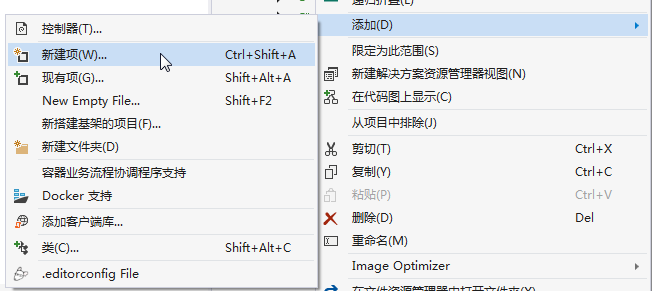
2. 在Visual Studio 2017的“解决方案资源管理器”中,右键单击在领域层“ABP.TPLMS.Web.Mvc”项目中的Controller目录。 选择“添加” > “新建项…”。如下图。
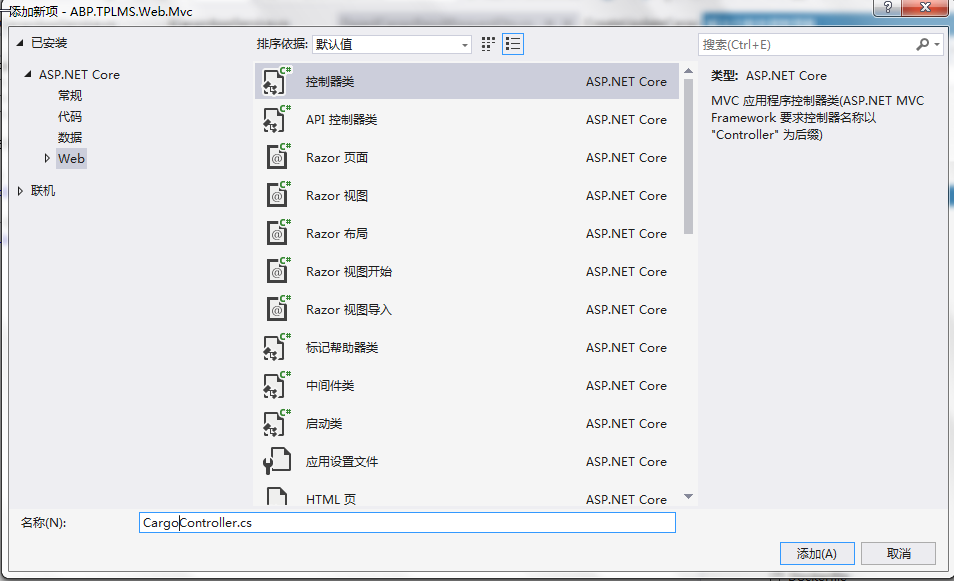
3. 在弹出对话框“添加新项-ABP.TPLMS.Web.Mvc”中选择“控制器类”,然后在名称输入框中输入“CargoController”,然后点击“添加”按钮。如下图。
4.在CargoController.cs文件中输入如下代码,通过构造函数注入对应用服务的依赖。
using System;

using System.Collections.Generic;

using System.Linq;

using System.Threading.Tasks;

using Abp.Application.Services.Dto;

using Abp.AspNetCore.Mvc.Authorization;

using Abp.Runtime.Validation;

using ABP.TPLMS.Controllers;

using ABP.TPLMS.Cargos;

using ABP.TPLMS.Cargos.Dto;

using Microsoft.AspNetCore.Mvc;

using Microsoft.EntityFrameworkCore;

namespace ABP.TPLMS.Web.Controllers

{

    [AbpMvcAuthorize]

    public class CargoController : TPLMSControllerBase

    {

        const int MaxNum= ;

        // GET: /<controller>/

        public IActionResult Index()

        {

            ViewData["SupplierId"] = "";

            return View();

        }

        private readonly ICargoAppService _cargoAppService;

        public CargoController(ICargoAppService cargoAppService)

        {

            _cargoAppService = cargoAppService;

        }

        public JsonResult List()

        {

             var page = Request.Form["page"].ToString();

            var size = Request.Form["rows"].ToString();

            int pageIndex = page == null ?  : int.Parse(page);

            int pageSize = size == null ?  : int.Parse(size);

            PagedCargoResultRequestDto paged = new PagedCargoResultRequestDto();

            paged.MaxResultCount = pageSize;

            paged.SkipCount = ((pageIndex-)<?: pageIndex - ) * pageSize;

            var userList = _cargoAppService.GetAll(paged).GetAwaiter().GetResult().Items;

            int total = ;

            var json = JsonEasyUI(userList,total);

            return json;

     }

    }

}
九、使用EasyUI创建货物管理页面
1. 在Visual Studio 2017的“解决方案资源管理器”中,右键单击在领域层“ABP.TPLMS.Web.Mvc”项目中的Views目录。 选择“添加” > “新建文件夹”。并重命名为“Cargo”。
2. 在Visual Studio 2017的“解决方案资源管理器”中,鼠标右键单击“Cargo”文件夹,然后选择“添加” > “新建项…”。 在“添加新项-ABP.TPLMS.Web.Mvc”对话框中,选择“Razor视图”,并将名称命名为Index.cshmtl。
3. 在我们刚才创建的Index.cshmtl文件中,编写如下代码:
@using ABP.TPLMS.Web.Startup

@{

    ViewData["Title"] = PageNames.Cargo;

}

@section scripts

    {

    <script src="~/view-resources/Views/Cargo/cargomgr.js" asp-append-version="true"></script>

    <script type="text/javascript">

        $(function () {

            initable();

            init();

            reloaded();

            updCargoInfo();

            showCargoDialog();

            deleteCargo();

        });

    </script>

}

<div data-options="region:'center'" style="overflow: hidden;">

    <div id="containter" style="width: 1000px; height: auto; margin: 0px auto;">

        <!--toolbar-->

        <div style="margin-bottom:1px;font-weight:bold;">

            <a href="#" id="add" class="easyui-linkbutton" data-options="iconCls:'icon-add'"
style="width:100px; height:30px; ">添加</a>

            <a href="#" id="del" class="easyui-linkbutton" data-options="iconCls:'icon-remove'"
style="width:100px; height:30px; ">删除</a>

            <a href="#" id="edit" class="easyui-linkbutton" data-options="iconCls:'icon-edit'"
style="width:100px; height:30px; ">修改</a>

            <a href="#" id="reload" class="easyui-linkbutton" data-options="iconCls:'icon-reload'"
style="width:100px; height:30px; ">刷新</a>

        </div>

        <!--panel-->

        <div data-options="region:'center',split:false" style="height:500px;">

            <!--表格-->

            <table id="dgCargo"></table>

        </div>

    </div>

</div>

<!---------------------------新增修改货物信息---------------------------->

<div id="divAddUpdCargo" class="easyui-dialog" closed="true" data-options="buttons: '#dlg-buttons'">

    <table>

        <tr>

            <td><input type="hidden" name="ID" id="IDUpdate" /></td>

        </tr>

        <tr>

            <td>供应商:</td>

            <td>

                <input type="text" id="SupplierIdUpdate" name="USupplierId"
class="form-control input-sm" value=@ViewData["SupplierId"].ToString() />

            </td>

            <td> 货物代码:</td>

            <td><input type="text" id="UpdCargoCode" name="UCargoCode"
class="form-control input-sm" /></td>

            <td>货物名称:</td>

            <td>

                <input type="text" id="CargoNameUpdate" name="UCargoName" class="form-control input-sm" />

            </td>

        </tr>

        <tr>

            <td>品牌:</td>

            <td>

                <input type="text" id="BrandUpdate" name="UBrand" class="form-control input-sm" />

            </td>

            <td> 规格型号:</td>

            <td colspan=""><input type="text" id="SpcfUpdate" name="USpcf"
class="form-control input-sm" /></td>

        </tr>

        <tr>

            <td>HSCode:</td>

            <td>

                <input type="text" id="HSCodeUpdate" name="UHSCode" class="form-control input-sm" />

            </td>

            <td>单价:</td>

            <td>

                <input type="number" id="PriceUpdate" name="UPrice" class="form-control input-sm" />

            </td>

            <td> 计量单位:</td>

            <td><input type="text" id="UnitUpdate" name="UUnit" class="form-control input-sm" /></td>

        </tr>

        <tr>

            <td>货币:</td>

            <td>

                <input type="text" id="CurrUpdate" name="UCurr" class="form-control input-sm" />

            </td>

            <td>包装:</td>

            <td>

                <input type="text" id="PackageUpdate" name="UPackage" class="form-control input-sm" />

            </td>

            <td>体积:</td>

            <td>

                <div class="input-group">

                    <input type="text" id="VolUpdate" name="UVol" class="form-control input-sm" readonly />

                    <span class="input-group-addon" id="basic-addon2">立方米</span>

                </div>

            </td>

        </tr>

        <tr>

            <td> 长:</td>

            <td>

                <div class="input-group">

                    <input type="number" id="LengthUpdate" name="ULength"
class="form-control input-sm" aria-describedby="basic-addon2">

                    <span class="input-group-addon" id="basic-addon2">cm *</span>

                </div>

            </td>

            <td>宽:</td>

            <td>

                <div class="input-group">

                    <input type="number" id="WidthUpdate" name="UWidth"
class="form-control input-sm" aria-describedby="basic-addon2">

                    <span class="input-group-addon" id="basic-addon2">cm * </span>

                </div>

            </td>

            <td>高:</td>

            <td>

                <div class="input-group">

                    <input type="number" id="HeightUpdate" name="UHeight"
 class="form-control input-sm" aria-describedby="basic-addon2">

                    <span class="input-group-addon" id="basic-addon2">cm</span>

                </div>

            </td>

        </tr>

        <tr>

            <td>毛重:</td>

            <td>

                <input type="number" id="GrossWtUpdate" name="UGrossWt" class="form-control input-sm" />

            </td>

            <td> 净重:</td>

            <td><input type="number" id="NetWtUpdate" name="UNetWt" class="form-control input-sm" /></td>

            <td>国家:</td>

            <td>

                <input type="text" id="CountryUpdate" name="UCountry" class="form-control input-sm" />

            </td>

        </tr>

        <tr>

            <td>安全库存:</td>

            <td>

                <input type="number" id="MinNumUpdate" name="UMinNum" class="form-control input-sm" />

            </td>

            <td> 最大库存:</td>

            <td><input type="number" id="MaxNumUpdate" name="UMaxNum" class="form-control input-sm" /></td>

            <td>创建时间:</td>

            <td>

                <input type="text" id="CreateTimeUpdate" name="UCreateTimey" class="form-control input-sm" />

            </td>

        </tr>

        <tr>

            <td>备注:</td>

            <td colspan="">

                <input type="text" id="RemarkUpdate" name="URemark" class="form-control input-sm" />

            </td>

        </tr>

    </table>

</div>

<div id="dlg-buttons">

    <input type="submit" id="btnSave" value="保存" class="btn btn-primary" />

    <input type="submit" id="btnCancle" value="取消" class="btn btn-info" />

</div>
4. 在Visual Studio 2017的“解决方案资源管理器”中,找到“ABP.TPLMS.Web.Mvc”项目中的Startup目录。 选择“PageNames.cs”文件,并双击打开。写入以下代码。
public const string Cargo = "Cargo";
abp(net core)+easyui+efcore实现仓储管理系统——EasyUI之货物管理二 (二十)的更多相关文章
- abp(net core)+easyui+efcore实现仓储管理系统——EasyUI之货物管理一 (十九)
abp(net core)+easyui+efcore实现仓储管理系统目录 abp(net core)+easyui+efcore实现仓储管理系统——ABP总体介绍(一) abp(net core)+ ...
- abp(net core)+easyui+efcore实现仓储管理系统——EasyUI之货物管理三 (二十一)
abp(net core)+easyui+efcore实现仓储管理系统目录 abp(net core)+easyui+efcore实现仓储管理系统——ABP总体介绍(一) abp(net core)+ ...
- abp(net core)+easyui+efcore实现仓储管理系统——EasyUI之货物管理四 (二十二)
abp(net core)+easyui+efcore实现仓储管理系统目录 abp(net core)+easyui+efcore实现仓储管理系统——ABP总体介绍(一) abp(net core)+ ...
- abp(net core)+easyui+efcore实现仓储管理系统——EasyUI之货物管理五 (二十三)
abp(net core)+easyui+efcore实现仓储管理系统目录 abp(net core)+easyui+efcore实现仓储管理系统——ABP总体介绍(一) abp(net core)+ ...
- abp(net core)+easyui+efcore实现仓储管理系统——EasyUI之货物管理六(二十四)
abp(net core)+easyui+efcore实现仓储管理系统目录 abp(net core)+easyui+efcore实现仓储管理系统——ABP总体介绍(一) abp(net core)+ ...
- abp(net core)+easyui+efcore实现仓储管理系统——EasyUI之货物管理七(二十五)
abp(net core)+easyui+efcore实现仓储管理系统目录 abp(net core)+easyui+efcore实现仓储管理系统——ABP总体介绍(一) abp(net core)+ ...
- abp(net core)+easyui+efcore实现仓储管理系统——EasyUI之货物管理八(二十六)
abp(net core)+easyui+efcore实现仓储管理系统目录 abp(net core)+easyui+efcore实现仓储管理系统——ABP总体介绍(一) abp(net core)+ ...
- abp(net core)+easyui+efcore实现仓储管理系统——EasyUI前端页面框架 (十八)
目录 abp(net core)+easyui+efcore实现仓储管理系统——ABP总体介绍(一) abp(net core)+easyui+efcore实现仓储管理系统——解决方案介绍(二) ab ...
- abp(net core)+easyui+efcore实现仓储管理系统——ABP WebAPI与EasyUI结合增删改查之一(二十七)
abp(net core)+easyui+efcore实现仓储管理系统目录 abp(net core)+easyui+efcore实现仓储管理系统——ABP总体介绍(一) abp(net core)+ ...
随机推荐
- Redis学习总结(四)--Redis主从配置
在分布式系统架构设计中高可用是必须考虑的因素之一.高可用通常是指,通过设计减少系统不能提供服务的时间.而单点是系统高可用的最大的败笔,如果单点出现问题的话,那么整个服务就不能使用了,所以应该尽量在系统 ...
- python 13 内置函数2
目录 内置函数(二) 匿名函数 内置函数(三) 闭包 内置函数(二) abs() #返回绝对值--返回的是正数 enumerate("可迭代对象","序号起始值" ...
- python批量处理压缩文件
python批量处理压缩文件 博客小序:在数据的处理中,下载的数据很有可能是许多个压缩文件,自己一个一个解压较为麻烦,最近几日自己在处理一次下载的数据时,遇到大量的压缩数据需要处理,于是利用pytho ...
- CSS 之Grid 网格知识梳理2
继上篇的CSS 之Grid下半部分 14.将单元格划分到一个区域,使用grid-template-areas属性: ag: grid-template-areas: "header h ...
- mysql安装-yum方式
1.环境 查看当前系统环境,使用的是 centos release 6.5 (Final). 2.检查当前系统是否已经安装过mysql rpm -qa | grep mysql 3.如果有,那么删除已 ...
- 理解Js的parseInt(转)
parseInt() 方法首先查看位置 0 处的字符,判断它是否是个有效数字:如果不是,该方法将返回 NaN,不再继续执行其他操作.但如果该字符是有效数字,该方法将查看位置 1 处的字符,进行同样的测 ...
- 第7章 使用springMVC构建Web应用程序 7.1 springMVC配置
最近在看spring in action第3版,这里搭建一个简单的spring mvc,也算书没白看,当然老鸟可以不屑了,这里只是给自己做个笔记,配置也尽量删烦就简, Spring MVC的核心是Di ...
- 【百度之星】【思维】hdu 6724Totori's Switching Game
思维题,最后只要判断每个点的度数>=k即可. #pragma comment(linker, "/STACK:1024000000,1024000000") #pragma ...
- POJ-2104 K-th Number CDQ分治
题目传送门 题意:给你一个序列,长度为n,m次询问,询问一段区间的第k大. 题解:CDQ分治,对整个值域进行分治.每次取一个mid, 计算出整个区间内mid <= 的数目,如果 num > ...
- poj 3468 A Simple Problem with Integers(原来是一道简单的线段树区间修改用来练练splay)
题目链接:http://poj.org/problem?id=3468 题解:splay功能比线段树强大当然代价就是有些操作比线段树慢,这题用splay实现的比线段树慢上一倍.线段树用lazy标记差不 ...