
吴裕雄 python 神经网络——TensorFlow 输入数据处理框架
import tensorflow as tf

files = tf.train.match_filenames_once("E:\\MNIST_data\\output.tfrecords")

filename_queue = tf.train.string_input_producer(files, shuffle=False)

# 读取文件。

reader = tf.TFRecordReader()

_,serialized_example = reader.read(filename_queue)

# 解析读取的样例。

features = tf.parse_single_example(

    serialized_example,

    features={

        'image_raw':tf.FixedLenFeature([],tf.string),

        'pixels':tf.FixedLenFeature([],tf.int64),

        'label':tf.FixedLenFeature([],tf.int64)

    })

decoded_images = tf.decode_raw(features['image_raw'],tf.uint8)

retyped_images = tf.cast(decoded_images, tf.float32)

labels = tf.cast(features['label'],tf.int32)

#pixels = tf.cast(features['pixels'],tf.int32)

images = tf.reshape(retyped_images, [784])

min_after_dequeue = 10000

batch_size = 100

capacity = min_after_dequeue + 3 * batch_size

image_batch, label_batch = tf.train.shuffle_batch([images, labels], batch_size=batch_size, capacity=capacity, min_after_dequeue=min_after_dequeue)

def inference(input_tensor, weights1, biases1, weights2, biases2):

    layer1 = tf.nn.relu(tf.matmul(input_tensor, weights1) + biases1)

    return tf.matmul(layer1, weights2) + biases2

# 模型相关的参数

INPUT_NODE = 784

OUTPUT_NODE = 10

LAYER1_NODE = 500

REGULARAZTION_RATE = 0.0001

TRAINING_STEPS = 5000

weights1 = tf.Variable(tf.truncated_normal([INPUT_NODE, LAYER1_NODE], stddev=0.1))

biases1 = tf.Variable(tf.constant(0.1, shape=[LAYER1_NODE]))

weights2 = tf.Variable(tf.truncated_normal([LAYER1_NODE, OUTPUT_NODE], stddev=0.1))

biases2 = tf.Variable(tf.constant(0.1, shape=[OUTPUT_NODE]))

y = inference(image_batch, weights1, biases1, weights2, biases2)

# 计算交叉熵及其平均值

cross_entropy = tf.nn.sparse_softmax_cross_entropy_with_logits(logits=y, labels=label_batch)

cross_entropy_mean = tf.reduce_mean(cross_entropy)

# 损失函数的计算

regularizer = tf.contrib.layers.l2_regularizer(REGULARAZTION_RATE)

regularaztion = regularizer(weights1) + regularizer(weights2)

loss = cross_entropy_mean + regularaztion

# 优化损失函数

train_step = tf.train.GradientDescentOptimizer(0.01).minimize(loss)

# 初始化会话,并开始训练过程。

with tf.Session() as sess:

    # tf.global_variables_initializer().run()

    sess.run((tf.global_variables_initializer(),tf.local_variables_initializer()))

    coord = tf.train.Coordinator()

    threads = tf.train.start_queue_runners(sess=sess, coord=coord)

    # 循环的训练神经网络。

    for i in range(TRAINING_STEPS):

        if i % 1000 == 0:

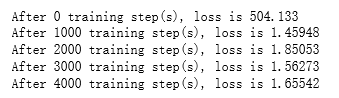
            print("After %d training step(s), loss is %g " % (i, sess.run(loss)))

        sess.run(train_step)

    coord.request_stop()

    coord.join(threads)
吴裕雄 python 神经网络——TensorFlow 输入数据处理框架的更多相关文章
- 吴裕雄 python 神经网络——TensorFlow 循环神经网络处理MNIST手写数字数据集
#加载TF并导入数据集 import tensorflow as tf from tensorflow.contrib import rnn from tensorflow.examples.tuto ...
- 吴裕雄 python 神经网络——TensorFlow 使用卷积神经网络训练和预测MNIST手写数据集
import tensorflow as tf import numpy as np from tensorflow.examples.tutorials.mnist import input_dat ...
- 吴裕雄 python 神经网络——TensorFlow 训练过程的可视化 TensorBoard的应用
#训练过程的可视化 ,TensorBoard的应用 #导入模块并下载数据集 import tensorflow as tf from tensorflow.examples.tutorials.mni ...
- 吴裕雄 python 神经网络——TensorFlow实现搭建基础神经网络
import numpy as np import tensorflow as tf import matplotlib.pyplot as plt def add_layer(inputs, in_ ...
- 吴裕雄 python 神经网络——TensorFlow图片预处理调整图片
import numpy as np import tensorflow as tf import matplotlib.pyplot as plt def distort_color(image, ...
- 吴裕雄 python 神经网络TensorFlow实现LeNet模型处理手写数字识别MNIST数据集
import tensorflow as tf tf.reset_default_graph() # 配置神经网络的参数 INPUT_NODE = 784 OUTPUT_NODE = 10 IMAGE ...
- 吴裕雄 python 神经网络——TensorFlow 数据集高层操作
import tempfile import tensorflow as tf train_files = tf.train.match_filenames_once("E:\\output ...
- 吴裕雄 python 神经网络——TensorFlow 图像预处理完整样例
import numpy as np import tensorflow as tf import matplotlib.pyplot as plt def distort_color(image, ...
- 吴裕雄 python 神经网络——TensorFlow 花瓣分类与迁移学习(4)
# -*- coding: utf-8 -*- import glob import os.path import numpy as np import tensorflow as tf from t ...
随机推荐
- Hive文件与记录格式
1. Hive文件与记录格式 Create table 有多种用法,例如STORED AS SEQUENCEFILE, ROW FORMAT DELIMITED, SERDE, INPUTFORMAT ...
- 2019年牛客多校第一场B题Integration 数学
2019年牛客多校第一场B题 Integration 题意 给出一个公式,求值 思路 明显的化简公式题,公式是分母连乘形式,这个时候要想到拆分,那如何拆分母呢,自然是裂项,此时有很多项裂项,我们不妨从 ...
- # E. Mahmoud and Ehab and the xor-MST dp/数学+找规律+xor
E. Mahmoud and Ehab and the xor-MST dp/数学/找规律 题意 给出一个完全图的阶数n(1e18),点由0---n-1编号,边的权则为编号间的异或,问最小生成树是多少 ...
- 【C语言】请输入一个n(n<=10)并输出一个n行n列的杨辉三角
应用二维数组的知识 杨辉三角特点: 1.第一列和对角线的元素全部为1 2.其他元素等于上一行的当前列的值和上一行中当前列前边一列的值之和 #include<stdio.h> #define ...
- HTML学习(14)表单
HTML 表单用于收集不同类型的用户输入. HTML 表单 表单是一个包含表单元素的区域. 表单元素是允许用户在表单中输入内容,比如:文本域(textarea).下拉列表.单选框(radio-butt ...
- php商城数据库的设计 之无限分类
商品分类,使用无限分类 即: -------如何创建数据表 pid---父级分类id,如果是顶级分类则为0 path---1,用户分类的排序 . 排序示例: 实现逻辑:获取type表的所有分类,ord ...
- split()函数+merge()函数
在图像处理时,我们接触到的彩色以RGB居多,为了分析图像在某一通道上的特性,需要将图像的颜色通道进行分离,或者是在对某一颜色通道处理后重新进行融合.opencv提供了split()函数来进行颜色通道的 ...
- git 本地回滚与远程库回滚
不说废话,开始: 一.本地回滚: git reset --hard commit-id //回滚到commit-id 二.远程回滚操作分3步:①将本地分支退回到某个commit ②删除远程分支 ...
- 生成树计数 UVA 10766
//本题题意:首先每个点之间都可达,然后m列举出不可达的,求出最多的生成树方案: //k这个变量是没用的. //公式:ans矩阵=度矩阵-建边矩阵: //度矩阵是当i==j时的,建边矩阵于平时定义可达 ...
- LOJ#6713. 「EC Final 2019」狄利克雷 k 次根 加强版
题目描述 定义两个函数 \(f, g: \{1, 2, \dots, n\} \rightarrow \mathbb Z\) 的狄利克雷卷积 \(f * g\) 为: \[ (f * g)(n) = ...