
爬虫Scrapy框架-2爬取网站视频详情
爬取视频详情:http://www.id97.com/
创建环境:


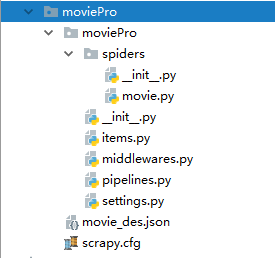
movie.py 爬虫文件的设置:
# -*- coding: utf-8 -*-

import scrapy

from moviePro.items import MovieproItem

class MovieSpider(scrapy.Spider):

    name = 'movie'

    # allowed_domains = ['www.id97.com']

    start_urls = ['http://www.id97.com/']

    def secondPageParse(self,response):

        item = response.meta['item']

        item['actor']=response.xpath('/html/body/div[1]/div/div/div[1]/div[1]/div[2]/table/tbody/tr[1]/td[2]/a/text()').extract_first()

        item['show_time'] = response.xpath('/html/body/div[1]/div/div/div[1]/div[1]/div[2]/table/tbody/tr[7]/td[2]/text()').extract_first()

        yield item

    def parse(self, response):

        div_list=response.xpath('/html/body/div[1]/div[2]/div[1]/div/div')

        for div in div_list:

            item = MovieproItem()

            item['name']=div.xpath('./div/div[@class="meta"]//a/text()').extract_first()

            #类型下面有多个a标签,所以使用//text,另外取到的是多个值,所以就用extract取值

            item['kind']=div.xpath('./div/div[@class="meta"]/div[@class="otherinfo"]//text()').extract()  #拿到的是列表类型,要转为字符串类型

            item['kind'] = ''.join(item['kind'])

            #拿到二次连接,用于发请求,拿到电影详细的描述信息

            item['url'] = div.xpath('./div/div[@class="meta"]//a/@href').extract_first()

            #将item对象参给二级页面方法,进而将内容存入到item里面

            yield scrapy.Request(url=item['url'],callback=self.secondPageParse,meta={'item':item})
items.py里面的设置:
# -*- coding: utf-8 -*-

# Define here the models for your scraped items

#

# See documentation in:

# https://doc.scrapy.org/en/latest/topics/items.html

import scrapy

class MovieproItem(scrapy.Item):

    # define the fields for your item here like:

    # name = scrapy.Field()

    name=scrapy.Field()

    kind=scrapy.Field()

    url=scrapy.Field()

    actor=scrapy.Field()

    show_time=scrapy.Field()
pipelines.py管道里面设置:
# -*- coding: utf-8 -*-

# Define your item pipelines here

#

# Don't forget to add your pipeline to the ITEM_PIPELINES setting

# See: https://doc.scrapy.org/en/latest/topics/item-pipeline.html

import json

class MovieproPipeline(object):

    def process_item(self, item, spider):

        dic_item={

            '电影名字':item['name'],

            '影片类型':item['kind'],

            '主演':item['actor'],

            '上映时间':item['show_time'],

        }

        json_str=json.dumps(dic_item,ensure_ascii=False)

        with open('./movie_des.json','at',encoding='utf-8') as f:

            f.write(json_str)

        print(item['name'])

        return item
日志等级设置:

手动设置日志等级,在settings里面设置(可以写在任意位置)

将制定日志信息,写入到文件中进行存储:

爬虫Scrapy框架-2爬取网站视频详情的更多相关文章
- Scrapy框架——CrawlSpider爬取某招聘信息网站
CrawlSpider Scrapy框架中分两类爬虫,Spider类和CrawlSpider类. 它是Spider的派生类,Spider类的设计原则是只爬取start_url列表中的网页, 而Craw ...
- python爬虫:爬取网站视频
python爬取百思不得姐网站视频:http://www.budejie.com/video/ 新建一个py文件,代码如下: 1 2 3 4 5 6 7 8 9 10 11 12 13 14 15 1 ...
- scrapy框架来爬取壁纸网站并将图片下载到本地文件中
首先需要确定要爬取的内容,所以第一步就应该是要确定要爬的字段: 首先去items中确定要爬的内容 class MeizhuoItem(scrapy.Item): # define the fields ...
- scrapy框架 + selenium 爬取豆瓣电影top250......
废话不说,直接上代码..... 目录结构 items.py import scrapy class DoubanCrawlerItem(scrapy.Item): # 电影名称 movieName = ...
- 爬虫--scrapy+redis分布式爬取58同城北京全站租房数据
作业需求: 1.基于Spider或者CrawlSpider进行租房信息的爬取 2.本机搭建分布式环境对租房信息进行爬取 3.搭建多台机器的分布式环境,多台机器同时进行租房数据爬取 建议:用Pychar ...
- python爬取网站视频保存到本地
前言 文的文字及图片来源于网络,仅供学习.交流使用,不具有任何商业用途,版权归原作者所有,如有问题请及时联系我们以作处理. 作者: Woo_home PS:如有需要Python学习资料的小伙伴可以加点 ...
- Scrapy爬虫框架之爬取校花网图片
Scrapy Scrapy是一个为了爬取网站数据,提取结构性数据而编写的应用框架. 其可以应用在数据挖掘,信息处理或存储历史数据等一系列的程序中.其最初是为了页面抓取 (更确切来说, 网络抓取 )所设 ...
- python爬虫入门10分钟爬取一个网站
一.基础入门 1.1什么是爬虫 爬虫(spider,又网络爬虫),是指向网站/网络发起请求,获取资源后分析并提取有用数据的程序. 从技术层面来说就是 通过程序模拟浏览器请求站点的行为,把站点返回的HT ...
- 使用scrapy爬取网站的商品数据
目标是爬取网站http://www.muyingzhijia.com/上全部的商品数据信息,包括商品的一级类别,二级类别,商品title,品牌,价格. 搜索了一下,python的scrapy是一个不错 ...
随机推荐
- win10 vm 11 桥接模式配置
1 保证你Vmware里面的虚拟机是关机状态 2 在本地连接 属性中 卸载VM 桥接协议 3 管理员身份运行VM ,编辑>虚拟网络编辑器 删除所有网卡,并且重新配置网络适配器 4 配置完成后,选 ...
- -oN ,-oX,-oG
-oN ,正常输出 -oX, xml输出 nmap 192.168.9.12 -oX TEST.xml -oG grep输出 html文件可读性比xml文件要好,将xml转换成html xs ...
- Python3+selenium3环境搭建笔记
系统:win7 64位浏览器:ie9 64位 chrome70 32位 firefox63 64位python版本:3.6.5 Windows x86 executable installersele ...
- pc端常见布局样式总结(针对常见的)
<!DOCTYPE html> <html> <head> <meta charset="utf-8"> <title> ...
- Codeforces Round #Pi (Div. 2) 567E President and Roads ( dfs and similar, graphs, hashing, shortest paths )
图给得很良心,一个s到t的有向图,权值至少为1,求出最短路,如果是一定经过的边,输出"YES",如果可以通过修改权值,保证一定经过这条边,输出"CAN",并且输 ...
- UVA 1600 Patrol Robert 巡逻机器人 (启发搜索BFS)
非常适合A*的一道题. 比普通的迷宫问题加一个信息k表示当前穿过的障碍物的数量. #include<cstdio> #include<cstring> #include< ...
- 个人作业-Alpha项目测试
姓名 蒋东航 学号 201731062328 这个作业属于哪个课程 课程链接 这个作业要求在哪里 作业要求链接 团队名称 机你太美(团队博客链接) 这个作业的目标 了解其他团队项目,学习其他团队优秀方 ...
- Nuget使用备忘
菜单:工具-库程序包管理器-管理解决方案的NuGet程序包,搜索,下载,安装 或者 工具-库程序包管理器-程序包管理器控制台,输入PM命令,如: install-package log4net 如果不 ...
- Voyager下的Dashboard Widgets
widgets设置,voyager.php下找到'widgets': 'widgets' => [ 'TCG\\Voyager\\Widgets\\UserDimmer', 'TCG\\Voya ...
- 地理位置编码geohash学习笔记
1.geohash及其性质 一种空间索引技术. (1)将二维的经纬度位置数据转换为一维的字符串(基本上hash族的算法都是这样): 其优点在于hash编码后的字符串,可以方便查找和索引,从而减少相似计 ...