
为什么SwiftUI使用struct, 限制使用class
前言
在学习SwiftUI所有的地方,视图元素都定义一个struct并实现View协议,该协议定义body变量返回View类型。
但是为什么,这里一直是指定的struct, 而不是class呢?
尝试使用class
如果你使用class 在SwiftUI中定义一个View,那么你将遇到一个编译器的错误
Protocol 'View' requirement '_makeView(view:inputs:)' cannot be satisfied by a non-final class ('ContentView') because it uses 'Self' in a non-parameter, non-result type position
错误的含义是,代码中使用了ContentView作为参数,如果ContentView有子类,那么将产生未定义的行为,必须限制ContentView没有子类,因此需要加上final修饰
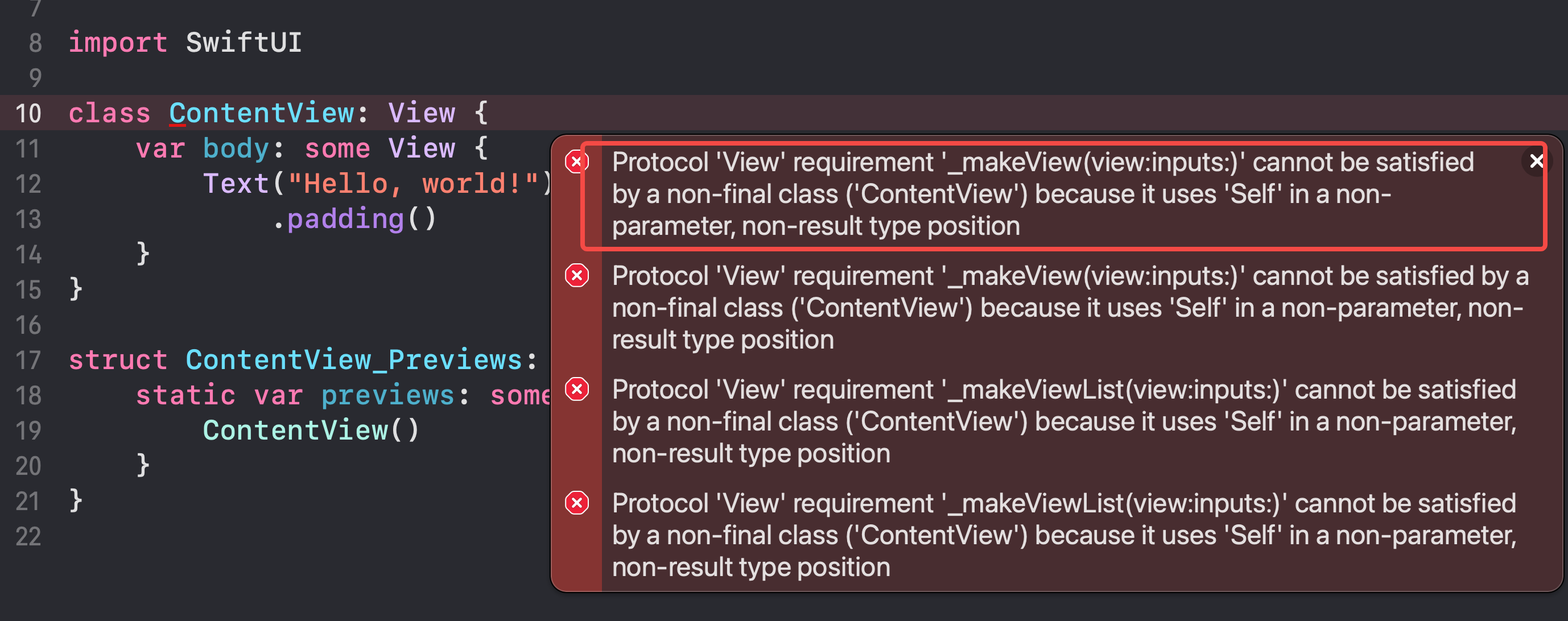
加上final修饰之后,代码可以编译,运行之后直接崩溃:
SwiftUI/CustomView.swift:49: Fatal error: views must be value types (either a struct or an enum); ContentView is a class.

2022-02-23 15:41:34.418714+0800 SwiftClassUI[98636:8723744] SwiftUI/CustomView.swift:49: Fatal error: views must be value types (either a struct or an enum); ContentView is a class.
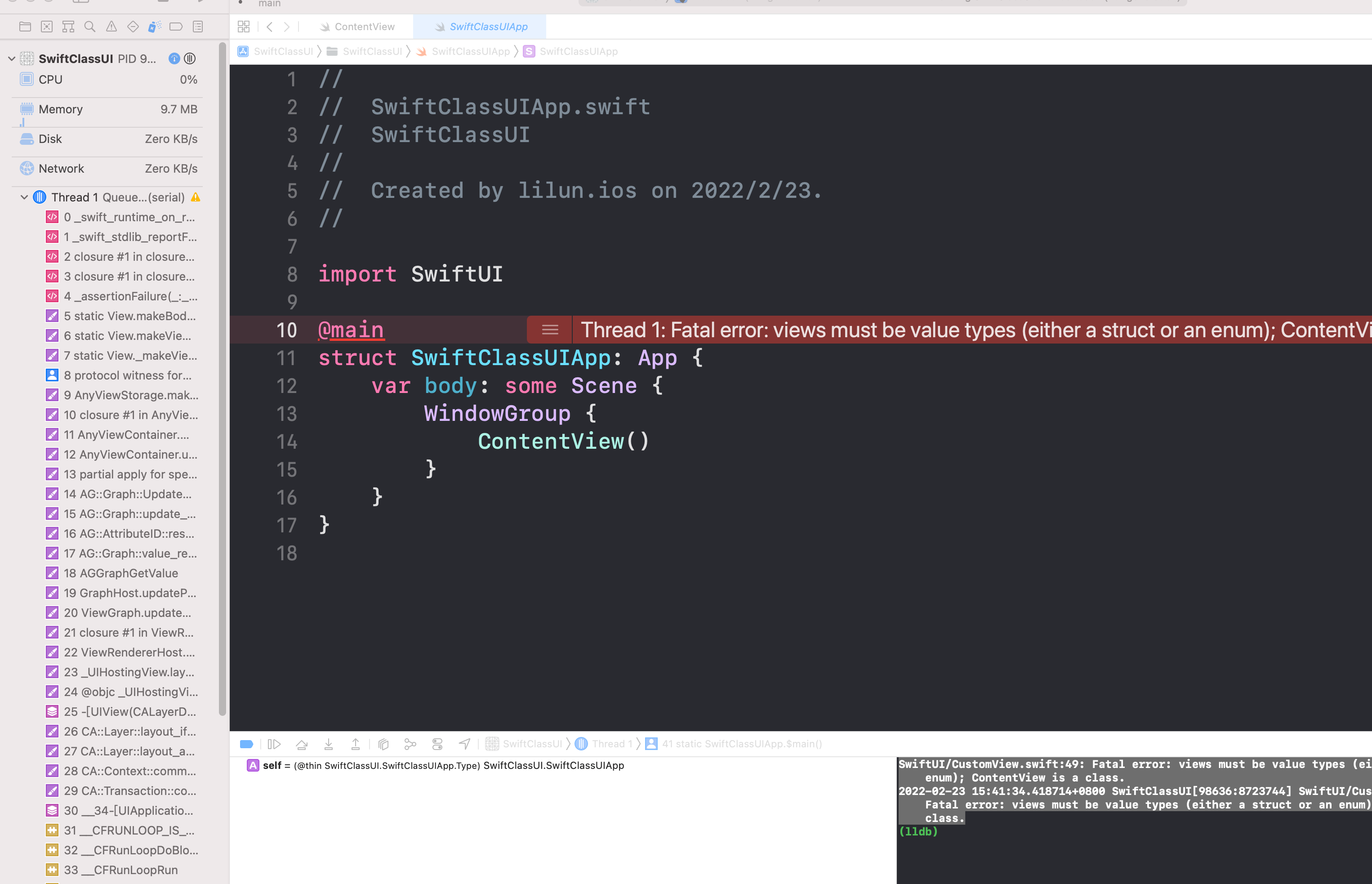
遇到断言错误,这个是SwiftUI限制只能使用struct或者枚举
为什么SwiftUI限制使用struct
经过搜索,大致有两个地方说明原因:
- 一个是stackoverflow上说,因为SwiftUI中使用到了@State修饰状态,将和state和当前view进行绑定,如果是class,会遇到问题
- 而是2019年的wwdc, swiftui_essentials, 其中有一个点提到了SwiftUI为什么采用struct而不是像UIKit一样的class
 If you're coming from UIKit or AppKitt, you've probably gotten used to views being defined as classes that inherit from a common view superclass instead of as structs conforming to protocols.

 For example, custom views in UIKit inherit from the UIView superclass.

 And UIView defines storage for common view properties like alpha and backgroundColor.

 Let's imagine we built our OrderHistory using UIKit instead of SwiftUI.

 Our Custom View would inherit the stored properties of UIView as well as adding more properties for its own custom behavior.

So how is SwiftUI different than this? Well, remember that in SwiftUI we represent those same kinds of common view properties as separate modifiers instead, like we did for opacity and background.

 And each of these modifiers creates their own view.

And this means that the storage for those properties is distributed across our view hierarchy in each of these modifier views instead of being inherited by every individual view.

Now this allows our views to be lighter weight, optimizing their storage for just their unique purpose.

And in this world, it makes a lot of sense that view just becomes a protocol because it's no longer needing to serve a common storage template for all of your views.

 But what does this view protocol actually do? Well, let's remember our conceptual definition of a view.

 Which is that a view defines a piece of our UI and we build bigger views by composing together smaller views.

 And that's all that the view protocol does.

 It defines a piece of our view hierarchy, giving it a name so that it can be composed and reused across your entire app.

 And each concrete type of view is just an encapsulation of some other view representing its contents in its body property and all of the inputs required to create that view represented by its properties.

Now the actual protocol just defines that one body property returning just another kind of view.

But look
总结
- struct相比class,能节省更多空间,有时候不需要继承父类中一些不需要的属性
- struct相比class,操作更快,struct在栈上分配空间更加快
- struct符合SwiftUI中的设计思路,界面是简单单一的,数据变化,UI就发生变化,数据不会在多处引用
为什么SwiftUI使用struct, 限制使用class的更多相关文章
- 从用SwiftUI搭建项目说起
前言 后续这个SwiftUI分类的文章全部都是针对SwiftUI的日常学习和理解写的,自己利用Swift写的第二个项目也顺利上线后续的需求也不是特着急,最近正好有空就利用这段时间补一下自己对Swift ...
- [Android开发学iOS系列] iOS写UI的几种方式
[Android开发学iOS系列] iOS写UI的几种方式 作为一个现代化的平台, iOS的发展也经历了好几个时代. 本文讲讲iOS写UI的几种主要方式和各自的特点. iOS写UI的方式 在iOS中写 ...
- SwiftUI 官方教程(八)
8. 动态生成预览 接下来,我们会在 LandmarkList_Previews 中添加代码以在不同的设备尺寸上渲染列表.默认情况下,预览会以当前的 scheme 中设备的大小进行渲染.我们可以通过调 ...
- SwiftUI 官方教程(七)
7. 给子 View 传递数据 LandmarkDetail 现在依然使用硬编码的数据来显示地标.像 LandmarkRow 一样,LandmarkDetail 类型和它组合的其他 view 都需要一 ...
- SwiftUI 官方教程(六)
6. 在列表和详情之间设置导航 虽然列表已经能显示了,但是我们还不能通过点击单个地标来查看地标详情页面.SwiftUI教程 把 list 嵌入一个 NavigationView 中,并把每个 row ...
- SwiftUI 官方教程(五)
SwiftUI官方教程(五) 5. 同时使用 UIKit 和 SwiftUI 至此,我们已准备好创建 map view 了,接下来使用 MapKit 中的 MKMapView 类来渲染地图. 在 Sw ...
- SwiftUI 官方教程(四)
SwiftUI 官方教程(四) 4. 自定义 Image View 搞定名称和位置 view 后,我们来给地标添加图片. 这不需要添加很多代码,只需要创建一个自定义 view,然后给图片加上遮罩.边框 ...
- SwiftUI 官方教程(三)
3. 用 Stacks 组合 View 在上一节创建标题 view 后,我们来添加 text view,它用来显示地标的详细信息,比如公园的名称和所在的州. 在创建 SwiftUI view 时,我们 ...
- SwiftUI 官方教程(二)
SwiftUI 官方教程(二) 2. 自定义 Text View 为了自定义 view 的显示,我们可以自己更改代码,或者使用 inspector 来帮助我们编写代码. 在构建 Landmarks 的 ...
- SwiftUI 官方教程(一)
完整中文教程及代码请查看 https://github.com/WillieWangWei/SwiftUI-Tutorials 创建和组合 View 此部分将指引你构建一个发现和分享您喜爱地方的 ...
随机推荐
- How Python Handles Big Files
The Python programming language has become more and more popular in handling data analysis and proc ...
- Flutter笔记 - 布局类组件
布局类组件 Row水平方向排列 textDirection 水平方向子组件布局顺序. mainAxisSize 占用空间,默认MainAxisSize.MAX mainAxisAligment 对齐方 ...
- asyncio和aiohttp携程并发
import asyncio from aiohttp import web import time async def process(): for i in range(10): print(&q ...
- 2024-04-21:用go语言,给一棵根为1的树,每次询问子树颜色种类数。 假设节点总数为n,颜色总数为m, 每个节点的颜色,依次给出,整棵树以1节点做头, 有k次查询,询问某个节点为头的子树,一共
2024-04-21:用go语言,给一棵根为1的树,每次询问子树颜色种类数. 假设节点总数为n,颜色总数为m, 每个节点的颜色,依次给出,整棵树以1节点做头, 有k次查询,询问某个节点为头的子树,一共 ...
- 【笔记】问题控制与管理&故障、问题、已知错误、变更请求之间的逻辑关系&问题管理流程
[笔记]问题控制与管理&故障.问题.已知错误.变更请求之间的逻辑关系 问题控制与管理 与故障管理的尽可能快地恢复服多的目标不同,问题管理是要防止再次发生故障 例如你制作了一个报表,用户填写了问 ...
- nginx请求头相关漏洞修复(http host&X-XSS-Protection)
nginx请求头相关漏洞修复(http host&X-XSS-Protection) 参考链接:Nginx常见漏洞处理 - 码农教程 (manongjc.com) Web应用漏洞-NGINX各 ...
- 力扣696(java)-计数二进制子串(简单)
题目: 给定一个字符串 s,统计并返回具有相同数量 0 和 1 的非空(连续)子字符串的数量,并且这些子字符串中的所有 0 和所有 1 都是成组连续的. 重复出现(不同位置)的子串也要统计它们出现的次 ...
- PolarDB-X 如何做分布式数据库热点分析
简介: PolarDB-X 是一款计算存储分离的云原生分布式数据库,在PolarDB-X 2.0的AUTO模式下,数据库会按照表的主键自动Hash分区,将数据均匀的分布到各个数据节点中,最理想的情况是 ...
- 最佳实践:使用阿里云CDN加速OSS访问
简介: 用户直接访问OSS资源,访问速度会受到OSS的下行带宽以及Bucket地域的限制.如果通过CDN来访问OSS资源,带宽上限更高,并且可以将OSS的资源缓存至就近的CDN节点,通过CDN节点进行 ...
- Serverless 工程实践 | 快速搭建 Kubeless 平台
简介: Kubeless 是基于 Kubernetes 的原生无服务器框架.其允许用户部署少量的代码(函数),而无须担心底层架构. 快速搭建 Kubeless 平台 Kubeless 简介 Kube ...