
吴裕雄 python 神经网络——TensorFlow TFRecord样例程序
import numpy as np

import tensorflow as tf

from tensorflow.examples.tutorials.mnist import input_data

# 定义函数转化变量类型。

def _int64_feature(value):

    return tf.train.Feature(int64_list=tf.train.Int64List(value=[value]))

def _bytes_feature(value):

    return tf.train.Feature(bytes_list=tf.train.BytesList(value=[value]))

# 将数据转化为tf.train.Example格式。

def _make_example(pixels, label, image):

    image_raw = image.tostring()

    example = tf.train.Example(features=tf.train.Features(feature={

        'pixels': _int64_feature(pixels),

        'label': _int64_feature(np.argmax(label)),

        'image_raw': _bytes_feature(image_raw)

    }))

    return example

# 读取mnist训练数据。

mnist = input_data.read_data_sets("E:\\MNIST_data\\",dtype=tf.uint8, one_hot=True)

images = mnist.train.images

labels = mnist.train.labels

pixels = images.shape[1]

num_examples = mnist.train.num_examples

# 输出包含训练数据的TFRecord文件。

with tf.python_io.TFRecordWriter("E:\\MNIST_data\\output.tfrecords") as writer:

    for index in range(num_examples):

        example = _make_example(pixels, labels[index], images[index])

        writer.write(example.SerializeToString())

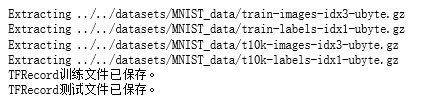
print("TFRecord训练文件已保存。")

# 读取mnist测试数据。

images_test = mnist.test.images

labels_test = mnist.test.labels

pixels_test = images_test.shape[1]

num_examples_test = mnist.test.num_examples

# 输出包含测试数据的TFRecord文件。

with tf.python_io.TFRecordWriter("E:\\MNIST_data\\output_test.tfrecords") as writer:

    for index in range(num_examples_test):

        example = _make_example(pixels_test, labels_test[index], images_test[index])

        writer.write(example.SerializeToString())

print("TFRecord测试文件已保存。")
# 读取文件。

reader = tf.TFRecordReader()

filename_queue = tf.train.string_input_producer(["E:\\MNIST_data\\output.tfrecords"])

_,serialized_example = reader.read(filename_queue)

# 解析读取的样例。

features = tf.parse_single_example(

    serialized_example,

    features={

        'image_raw':tf.FixedLenFeature([],tf.string),

        'pixels':tf.FixedLenFeature([],tf.int64),

        'label':tf.FixedLenFeature([],tf.int64)

    })

images = tf.decode_raw(features['image_raw'],tf.uint8)

labels = tf.cast(features['label'],tf.int32)

pixels = tf.cast(features['pixels'],tf.int32)

sess = tf.Session()

# 启动多线程处理输入数据。

coord = tf.train.Coordinator()

threads = tf.train.start_queue_runners(sess=sess,coord=coord)

for i in range(10):

    image, label, pixel = sess.run([images, labels, pixels])
吴裕雄 python 神经网络——TensorFlow TFRecord样例程序的更多相关文章
- 吴裕雄 python 神经网络TensorFlow实现LeNet模型处理手写数字识别MNIST数据集
import tensorflow as tf tf.reset_default_graph() # 配置神经网络的参数 INPUT_NODE = 784 OUTPUT_NODE = 10 IMAGE ...
- 吴裕雄 python 神经网络——TensorFlow 输入数据处理框架
import tensorflow as tf files = tf.train.match_filenames_once("E:\\MNIST_data\\output.tfrecords ...
- 吴裕雄 python 神经网络——TensorFlow 输入文件队列
import tensorflow as tf def _int64_feature(value): return tf.train.Feature(int64_list=tf.train.Int64 ...
- 吴裕雄 python 神经网络——TensorFlow 图像预处理完整样例
import numpy as np import tensorflow as tf import matplotlib.pyplot as plt def distort_color(image, ...
- 吴裕雄 python 神经网络——TensorFlow 完整神经网络样例程序
import tensorflow as tf from numpy.random import RandomState batch_size = 8 w1= tf.Variable(tf.rando ...
- 吴裕雄 python 神经网络——TensorFlow variables_to_restore函数的使用样例
import tensorflow as tf v = tf.Variable(0, dtype=tf.float32, name="v") ema = tf.train.Expo ...
- 吴裕雄 python 神经网络——TensorFlow训练神经网络:卷积层、池化层样例
import numpy as np import tensorflow as tf M = np.array([ [[1],[-1],[0]], [[-1],[2],[1]], [[0],[2],[ ...
- 吴裕雄 python 神经网络——TensorFlow 数据集高层操作
import tempfile import tensorflow as tf train_files = tf.train.match_filenames_once("E:\\output ...
- 吴裕雄 python 神经网络——TensorFlow 数据集基本使用方法
import tempfile import tensorflow as tf input_data = [1, 2, 3, 5, 8] dataset = tf.data.Dataset.from_ ...
随机推荐
- eclipse非正常关闭,再打开后报错
Previous operation has not finished; run 'cleanup' if it was interrupted 启动任务管理器,将javaw.exe进程杀死,然后重启 ...
- vue 项目太大, 导致 javascript heap out of memory
原因: node 环境, 对单个进程的内存是有限制的, 但是现在前端项目太大, 所以我们需要根据当前机器环境, 手动加大node的内存限制 安装包 npm i increase-memory-limi ...
- sql server2008用ip远程连接
sql server2008用ip远程连接 转载 weixin_34167819 发布于2017-09-14 15:23:00 阅读数 84 收藏 展开 1,2005的外围应用配置器在2008中换了地 ...
- tarsgo初探
参考:https://mp.weixin.qq.com/s/aO8ybUiu5htqcoGAwxwc5Q?utm_source=tuicool&utm_medium=referral 1.Go ...
- Codeforces Round #598 (Div. 3) D. Binary String Minimizing
You are given a binary string of length nn (i. e. a string consisting of nn characters '0' and '1'). ...
- 概率DP (大概是最入门的题了) lightoj 1248
有一个骰子,n个面,问所有面都被摇出的期望. 转自**的博客, 因为概率是(n-k)/n 所以期望次数是1/(前面这个数) #include<cstdio> #include<a ...
- CSS--box
width is content width height is content height set margin and padding zero leads box to the same wi ...
- 【 Struts2 过滤器】
LoginInterceptor package k.util; import com.opensymphony.xwork2.ActionInvocation; import com.opensym ...
- CSS学习(8)盒模型
box:盒子,每个元素在页面中都会生成一个矩形区域(盒子) 盒子类型: 1.行盒,display属性=inline的元素,不换行(默认值) 2.块盒,display属性=block的元素,换行 浏览器 ...
- 程序员过年必备 -- Auto.js微信自动抢红包
打开微信就不用管了: - 自动打开未读消息 - 自动滑动屏幕检测红包 - 自动跳过无效红包 基于Auto JS,apk版本4.01: - 大多数动作均基于控件 - 极个别点击基于动态抓取的坐标 - 这 ...