
Android 布局 中实现适应屏幕大小及组件滚动
要实现如图的布局:
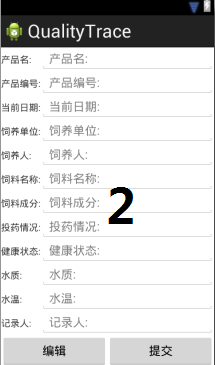
这是在eclipse可视化窗口中的截图,但实际运行在Android设备上可能出现的问题有:
(1):当编辑图1中的最后一个EditText时,输入法的编辑界面会把底部的Button顶上去,遮挡住了最后一个EditText;
(2):图2中的控件太多,以至于无法一屏全部显示,导致底部的Button被挤下去,又无法滚动控件,导致无法操作Button;
解决方案:
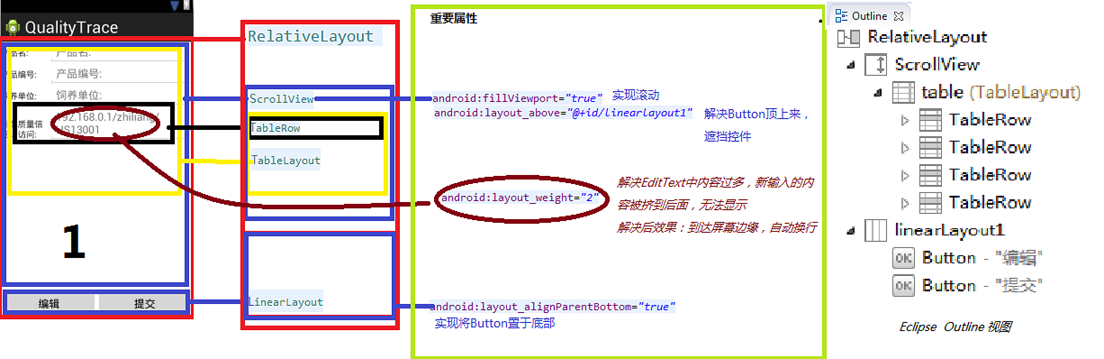
以下为布局文件代码:
图 1:
<?xml version="1.0" encoding="utf-8"?>

<RelativeLayout xmlns:android="http://schemas.android.com/apk/res/android"

    android:layout_width="fill_parent"

    android:layout_height="wrap_content"

    android:orientation="vertical" >

    <ScrollView

        android:layout_width="fill_parent"

        android:layout_height="match_parent"

        android:layout_above="@+id/linearLayout1"

        android:fillViewport="true" >

        <TableLayout

            android:id="@+id/table"

            android:layout_width="fill_parent"

            android:layout_height="wrap_content"

            android:stretchColumns="1" >

            <TableRow>

                <TextView

                    android:layout_width="60dp"

                    android:layout_height="wrap_content"

                    android:text="@string/product_name" />

                <EditText

                    android:layout_height="wrap_content"

                    android:hint="@string/product_name" >

                </EditText>

            </TableRow>

            <TableRow>

                <TextView

                    android:layout_width="60dp"

                    android:layout_height="wrap_content"

                    android:text="@string/product_id" />

                <EditText

                    android:layout_height="wrap_content"

                    android:hint="@string/product_id" >

                </EditText>

            </TableRow>

            <TableRow>

                <TextView

                    android:layout_width="60dp"

                    android:layout_height="wrap_content"

                    android:text="@string/raise_company" />

                <EditText

                    android:layout_height="wrap_content"

                    android:hint="@string/raise_company" >

                </EditText>

            </TableRow>

            <TableRow>

                <TextView

                    android:layout_width="80dp"

                    android:layout_height="wrap_content"

                    android:text="@string/about_info" />

                <EditText

                    android:layout_height="wrap_content"

                    android:layout_weight="2"

                    android:hint="@string/about_quality_website" >

                </EditText>

            </TableRow>

        </TableLayout>

    </ScrollView>

    <LinearLayout

        android:id="@+id/linearLayout1"

        android:layout_width="fill_parent"

        android:layout_height="wrap_content"

        android:layout_alignParentBottom="true"

        android:paddingBottom="0dp" >

        <Button

            android:layout_width="70dp"

            android:layout_height="wrap_content"

            android:layout_weight="2"

            android:text="@string/edit" />

        <Button

            android:layout_width="70dp"

            android:layout_height="wrap_content"

            android:layout_weight="2"

            android:text="@string/refer" >

        </Button>

    </LinearLayout>

</RelativeLayout>
图 2:
<?xml version="1.0" encoding="utf-8"?>

<ScrollView xmlns:android="http://schemas.android.com/apk/res/android"

    android:id="@+id/view"

    android:layout_width="fill_parent"

    android:layout_height="fill_parent" >

    <RelativeLayout

        android:layout_width="fill_parent"

        android:layout_height="wrap_content"

        android:orientation="vertical" >

        <ScrollView

            android:id="@+id/view1"

            android:layout_width="fill_parent"

            android:layout_height="fill_parent" >

            <TableLayout

                android:id="@+id/table"

                android:layout_width="fill_parent"

                android:layout_height="wrap_content"

                android:stretchColumns="1" >

                <TableRow>

                    <TextView

                        android:layout_width="60dp"

                        android:layout_height="wrap_content"

                        android:text="@string/product_name" />

                    <EditText

                        android:layout_height="wrap_content"

                        android:hint="@string/product_name" >

                    </EditText>

                </TableRow>

                <TableRow>

                    <TextView

                        android:layout_width="60dp"

                        android:layout_height="wrap_content"

                        android:text="@string/product_id" />

                    <EditText

                        android:layout_height="wrap_content"

                        android:hint="@string/product_id" >

                    </EditText>

                </TableRow>

                <TableRow>

                    <TextView

                        android:layout_width="60dp"

                        android:layout_height="wrap_content"

                        android:text="@string/current_data" />

                    <EditText

                        android:layout_height="wrap_content"

                        android:hint="@string/current_data" >

                    </EditText>

                </TableRow>

                <TableRow>

                    <TextView

                        android:layout_width="60dp"

                        android:layout_height="wrap_content"

                        android:text="@string/raise_company" />

                    <EditText

                        android:layout_height="wrap_content"

                        android:hint="@string/raise_company" >

                    </EditText>

                </TableRow>

                <TableRow>

                    <TextView

                        android:layout_width="60dp"

                        android:layout_height="wrap_content"

                        android:text="@string/raise_man" />

                    <EditText

                        android:layout_height="wrap_content"

                        android:hint="@string/raise_man" >

                    </EditText>

                </TableRow>

                <TableRow>

                    <TextView

                        android:layout_width="60dp"

                        android:layout_height="wrap_content"

                        android:text="@string/feed_name" />

                    <EditText

                        android:layout_height="wrap_content"

                        android:hint="@string/feed_name" >

                    </EditText>

                </TableRow>

                <TableRow>

                    <TextView

                        android:layout_width="60dp"

                        android:layout_height="wrap_content"

                        android:text="@string/feed_element" />

                    <EditText

                        android:layout_height="wrap_content"

                        android:hint="@string/feed_element" >

                    </EditText>

                </TableRow>

                <TableRow>

                    <TextView

                        android:layout_width="60dp"

                        android:layout_height="wrap_content"

                        android:text="@string/medicine" />

                    <EditText

                        android:layout_height="wrap_content"

                        android:hint="@string/medicine" >

                    </EditText>

                </TableRow>

                <TableRow>

                    <TextView

                        android:layout_width="60dp"

                        android:layout_height="wrap_content"

                        android:text="@string/health_condition" />

                    <EditText

                        android:layout_height="wrap_content"

                        android:hint="@string/health_condition" >

                    </EditText>

                </TableRow>

                <TableRow>

                    <TextView

                        android:layout_width="60dp"

                        android:layout_height="wrap_content"

                        android:text="@string/water_quality" />

                    <EditText

                        android:layout_height="wrap_content"

                        android:hint="@string/water_quality" >

                    </EditText>

                </TableRow>

                <TableRow>

                    <TextView

                        android:layout_width="60dp"

                        android:layout_height="wrap_content"

                        android:text="@string/water_temperature" />

                    <EditText

                        android:layout_height="wrap_content"

                        android:hint="@string/water_temperature" >

                    </EditText>

                </TableRow>

                <TableRow>

                    <TextView

                        android:layout_width="60dp"

                        android:layout_height="wrap_content"

                        android:text="@string/record" />

                    <EditText

                        android:layout_height="wrap_content"

                        android:hint="@string/record" >

                    </EditText>

                </TableRow>

            </TableLayout>

        </ScrollView>

        <LinearLayout

            android:layout_width="fill_parent"

            android:layout_height="wrap_content"

            android:layout_below="@+id/view1" >

            <Button

                android:layout_width="70dp"

                android:layout_height="wrap_content"

                android:layout_weight="2"

                android:text="@string/edit" />

            <Button

                android:layout_width="70dp"

                android:layout_height="wrap_content"

                android:layout_weight="2"

                android:text="@string/refer" >

            </Button>

        </LinearLayout>

    </RelativeLayout>

</ScrollView>
需要说明的是:图一结构为:
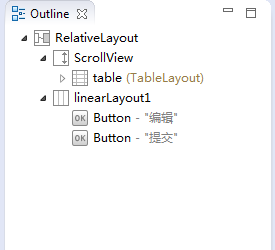
图二结构为:

图二没有遮挡的问题,所以没有去修改它
结束语:关于Android中布局文件的滚动和控件遮挡问题已经描述和解决,作为一篇记录学习过程的文章,也希望能够帮助别人一起学习。
附上的代码,如果你喜欢,欢迎拿去,顺便,如果你把它完善的根据完美漂亮,也希望你反馈到这里 ^_^
Android 布局 中实现适应屏幕大小及组件滚动的更多相关文章
- 在Eclipse Android中设置模拟器屏幕大小
在Eclipse Android中设置模拟器屏幕大小是本文要介绍的内容,主要是来了解并学习Eclipse Android中模拟器的设置,具体关于Eclipse Android内容的详解来看本文. 方法 ...
- Android布局中的空格以及占一个汉字宽度的空格的实现
在Android布局中进行使用到空格,以便实现文字的对齐.那么在Android中如何表示一个空格呢? 空格: 窄空格: 一个汉字宽度的空格: [用两个空格( )占一个汉字的宽度时,两个空格比 ...
- Android布局中的空格以及占一个汉字宽度的空格,实现不同汉字字数对齐
前言 在Android布局中进行使用到空格,以便实现文字的对齐.那么在Android中如何表示一个空格呢? 空格: (普通的英文半角空格但不换行) 窄空格: (中文全角空格 (一个中文宽度)) ...
- android布局中使用include及需注意点
在android布局中,使用include,将另一个xml文件引入,可作为布局的一部分,但在使用include时,需注意以下问题: 一.使用include引入 如现有标题栏布局block_header ...
- Android布局中的layout_weight和weightSum属性的详解及使用
由于Android设备的尺寸大小不一,种类繁多,当我们在开发应用的时候就要考虑屏幕的适配型了,尽可能让我们的应用适用于主流机型的尺寸,这样我们的应用不会因为尺寸不同而不美观,解决屏幕适配问题的方法有很 ...
- Android针对不同的手机屏幕大小设计图片资源与编码
注:本文转载于:http://blog.csdn.net/welovesunflower/article/details/7930248 一些术语 Screen Size 屏幕尺寸: 实际的物理尺寸, ...
- 【转】在Android布局中使用include和merge标签
内容转自:http://fengweipeng1208.blog.163.com/blog/static/21277318020138229754135/ 在我们开发android布局时,经常会有很多 ...
- Android布局中涉及的一些属性
Android:gravity属性 线性布局常见的就是利用LinearLayout进行布局,其中有个比较重要的属性就是android:gravity,在官方文档中是这么描述这个属性的:指定一个元素怎么 ...
- android 布局中 layout_gravity、gravity、orientation、layout_weight
线性布局中,有 4 个及其重要的参数,直接决定元素的布局和位置,这四个参数是 android:layout_gravity ( 是本元素相对于父元素的重力方向 ) android:gravity (是 ...
随机推荐
- 模式识别 - 处理多演示样例学习(MIL)特征(matlab)
处理多演示样例学习(MIL)特征(matlab) 本文地址: http://blog.csdn.net/caroline_wendy/article/details/27206325 多演示样例学习( ...
- 在Linux里设置环境变量的方法(export PATH)
一般来说,配置交叉编译工具链的时候需要指定编译工具的路径,此时就需要设置环境变量.例如我的mips-linux-gcc编译器在“/opt/au1200_rm/build_tools/bin”目录下,b ...
- HDFS原理讲解
简介 本文是笔者在学习HDFS的时候的学习笔记整理, 将HDFS的核心功能的原理都整理在这里了. [广告] 如果你喜欢本博客,请点此查看本博客所有文章:http://www.cnblogs.com/x ...
- 网络IPC:套接字之套接字选项
套接字机制提供两个套接字选项接口来控制套接字的行为.一个接口用来设置选项,另一个接口允许查询一个选项的状态.可以获取或设置的三种选项: (1)通用选项,工作在所有套接字类型上. (2)在套接字层次管理 ...
- 更改gps.conf来加快GPS搜星速度
国内NTP ServerNTP全称是Network Time Protocol,是用来让计算机之间实现时间同步的协议,而发布这种校对时间的服务器,就是NTP Server!一般来说客户端与服务器之间的 ...
- #pragma_pack(n)_与___attribute(aligned(n))
#pragma pack(n) 与 __attribute(aligned(n)) 在C语言中,结构是一种复合数据类型,其构成元素既可以是基本数据类型(如int.long.float等)的变量,也 ...
- 面试常考的常用数据结构与算法(zz)
数据结构与算法,这个部分的内容其实是十分的庞大,要想都覆盖到不太容易.在校学习阶段我们可能需要对每种结构,每种算法都学习,但是找工作笔试或者面试的时候,要在很短的时间内考察一个人这方面的能力,把每种结 ...
- CCScale9Sprite的使用
#include "cocos-ext.h" USING_NS_CC_EXT; //框中需要显示的label CCLabelTTF *label = CCLableTTF::cre ...
- javascript oop深入学习笔记(二)--javascript的函数
一.概述: 函数是进行模块化程序设计的基础, javascript重的的函数不同于其他语言,每个函数都作为一个对象被维护和运行.通过函数对象的性质,可以很方便的将一个函数赋值给一个变量或则讲函数作为参 ...
- maven管理多模块系统
1.创建mydemo项目cd d:\myworkmvn archetype:create -DgroupId=com.example.mydemo -DartifactId=mydemo 生成myde ...