
1.3 Quick Start中 Step 3: Create a topic官网剖析(博主推荐)
不多说,直接上干货!
一切来源于官网
http://kafka.apache.org/documentation/
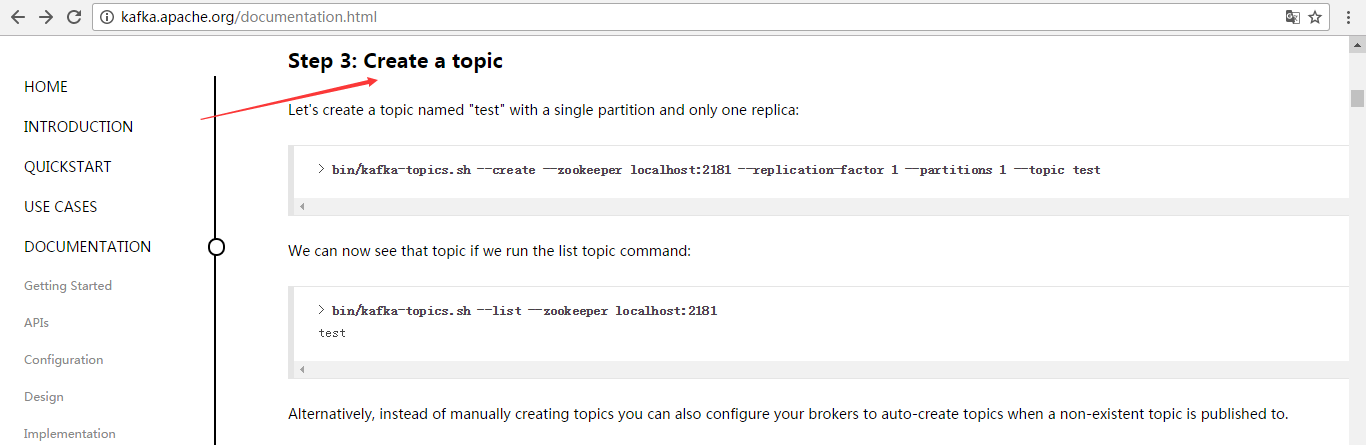
Step 3: Create a topic
Let's create a topic named "test" with a single partition and only one replica:
> bin/kafka-topics.sh --create --zookeeper localhost:2181 --replication-factor 1 --partitions 1 --topic test
We can now see that topic if we run the list topic command:
创建好之后,可以通过运行以下命令,查看已创建的topic信息:
> bin/kafka-topics.sh --list --zookeeper localhost:2181

test
Alternatively, instead of manually creating topics you can also configure your brokers to auto-create topics when a non-existent topic is published to.
其实,这个很简单,比如--create就是创建,--list是查看。当然,不能局限于官网,大家要灵活多变,官网只是个参考和引子。
--topic test 名字为test的topic
--partitions 1 分区数为1
--replication-factor 1 复制因子是1(即每个分区在集群中有1份数据)
--zookeeper localhost:2181 这个不多说,太简单
比如,我们一般写
bin/kafka-topics.sh --create --zookeeper master: --replication-factor --partitions --topic t-behavior
或
bin/kafka-topics.sh --create --zookeeper hadoop1: --replication-factor --partitions --topic t-behavior
说明:

--replication-factor 3     指定了复制因子3,即每个分区在集群中有3份数据

--partitions  10          指定topic的分区数10
--topic t-behavior 指定创建名为t-behavior的topic
同时,查看topic详情
bin/kafka-topics.sh --zookeeper txy001: --topic t-behavior --describe
打印如下:

Topic:t-behavior  PartitionCount:       ReplicationFactor:     Configs:

        Topic: t-behavior Partition:     Leader:        Replicas: ,, Isr: ,,

        Topic: t-behavior Partition:     Leader:        Replicas: ,, Isr: ,,

        Topic: t-behavior Partition:     Leader:        Replicas: ,, Isr: ,,

        Topic: t-behavior Partition:     Leader:        Replicas: ,, Isr: ,,

        Topic: t-behavior Partition:     Leader:        Replicas: ,, Isr: ,,

        Topic: t-behavior Partition:     Leader:        Replicas: ,, Isr: ,,

        Topic: t-behavior Partition:     Leader:        Replicas: ,, Isr: ,,

        Topic: t-behavior Partition:     Leader:        Replicas: ,, Isr: ,,

        Topic: t-behavior Partition:     Leader:        Replicas: ,, Isr: ,,

        Topic: t-behavior Partition:     Leader:        Replicas: ,, Isr: ,,

说明;

ReplicationFactor 表示复制因子,即每个分区有几份数据

Leader 分区的主在那个broker上

Replicas 表示分区数据分布在哪些broker上

Isr 表示可立即作为分区的主的broker,即标识3分数据已经保持一致了。
over
1.3 Quick Start中 Step 3: Create a topic官网剖析(博主推荐)的更多相关文章
- 1.3 Quick Start中 Step 4: Send some messages官网剖析(博主推荐)
不多说,直接上干货! 一切来源于官网 http://kafka.apache.org/documentation/ Step 4: Send some messages Step : 发送消息 Kaf ...
- 1.3 Quick Start中 Step 2: Start the server官网剖析(博主推荐)
不多说,直接上干货! 一切来源于官网 http://kafka.apache.org/documentation/ Step 2: Start the server Step : 启动服务 Kafka ...
- 1.3 Quick Start中 Step 5: Start a consumer官网剖析(博主推荐)
不多说,直接上干货! 一切来源于官网 http://kafka.apache.org/documentation/ Step 5: Start a consumer Step : 消费消息 Kafka ...
- 1.3 Quick Start中 Step 1: Download the code官网剖析(博主推荐)
不多说,直接上干货! 一切来源于官网 http://kafka.apache.org/documentation/ 不要局限于,这个版本,我只是以最新的版本,来做个引子,让大家对官网的各个kafka版 ...
- 1.1 Introduction中 Kafka as a Storage System官网剖析(博主推荐)
不多说,直接上干货! 一切来源于官网 http://kafka.apache.org/documentation/ Kafka as a Storage System kafka作为一个存储系统 An ...
- 1.1 Introduction中 Kafka as a Messaging System官网剖析(博主推荐)
不多说,直接上干货! 一切来源于官网 http://kafka.apache.org/documentation/ Kafka as a Messaging System kafka作为一个消息系统 ...
- 1.3 Quick Start中 Step 8: Use Kafka Streams to process data官网剖析(博主推荐)
不多说,直接上干货! 一切来源于官网 http://kafka.apache.org/documentation/ Step 8: Use Kafka Streams to process data ...
- 1.3 Quick Start中 Step 7: Use Kafka Connect to import/export data官网剖析(博主推荐)
不多说,直接上干货! 一切来源于官网 http://kafka.apache.org/documentation/ Step 7: Use Kafka Connect to import/export ...
- 1.3 Quick Start中 Step 6: Setting up a multi-broker cluster官网剖析(博主推荐)
不多说,直接上干货! 一切来源于官网 http://kafka.apache.org/documentation/ Step 6: Setting up a multi-broker cluster ...
随机推荐
- 【转载】C# 跨线程调用控件
转自:http://www.cnblogs.com/TankXiao/p/3348292.html 感谢原作者,转载以备后用 在C# 的应用程序开发中, 我们经常要把UI线程和工作线程分开,防止界面停 ...
- [Android随笔]内存泄漏以及内存溢出
名词解释 内存泄漏:memory leak,是指程序在申请内存后,无法释放已申请的内存空间,一次内存泄漏危害能够忽略,但内存泄漏堆积后果非常严重,不管多少内存,迟早会被占光. 内存溢出:out of ...
- Mac OSX 平台安装 MongoDB
Mac OSX 平台安装 MongoDB MongoDB 提供了 OSX 平台上 64 位的安装包,你可以在官网下载安装包. 下载地址:https://www.mongodb.com/download ...
- 分享一个vue中的vue-Resource用法
//引入 <script src="//cdn.bootcss.com/vue-resource/1.2.1/vue-resource.js" type="text ...
- Eclipse如何新建一个tomcat_server发布web项目
方法/步骤 通过Eclipse打开一个正在开发阶段的java的web项目,没有项目的,只是为了学习的话,可以新建一个测试的java的web项目即可.在功能窗口找到如图所示的Servers窗口, ...
- Flex 编译器及编译步骤
通过为Flex项目添加编译器参数:-keep-generated-actionscript=true 可以看到经过编译器处理过的源程序文件集合. 在这些文件的文件名中包含有“xxx-generated ...
- 昼猫笔记 JavaScript -- 闭包
本次主要内容是 闭包 阅读时间: 约 3分钟 记得点个赞支持支持我哦 初步了解 先看下代码,输出结果是多少? function fn1 () { var a = 2 function fn2 () ...
- Objective-C(十九、通知-消息发送模式之中的一个)——iOS开发基础
结合之前的学习笔记以及參考<Objective-C编程全解(第三版)>,对Objective-C知识点进行梳理总结. 知识点一直在变.仅仅是作为參考.以苹果官方文档为准~ 十九.通知-消息 ...
- TXT小说朗读正式版
作者:www.gudianxiaoshuo.com 干净清洁的小说朗读软件,支持 TXT阅读.语音朗诵.点评标注.数据挖掘
- OpenLayers3基础教程——OL3之Popup
概述: 本节重点讲述OpenLayers3中Popup的调用时实现,OL3改用Overlay取代OL2的Popup功能. 接口简单介绍: overlay跟ol.control.Control一样,是一 ...