
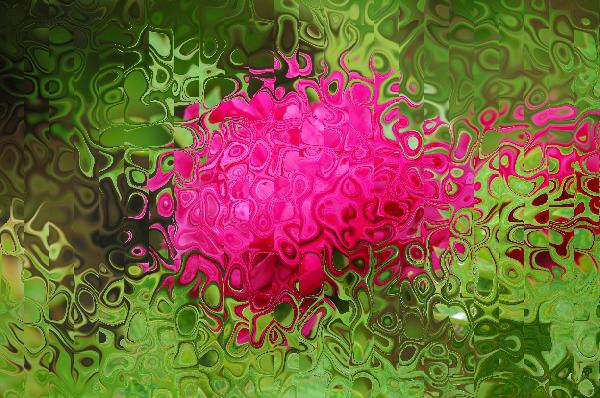
PS 滤镜— —Marble 效果
    clc;

    clear all;

    close all;

    addpath('E:\PhotoShop Algortihm\Image Processing\PS Algorithm');

    I=imread('4.jpg');

    I=double(I);

    Image=I/255;

    xScale = 20;

    yScale = 20;

    amount = 1;

    turbulence =0.25;

    Image_new=Image;

    [height, width, depth]=size(Image);

    Index=1:256;

    sin_T=-yScale*sin(2*pi*(Index-1)/256*turbulence);

    cos_T=xScale*cos(2*pi*(Index-1)/256*turbulence);

    [ind, g1, g2, g3]=init_arr();

    for ii=1:height

    % %     [ind, g1, g2, g3]=init_arr();

        for jj=1:width

            dis=min(max( floor(127*(1+Noise2(jj/xScale, ii/yScale, ind, g2))), 1), 256);

            x=jj+sin_T(dis);

            y=ii+cos_T(dis);

    % %         if (x<=1)     x=1;  end

    % %         if (x>=width)   x=width-1; end;

    % %         if (y>=height)  y=height-1; end;

    % %         if (y<1)  y=1;     end;

    % %

            if (x<=1)     continue;  end

            if (x>=width)   continue; end;

            if (y>=height)  continue; end;

            if (y<1)  continue;     end;

            x1=floor(x);

            y1=floor(y);

            p=x-x1;

            q=y-y1;

            Image_new(ii,jj,:)=(1-p)*(1-q)*Image(y1,x1,:)+p*(1-q)*Image(y1,x1+1,:)...

                +q*(1-p)*Image(y1+1,x1,:)+p*q*Image(y1+1,x1+1,:);

        end

    end

    imshow(Image_new)

imwrite(Image_new, 'out.jpg');参考来源:http://www.jhlabs.com/index.html
原图:

效果图:

PS 滤镜— —Marble 效果的更多相关文章
- Python: PS 滤镜--万花筒效果
本文用 Python 实现 PS 的一种滤镜效果,称为万花筒.也是对图像做各种扭曲变换,最后图像呈现的效果就像从万花筒中看到的一样: 图像的效果可以参考之前的博客: http://blog.csdn. ...
- PS 滤镜— —挤压效果
clc; clear all; close all; addpath('E:\PhotoShop Algortihm\Image Processing\PS Algorithm'); I=imread ...
- PS 滤镜— — 万花筒效果
clc; clear all; close all; addpath('E:\PhotoShop Algortihm\Image Processing\PS Algorithm'); I=imread ...
- PS 滤镜— —水波效果
clc; clear all; close all; addpath('E:\PhotoShop Algortihm\Image Processing\PS Algorithm'); I=imread ...
- PS 滤镜— — sparkle 效果
clc; clear all; close all; addpath('E:\PhotoShop Algortihm\Image Processing\PS Algorithm'); I=imread ...
- PS 滤镜— —球面化效果
clc; clear all; close all; addpath('E:\PhotoShop Algortihm\Image Processing\PS Algorithm'); I=imread ...
- PS滤镜— —波浪效果
clc; clear all; close all; addpath('E:\PhotoShop Algortihm\Image Processing\PS Algorithm'); I=imread ...
- OpenCV——PS滤镜 水波效果
// define head function #ifndef PS_ALGORITHM_H_INCLUDED #define PS_ALGORITHM_H_INCLUDED #include < ...
- Python: PS 滤镜特效 -- Marble Filter
本文用 Python 实现 PS 滤镜特效,Marble Filter, 这种滤镜使图像产生不规则的扭曲,看起来像某种玻璃条纹, 具体的代码如下: import numpy as np import ...
随机推荐
- 如何创建AnjularJS项目
第一步:命名空间 var applyAppModule=angular.module('apply-app' ,[]); 第二步:控制器 ng-controller="ApplyCon ...
- mysql主从实验
实验一: 服务器A与服务器B是主从关系,关联的库有test1,.test2库,主从一直运行正常,此时由于业务的需求,需再增加test3库,并让其仍然维持主从关系,应该怎么做? 步骤一: 修改从库服务器 ...
- ios uitableview button 获取cell indexpath.row
在iOS7下面已经无效,因为iOS7的层级关系发生变化 UITableViewCell->UITableViewCellScrollView->UITableViewCellContent ...
- 爬虫入门【2】Requests库简介
发送请求 使用Requests发送网络请求很简单 #首先要导入requests库 import requests #返回一个Response对象 r=requests.get('https://git ...
- 【Emit】关于System.MethodAccessException解决方案
最近学习Emit,在使用Emit动态生成对象时碰到一些"蛋疼"的问题,如下: 1.安全透明方法"XXX.XX()"尝试访问安全关键方法"YYY ...
- 6.2-SingletonBeanRegistry-DefaultSingletonBeanRegistry
SingletonBeanRegistry package org.springframework.beans.factory.config; public interface SingletonBe ...
- python基础13 ---函数模块3(正则表达式)
正则表达式 一.正则表达式的本质 1.正则表达式的本质(或 RE)是一种小型的.高度专业化的编程语言,(在Python中)它内嵌在Python中,并通过 re 模块实现.正则表达式模式被编译成一系列的 ...
- Linux通过Shell对文件自动进行远程拷贝备份
在执行计划任务拷贝文件的时候,用scp命令需要输入密码,这里用公共密钥的方式实现密码的自动输入. 具体操作: 要求:把192.168.0.2机上的test.tar拷贝到192.168.0.3机器的上 ...
- 【LeetCode】【找元素】Find First and Last Position of Element in Sorted Array
描述: Given an array of integers nums sorted in ascending order, find the starting and ending position ...
- 【leetcode刷题笔记】Add Binary
Given two binary strings, return their sum (also a binary string). For example,a = "11"b = ...