
配置百度云盘python客户端bypy上传备份文件
要求:安装python2.7,安装git
1、git clone https://github.com/houtianze/bypy.git
2、cd bypy
3、sudo python setup.py install
4、bypy info收到提示:
Please visit:

https://openapi.baidu.com/oauth/2.0/authorize?scope=basic+netdisk&redirect_uri=oob&response_type=code&client_id=q8WE4EpCsau1oS0MplgMKNBn

And authorize this app

Paste the Authorization Code here within  minutes.

Press [Enter] when you are done
5、按照提示访问链接并完成授权登陆
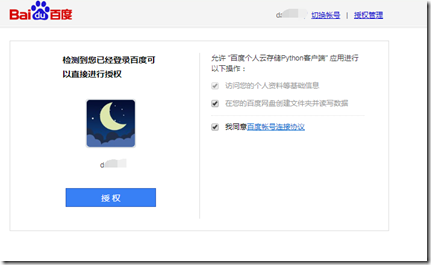
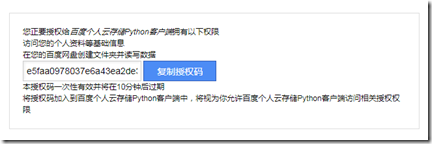
6、输入授权码后回车,完成。
Press [Enter] when you are done

e5faafdf80adfa6a43ea2de3d0ff2d97e

Authorizing, please be patient, it may take upto  seconds...

Authorizing/refreshing with the OpenShift server ...

OpenShift server failed, authorizing/refreshing with the Heroku server ...

Successfully authorized

Quota: .007TB

Used: .751GB
7、可以使用了
[ec2-user@ip---- bypy]$ bypy list

/apps/bypy ($t $f $s $m $d):

[ec2-user@ip---- ~]$ bypy help

usage: bypy [-h] [-V] [-d] [-v] [-r RETRY] [-q] [-t TIMEOUT] [-s SLICE]

            [--chunk CHUNK] [-e] [-f] [--no-resume-download]

            [--include-regex INCREGEX] [--on-dup ONDUP] [--no-symlink]

            [--disable-ssl-check] [--cacerts CACERTS] [--mirror MIRROR]

            [--select-fastest-mirror] [--rapid-upload-only]

            [--resume-download-revert-back RCOUNT] [--move]

            [--processes PROCESSES] [--downloader DOWNLOADER]

            [--downloader-arguments DOWNLOADER_ARGS] [--config-dir CONFIGDIR]

            [-c]

            [command [command ...]]

bypy v1.6.4 - Python client for Baidu Yun (Personal Cloud Storage) 百度云/百度网盘 Python 客户端

positional arguments:

  command               operations (quota, list, etc)

optional arguments:

  -h, --help            show this help message and exit

  -V, --version         show program's version number and exit

  -d, --debug           set debugging level (-dd to increase debugging level,

                        -ddd to enable HTPP traffic debugging as well (very

                        talkative)) [default: ]

  -v, --verbose         set verbosity level [default: ]

  -r RETRY, --retry RETRY

                        number of retry attempts on network error [default:

                        times]

  -q, --quit-when-fail  quit when maximum number of retry failed [default:

                        False]

  -t TIMEOUT, --timeout TIMEOUT

                        network timeout in seconds [default: ]

  -s SLICE, --slice SLICE

                        size of file upload slice (can use '', '2k',

                        '3MB', etc) [default:  MB]

  --chunk CHUNK         size of file download chunk (can use '', '2k',

                        '3MB', etc) [default:  MB]

  -e, --verify          verify upload / download [default : False]

  -f, --force-hash      force file MD5 / CRC32 calculation instead of using

                        cached value

  --no-resume-download  resume instead of restarting when downloading if local

                        file already exists [default: True]

  --include-regex INCREGEX

                        regular expression of files to include. if not

                        specified (default), everything is included. for

                        download, the regex applies to the remote files; for

                        upload, the regex applies to the local files. to

                        exclude files, think about your regex, some tips here:

https://stackoverflow.com/questions/406230/regular-

                        expression-to-match-string-not-containing-a-word

                        [default: ]

  --on-dup ONDUP        what to do when the same file / folder exists in the

                        destination: 'overwrite', 'skip', 'prompt' [default:

                        overwrite]

  --no-symlink          DON'T follow symbol links when uploading / syncing up

  --disable-ssl-check   DON'T verify host SSL cerificate

  --cacerts CACERTS     Specify the path for CA Bundle [default: None]

  --mirror MIRROR       Specify the PCS mirror (e.g. bj.baidupcs.com. Open 'ht

                        tps://pcs.baidu.com/rest/2.0/pcs/manage?method=listhos

                        t' to get the list) to use. [default: pcs.baidu.com]

  --select-fastest-mirror

                        Let the program run some tests and select the fastest

                        PCS mirror it detectes. [default: False]

  --rapid-upload-only   only upload large files that can be rapidly uploaded

  --resume-download-revert-back RCOUNT

                        Revert back at least RCOUNT download chunk(s) and

                        align to chunk boundary when resuming the download. A

                        negative value means NO reverts. [default: ]

  --move                Delete source files/directories after

                        download/upload/syncdown/syncup is successful (This

                        will force verification of the files). [default:

                        False]

  --processes PROCESSES

                        Number of parallel processes. (Only applies to dir

                        sync/dl/ul). [default: ]

  --downloader DOWNLOADER

                        downloader to use (use python if not specified). valid

                        values: [u'aria2'] [default: ]

  --downloader-arguments DOWNLOADER_ARGS

                        arguments for the downloader: normally, the string is

                        the arguments to be passed to the downloader. however,

                        when it begins with '@', it will be treated as the

                        name of file, whose contents will be used as the

                        downloader arguments (example: when specifying

                        '@args.txt', file contents of 'args.txt' will be used

                        as the downloader arguments, not the string

                        '@args.txt' itself). you can also use environment

                        variable 'DOWNLOADER_ARGUMENTS' to specify the

                        downloader arguments (the environment variable has

                        lower priority compared to this argument). default

                        values: {u'aria2': u'-c -k10M -x4 -s4 --file-

                        allocation=none'}

  --config-dir CONFIGDIR

                        specify the config path [default:

                        /home/ec2-user/.bypy]

  -c, --clean           remove the token file (need re-auth) and upload

                        progress file, -cc: clean hash cache file as well

Commands:

restore <remotepath> - restore a file from the recycle bin

cdl_add <source_url> [save_path] [timeout] - add an offline (cloud) download task

cdl_addmon <source_url> [save_path] [timeout] - add an offline (cloud) download task and monitor the download progress

cdl_cancel <task_id>  - cancel an offline (cloud) download task

cdl_list - list offline (cloud) download tasks

cdl_query <task_ids>  - query existing offline (cloud) download tasks

cleancache - remove invalid entries from hash cache file

combine <remotefile> [localfile] [md5s] - try to create a file at PCS by combining slices, having MD5s specified

compare [remotedir] [localdir] - compare the remote directory with the local directory

copy/cp <from> <to> - copy a file / dir remotely at Baidu Yun

delete/remove/rm <remotepath> - delete a file / dir remotely at Baidu Yun

downdir [remotedir] [localdir] - download a remote directory (recursively)

downfile <remotefile> [localpath] - download a remote file.

download [remotepath] [localpath] - download a remote directory (recursively) / file

dumpcache - display file hash cache

list/ls [remotepath] [format] [sort] [order] - list the 'remotepath' directory at Baidu PCS

listrecycle [start] [limit] - list the recycle contents

meta <remotepath> [format] - get information of the given path (dir / file) at Baidu Yun.

mkdir <remotedir> - create a directory at Baidu Yun

move/mv/rename/ren <from> <to> - move a file / dir remotely at Baidu Yun

quota/info - displays the quota information

refreshtoken - refresh the access token

search <keyword> [remotepath] [recursive] - search for a file using keyword at Baidu Yun

stream <remotefile> <localpipe> [format] [chunk] - stream a video / audio file converted to M3U format at cloud side, to a pipe.

syncdown [remotedir] [localdir] [deletelocal] - sync down from the remote directory to the local directory

syncup [localdir] [remotedir] [deleteremote] - sync up from the local directory to the remote directory

upload [localpath] [remotepath] [ondup] - upload a file or directory (recursively)
上传本机使用的jdk,180多M的文件几秒钟就完成了,还是不错的
[ec2-user@ip---- ~]$ bypy upload jdk-8u191-linux-x64.tar.gz
配置百度云盘python客户端bypy上传备份文件的更多相关文章
- Python基于Python实现批量上传文件或目录到不同的Linux服务器
基于Python实现批量上传文件或目录到不同的Linux服务器 by:授客 QQ:1033553122 实现功能 1 测试环境 1 使用方法 1 1. 编辑配置文件conf/rootpath_fo ...
- Linux VPS使用百度网盘API上传备份文件
最近百度网盘将空间升级到了永久1TB,鉴于百度的实力用做数据备份空间不错,不过百度网盘没有Linux下的客户端,上传管理文件需通过百度开放云平台访问PCS资源的系列接口. 1.首先加入百度开发者:ht ...
- Python Selenium 文件上传之Autoit
今天补充一种文件上传的方法 主要是因为工作中使用SendKeys方法不稳定,具体方法见: Python Selenium 文件上传之SendKeys 这种方法直接通过命令行执行脚本时没有问题,可以成功 ...
- Python Selenium 文件上传之SendKeys
昨天写了Web 文件下载的ui自动化,下载之后,今天就要写web 文件上传的功能了. 当然从折腾了俩小时才上传成功.下面写一下自己操作的步骤 首先网上说的有很多方法 如 input 标签的最好做了,直 ...
- html5 如何实现客户端验证上传文件的大小
在HTML 5中,现在可以在客户端进行文件上传时的校验了,比如用户选择文件后,可以 马上校验文件的大小和属性等.本文章向码农介绍html5 如何实现客户端验证上传文件的大小,感兴趣的码农可以参考一下. ...
- Python 第三方包上传至 PyPI 服务器
PyPI 服务器主要功能是?PyPI 服务器怎么搭建? PyPI 服务器可以用来管理自己开发的 Python 第三包. Pypi服务器搭建 Python 第三方包在本地打包 # 本地目录执行以下命令应 ...
- Python WebDriver 文件上传(二)
今天补充一种文件上传的方法 主要是因为工作中使用SendKeys方法不稳定,具体方法见: Python WebDriver 文件上传(一) 这种方法直接通过命令行执行脚本时没有问题,可以成功上传,但是 ...
- Python WebDriver 文件上传(一)
昨天写了Web 文件下载的ui自动化,下载之后,今天就要写web 文件上传的功能了. 当然从折腾了俩小时才上传成功.下面写一下自己操作的步骤 首先网上说的有很多方法 如 input 标签的最好做了,直 ...
- python代码git上传
python代码git上传 1.每次上传代码之前需要先拉取线上的代码 操作如下:
随机推荐
- SpringBoot05 数据操作03 -> JPA查询方法的规则定义
请参见<springboot详解>springjpa部分知识 1 按照方法命名来进行查询 待更新... package cn.xiangxu.springboot.repository; ...
- storm启动supervisor源码分析-supervisor.clj
supervisor是storm集群重要组成部分,supervisor主要负责管理各个"工作节点".supervisor与zookeeper进行通信,通过zookeeper的&qu ...
- C++ 从内存的角度,学习虚继承机制
测试代码 #include <stdio.h> struct AA { char b; char b1; int b3; char b2; }; class A { public: A() ...
- HDU 3915 Game (高斯消元)
题意:有n堆石子,每个人只能从某一堆至少拿走一个,不能拿者败.问事先拿走某些堆的石子,使得先手必败. 析:将石子拆成二进制,未知数为1表示保留该堆石子,为0表示事先拿走该堆石子.最后求自由变元的数目, ...
- 《JavaScript语言精粹》第二章-语法 简单笔记
注释 JavaScript提供两种注释: /* */包围的块注释及//开头的行注释. 注释应该被优先用来提高程序的可读性,注释要精确地描述代码,没有用的注释比没有注释更糟糕. /* */块注释对于被注 ...
- unity3d AssetStore 下载的资源位置
Win7,8和Win10系统下: 进入C:\Users\“用户名”目录,然后打开文件夹选项的显示隐藏文件选项 再进入AppData\Roaming\Unity/Asset Store-5.x下找到 M ...
- 2018杭电多校第五场1002(暴力DFS【数位】,剪枝)
//never use translation#include<bits/stdc++.h>using namespace std;int k;char a[20];//储存每个数的数值i ...
- servlet之doPost()、doGet()
1.doGet和doPost方法的具体应用?即在什么时候程序调用doGet方法,什么时候程序执行doPost方法? HttpServlet是从GenericServlet继承而来,因此HttpServ ...
- hdu 5693 D Game
D Game HDU - 5693 众所周知,度度熊喜欢的字符只有两个:B 和D. 今天,它发明了一个游戏:D游戏. 度度熊的英文并不是很高明,所以这里的D,没什么高深的含义,只是代指等差数列[(等差 ...
- macbook 集成 Kaleidoscope 环境
Kaleidoscope 在macbook ,算是非常出色的file diff 工具了,唯一一个缺点就是:贵. 在网上找了一个科学实用版,暂时先这么用着吧(此处强烈建议有条件的朋友,支持正版). 作者 ...