
吴裕雄 python 神经网络——TensorFlow图片预处理
import numpy as np

import tensorflow as tf

import matplotlib.pyplot as plt

# 使用'r'会出错,无法解码,只能以2进制形式读取

# img_raw = tf.gfile.FastGFile('E:\\myresource\\moutance.jpg','rb').read()

img_raw = open('E:\\myresource\\moutance.jpg','rb').read()

# 把二进制文件解码为uint8

img_0 = tf.image.decode_png(img_raw)

# 可以用np直接转换了

# img_1 = tf.image.convert_image_dtype(img_0,dtype=tf.uint8)

sess = tf.Session()

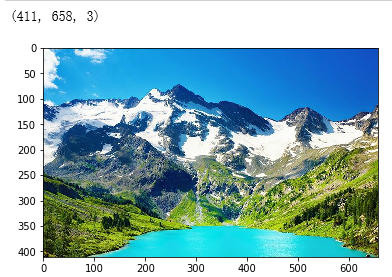
print(sess.run(img_0).shape)

plt.imshow(sess.run(img_0))

plt.show()

def show_pho(img,sess=sess):

    '''

    TF处理过的图片自动转换了类型,需要调整回uint8才能正常显示

    :param sess:

    :param img:

    :return:

    '''

    moutance = np.asarray(sess.run(img),dtype='uint8')

    print(moutance.shape)

    plt.imshow(moutance)

    plt.show()
'''调整图像大小'''

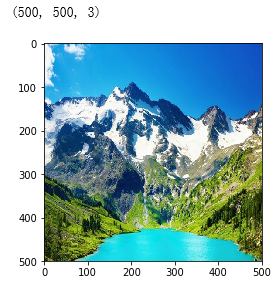
# 插值尽量保存原图信息

img_1 = tf.image.resize_images(img_0,[500,500],method=3)

show_pho(img_1)
# 裁剪或填充

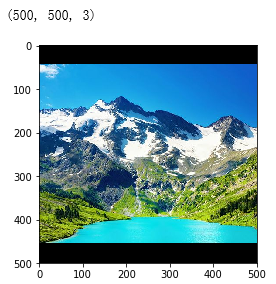
# 自动中央截取

img_2 = tf.image.resize_image_with_crop_or_pad(img_0,500,500)

show_pho(img_2)
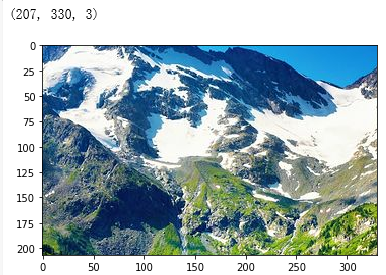
# 比例中央裁剪

img_4 = tf.image.central_crop(img_0,0.5)

show_pho(img_4)
吴裕雄 python 神经网络——TensorFlow图片预处理的更多相关文章
- 吴裕雄 python 神经网络——TensorFlow图片预处理调整图片
import numpy as np import tensorflow as tf import matplotlib.pyplot as plt def distort_color(image, ...
- 吴裕雄 python 神经网络——TensorFlow 图像预处理完整样例
import numpy as np import tensorflow as tf import matplotlib.pyplot as plt def distort_color(image, ...
- 吴裕雄 python 神经网络——TensorFlow 卷积神经网络水果图片识别
#-*- coding:utf- -*- import time import keras import skimage import numpy as np import tensorflow as ...
- 吴裕雄 python 神经网络——TensorFlow 卷积神经网络手写数字图片识别
import os import tensorflow as tf from tensorflow.examples.tutorials.mnist import input_data INPUT_N ...
- 吴裕雄 python 神经网络——TensorFlow 数据集高层操作
import tempfile import tensorflow as tf train_files = tf.train.match_filenames_once("E:\\output ...
- 吴裕雄 python 神经网络——TensorFlow 花瓣分类与迁移学习(4)
# -*- coding: utf-8 -*- import glob import os.path import numpy as np import tensorflow as tf from t ...
- 吴裕雄 python 神经网络——TensorFlow 花瓣分类与迁移学习(3)
import glob import os.path import numpy as np import tensorflow as tf from tensorflow.python.platfor ...
- 吴裕雄 python 神经网络——TensorFlow 花瓣分类与迁移学习(2)
import glob import os.path import numpy as np import tensorflow as tf from tensorflow.python.platfor ...
- 吴裕雄 python 神经网络——TensorFlow 花瓣识别2
import glob import os.path import numpy as np import tensorflow as tf from tensorflow.python.platfor ...
随机推荐
- 计蒜客 - A1603.天上的星星
二维差分,理论上很简单,虽然我实际上做的时候一堆问题 1.边界的星星包含在内,需要在减去的时候往前挪一个 2.我是从0开始的,循环的时候非常不方便 3.x1, x2, y1, y2总是弄混 #incl ...
- Java基本语法--关键字&标识符
本篇博客主要介绍了Java基本语法中的关键字.保留字和标识符. 关键字与保留字 关键字(keyword的定义及特点) ✄ 定义:被Java 语言赋予了特殊含义,用做专门用途的字符串 ✄ 特点:关键字中 ...
- monkey log 处理
Monkey结果输出 1.保存在pc中 adb shell monkey [option] <count> >d:\monkey.txt 2.保存在手机中 adb shell mon ...
- 并查集-F - How Many Tables
F - How Many Tables 并查集的模板都能直接套,太简单不注释了,就存个代码 #include<bits/stdc++.h> using namespace std; ; i ...
- foreach中如何取全部长度的值
foreach($data as $num=>$key ){ return $num; } 关键就是这个$num;
- PHP windoews调用OpenOffice实现word/ppt转PDF
1.安装免费的openOffice软件 2.需要JDK支持 3.安装完openOffice后,在开始--运行中输入Dcomcnfg打开组件服务.在组件服务—计算机—我的电脑—DCOMP配置中 4. 先 ...
- linux deploy---旧手机变废为宝
前几天朋友送了我一部红米Note 1s,本来不想要,转念一想,不要白不要,就收了. 拿到之后我就想,这么一个1+8的手机能做什么呢? 翻遍了CSDN和简书,找到了一个性价比不错的方法:给旧手机装上一个 ...
- java基础(十)之向上转型/向下转型
向上转型:将子类的对象赋值给父类的引用. 向下转型:将父类的对象赋值给子类的引用. 向上转型 Student a = new Student(); Person zhang = a; 或者 Perso ...
- python-excel读取-pyodbc
https://github.com/mkleehammer/pyodbc/wiki/Cursor 利用pyodbc读取数据库,流程基本一样,就是配置connect对象时有所不同,下面是excel的: ...
- springboot中配置addResourceHandler和addResourceLocations,使得可以从磁盘中读取图片、视频、音频等
磁盘目录 WebMvcConfig的代码 //对静态资源的配置 @Override public void addResourceHandlers(ResourceHandlerRegistry re ...