
进度2_家庭记账本App
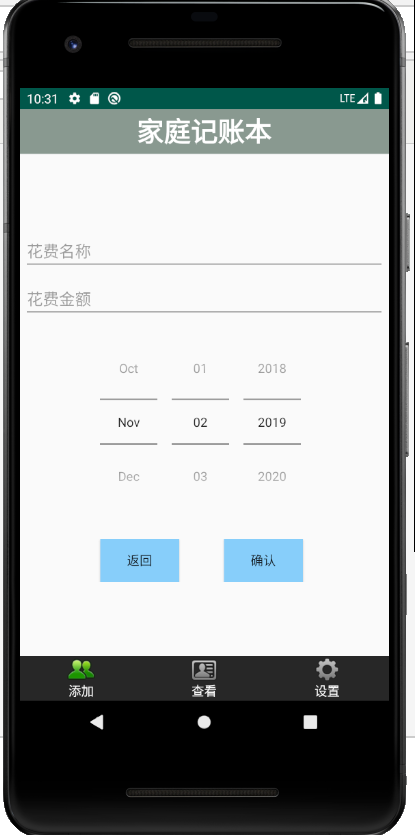
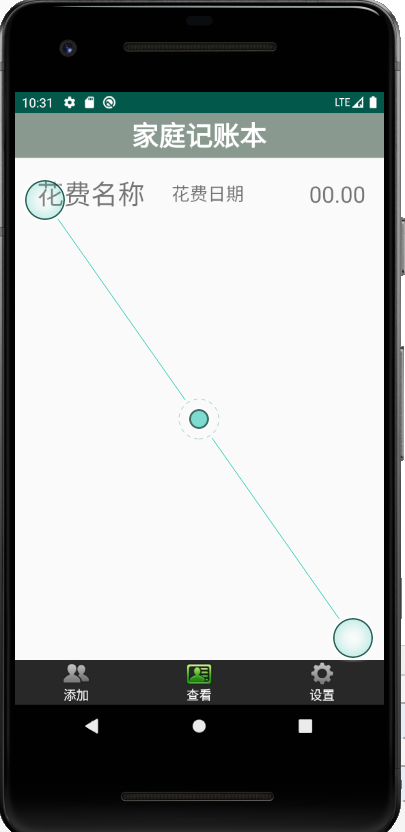
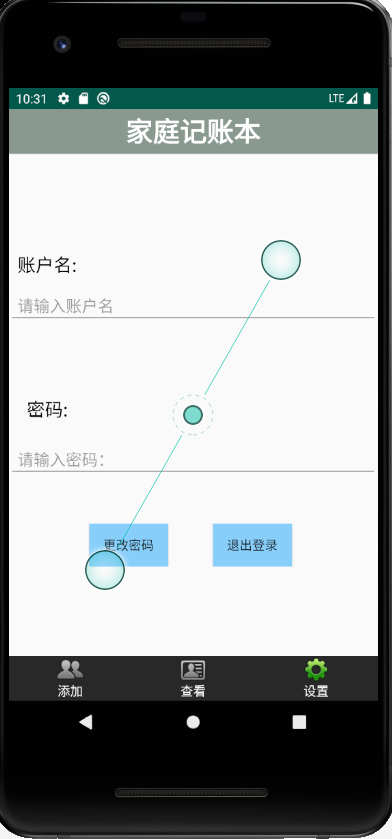
今天在昨天的基础上,相继完成了三个页面的布局和显示情况:
新增加的xml文件如下:
activity_add.xml:
<?xml version="1.0" encoding="utf-8"?>

<LinearLayout xmlns:android="http://schemas.android.com/apk/res/android"

    xmlns:app="http://schemas.android.com/apk/res-auto"

    xmlns:tools="http://schemas.android.com/tools"

    android:layout_width="match_parent"

    android:layout_height="match_parent"

    android:orientation="vertical"

    android:gravity="center">

  <EditText

      android:id="@+id/et_cost_title"

      android:layout_width="match_parent"

      android:layout_height="wrap_content"

      android:layout_margin="4dp"

      android:hint="花费名称"/>

    <EditText

        android:id="@+id/et_cost_money"

        android:layout_width="match_parent"

        android:layout_height="wrap_content"

        android:layout_margin="4dp"

        android:hint="花费金额"/>

    <DatePicker

        android:id="@+id/dp_cost_date"

        android:layout_width="wrap_content"

        android:layout_height="wrap_content"

        android:layout_margin="4dp"

        android:datePickerMode="spinner"

        android:calendarViewShown="false"/>

    <LinearLayout

        android:id="@+id/btn"

        android:layout_width="match_parent"

        android:layout_height="wrap_content"

        android:layout_marginTop="20dp"

        android:layout_gravity="center"

        android:orientation="horizontal">

        <Button

            android:id="@+id/btn_return"

            android:layout_width="wrap_content"

            android:layout_height="wrap_content"

            android:text="返回"

            android:background="#87CEFA"

            android:layout_marginLeft="90dp"

            />

        <Button

            android:id="@+id/btn_go"

            android:layout_width="wrap_content"

            android:layout_height="wrap_content"

            android:text="确认"

            android:background="#87CEFA"

            android:layout_marginLeft="50dp" />

    </LinearLayout>

    </LinearLayout>
activity_look.xml:
<?xml version="1.0" encoding="utf-8"?>

<RelativeLayout xmlns:android="http://schemas.android.com/apk/res/android"

    xmlns:app="http://schemas.android.com/apk/res-auto"

    xmlns:tools="http://schemas.android.com/tools"

    android:layout_width="match_parent"

    android:layout_height="80dp"

    android:orientation="vertical">

    <TextView

        android:id="@+id/tv_title"

        android:layout_width="150dp"

        android:layout_height="80dp"

        android:layout_marginLeft="10dp"

        android:layout_alignParentLeft="true"

        android:gravity="center"

        android:singleLine="true"

        android:textSize="30sp"

        android:ellipsize="marquee"

        android:text="花费名称"/>

    <TextView

        android:id="@+id/tv_data"

        android:layout_width="wrap_content"

        android:layout_height="80dp"

        android:gravity="center"

        android:textSize="20sp"

        android:layout_marginLeft="15dp"

        android:layout_toRightOf="@id/tv_title"

        android:text="花费日期"/>

    <TextView

        android:id="@+id/tv_cost"

        android:layout_width="wrap_content"

        android:layout_height="80dp"

        android:gravity="center"

        android:layout_alignParentRight="true"

        android:layout_marginRight="20dp"

        android:text="00.00"

        android:textSize="25sp"/>

</RelativeLayout>
activity_setting.xml:
<?xml version="1.0" encoding="utf-8"?>

<LinearLayout xmlns:android="http://schemas.android.com/apk/res/android"

    android:orientation="vertical"

    android:layout_width="match_parent"

    android:layout_height="match_parent">

    <TextView

        android:id="@+id/usname"

        android:layout_marginTop="100dp"

        android:layout_width="wrap_content"

        android:layout_height="wrap_content"

        android:padding="10dp"

        android:text="账户名:"

        android:textColor="#000"

        android:textSize="20dp" />

    <EditText

        android:id="@+id/usname_"

        android:layout_alignBottom="@+id/reg_number1"

        android:layout_toRightOf="@+id/reg_number1"

        android:layout_width="match_parent"

        android:layout_height="wrap_content"

        android:hint="请输入账户名"

        android:padding="10dp" />

    <TextView

        android:layout_marginTop="60dp"

        android:id="@+id/reg_number1"

        android:layout_width="wrap_content"

        android:layout_height="wrap_content"

        android:padding="20dp"

        android:text="密码:"

        android:textColor="#000"

        android:textSize="20dp" />

    <EditText

        android:layout_alignBottom="@+id/reg_number1"

        android:layout_toRightOf="@+id/reg_number1"

        android:id="@+id/reg_username"

        android:layout_width="match_parent"

        android:layout_height="wrap_content"

        android:hint="请输入密码:"

        android:padding="10dp" />

    <LinearLayout

        android:id="@+id/btn_setting_"

        android:layout_width="match_parent"

        android:layout_height="wrap_content"

        android:layout_marginTop="50dp"

        android:layout_gravity="center"

        android:orientation="horizontal">

        <Button

            android:id="@+id/btn_return"

            android:layout_width="wrap_content"

            android:layout_height="wrap_content"

            android:text="更改密码"

            android:background="#87CEFA"

            android:layout_marginLeft="90dp"

            />

        <Button

            android:id="@+id/btn_go"

            android:layout_width="wrap_content"

            android:layout_height="wrap_content"

            android:text="退出登录"

            android:background="#87CEFA"

            android:layout_marginLeft="50dp" />

    </LinearLayout>

</LinearLayout>
运行结果:
进度2_家庭记账本App的更多相关文章
- 进度1_家庭记账本App
今天完成了昨天的初步构想,详细介绍见上一篇博客,具体项目结构和案例如下: MainActivity.java: package com.example.familybooks; import andr ...
- 进度4_家庭记账本App
在上一个博客中,我学习了用Fragment进行数据的传值,但是出现了好多问题,我通过百度查阅资料发现fregment在进行数值传输的时候有的语法不能使用,并且不方便的进行数据库的使用,所以我在原来的家 ...
- 进度5_家庭记账本App_数据库的添加和查看
今天继续在昨天的基础上完成了家庭记账单的在数据库中的添加和查看功能 在之前的基础上舍弃了Fragment,重新在百度上找到了学习资料,并且自我完成了实践 首先在之前的基础上创建CostListAdap ...
- 家庭记账本app进度之android中AlertDialog的相关应用以及对日期时间的相关操作(应用alertdialog使用的谈话框)
对于AlertDialog的相关知识: 1.创建构造器AlertDialog.Builder的对象: 2.通过构造器对象调用setTitle.setMessage.setIcon等方法构造对话框 ...
- 家庭记账本app进度之对于登录和注册两个界面点击按钮的相互跳转
这次主要完成了两个两个android页面之间的跳转.从登录页面点击注册就会跳转到注册页面.在注册页面点击返回登录,这样就可以返回到登录界面.主要是这样的操作.其中遇到了一个困难主要是当点击按钮的时候, ...
- 家庭记账本app进度之下拉框和数字转轮的相关应用
这次主要是悬系的下拉框Spinner和数字转轮NumberPicker的使用.先分析相关的用到的知识点. 在Android中,用string-array是一种简单的提取XML资源文件数据的方法. 例子 ...
- 家庭记账本app进度之复选框以及相应滚动条的应用
这次主要是对于android中复选框的相应的操作.以及其中可能应用到的滚动条的相关应用.每一个复选框按钮都要有一个checkBox与之相对应. 推荐使用XML配置,基本语法如下:<CheckBo ...
- 家庭记账本app进度之关于单选按钮的相关操作(添加点击按钮事件以及点击单选更改事件)
这次主要是通过代码实现了android中的相关单选按钮的相关操作,之后再最下面有一个按钮,当点击这个按钮的时候,会获取当上面的相关信息,之后再下方会进行相应的文字显示,获取的信息不同显示的信息也不会一 ...
- 家庭记账本app进度之关于tap的相关操作1
今天还主要学习关于怎样制作微信的先关的tap. 今天的主要成果是已经了解了相关的技术,以及相关的思路.代码经过一个下午的编写,基本接近尾声. 更详细的实验代码,以及相关的知识点将在明天完善后进行发表. ...
随机推荐
- 新闻网大数据实时分析可视化系统项目——17、Spark2.X分布式弹性数据集
1.三大弹性数据集介绍 1)概念 2)优缺点对比 2.Spark RDD概述与创建方式 1)概述 在集群背后,有一个非常重要的分布式数据架构,即弹性分布式数据集(resilientdistribute ...
- centos下离线安装zip和unzip
首先如果你的centos可以联网,那可以不用看了,直接yum install -y zip unzip就行,非常的痛快! 如果不能联网,像我一样,只能用vpn连上去,做了点限制.那就非常烦了,yum了 ...
- python的super()以及父类继承
Python中子类调用父类的方法有两种方法能够实现:调用父类构造方法,或者使用super函数(两者不要混用). 使用“super”时经常会出现代码“super(FooChild,self).__ini ...
- php二位数组排序(按子元素排序)
array_multisort(array_column($mainTree[$note]["beCalls"], "wtp"), SORT_DESC, arr ...
- C++代写,代写C++,C++程序代写,C++ assignment代写
C++代写,代写C++,C++程序代写 关于C++代写,我们的涉猎范围: C++数据结构.算法题目 C++操作系统os题目 C++网络编程networking题目 C++ Linux题目 C++ Wi ...
- Scala match 变量
昨天写 Scala 的时候,使用 match(相当于 switch)时,运行结果很奇怪. var i: Int = 0 while (i < items.length) { i % width ...
- spark sortShuffleWriter源码学习
查看的源码为spark2.3 调用ShuffleMapTask的runTask方法 org.apache.spark.scheduler.ShuffleMapTask#runTask ShuffleM ...
- sql server 2012插入排序后的数据到临时表无效
IF OBJECT_ID('TEMPDB..#list') IS NOT NULLBEGIN DROP TABLE TEMPDB.#list END CREATE TABLE #list(OFC_ID ...
- 关于如何实现一个Saga分布式事务框架的思考
关于Saga模式的介绍,已经有一篇文章介绍的很清楚了,链接在这里:分布式事务:Saga模式. 关于TCC模式的介绍,也已经有一篇文章介绍的很清楚了,链接在这里:关于如何实现一个TCC分布式事务框架的一 ...
- C++面试常见问题——02动态分配内存
动态分配内存 C++动态内存 C++程序中内存分为两个部分 堆:程序中未使用的内存,在程序运行时可用于动态分配内存. 栈:函数内部申明的所有变量都将占用栈内存. 很多时候不知道一个程序到底需要多少内存 ...