
用Keras搭建神经网络 简单模版(四)—— RNN Classifier 循环神经网络(手写数字图片识别)
# -*- coding: utf-8 -*-

import numpy as np

np.random.seed(1337)

from keras.datasets import mnist

from keras.utils import np_utils

from keras.models import Sequential

from keras.layers import SimpleRNN,Activation,Dense

from keras.optimizers import Adam

TIME_STEPS = 28 #图片的高

INPUT_SIZE = 28 #图片的行

BATCH_SIZE = 50 #每批训练多少图片

BATCH_INDEX = 0

OUTPUT_SIZE = 10

CELL_SIZE = 50

LR = 0.001

#下载mnist数据集

# X shape (60000,28*28) ,y shape (10000)

(X_train,y_train),(X_test,y_test) = mnist.load_data()

# 数据预处理

X_train = X_train.reshape(-1,28,28)/255

X_test = X_test.reshape(-1,28,28)/255

y_train = np_utils.to_categorical(y_train,num_classes=10)

y_test = np_utils.to_categorical(y_test,num_classes=10)

# 建模型

model = Sequential()

# RNN

model.add(SimpleRNN(

        batch_input_shape=(None,TIME_STEPS,INPUT_SIZE),# 每次训练的量(None表示全部),图片大小

        output_dim=CELL_SIZE,

        ))

# 输出层

model.add(Dense(OUTPUT_SIZE))

model.add(Activation('softmax'))

# 优化器

adam = Adam(LR)

model.compile(optimizer=adam,

              loss='categorical_crossentropy',

              metrics=['accuracy'])

# 训练

for step in range(4001):

    X_batch=X_train[BATCH_INDEX:BATCH_SIZE+BATCH_INDEX,:,:]

    Y_batch=y_train[BATCH_INDEX:BATCH_SIZE+BATCH_INDEX,:]

    cost = model.train_on_batch(X_batch,Y_batch)

    BATCH_INDEX += BATCH_SIZE

    BATCH_INDEX = 0 if BATCH_INDEX>=X_train.shape[0] else BATCH_INDEX

    if step % 500 == 0:

        cost,accuracy = model.evaluate(X_test,y_test,batch_size=y_test.shape[0],verbose=False)

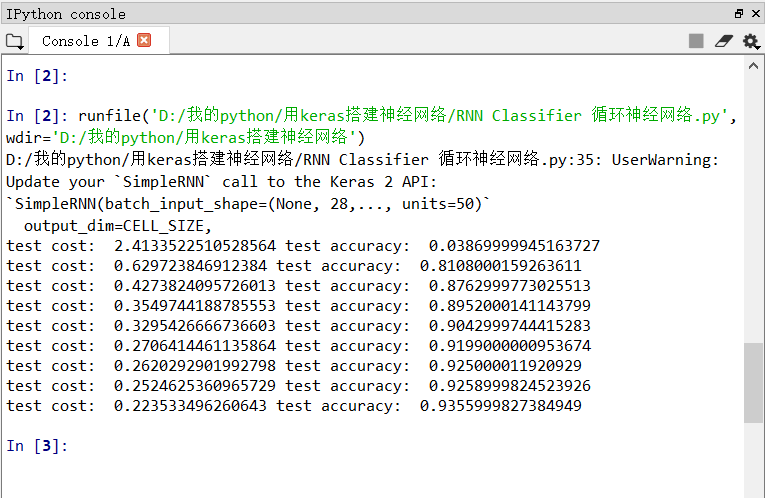
        print('test cost: ',cost,'test accuracy: ',accuracy)
用Keras搭建神经网络 简单模版(四)—— RNN Classifier 循环神经网络(手写数字图片识别)的更多相关文章
- 用Keras搭建神经网络 简单模版(三)—— CNN 卷积神经网络(手写数字图片识别)
# -*- coding: utf-8 -*- import numpy as np np.random.seed(1337) #for reproducibility再现性 from keras.d ...
- 吴裕雄 python神经网络 手写数字图片识别(5)
import kerasimport matplotlib.pyplot as pltfrom keras.models import Sequentialfrom keras.layers impo ...
- 吴裕雄 python 神经网络——TensorFlow 卷积神经网络手写数字图片识别
import os import tensorflow as tf from tensorflow.examples.tutorials.mnist import input_data INPUT_N ...
- 用Keras搭建神经网络 简单模版(二)——Classifier分类(手写数字识别)
# -*- coding: utf-8 -*- import numpy as np np.random.seed(1337) #for reproducibility再现性 from keras.d ...
- 用tensorflow搭建RNN(LSTM)进行MNIST 手写数字辨识
用tensorflow搭建RNN(LSTM)进行MNIST 手写数字辨识 循环神经网络RNN相比传统的神经网络在处理序列化数据时更有优势,因为RNN能够将加入上(下)文信息进行考虑.一个简单的RNN如 ...
- RNN探索(2)之手写数字识别
这篇博文不介绍基础的RNN理论知识,只是初步探索如何使用Tensorflow,之后会用笔推导RNN的公式和理论,现在时间紧迫所以先使用为主~~ import numpy as np import te ...
- 用tensorflow求手写数字的识别准确率 (简单版)
import tensorflow as tf from tensorflow.examples.tutorials.mnist import input_data #载入数据集 mnist = in ...
- 卷积神经网络CNN 手写数字识别
1. 知识点准备 在了解 CNN 网络神经之前有两个概念要理解,第一是二维图像上卷积的概念,第二是 pooling 的概念. a. 卷积 关于卷积的概念和细节可以参考这里,卷积运算有两个非常重要特性, ...
- 100天搞定机器学习|day39 Tensorflow Keras手写数字识别
提示:建议先看day36-38的内容 TensorFlow™ 是一个采用数据流图(data flow graphs),用于数值计算的开源软件库.节点(Nodes)在图中表示数学操作,图中的线(edge ...
随机推荐
- LINQ图解教程
LINQ 什么是LINQLINQ提供程序 匿名类型 方法语法和查询语法查询变量查询表达式的结构 from子句join子句什么是联结查询主体中的from…let…where片段 from子句let子句w ...
- 0012SpringBoot访问首页
有三种方式可以实现访问首页: 第一种: 定义一个Controller,定义请求方法和返回内容,方法内容如下: @RequestMapping({"/","/index&q ...
- 【JUC系列第二篇】-原子变量
作者:毕来生 微信:878799579 1.什么是原子变量? 原子变量保证了该变量的所有操作都是原子的,不会因为多线程的同时访问而导致脏数据的读取问题. 2.通过synchronized保证原子操 ...
- C# 重写IComparer 接口
首先定义比较类 继承自IComparer<Racer> public class RacerComparer : IComparer<Racer> { public enum ...
- C#中使用WCF一些常见问题及解决方案
最近在学习WCF,在这过程当中我遇到了很多的问题,简单说说我遇到的问题已经可能有效的解决方案. 1.在C#中,同一个解决方案下无法引用别的项目,引用之后会有一个警告,查看属性找不到引用的路径,这种情况 ...
- VUE cli 4.x下配置多页面以及同时配置支持element-ui及mint-ui并且优化首页文件大小。
场景,公司的一个小型项目,需同时支持移动端和PC端.最开始考虑做两个独立的项目.但后来考虑到总共只有4个功能页面,布署起来相对麻烦.所以决定做在一个项目里. 1.升级vue-cli到4.x npm i ...
- PHP mysqli_dump_debug_info() 函数
mysqli_dump_debug_info() 函数转储调试信息到日志中. <?php mysqli_dump_debug_info($con); ?>
- bufferedinputstream FileInputStream inputstream的比较
BufferedInputStream类相比InputStream类,提高了输入效率,增加了输入缓冲区的功能 不带缓冲的操作,每读一个字节就要写入一个字节,由于涉及磁盘的IO操作相比内存的操作要慢很多 ...
- 如何实现对ArrayList排序 sort()
package com.collection; import java.util.ArrayList;import java.util.Collections;import java.util.Com ...
- Shell 06 awk
一.基本操作方法 ######################################### grep 按行进行查找 vim 编辑文档,交互式 ####################### ...