
Entity Framework Tutorial Basics(17):DBSet Class
DBSet Class
DBSet class represents an entity set that is used for create, read, update, and delete operations. A generic version of DBSet (DbSet<TEntity>) can be used when the type of entity is not known at build time.
You can get the reference of DBSet by using DBContext, eg. dbcontext.Students, dbcontext.Standards, or any other entity set. DbContext class includes DbSet as shown below:
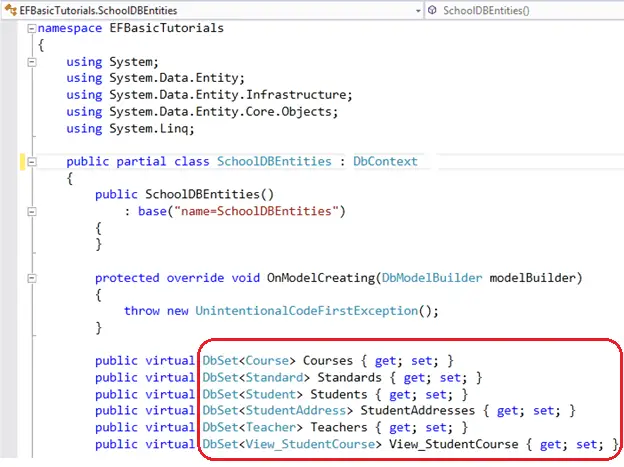
Some of the important methods of DBSet class are shown in the table below::
| Method Name | Return Type | Description |
|---|---|---|
| Add | Added entity type | Adds the given entity to the context the Added state. When the changes are being saved, the entities in the Added states are inserted into the database. After the changes are saved, the object state changes to Unchanged.
Example: |
| AsNoTracking<Entity> | DBQuery<Entity> | Returns a new query where the entities returned will not be cached in the DbContext. (Inherited from DbQuery.)
Entities returned as AsNoTracking, will not be tracked by DBContext. This will be significant performance boost for read only entities. Example: |
| Attach(Entity) | Entity which was passed as parameter | Attaches the given entity to the context in the Unchanged state
Example: |
| Create | Entity | Creates a new instance of an entity for the type of this set. This instance is not added or attached to the set. The instance returned will be a proxy if the underlying context is configured to create proxies and the entity type meets the requirements for creating a proxy.
Example: |
| Find(int) | Entity type | Uses the primary key value to attempt to find an entity tracked by the context. If the entity is not in the context then a query will be executed and evaluated against the data in the data source, and null is returned if the entity is not found in the context or in the data source. Note that the Find also returns entities that have been added to the context but have not yet been saved to the database.
Example: |
| Include | DBQuery | Returns the included non generic LINQ to Entities query against a DbContext. (Inherited from DbQuery)
Example: |
| Remove | Removed entity | Marks the given entity as Deleted. When the changes are saved, the entity is deleted from the database. The entity must exist in the context in some other state before this method is called.
Example: |
| SqlQuery | DBSqlQuery | Creates a raw SQL query that will return entities in this set. By default, the entities returned are tracked by the context; this can be changed by calling AsNoTracking on theDbSqlQuery<TEntity> returned from this method.
Example: |
Visit MSND for more information on DBSet class.
Entity Framework Tutorial Basics(17):DBSet Class的更多相关文章
- Entity Framework Tutorial Basics(1):Introduction
以下系列文章为Entity Framework Turial Basics系列 http://www.entityframeworktutorial.net/EntityFramework5/enti ...
- Entity Framework Tutorial Basics(4):Setup Entity Framework Environment
Setup Entity Framework Environment: Entity Framework 5.0 API was distributed in two places, in NuGet ...
- Entity Framework Tutorial Basics(43):Download Sample Project
Download Sample Project: Download sample project for basic Entity Framework tutorials. Sample projec ...
- Entity Framework Tutorial Basics(42):Colored Entity
Colored Entity in Entity Framework 5.0 You can change the color of an entity in the designer so that ...
- Entity Framework Tutorial Basics(41):Multiple Diagrams
Multiple Diagrams in Entity Framework 5.0 Visual Studio 2012 provides a facility to split the design ...
- Entity Framework Tutorial Basics(37):Lazy Loading
Lazy Loading: One of the important functions of Entity Framework is lazy loading. Lazy loading means ...
- Entity Framework Tutorial Basics(36):Eager Loading
Eager Loading: Eager loading is the process whereby a query for one type of entity also loads relate ...
- Entity Framework Tutorial Basics(34):Table-Valued Function
Table-Valued Function in Entity Framework 5.0 Entity Framework 5.0 supports Table-valued functions o ...
- Entity Framework Tutorial Basics(33):Spatial Data type support in Entity Framework 5.0
Spatial Data type support in Entity Framework 5.0 MS SQL Server 2008 introduced two spatial data typ ...
随机推荐
- Leetcode 970. Powerful Integers
Brute Force(暴力) class Solution(object): def powerfulIntegers(self, x, y, bound): """ ...
- uva10943(隔板法)
很裸的隔板法. 引用一下维基上对隔板法的解释: 现在有10个球,要放进3个盒子里 ●●●●●●●●●● 隔2个板子,把10个球被隔开成3个部份 ●|●|●●●●●●●●.●|●●|●●●●●●●.●| ...
- Laser
Petya is the most responsible worker in the Research Institute. So he was asked to make a very impor ...
- C#异步编程(五)异步的同步构造
异步的同步构造 任何使用了内核模式的线程同步构造,我都不是特别喜欢.因为所有这些基元都会阻塞一个线程的运行.创建线程的代价很大.创建了不用,这于情于理说不通. 创建了reader-writer锁的情况 ...
- Balanced Lineup(线段树的简单了解)
个人心得:线段树就是将一段序列拆分为一个个单独的节点,不过每俩个节点又可以联系在一起,所以就能很好的结合,比如这一题, 每次插入的时候都将这一段区间的最大最小值更新,就能大大减少时间. 这个线段树建立 ...
- JavaWeb框架_Struts2_(四)----->表达式语言OGNL
2. 表达式语言OGNL 2.1 OGNL简介 OGNL(Object-Graph Navigation Language)对象图导航语言的缩写,OGNL是一种表达式语言(Expression L ...
- 关于Intellij IDEA导入jdk出现异常
目前JDK出现的情况如下: 这里JavaJDK是有问题的,因为只有jre而没有JDK.正确做法是重新安装新的JDK. 正常的JDK下的目录是这样的: 选择jdk开头的文件夹就可以了.
- ISE(Iris Server Engine)是一个基于现代C++的跨平台(Linux和Windows)框架
ISE(Iris Server Engine)是一个基于现代C++的跨平台(Linux和Windows)的高性能多线程并发网络服务器程序框架.它封装了琐碎的socket以及各种操作系统APIs,以面向 ...
- boost的asio接收单路大数据量udp包的方法
开发windows客户端接收RTP视频流,当h264视频达到1080P 60fps的时候,按包来调用recvfrom的函数压力比较大,存在丢包的问题,windows的完成端口的性能效果当然可以解决这个 ...
- sql---left join;right join;inner join---区别
sql---left join;right join;inner join---区别 分为以下几类: 1.内联接(典型的联接运算,使用像 = 或 <> 之类的比较运算符).包括相等联接和自 ...