
tensorflow在文本处理中的使用——词袋
代码来源于:tensorflow机器学习实战指南(曾益强 译,2017年9月)——第七章:自然语言处理
代码地址:https://github.com/nfmcclure/tensorflow-cookbook
解决问题:使用“词袋”嵌入来进行垃圾短信的预测(使用逻辑回归算法)
缺点:不考虑相关单词顺序特征,长文本的处理困难
步骤如下:
step1:导入需要的包
step2:准备数据集
step3:选择参数(每个文本保留多少单词数,最低词频是多少)
step4:构建词袋
step5:分割数据集
step6:构建图
step7:训练
step8:测试
step1:导入需要的包
import tensorflow as tf

import matplotlib.pyplot as plt

import os

import numpy as np

import csv

import string

import requests

import io

from zipfile import ZipFile

from tensorflow.contrib import learn

from tensorflow.python.framework import ops

ops.reset_default_graph()

# Start a graph session

sess = tf.Session()
step2:准备数据集
# Check if data was downloaded, otherwise download it and save for future use

save_file_name = os.path.join('temp','temp_spam_data.csv')

if os.path.isfile(save_file_name):

    text_data = []

    with open(save_file_name, 'r') as temp_output_file:

        reader = csv.reader(temp_output_file)

        for row in reader:

            text_data.append(row)

else:

    zip_url = 'http://archive.ics.uci.edu/ml/machine-learning-databases/00228/smsspamcollection.zip'

    r = requests.get(zip_url)

    z = ZipFile(io.BytesIO(r.content))

    file = z.read('SMSSpamCollection')

    # Format Data

    text_data = file.decode()

    text_data = text_data.encode('ascii',errors='ignore')

    text_data = text_data.decode().split('\n')

    text_data = [x.split('\t') for x in text_data if len(x)>=1]

    # And write to csv

    with open(save_file_name, 'w') as temp_output_file:

        writer = csv.writer(temp_output_file)

        writer.writerows(text_data)

texts = [x[1] for x in text_data]

target = [x[0] for x in text_data]

# Relabel 'spam' as 1, 'ham' as 0

target = [1 if x=='spam' else 0 for x in target]

# Normalize text,为减少无意义的词汇,对文本进行规则化处理

# Lower case

texts = [x.lower() for x in texts]

# Remove punctuation

texts = [''.join(c for c in x if c not in string.punctuation) for x in texts]

# Remove numbers

texts = [''.join(c for c in x if c not in '') for x in texts]

# Trim extra whitespace

texts = [' '.join(x.split()) for x in texts]
step3:选择参数
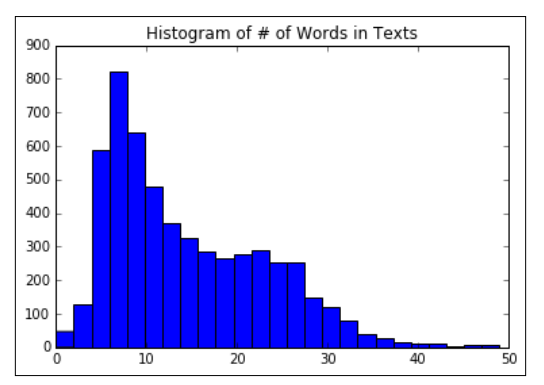
# Plot histogram of text lengths文本数据中的单词数的直方图

text_lengths = [len(x.split()) for x in texts]

text_lengths = [x for x in text_lengths if x < 50]

plt.hist(text_lengths, bins=25)

plt.title('Histogram of # of Words in Texts')
step4:构建词袋
# Choose max text word length at 25,也可以设为30或者40

sentence_size = 25

min_word_freq = 3

# Setup vocabulary processor

vocab_processor = learn.preprocessing.VocabularyProcessor(sentence_size, min_frequency=min_word_freq)

# Have to fit transform to get length of unique words.

vocab_processor.fit_transform(texts)

embedding_size = len(vocab_processor.vocabulary_)
step5:分割数据集
# Split up data set into train/test

train_indices = np.random.choice(len(texts), round(len(texts)*0.8), replace=False)

test_indices = np.array(list(set(range(len(texts))) - set(train_indices)))

texts_train = [x for ix, x in enumerate(texts) if ix in train_indices]

texts_test = [x for ix, x in enumerate(texts) if ix in test_indices]

target_train = [x for ix, x in enumerate(target) if ix in train_indices]

target_test = [x for ix, x in enumerate(target) if ix in test_indices]
step6:构建图
step6.1:构建出文本的向量
# Setup Index Matrix for one-hot-encoding,使用该矩阵为每个单词查找稀疏向量

identity_mat = tf.diag(tf.ones(shape=[embedding_size]))

# Create variables for logistic regression

A = tf.Variable(tf.random_normal(shape=[embedding_size,1]))

b = tf.Variable(tf.random_normal(shape=[1,1]))

# Initialize placeholders

x_data = tf.placeholder(shape=[sentence_size], dtype=tf.int32)

y_target = tf.placeholder(shape=[1, 1], dtype=tf.float32)

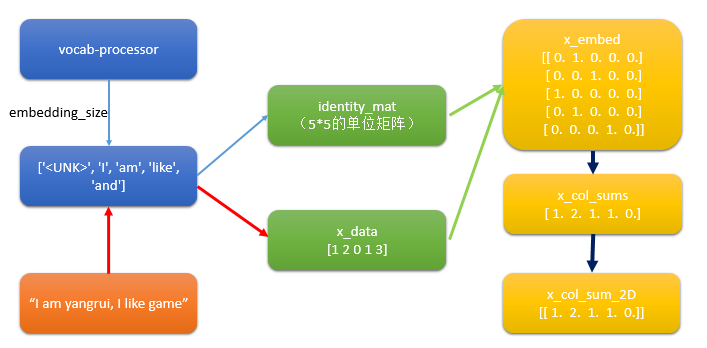
# Text-Vocab Embedding,使用tf的嵌入查找函数来映射句子中的单词为单位矩阵的one-hot向量,再进行求和

# tf.nn.embedding_lookup(y,x)x为索引,找出y中对应索引的值

x_embed = tf.nn.embedding_lookup(identity_mat, x_data)

x_col_sums = tf.reduce_sum(x_embed, 0)

# Declare model operations

x_col_sums_2D = tf.expand_dims(x_col_sums, 0)
疑问:如何利用词袋将文本变成向量?
step6.2 构建图
model_output = tf.add(tf.matmul(x_col_sums_2D, A), b)

# Declare loss function (Cross Entropy loss)

loss = tf.reduce_mean(tf.nn.sigmoid_cross_entropy_with_logits(model_output, y_target))

# Prediction operation

prediction = tf.sigmoid(model_output)

# Declare optimizer

my_opt = tf.train.GradientDescentOptimizer(0.001)

train_step = my_opt.minimize(loss)
step7:训练
# Intitialize Variables

init = tf.initialize_all_variables()

sess.run(init)

# Start Logistic Regression

print('Starting Training Over {} Sentences.'.format(len(texts_train)))

loss_vec = []

train_acc_all = []

train_acc_avg = []

for ix, t in enumerate(vocab_processor.fit_transform(texts_train)):

    y_data = [[target_train[ix]]]

    sess.run(train_step, feed_dict={x_data: t, y_target: y_data})

    temp_loss = sess.run(loss, feed_dict={x_data: t, y_target: y_data})

    loss_vec.append(temp_loss)

    if (ix+1)%10==0:

        print('Training Observation #' + str(ix+1) + ': Loss = ' + str(temp_loss))

    # Keep trailing average of past 50 observations accuracy

    # Get prediction of single observation

    [[temp_pred]] = sess.run(prediction, feed_dict={x_data:t, y_target:y_data})

    # Get True/False if prediction is accurate

    train_acc_temp = target_train[ix]==np.round(temp_pred)

    train_acc_all.append(train_acc_temp)

    if len(train_acc_all) >= 50:

        train_acc_avg.append(np.mean(train_acc_all[-50:]))
step8:测试
# Get test set accuracy

print('Getting Test Set Accuracy For {} Sentences.'.format(len(texts_test)))

test_acc_all = []

for ix, t in enumerate(vocab_processor.fit_transform(texts_test)):

    y_data = [[target_test[ix]]]

    if (ix+1)%50==0:

        print('Test Observation #' + str(ix+1))

    # Keep trailing average of past 50 observations accuracy

    # Get prediction of single observation

    [[temp_pred]] = sess.run(prediction, feed_dict={x_data:t, y_target:y_data})

    # Get True/False if prediction is accurate

    test_acc_temp = target_test[ix]==np.round(temp_pred)

    test_acc_all.append(test_acc_temp)

print('\nOverall Test Accuracy: {}'.format(np.mean(test_acc_all)))

# Plot training accuracy over time

plt.plot(range(len(train_acc_avg)), train_acc_avg, 'k-', label='Train Accuracy')

plt.title('Avg Training Acc Over Past 50 Generations')

plt.xlabel('Generation')

plt.ylabel('Training Accuracy')

plt.show()
tensorflow在文本处理中的使用——词袋的更多相关文章
- tensorflow在文本处理中的使用——TF-IDF算法
代码来源于:tensorflow机器学习实战指南(曾益强 译,2017年9月)——第七章:自然语言处理 代码地址:https://github.com/nfmcclure/tensorflow-coo ...
- tensorflow在文本处理中的使用——CBOW词嵌入模型
代码来源于:tensorflow机器学习实战指南(曾益强 译,2017年9月)——第七章:自然语言处理 代码地址:https://github.com/nfmcclure/tensorflow-coo ...
- tensorflow在文本处理中的使用——Doc2Vec情感分析
代码来源于:tensorflow机器学习实战指南(曾益强 译,2017年9月)——第七章:自然语言处理 代码地址:https://github.com/nfmcclure/tensorflow-coo ...
- tensorflow在文本处理中的使用——skip-gram模型
代码来源于:tensorflow机器学习实战指南(曾益强 译,2017年9月)——第七章:自然语言处理 代码地址:https://github.com/nfmcclure/tensorflow-coo ...
- tensorflow在文本处理中的使用——Word2Vec预测
代码来源于:tensorflow机器学习实战指南(曾益强 译,2017年9月)——第七章:自然语言处理 代码地址:https://github.com/nfmcclure/tensorflow-coo ...
- tensorflow在文本处理中的使用——skip-gram & CBOW原理总结
摘自:http://www.cnblogs.com/pinard/p/7160330.html 先看下列三篇,再理解此篇会更容易些(个人意见) skip-gram,CBOW,Word2Vec 词向量基 ...
- tensorflow在文本处理中的使用——辅助函数
代码来源于:tensorflow机器学习实战指南(曾益强 译,2017年9月)——第七章:自然语言处理 代码地址:https://github.com/nfmcclure/tensorflow-coo ...
- (数据科学学习手札71)在Python中制作个性化词云图
本文对应脚本及数据已上传至我的Github仓库https://github.com/CNFeffery/DataScienceStudyNotes 一.简介 词云图是文本挖掘中用来表征词频的数据可视化 ...
- TensorFlow实现文本情感分析详解
http://c.biancheng.net/view/1938.html 前面我们介绍了如何将卷积网络应用于图像.本节将把相似的想法应用于文本. 文本和图像有什么共同之处?乍一看很少.但是,如果将句 ...
随机推荐
- 【Leetcode 堆、快速选择、Top-K问题 BFPRT】数组中的第K个最大元素(215)
这道题很强大,引出了很多知识点 题目 在未排序的数组中找到第 k 个最大的元素.请注意,你需要找的是数组排序后的第 k 个最大的元素,而不是第 k 个不同的元素. 示例 1: 输入: [3,2,1,5 ...
- PHPCMS快速建站系列之网站迁移(本地到服务器,服务器迁移,更换域名等)
可能出现的问题: 1.后台登录验证码显示不正常(修改/caches/configs/system.php文件) //网站路径'web_path' => '/', 2.phpsso修改 如果不修改 ...
- PHPCMS快速建站系列之类别调用及类别显示页面
在需要调用类别的地方,比如列表页,首先写循环前面写上一句: <?php $TYPE = getcache('type_content','commons');?> 这句就是把类别缓存加载进 ...
- Flask第一篇
一. Python 现阶段三大主流Web框架 Django Tornado Flask 对比 1.Django 主要特点是大而全,集成了很多组件,例如: Models Admin Form 等等, 不 ...
- 2018-8-9-win10-uwp-装机必备应用-含源代码
title author date CreateTime categories win10 uwp 装机必备应用 含源代码 lindexi 2018-8-9 9:7:31 +0800 2018-8-9 ...
- TIJ——Chapter Ten:Inner Classes
先提纲挈领地来个总结: 内部类(Inner Class)有四种: member inner class,即成员内部类.可以访问外部类所有方法与成员变量.生成成员内部类对象的方法:OuterClass. ...
- HDU 5572 An Easy Physics Problem【计算几何】
计算几何的题做的真是少之又少. 之前wa以为是精度问题,后来发现是情况没有考虑全... 题目链接: http://acm.hdu.edu.cn/showproblem.php?pid=5572 题意: ...
- 2019-1-9-WPF-最小的代码使用-DynamicRenderer-书写
title author date CreateTime categories WPF 最小的代码使用 DynamicRenderer 书写 lindexi 2019-1-9 14:7:26 +080 ...
- 01docker简单使用和配置(容器、镜像)
一:容器中运行简单应用程序 1:hello world 使用docker可以在容器中运行应用程序,使用docker run命令即可.比如下面的命令: $ docker run ubuntu /bin ...
- Python基础:01Python标准类型分类
有三种不同的模式可以帮助我们对基本类型进行分类,每种模型都展示了这些类型之间的相互关系. 一:存储模式 这种分类模式,看这种类型的对象能保存多少个对象. 一个能保存单个字面对象的类型称为原子或标量存储 ...