
[Windows]Visual Studio Code个人配置
编辑器要添加的
settings.json
打开这个:
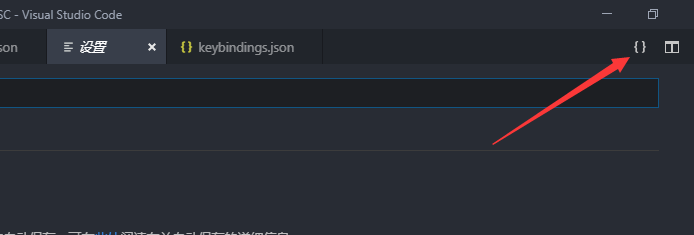
{

    "editor.fontSize": ,//编辑字号

    "files.autoSave": "afterDelay",//自动保存

    "workbench.colorTheme": "One Monokai",//主题

    "command-runner.commands": {

        "Run": "start cmd /c \"C:\\Program Files (x86)\\Dev-Cpp\\ConsolePauser.exe\" ${fileDirname}\\${fileBasenameNoExtension}"

    }//方便一键运行

}
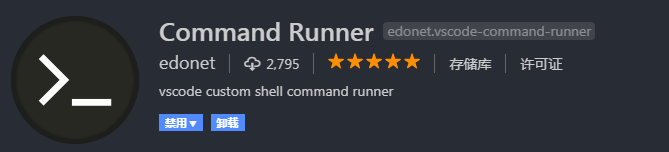
第三个需要安装插件:

第四个需要安装插件:
keybindings.json
快捷键设置
打开位置同理
[

    {

        "key": "f11",

        "command": "workbench.action.tasks.build"

    },//编译运行

    {

        "key": "f10",

        "command": "command-runner.run",

        "args":{

            "command": "Run"

        },

        "when": "editorTextFocus"

    }//运行,配合上面的command runner插件

]
每个文件内
想要进行编译:
c_cpp_properties.json
配置编译器位置和语言
{

    "configurations": [

        {

            "name": "MinGW",

            "intelliSenseMode": "gcc-x64",

            "compilerPath": "C:/Program Files (x86)/Dev-Cpp/MinGW64/bin/g++.exe",//编译器位置,安装Dev C++才有这个路径。。。

            "includePath": [

                "${workspaceFolder}"

            ],

            "cStandard": "c11",

            "cppStandard": "c++11"

        }

    ],

    "version":

}
settings.json
暂时不知道有什么用
{

    "files.associations": {

        "array": "cpp",

        "atomic": "cpp",

        "*.tcc": "cpp",

        "bitset": "cpp",

        "cctype": "cpp",

        "cfenv": "cpp",

        "chrono": "cpp",

        "cinttypes": "cpp",

        "clocale": "cpp",

        "cmath": "cpp",

        "complex": "cpp",

        "condition_variable": "cpp",

        "csetjmp": "cpp",

        "csignal": "cpp",

        "cstdarg": "cpp",

        "cstdint": "cpp",

        "cstdio": "cpp",

        "cstdlib": "cpp",

        "cstring": "cpp",

        "ctime": "cpp",

        "cwchar": "cpp",

        "cwctype": "cpp",

        "deque": "cpp",

        "forward_list": "cpp",

        "list": "cpp",

        "unordered_map": "cpp",

        "unordered_set": "cpp",

        "vector": "cpp",

        "exception": "cpp",

        "fstream": "cpp",

        "functional": "cpp",

        "future": "cpp",

        "initializer_list": "cpp",

        "iomanip": "cpp",

        "iosfwd": "cpp",

        "iostream": "cpp",

        "istream": "cpp",

        "limits": "cpp",

        "mutex": "cpp",

        "new": "cpp",

        "ostream": "cpp",

        "numeric": "cpp",

        "ratio": "cpp",

        "scoped_allocator": "cpp",

        "sstream": "cpp",

        "stdexcept": "cpp",

        "streambuf": "cpp",

        "system_error": "cpp",

        "thread": "cpp",

        "type_traits": "cpp",

        "tuple": "cpp",

        "typeindex": "cpp",

        "typeinfo": "cpp",

        "utility": "cpp",

        "valarray": "cpp"

    }

}
tasks.json
编译命令
{

    "version": "2.0.0",

    "tasks": [

        {

            "label": "Compile",

            "type": "shell",

            "command": "g++ -Wall -std=c++11 -O2 -Wl,-stack=512000000 \"${file}\" -o \"${fileDirname}\\${fileBasenameNoExtension}\" && start cmd /c \"C:\\Program Files (x86)\\Dev-Cpp\\ConsolePauser.exe\" ${fileDirname}\\${fileBasenameNoExtension}",

            "problemMatcher": [

                "$gcc"

            ],

            "group": {

                "kind": "build",

                "isDefault": true

            }

        },

        {

            "label": "Run",

            "type": "shell",

            "command": "start cmd /c \"C:\\Program Files (x86)\\Dev-Cpp\\ConsolePauser.exe\" ${fileDirname}\\${fileBasenameNoExtension}",

            "problemMatcher": []

        },

        {

            "type": "shell",

            "label": "g++.exe build active file",

            "command": "C:/Program Files (x86)/Dev-Cpp/MinGW64/bin/g++.exe",

            "args": [

                "-g",

                "${file}",

                "-o",

                "${fileDirname}\\${fileBasenameNoExtension}.exe"

            ],

            "options": {

                "cwd": "C:/Program Files (x86)/Dev-Cpp/MinGW64/bin"

            }

        }

    ]

}
额外插件
除了上述两个
还有:
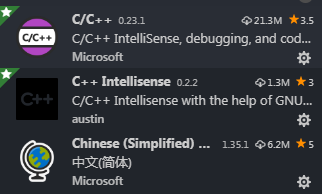
前两个是C++语言的配置
最后一个是中文汉化
效果图

[Windows]Visual Studio Code个人配置的更多相关文章
- windows通过Visual Studio Code中配置GO开发环境(转)
一.GO语言安装 详情查看:GO语言下载.安装.配置 二.GoLang插件介绍 对于Visual Studio Code开发工具,有一款优秀的GoLang插件,它的主页为:https://github ...
- 在Visual Studio Code中配置GO开发环境
一.GO语言安装 详情查看:GO语言下载.安装.配置 二.GoLang插件介绍 对于Visual Studio Code开发工具,有一款优秀的GoLang插件,它的主页为:https://github ...
- Visual Studio Code中配置GO开发环境
在Visual Studio Code中配置GO开发环境 一.GO语言安装 详情查看:GO语言下载.安装.配置 二.GoLang插件介绍 对于Visual Studio Code开发工具,有一款优秀的 ...
- Visual Studio Code (vscode) 配置 C / C++ 环境
Visual Studio Code (vscode) 配置 C / C++ 环境 昨天突发奇想,想使用vscode配置C++环境,因为不想下载 Dev OR codeblock,然后借助了很多网上教 ...
- 在Visual Studio Code 中配置Python 中文乱码问题
在Visual Studio Code 中配置Python 中文乱码问题 方法一:直接代码修改字符集 添加前四行代码 import io import sys #改变标准输出的默认编码 sys.std ...
- Ubuntu下Visual Studio Code的配置
最近在Ubuntu系统里用Visual Studio Code编写vue代码时,在build的时候老是报错,后来发现原来Visual Studio Code里默认Tab是4个空格,而vue代码要求ta ...
- Visual Studio Code (VSCode) 配置 C/C++ 开发编译环境
前言 工作多年,突然发现很多C++的基础都忘记了,加之C++不断更新换代后的各种新特性,于是想重拾C++的基础学习.虽然现在工作都是Linux平台,但考虑到个人方便,自己也仅仅想重温语法,家里家外都可 ...
- 在visual studio code 中配置python以及解决中文乱码问题
安装好 visual stuido code (下面简称 “ VSC ”)后,要想使用它运行调试 python 代码还需要做一些工作以解决下列问题: 搭建 python 环境 print 打印中文出现 ...
- [tool] Visual Studio Code python配置
语言设置 安装中文插件即可成为中文 选择一个Python解释器 Python是一种解释型语言,为了运行Python代码并获取Python IntelliSense,您必须告诉VS Code使用哪个解释 ...
随机推荐
- jQuery_了解jQuery
- Ajax的学习
AJAX的学习 AJAX的简介 AJAX即“Asynchronous Javascript And XML”(异步JavaScript和XML),是指一种创建交互式网页应用的网页开发技术. AJAX ...
- SourceTree撤销commit
参考链接:http://blog.csdn.net/gang544043963/article/details/71511958 重点是:选中提交之前的版本,再进行撤销回退
- 串口工具kermit(ubuntu)
安装 # sudo apt-get install ckermit 配置 kermit启动时,会首先查找~/.kermrc,然后再遍历/etc/kermit/kermrc # vi /etc/kerm ...
- echart 不同颜色(柱状图)
var option = { tooltip: { trigger: 'axis' }, grid: { left: '3%', right: '4%', bottom: '3%', containL ...
- ubuntu16.04安装zabbix-server3.4
一.安装前环境准备 部署zabbix需要安装apache,mysql和php sudo apt-get install apache2 sudo apt-get install mysql-serve ...
- 【转】DELPHI开始支持LINUX DOCKER
这是咏南翻译Marco Cantu的文章. 在过去的几年中,将服务器端解决方案(实际上是任何类型的应用程序)部署到轻量级DOCKER而不是物理机器或虚拟机已经变得越来越普遍,因为这允许更大的灵活性(在 ...
- Android休眠唤醒机制
有四种方式可以引起休眠 ①在wake_unlock()中, 如果发现解锁以后没有任何其他的wake lock了, 就开始休眠 ②在定时器到时间以后, 定时器的回调函数会查看是否有其他的wake loc ...
- VM虚拟机?
虚拟机(Virtual Machine)指通过软件模拟的具有完整硬件系统功能的.运行在一个完全隔离环境中的完整计算机系统. 虚拟系统通过生成现有操作系统的全新虚拟镜像,它具有真实windows系统完全 ...
- 模块化开发之sea.js
随着时间的推移,原生js越来越强大,es6中的improt,export已经可以实现模块化开发,但可惜的是现在的浏览器还不支持,需要进行编译,相信在不久的将来,一定会大行其道,今天我们来聊聊模块化开发 ...