
Python实训day07pm【Selenium操作网页、爬取数据-下载歌曲】
练习1-爬取歌曲列表
任务:通过两个案例,练习使用Selenium操作网页、爬取数据。
使用无头模式,爬取网易云的内容。

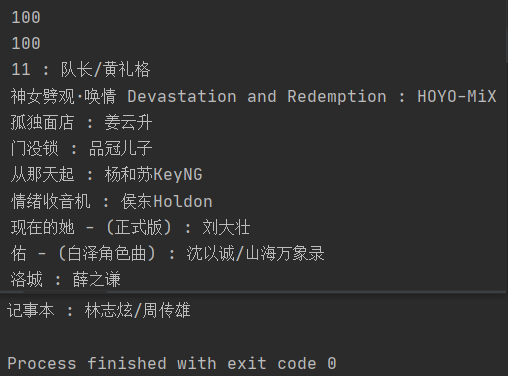
'''

任务:通过两个案例,练习使用Selenium操作网页、爬取数据。

使用无头模式,爬取网易云的内容。

'''

from selenium import webdriver

# 无头模式:隐身地启动浏览器,但是并没有窗口展现

from selenium.webdriver.chrome.options import Options

opts = Options()

opts.add_argument('--headless')

opts.add_argument('--disable-gpu')

bw = webdriver.Chrome(options=opts);

# bw = webdriver.Chrome();

url = 'https://music.163.com/#/discover/toplist?id=3779629'

bw.get(url);

bw.switch_to.frame('g_iframe')

# 如果页面中有iframe,说明有内嵌页面

# 要爬取元素时,先切换到对应的内嵌页面中,然后再爬

ss = bw.find_elements_by_css_selector('.m-table-rank tbody tr .txt a b');

print(len(ss))  # 100

authors = bw.find_elements_by_css_selector('.m-table-rank tbody tr .text');

print(len(authors))  # 100

for i, s in enumerate(ss):

    print(s.get_attribute('title'), ':', authors[i].get_attribute('title'));

bw.close();
练习2-爬取歌曲文件mp3
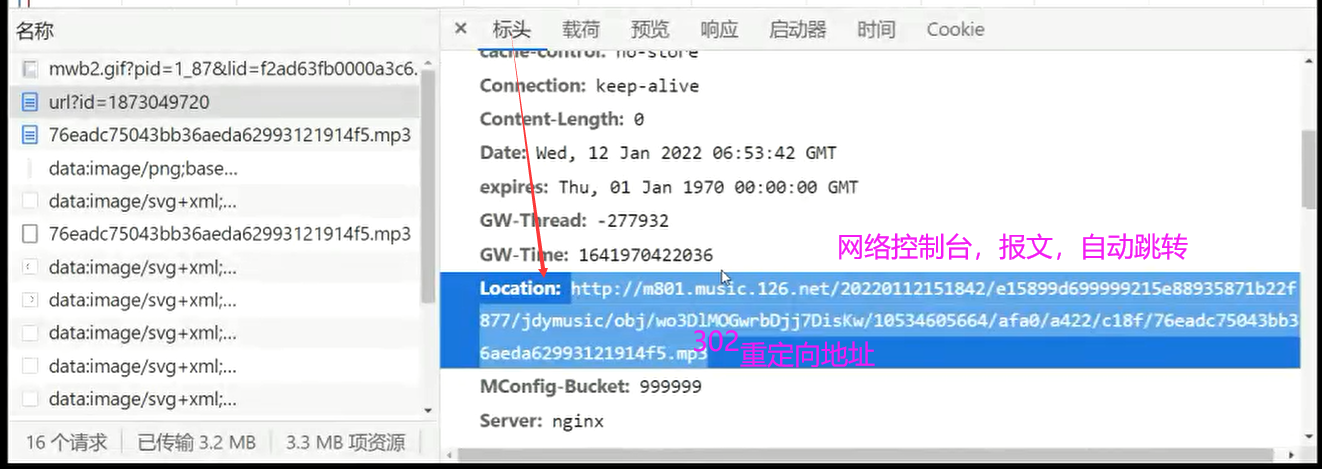
网易云:能不能爬取音乐???可以!能不能爬歌词???可以!
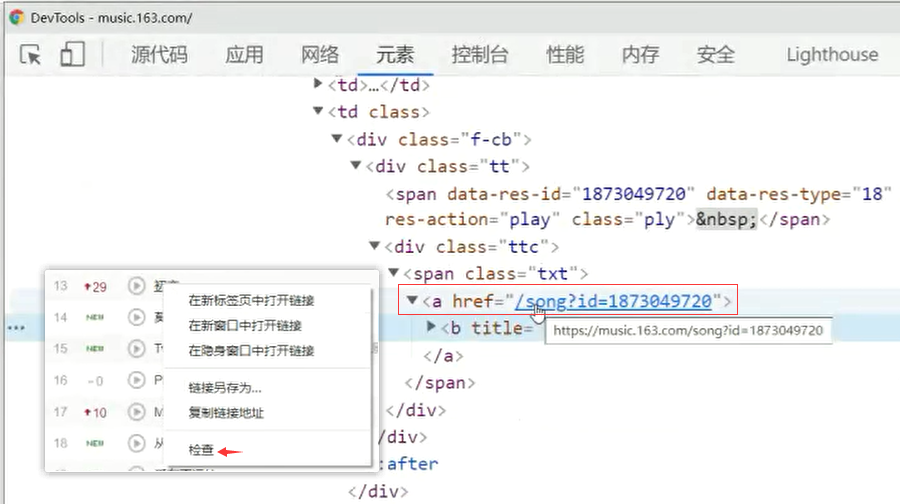
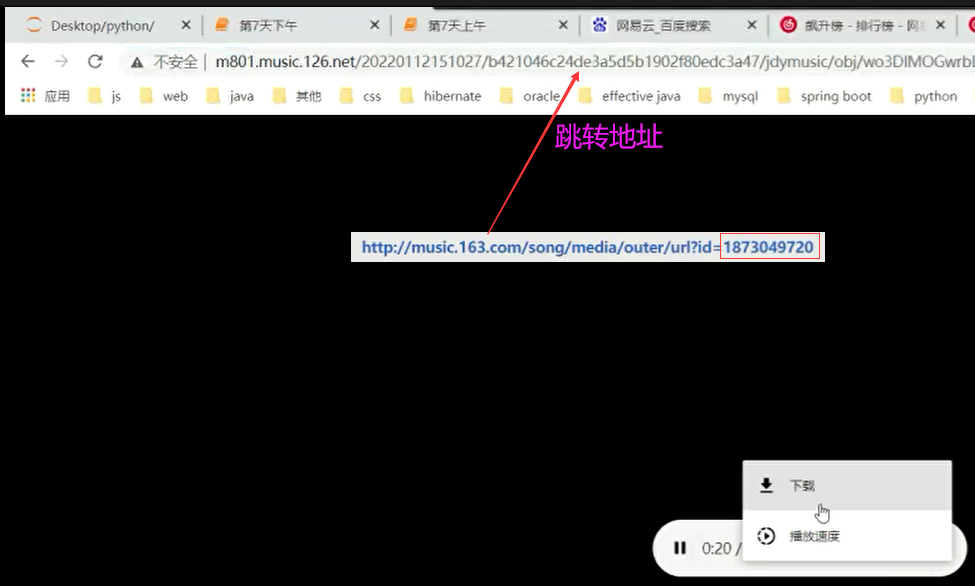
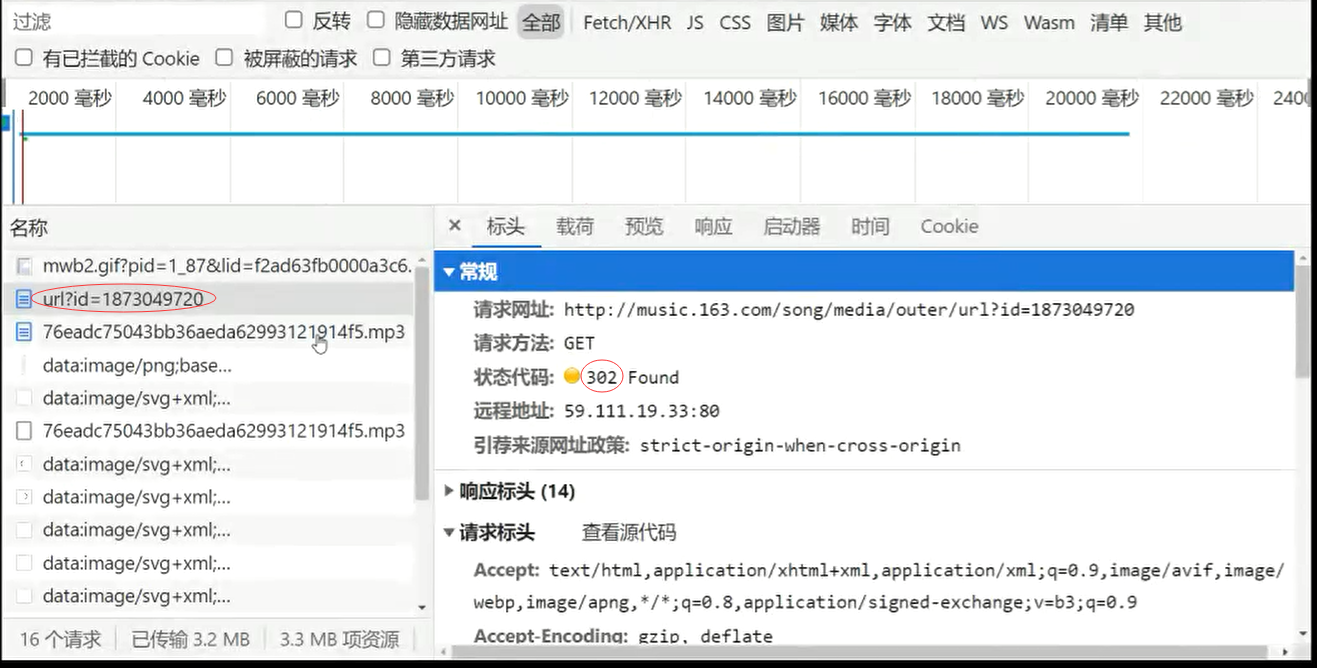
网易云音乐,歌曲通用下载地址:http://music.163.com/song/media/outer/url?id= [ id后面拼接歌曲编号 ]


'''

尝试下载,requests访问,得到二进制数据,保存到本地即可

爬取网易云音乐的歌曲mp3文件(单个歌曲下载)

《初恋》歌曲id: 1873049720

《清醒》歌曲id:1909660296

《星辰大海》歌曲id:1811921555

'''

import requests as req

# hds:伪装成浏览器

hds = {

    'User-Agent': 'Mozilla/5.0 (Windows NT 10.0; Win64; x64) AppleWebKit/537.36 (KHTML, like Gecko) Chrome/97.0.4692.71 Safari/537.36'}

common_url = 'http://music.163.com/song/media/outer/url?id={}';  # 通用下载路径

resp = req.get(common_url.format('1909660296'), headers=hds);

ct = resp.content;  # 响应内容

print(len(ct))  # 响应内容长度

print(resp.status_code);  # 200正常;302重定向,需要继续获取重定向后的路径

# print(resp.headers)

# u2 = resp.headers['Location'];

# print(u2)  # 继续爬取u2路径,来下载音乐

if resp.status_code == 200:

    with open(r'C:\Users\lwx\Desktop\网易云\清醒.mp3', 'wb') as f:  # as f取别名,简写

        f.write(ct);

    # 上述两行代码(简写),在效果上等于下面三行代码。

    # f = open(r'C:\Users\lwx\Desktop\网易云\清醒.mp3', 'wb')

    # f.write(ct)

    # f.close()

    print('over!')
练习3-下载飙升榜中的歌曲
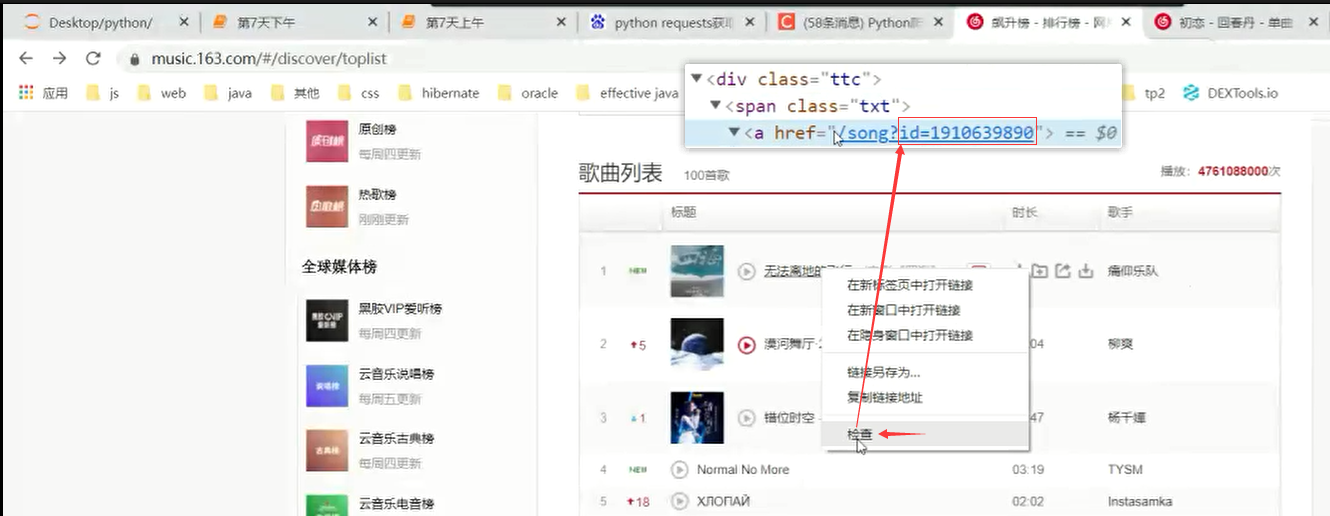
结合上午的代码和刚才下载音乐的办法,请尝试:将飙升榜中的前20首歌曲下载(尝试下载)。
https://music.163.com/#/discover/toplist 15分钟时间
import requests as req

from selenium import webdriver

from selenium.webdriver.chrome.options import Options

hds = {'User-Agent': 'Mozilla/5.0 (Windows NT 10.0; Win64; x64) AppleWebKit/537.36 (KHTML, like Gecko) Chrome/97.0.4692.71 Safari/537.36'}

def wydown(songname, songid):

    common_url = 'http://music.163.com/song/media/outer/url?id={}';

    resp = req.get(common_url.format(songid), headers=hds);

    ct = resp.content;

    # print(len(ct))

    # print(resp.status_code); #200正常  302重定向,需要继续获取重定向后的路径

    if resp.status_code == 200:

        f = open(r'C:\Users\qx\Desktop\网易云\{}.mp3'.format(songname), 'wb')

        f.write(ct);

        f.close();

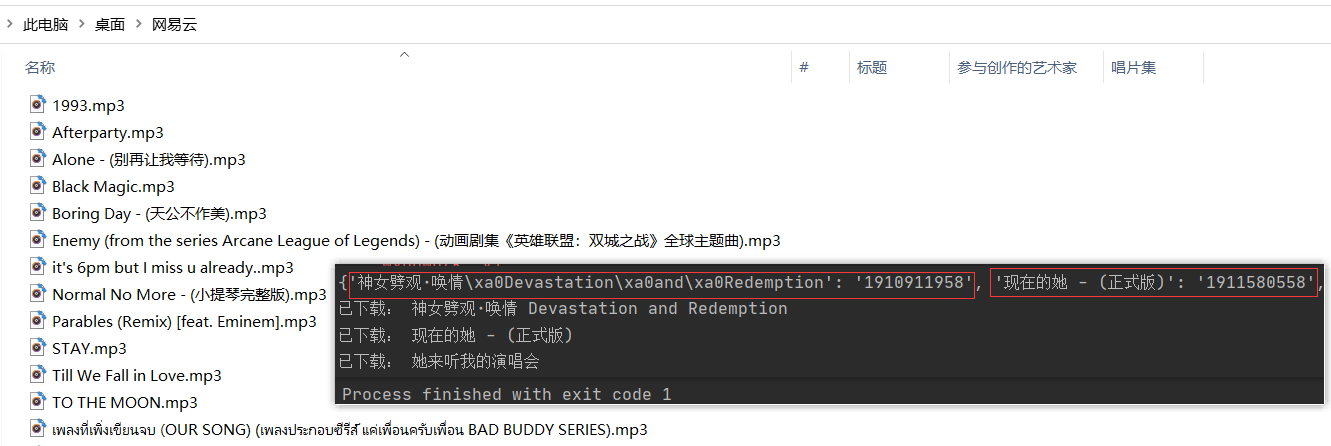
        print('已下载:', songname);

# 无头模式 : 隐身的启动浏览器,但是并没有窗口展现

opts = Options()

opts.add_argument('--headless')

opts.add_argument('--disable-gpu')

bw = webdriver.Chrome(options=opts);

url = 'https://music.163.com/#/discover/toplist'

bw.get(url);

bw.switch_to.frame('g_iframe');

ss = bw.find_elements_by_css_selector('.m-table-rank tbody tr .txt a b');

ids = bw.find_elements_by_css_selector('.m-table-rank tbody tr .txt a');

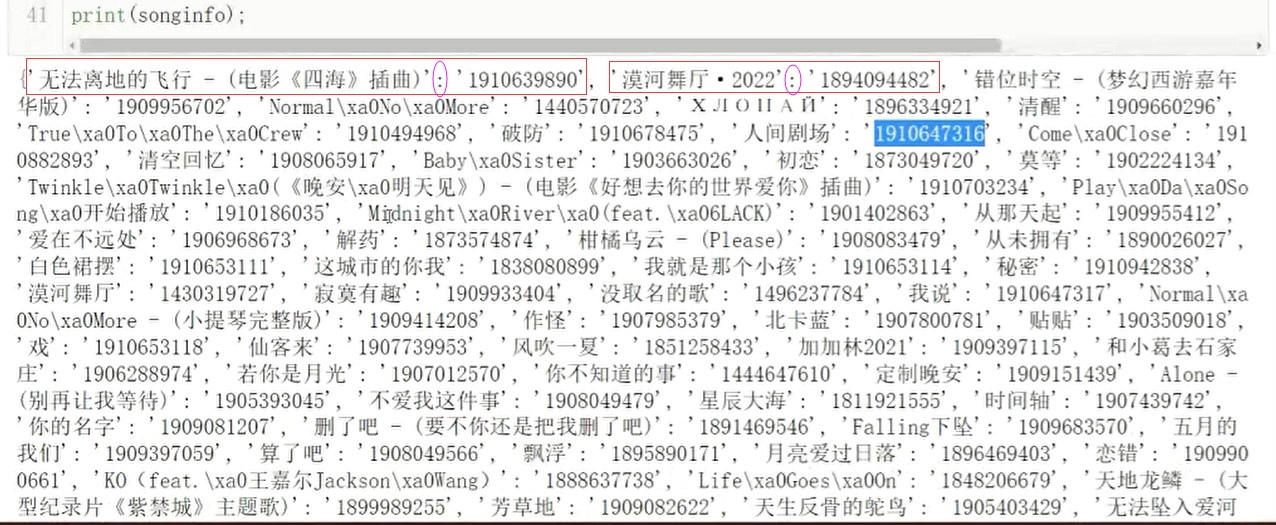
songinfo = {};  # 歌曲名:歌曲id

for i, s in enumerate(ss):

    songinfo[s.get_attribute('title')] = ids[i].get_attribute('href').split("=")[1];

bw.close();

# print(songinfo);

# 遍历字典,下载所有歌曲

for k, v in songinfo.items():

    wydown(k, v);
Python实训day07pm【Selenium操作网页、爬取数据-下载歌曲】的更多相关文章
- Python-异常处理 使用selenium库自动爬取数据
异常处理 处理程序的报错 语法 捕捉万能异常: try: print(a) except Exception as e: print("你的代码有问题") print(" ...
- [Python爬虫] 之三:Selenium 调用IEDriverServer 抓取数据
接着上一遍,在用Selenium+phantomjs 抓取数据过程中发现,有时候抓取不到,所以又测试了用Selenium+浏览器驱动的方式:具体代码如下: #coding=utf-8import os ...
- Python爬虫学习——使用selenium和phantomjs爬取js动态加载的网页
1.安装selenium pip install selenium Collecting selenium Downloading selenium-3.4.1-py2.py3-none-any.wh ...
- python 网页爬取数据生成文字云图
1. 需要的三个包: from wordcloud import WordCloud #词云库 import matplotlib.pyplot as plt #数学绘图库 import jieba; ...
- 动态网页爬取例子(WebCollector+selenium+phantomjs)
目标:动态网页爬取 说明:这里的动态网页指几种可能:1)需要用户交互,如常见的登录操作:2)网页通过JS / AJAX动态生成,如一个html里有<div id="test" ...
- Python使用urllib,urllib3,requests库+beautifulsoup爬取网页
Python使用urllib/urllib3/requests库+beautifulsoup爬取网页 urllib urllib3 requests 笔者在爬取时遇到的问题 1.结果不全 2.'抓取失 ...
- Python和BeautifulSoup进行网页爬取
在大数据.人工智能时代,我们通常需要从网站中收集我们所需的数据,网络信息的爬取技术已经成为多个行业所需的技能之一.而Python则是目前数据科学项目中最常用的编程语言之一.使用Python与Beaut ...
- [Python爬虫] 使用 Beautiful Soup 4 快速爬取所需的网页信息
[Python爬虫] 使用 Beautiful Soup 4 快速爬取所需的网页信息 2018-07-21 23:53:02 larger5 阅读数 4123更多 分类专栏: 网络爬虫 版权声明: ...
- 利用selenium和ffmpeg爬取m3u8 ts视频《进击的巨人》
需求 想看下动漫<进击的巨人>,发现到处被和谐,找不到资源,但是在一个视频网站找到了在线播放,https://www.55cc.cc/dongman/17890/player-2-1.ht ...
随机推荐
- AtCoder Beginner Contest 169 题解
AtCoder Beginner Contest 169 题解 这场比赛比较简单,证明我没有咕咕咕的时候到了! A - Multiplication 1 没什么好说的,直接读入两个数输出乘积就好了. ...
- 移动端滚动方案:better-scroll
BetterScroll 是什么 BetterScroll 是一款重点解决移动端(已支持 PC)各种滚动场景需求的插件.它的核心是借鉴的 iscroll (opens new window) 的实现, ...
- JAVA将Object数组转换为String数组
java.lang.ClassCastException: [Ljava.lang.Object; cannot be cast to [Ljava.lang.String; java将Object[ ...
- fmt的API介绍(版本: 7.0.1)
!!版权声明:本文为博主原创文章,版权归原文作者和博客园共有,谢绝任何形式的 转载!! 作者:mohist 本文翻译: https://fmt.dev/latest/api.html 水平有限,仅供参 ...
- ubuntu(Linux) c++ 获取本机IPv4和ipv6、查询本机IPv4,IPv6
1.关于 演示环境: Linux xxxxxxx 5.4.0-47-generic #51-Ubuntu SMP Fri Sep 4 19:50:52 UTC 2020 x86_64 x86_64 x ...
- 【LeetCode】760. Find Anagram Mappings 解题报告
[LeetCode]760. Find Anagram Mappings 解题报告 标签(空格分隔): LeetCode 题目地址:https://leetcode.com/problems/find ...
- 【LeetCode】713. Subarray Product Less Than K 解题报告(Python)
作者: 负雪明烛 id: fuxuemingzhu 个人博客: http://fuxuemingzhu.cn/ 题目地址: https://leetcode.com/problems/subarray ...
- 【授课录屏】JavaScript高级(IIFE、js中的作用域、闭包、回调函数和递归等)、MySQL入门(单表查询和多表联查)、React(hooks、json-server等) 【可以收藏】
一.JavaScript授课视频(适合有JS基础的) 1.IIFE 2.js中的作用域 3.闭包 4.表达式形式函数 5.回调函数和递归 资源地址:链接:https://pan.baidu.com/s ...
- 『学了就忘』vim编辑器基础 — 97、vim使用技巧
目录 1.在vim中导入其他文件内容或命令结果 (1)导入其他文件内容 (2)在vim中执行系统命令 (3)导入命令结果 2.设定快捷键 3.字符替换 4.多文件打开 vim使用技巧,就是vim编辑器 ...
- Git reflog 引用日志使用详解
本章节主要介绍 git reflog 命令. Git 使用一种称为引用日志或"reflogs"的机制来跟踪分支顶端的更新. 许多 Git 命令接受用于指定引用或"ref& ...