
vivado place30-378
AR# 60131
Vivado Placer - [Place 30-378] Input pin of input buffer has an illegal connection to a logic constant value
Description
I am adding old NGC files as sources to my Vivado project.
I am receiving the following errors when trying to place the design:
[Place 30-378] Input pin of input buffer hierarchy_path_to_cell/clk_BUFGP/IBUF has an illegal connection to a logic constant value.
[Place 30-378] Input pin of input buffer hierarchy_path_to_cell/clk_BUFGP/IBUF has an illegal connection to a logic constant value.
[Place 30-378] Input pin of input buffer hierarchy_path_to_cell/clk_BUFGP/IBUF has an illegal connection to a logic constant value.
[Place 30-378] Input pin of input buffer hierarchy_path_to_cell/CH0_CLK_BUFGP/IBUF has an illegal connection to a logic constant value.
[Place 30-99] Placer failed with error: 'Implementation Feasibility check failed, Please see the previously displayed individual error or warning messages for more details.
'Please review all ERROR, CRITICAL WARNING, and WARNING messages during placement to understand the cause for failure.
What is wrong here and how can I fix this?
Solution
These errors are pointing to BUFGP primitives in the NGC files being used.
BUFGP primitives must connect to a port.
When you view the Synthesized netlist in Vivado, it can be seen that the BUFGP primitive is transformed to an "IBUF -> BUFG", see schematic shot below.
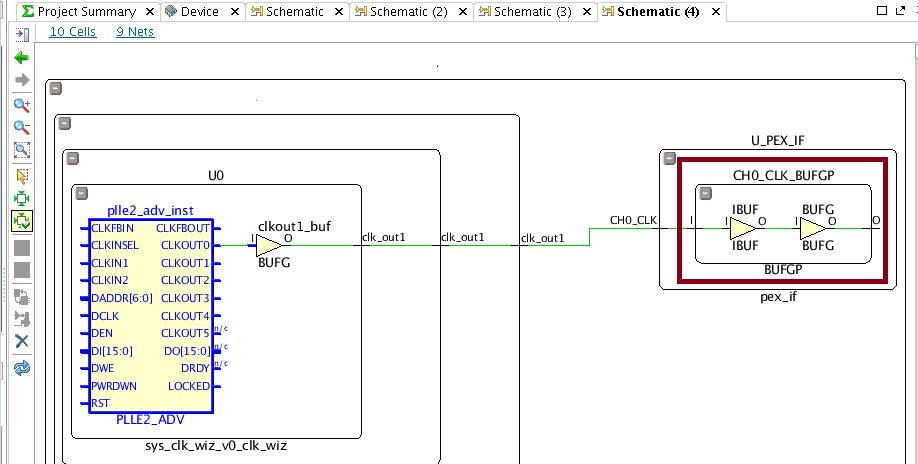
The BUFG -> IBUF -> BUFG path causes the errors reported.
Recommended Solution:
Ensure that the NGC files are created with the "-iobuf" switch set to false for XST.
This will result in this construct not being produced and if the original projects exist it is a very straight forward way to avoid this error.
vivado place30-378的更多相关文章
- Vivado SDK 2014.2 创建新工程后,BSP版本不对的解决办法
问题描述如下: 1. 使用Vivado SDK 2014.2已经创建了工程,但是此时,hdf文件增加了外设,需要重新创建工程以更新SDK中的外设描述: 2. 使用新的hdf创建工程后,发现system ...
- notepad++与vivado关联
notepad++与vivado关联 打开vivado软件,选择菜单栏“Tools——>Options…”,在弹出的对话框中,选择General选项卡,如图1所示. 图1 选择General选 ...
- [转载]Vivado轻松实现IP封装
Vivado轻松实现IP封装 1.新建一个测试工程 工程化的设计方法是离不开工程的,第一步往往都是新建工程,后面我会学习去工程化的开发方法,可能会更加高效. 2.利用向导完成IP封装 2.1.启动IP ...
- 在vivado中使用attribute
之前最常用的一个attribute就是mark_debug了,语法如下:(*mark_debug="ture"*). 今天又学到几个新的,原文在这里:http://china.xi ...
- [vivado系列]Vivado软件的下载
时间:2016.10.27 ------------------ 前言:我们知道vivado软件是用于xilinx的7系列及以上器件的FPGA开发工具. 随着版本的不断更新,也变得越来越庞大.臃肿! ...
- [vivado系列]Zynq开发常用文档
时间:2016.06.13 目的:阶段性总结学习的策略 ------------------------------------------------------------------------ ...
- [Xilinx]Modelsim独立仿真Vivado生成的PLL核
EDA Tools: 1.Vivado 2015.1(64-bit) 2.Modelsim SE-64 10.1c Time: 2016.05.26 ------------------------- ...
- modelsim仿真vivado自动化脚本
quit -sim set PATH1 C:/modeltech64_10.2c/xilinx144_lib set PATH2 C:/xilinx1/Vivado/2014.4/data/veril ...
- 基于Vivado HLS在zedboard中的Sobel滤波算法实现
基于Vivado HLS在zedboard中的Sobel滤波算法实现 平台:zedboard + Webcam 工具:g++4.6 + VIVADO HLS + XILINX EDK + ...
- 68.vivado与modelsim的关联以及器件库编译
vivado软件中也自带仿真工具,但用了几天之后感觉仿真速度有点慢,至少比modelsim慢挺多的.而modelsim是我比较熟悉的一款仿真软件,固然选它作为设计功能的验证.为了将vivado和mod ...
随机推荐
- Selenium自动化 Xpath-元素定位
最近在教妹子做自动化测试,妹子基础差,于是想到很多初学自动化的朋友们学习的知识没有规范化,信息太过杂乱.所以,本文整理了一些自动化元素定位方式: 这次将讲Xpath定位! 什么是Xpath: Path ...
- 解决VS2017不连接visual studio emulator for android
参考: http://blog.csdn.net/allen_xu5320/article/details/47280457 查出IP 直接ADB连上去
- 在Office应用中打开WPF窗体并且让子窗体显示在Office应用上
在.NET主程序中,我们可以通过创建 ExcelApplication 对象来打开一个Excel应用程序,如果我们想在Excle里面再打开WPF窗口,问题就不那么简单了. 我们可以简单的实例化一个WP ...
- Ansible第一篇:介绍及安装
Ansible介绍 Ansible是个什么东西呢?官方的title是"Ansible is Simple IT Automation"--简单的自动化IT工具.ansible基于P ...
- PHP实现开心消消乐的算法示例
本文主要介绍了关于PHP如何实现我们大家都知道的开心消消乐的算法,分享PHP教程出来供大家参考学习,下面话不多说了,来一起看看详细的介绍吧. 一.需求描述: 1.在一个8*8的矩阵方格中随机 ...
- SQLServer之删除函数
删除函数注意事项 从当前数据库中删除一个或多个用户定义函数.DROP 函数支持本机编译的标量用户定义函数. 如果数据库中存在引用 DROP FUNCTION 的 Transact-SQL 函数或视图并 ...
- TinScrapy-简化的Scrapy原码-查看爬虫的执行流程
学习了自定义的TinyScrapy框架,整理出以下定注释的代码 from twisted.web.client import getPage,defer from twisted.internet i ...
- Java文件下载:如何编码文件名称以及如何设置HttpServletResponse
在下载文件时,经常遇到文件名乱码等问题. 本文说明如何编码文件名,以及如何设置HttpServletResponse对象. 1,如何编码文件名 String userAgent = request.g ...
- Think_in_java_4th(并发学习二)
使用Executor java.util.concurrent CachedThreadPool package concurrency.ExecutorService; //: concurrenc ...
- Filebeat插件启动失败,不能直接查找报错原因
老是在filebeat启动的这一步骤上出错,但是由于filebeat是由systemd启动的,因此原因也经常查不清楚,因此并不能直观的查出错误在哪里,所以今天教给大家两个寻找错误的根源的方法 先看我这 ...