
[转]Cross-type joins in Elasticsearch
Cross-type joins in Elasticsearch
http://rore.im/posts/elasticsearch-joins
December 31, 2014
When modeling data in Elasticsearch, a common question is how to design the data to capture relationships between entities, to allow at least some level of “joins”.
Elasticsearch has a good guide about data modeling. One of the options provided for expressing relationships is the parent-child model.
A parent-child relationship in Elasticsearch is a way to express a one-to-many relationship (a parent with many children). The parent and child are separate Elasticsearch types, bounded only by specifying the parent type on the child mapping, and by giving the parent ID for every child index operation (this is used for routing the child to the shard of the parent).
It’s a useful model when a parent has many children and when the child update pattern is different from that of the parent. (Since every child is a separate document, updating the child does not require re-indexing the parent).
But this model also provides an interesting (if limited) way to capture relationships between sibling types.
Lets consider the following data:
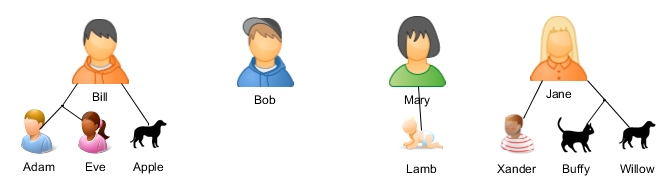
Bill has two children - Adam and Eve, and a Dog (Apple).
Bob has no children or pets (ah, freedom!).
Mary has a little newborn child called Lamb.
Jane has a boy named Xander, a cat (Buffy) and a dog (Willow).
Lets create this data in Elasticsearch.
We will have a parent type - “person”, and two child types - “children” and “pets”.
First we’ll create the mapping for the child types.
    #!/bin/bash

    export ELASTICSEARCH_ENDPOINT="http://localhost:9200"

    # Create indexes

    curl -XPUT "$ELASTICSEARCH_ENDPOINT/es-joins" -d '{

        "mappings": {

            "children": {

                "_parent": {

                    "type": "person"

                }

            },

            "pets": {

                "_parent": {

                    "type": "person"

                }

            }

        }

    }'
Next, index all the documents - parents, children and pets.
    # Index documents

    curl -XPOST "$ELASTICSEARCH_ENDPOINT/_bulk?refresh=true" -d '

    {"index":{"_index":"es-joins","_type":"person","_id":1}}

    {"name":"Bill","gender":"male"}

    {"index":{"_index":"es-joins","_type":"person","_id":2}}

    {"name":"Bob","gender":"male"}

    {"index":{"_index":"es-joins","_type":"person","_id":3}}

    {"name":"Mary","gender":"female"}

    {"index":{"_index":"es-joins","_type":"person","_id":4}}

    {"name":"Jane","gender":"female"}

    {"index":{"_index":"es-joins","_type":"children","_parent":1,"_id":1}}

    {"name":"Adam","gender":"male"}

    {"index":{"_index":"es-joins","_type":"children","_parent":1,"_id":2}}

    {"name":"Eve","gender":"female"}

    {"index":{"_index":"es-joins","_type":"children","_parent":3,"_id":3}}

    {"name":"Lamb","gender":"male"}

    {"index":{"_index":"es-joins","_type":"children","_parent":4,"_id":4}}

    {"name":"Xander","gender":"male"}

    {"index":{"_index":"es-joins","_type":"pets","_parent":1,"_id":1}}

    {"name":"Apple","type":"dog"}

    {"index":{"_index":"es-joins","_type":"pets","_parent":4,"_id":2}}

    {"name":"Buffy","type":"cat"}

    {"index":{"_index":"es-joins","_type":"pets","_parent":4,"_id":3}}

    {"name":"Willow","type":"dog"}

    '
Now we can do some searches on it.
The usual example will be searching a parent by its children. Lets find
all the parents that has a girl. We expect to get back only Bill.
    curl -XPOST "$ELASTICSEARCH_ENDPOINT/es-joins/person/_search?pretty" -d '

    {

        "query": {

            "filtered": {

                "filter": {

                    "and": [

                        {

                            "has_child": {

                                "type": "children",

                                "query": {

                                    "term": {

                                        "gender": "female"

                                    }

                                }

                            }

                        }

                    ]

                }

            }

        }

    }

    '
We can also combine conditions on multiple child types.
Lets find parents that have a boy and a dog. This time we expect to get back both Bill and Jane.
    curl -XPOST "$ELASTICSEARCH_ENDPOINT/es-joins/person/_search?pretty" -d '

    {

        "query": {

            "filtered": {

                "filter": {

                    "and": [

                        {

                            "has_child": {

                                "type": "children",

                                "query": {

                                    "term": {

                                        "gender": "male"

                                    }

                                }

                            }

                        },

                        {

                            "has_child": {

                                "type": "pets",

                                "query": {

                                    "term": {

                                        "type": "dog"

                                    }

                                }

                            }

                        }

                    ]

                }

            }

        }

    }

    '
Another commonly used option is finding children by their parents.
But a more interesting possibility is finding children by their siblings.
Lets lookup all boys that have a dog. To do that we’re searching on the
“children” type, and doing a has_parent filter that contains a has_child
filter on the “pets” type.
This time we expect to get back the children - Adam and Xander.
    curl -XPOST "$ELASTICSEARCH_ENDPOINT/es-joins/children/_search?pretty" -d '

    {

        "query": {

            "filtered": {

                "filter": {

                    "and": [

                        {

                            "has_parent": {

                                "parent_type": "person",

                                "filter": {

                                    "has_child": {

                                        "type": "pets",

                                        "query": {

                                            "term": {

                                                "type": "dog"

                                            }

                                        }

                                    }

                                }

                            }

                        },

                        {

                            "term": {

                                "gender": "male"

                            }

                        }

                    ]

                }

            }

        }

    }

    '
Of course, our data model here is a bit simplified as it allows only a single parent. If we were to extend it, we would create a “family” parent type, with child types - “parents”, “children” and “pets”.
Currently, in order to get the details of the “joined” entity, another query is needed. For example, when searching “all boys that have a dog”, if we want the details of the dogs we need a second search for “all dogs with parents that have children with _id=…” (and the _ids of the children from the first search).
This will change with the new upcoming inner hits feature that will allow getting the data of the inner entities in a single query.
One should note that this method is not exactly recommended by
Elasticsearch. Because of the memory requirements and performance hit,
the official recommendation is: “Avoid using multiple parent-child joins in a single query”. So as always, test, measure and choose your modeling wisely.
[转]Cross-type joins in Elasticsearch的更多相关文章
- 自己写的数据交换工具——从Oracle到Elasticsearch
先说说需求的背景,由于业务数据都在Oracle数据库中,想要对它进行数据的分析会非常非常慢,用传统的数据仓库-->数据集市这种方式,集市层表会非常大,查询的时候如果再做一些group的操作,一个 ...
- ElasticSearch+NLog+Elmah实现Asp.Net分布式日志管理
本文将介绍使用NLOG.Elmah结合ElasticSearch实现分布式日志管理. 一.ElasticSearch简介 ElasticSearch是一个基于Lucene的搜索服务器.它提供了一个分布 ...
- Elasticsearch: Indexing SQL databases. The easy way
Elasticsearchis a great search engine, flexible, fast and fun. So how can I get started with it? Thi ...
- elasticsearch插件大全
Elasticsearch扩展性非常好,有很多官方和第三方开发的插件,下面以分词.同步.数据传输.脚本支持.站点.其它这几个类别进行划分. 分词插件 Combo Analysis Plugin (作者 ...
- 安装elasticsearch
安装elasticsearch 来自:http://www.cnblogs.com/huangfox/p/3541300.html 一)安装elasticsearch 1)下载elasticsea ...
- ElasticSearch中文分词(IK)
ElasticSearch常用的很受欢迎的是IK,这里稍微介绍下安装过程及测试过程. 1.ElasticSearch官方分词 自带的中文分词器很弱,可以体检下: [zsz@VS-zsz ~]$ c ...
- Elasticsearch和mysql数据同步(elasticsearch-jdbc)
1.介绍 对mysql.oracle等数据库数据进行同步到ES有三种做法:一个是通过elasticsearch提供的API进行增删改查,一个就是通过中间件进行数据全量.增量的数据同步,另一个是通过收集 ...
- Logstash同步Oracle数据到ElasticSearch
最近在项目上应用到了ElasticSearch和Logstash,在此主要记录了Logstash-input-jdbc同步Oracle数据库到ElasticSearch的主要步骤,本文是对环境进行简单 ...
- ELK( ElasticSearch+ Logstash+ Kibana)分布式日志系统部署文档
开始在公司实施的小应用,慢慢完善之~~~~~~~~文档制作 了好作运维同事之间的前期普及.. ~~~~~~~~~~~~~~~~~~~~~~~~~~~~~~~ 软件下载地址: https://www.e ...
随机推荐
- MongoDB 教程(五):连接、新建数据库、删除数据库
连接 启动 MongoDB 服务 只需要在 MongoDB 安装目录的 bin 目录下执行 mongodb 即可. 执行启动操作后,mongodb 在输出一些必要信息后不会输出任何信息,之后就等待连接 ...
- html中传递信息
<div class="card" data-username="ArgenBarbie"> </div> JS: var userna ...
- NOIP2016玩具谜题
题目描述 小南有一套可爱的玩具小人, 它们各有不同的职业. 有一天, 这些玩具小人把小南的眼镜藏了起来. 小南发现玩具小人们围成了一个圈,它们有的面朝圈内,有的面朝圈外.如下图: 这时singersi ...
- java 中多播、广播编程
在 IP 协议层,有多播.广播的概念.IP 地址分为网络地址和主机地址,主机地址全部为1,就是广播地址.多播使用 D 类地址,从 224.0.0.0 到 239.255.255.255.IP 多播需要 ...
- redisObject
typedef struct redisObject { unsigned type:4; unsigned encoding:4; unsigned lru:REDIS_LRU_B ...
- sudo配置教程
一.相关说明 1.sudo配置文件是/etc/sudoers:另外会自动包含/etc/sudoers.d目录下的文件(/etc/sudoers文件最后有一句“#includedir /etc/sudo ...
- asp企业网站源码部分
ASP的网页文件的格式是.asp,现在常用于各种动态网站中.PHP是一种 HTML 内嵌式的语言,PHP与微软的ASP颇有几分相似,都是一种在服务器端执行的嵌入HTML文档的脚本语言,语言的风格有类似 ...
- az nginx install and other
Nginx 1◆ nginx install 源码:https://trac.nginx.org/nginx/browser 官网:http://www.nginx.org/ ...
- 网络基础协议part 1
1.计算机与计算机之间如何进行联系? 两个独立的计算机是无法进行交流的,如同人一样,如果没有语言的存在就不能正常的交流.而在计算机领域,互联网协议就如同一门计算机与计算机交流的语言.但是为了全世界人们 ...
- datetime.strptime格式转换报错ValueError
今天遇到一个报错:ValueError: time data '2018-10-10(Wednesday) AM0:50' does not match format '%Y-%m-%d(%A) %p ...