
Learning OSG programing---osgScribe
Learning OSG programing---osgScribe
Scribe可以翻译为素描,抄写等。本例通过在模型表面添加一层素描,来显示模型的骨架。
关键代码:
     osg::ref_ptr<osg::StateSet> stateset = new osg::StateSet;

     osg::ref_ptr<osg::PolygonOffset> polyoffset = new osg::PolygonOffset;

     polyoffset->setFactor(-1.0f);

     polyoffset->setUnits(5.0f);

     osg::ref_ptr<osg::PolygonMode> polymode = new osg::PolygonMode;

     polymode->setMode(osg::PolygonMode::FRONT_AND_BACK,osg::PolygonMode::LINE);

     stateset->setAttributeAndModes(polyoffset,osg::StateAttribute::OVERRIDE|osg::StateAttribute::ON);

     stateset->setAttributeAndModes(polymode,osg::StateAttribute::OVERRIDE|osg::StateAttribute::ON);

     osg::ref_ptr<osg::Material> material = new osg::Material;

     material->setAmbient(osg::Material::FRONT_AND_BACK,osg::Vec4f(1.0,0.0,1.0,1.0));

     stateset->setAttributeAndModes(material,osg::StateAttribute::OVERRIDE|osg::StateAttribute::ON);
13   stateset->setTextureMode(0,GL_TEXTURE_2D,osg::StateAttribute::OVERRIDE|osg::StateAttribute::OFF);
14   decorator->setStateSet(stateset);
这段代码主要设置用于绘制素描效果的属性集stateset。属性集的设置主要是三个方面:
PolygonOffest polyoffset用于设置素描模型和加载模型之间的偏移,避免深度检测过小,出现的闪烁现象。这个类主要是封装了OpenGL中的glPolygonOffset函数,其成员函数和说明可见于这里。关于OpenGL中的glPolygonOffset函数的使用说明可见这里。分析这个例程的对象关系图,如下所示:
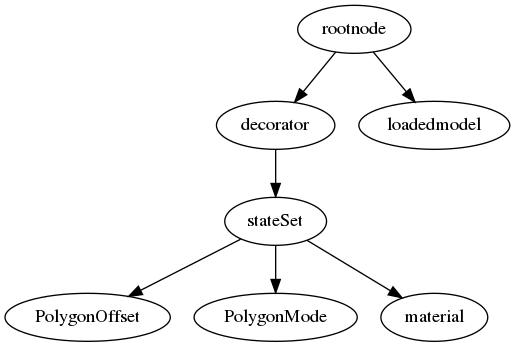
这个例程的对象关系还是很清晰的,通过对Scribe装饰对象decorator设置其状态集,设置PolygonOffset避免闪烁,设置PolygonMode将装饰器设置为线模型,通过设置materal可更改线框的颜色,材质,纹理,各种光照反射效果等。最后将装饰器节点和加载模型共同添加到根节点,显示线框效果: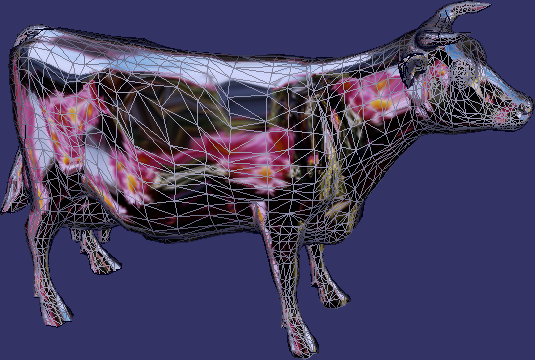
Learning OSG programing---osgScribe的更多相关文章
- Learning OSG programing---Multi Camera in Multi window 在多窗口中创建多相机
这个例子演示了在多个窗口中创建多个相机,函数的代码如下: void multiWindowMultipleCameras(osgViewer::Viewer& viewer,bool mult ...
- Learning OSG programing---Multi Camera in one window 在单窗口中创建多相机
在学习OSG提供的例子osgCamera中,由于例子很长,涉及很多细节,考虑将其分解为几个小例子.本文介绍实现在一个窗口中添加多个相机的功能. 此函数接受一个Viewer引用类型参数,设置图形上下文的 ...
- Learning OSG programing---osgAnimation(3)
接下来是用createModel函数创建模型: osg::ref_ptr<osg::Group> createModel(bool overlay, osgSim::OverlayNode ...
- Learning OSG programing---osgAnimation(2)
osg::Node* createBase(const osg::Vec3& center,float radius) { ; ; *radius; *radius; osg::Vec3 v0 ...
- Learning OSG programing---osgAnimation(1)
osg::AnimationPath* createAnimationPath(const osg::Vec3& center,float radius,double looptime) { ...
- Learning OSG programing---osgShape
本例示范了osg中Shape ---- 基本几何元素的绘制过程.参照osg官方文档,Shape 类包含以下子类: 在示例程序中,函数createShapes函数用于生成需要绘制的几何形状. osg:: ...
- Learning OSG programing---osgClip
OSG Clip例程剖析 首先是创建剪切节点的函数代码: osg::ref_ptr<osg::Node> decorate_with_clip_node(const osg::ref_pt ...
- Learning OSG programing---osgwindows
/* OpenSceneGraph example, osgwindows. * * Permission is hereby granted, free of charge, to any pers ...
- Coursera Deep Learning 2 Improving Deep Neural Networks: Hyperparameter tuning, Regularization and Optimization - week3, Hyperparameter tuning, Batch Normalization and Programming Frameworks
Tuning process 下图中的需要tune的parameter的先后顺序, 红色>黄色>紫色,其他基本不会tune. 先讲到怎么选hyperparameter, 需要随机选取(sa ...
随机推荐
- JavaScript的进制转换
先介绍两个API: 一.number 类型的 toString 方法 语法 JavaScript: numberObject.toString( [ radix ] ) 参数 参数 描述 radix ...
- java.net.ProtocolException: Exceeded stated content-length of: '13824' bytes
转自:https://blog.csdn.net/z69183787/article/details/18967927 1. 原因: 因为weblogic会向response中写东西造成的,解决方式是 ...
- vue项目build打包后图片路径不对导致图片空白不显示问题解决方法
1.在上篇文章src配置及引入的基础上修改项目配置: 文章链接地址:https://www.cnblogs.com/hsl-shiliang/p/10333022.html. 2.具体配置过程如图: ...
- 将ibatis迁移到mybatis3的过程记录
将ibatis迁移到mybatis3的过程记录 场景:有些以前的老项目是使用ibatis开发的,现在有转换成mybatis3的需求. 环境准备:需要安装Ant,以下是本人的安装版本,具体怎么安装不再赘 ...
- RESET - 把一个运行时参数值恢复为缺省值
SYNOPSIS RESET name RESET ALL DESCRIPTION 描述 RESET 将运行时参数恢复为缺省值. RESET 是下面语句的一个变种 SET parameter TO D ...
- 《Spring Boot实战》笔记 (六章)
6.1 基本配置 ........................................................................................... ...
- OkHttp源码剥离导入到eclipse中
1.里面有两个类关于Android版本的我稍微修改过了,没有用的. 2.可以直接导入eclipse中,maven里面的jar包可能还有不需要的冗余,可以自己去剔除. https://github.co ...
- Sass函数-comparable 判断两个数是否可进行加减、合并
comparable() 函数主要是用来判断两个数是否可以进行“加,减”以及“合并”.如果可以返回的值为 true,如果不可以返回的值是 false: >> comparable(2px, ...
- CenterOS 7安装Nginx
1.wget http://nginx.org/packages/centos/7/noarch/RPMS/nginx-release-centos-7-0.el7.ngx.noarch.rpm下载对 ...
- Flutter日曆國際化
Flutter自带的日期选择器是showDatePicker,时间选择器是showTimePicker. 这两个选择器默认的显示效果都是英文的,我们是在中国,那么就需要将其显示成中文版的,这就涉及到F ...