
Learning OSG programing---osgScribe
Learning OSG programing---osgScribe
Scribe可以翻译为素描,抄写等。本例通过在模型表面添加一层素描,来显示模型的骨架。
关键代码:
     osg::ref_ptr<osg::StateSet> stateset = new osg::StateSet;

     osg::ref_ptr<osg::PolygonOffset> polyoffset = new osg::PolygonOffset;

     polyoffset->setFactor(-1.0f);

     polyoffset->setUnits(5.0f);

     osg::ref_ptr<osg::PolygonMode> polymode = new osg::PolygonMode;

     polymode->setMode(osg::PolygonMode::FRONT_AND_BACK,osg::PolygonMode::LINE);

     stateset->setAttributeAndModes(polyoffset,osg::StateAttribute::OVERRIDE|osg::StateAttribute::ON);

     stateset->setAttributeAndModes(polymode,osg::StateAttribute::OVERRIDE|osg::StateAttribute::ON);

     osg::ref_ptr<osg::Material> material = new osg::Material;

     material->setAmbient(osg::Material::FRONT_AND_BACK,osg::Vec4f(1.0,0.0,1.0,1.0));

     stateset->setAttributeAndModes(material,osg::StateAttribute::OVERRIDE|osg::StateAttribute::ON);
13   stateset->setTextureMode(0,GL_TEXTURE_2D,osg::StateAttribute::OVERRIDE|osg::StateAttribute::OFF);
14   decorator->setStateSet(stateset);
这段代码主要设置用于绘制素描效果的属性集stateset。属性集的设置主要是三个方面:
PolygonOffest polyoffset用于设置素描模型和加载模型之间的偏移,避免深度检测过小,出现的闪烁现象。这个类主要是封装了OpenGL中的glPolygonOffset函数,其成员函数和说明可见于这里。关于OpenGL中的glPolygonOffset函数的使用说明可见这里。分析这个例程的对象关系图,如下所示:
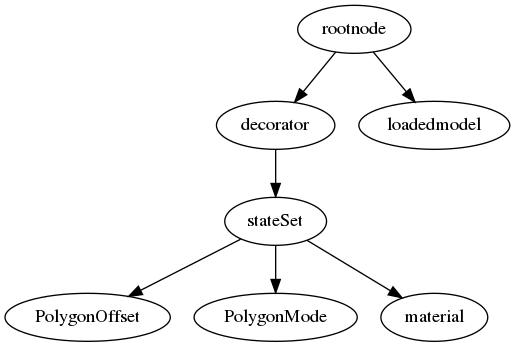
这个例程的对象关系还是很清晰的,通过对Scribe装饰对象decorator设置其状态集,设置PolygonOffset避免闪烁,设置PolygonMode将装饰器设置为线模型,通过设置materal可更改线框的颜色,材质,纹理,各种光照反射效果等。最后将装饰器节点和加载模型共同添加到根节点,显示线框效果: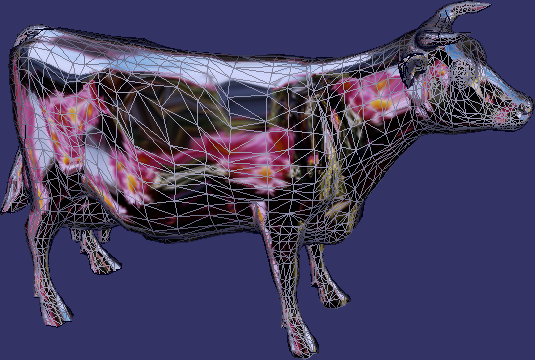
Learning OSG programing---osgScribe的更多相关文章
- Learning OSG programing---Multi Camera in Multi window 在多窗口中创建多相机
这个例子演示了在多个窗口中创建多个相机,函数的代码如下: void multiWindowMultipleCameras(osgViewer::Viewer& viewer,bool mult ...
- Learning OSG programing---Multi Camera in one window 在单窗口中创建多相机
在学习OSG提供的例子osgCamera中,由于例子很长,涉及很多细节,考虑将其分解为几个小例子.本文介绍实现在一个窗口中添加多个相机的功能. 此函数接受一个Viewer引用类型参数,设置图形上下文的 ...
- Learning OSG programing---osgAnimation(3)
接下来是用createModel函数创建模型: osg::ref_ptr<osg::Group> createModel(bool overlay, osgSim::OverlayNode ...
- Learning OSG programing---osgAnimation(2)
osg::Node* createBase(const osg::Vec3& center,float radius) { ; ; *radius; *radius; osg::Vec3 v0 ...
- Learning OSG programing---osgAnimation(1)
osg::AnimationPath* createAnimationPath(const osg::Vec3& center,float radius,double looptime) { ...
- Learning OSG programing---osgShape
本例示范了osg中Shape ---- 基本几何元素的绘制过程.参照osg官方文档,Shape 类包含以下子类: 在示例程序中,函数createShapes函数用于生成需要绘制的几何形状. osg:: ...
- Learning OSG programing---osgClip
OSG Clip例程剖析 首先是创建剪切节点的函数代码: osg::ref_ptr<osg::Node> decorate_with_clip_node(const osg::ref_pt ...
- Learning OSG programing---osgwindows
/* OpenSceneGraph example, osgwindows. * * Permission is hereby granted, free of charge, to any pers ...
- Coursera Deep Learning 2 Improving Deep Neural Networks: Hyperparameter tuning, Regularization and Optimization - week3, Hyperparameter tuning, Batch Normalization and Programming Frameworks
Tuning process 下图中的需要tune的parameter的先后顺序, 红色>黄色>紫色,其他基本不会tune. 先讲到怎么选hyperparameter, 需要随机选取(sa ...
随机推荐
- redis缓存架构-03-redis下的replication以及master+slave
1.master和slave的读写分离(水平扩容支持读高并发) 2.master主从复制流程 master开始复制给slave前的认证流程 master向slave复制流程 2.1 无磁盘化复制配置 ...
- Codeforces Round #535 E2-Array and Segments (Hard version)
Codeforces Round #535 E2-Array and Segments (Hard version) 题意: 给你一个数列和一些区间,让你选择一些区间(选择的区间中的数都减一), 求最 ...
- Panabit的各种配置文件
Panabit的各种配置文件 1.启动配置文件路径:/etc/rc.local作用:这个文件里的内容是BSD启动后会自动执行的命令默认配置如下:fsck -y -t ufs /dev/ad0s2a & ...
- 125-FMC125-两路125Msps AD,两路160Msps DA FMC子卡模块
FMC125-两路125Msps AD,两路160Msps DA FMC子卡模块 1.板卡概述 该板卡可实现2路14bit 250Msps AD 和2路16bit 160MspsDA功能,FMC连接 ...
- linux time命令的输出中“real”“user”“sys”的真正含义
下面转载的文章详细地介绍了time出来显示的“real”“user”“sys”的真正含义. Linux中time命令,我们经常用来计算某个程序的运行耗时,用户态cpu耗时,系统态cpu耗时. 例如: ...
- MySQL中常见函数
一.日期函数 1.NOW() 返回当前日期和时间 mysql> SELECT NOW(); +---------------------+ | NOW() | +-------------- ...
- opencl(九)----标量、向量数据类型
1.opencl 标量数据类型 bool char unsigned char/uchar short 16位有符号整数(补码) ushort int 32位有符号整数(补码) uint 32位无符号 ...
- 洛谷4721 【模板】分治 FFT
传送门 久违的多项式全家桶= =+ 分治NTT 用的就是cdq分治的思想 对于当前递归到的区间[l,r] 我们处理出[l,mid]对[mid+1,r]答案的贡献 然后分治递归求解就可以啦qwq 这个贡 ...
- 洛谷P4331[BOI2004] sequence
博客复活? 这个题很模板啊.随便上个左偏树.之前第一遍写对了.然后今天翻出来又写了一遍发现了一个奇奇怪怪的问题. 对比如下 上面的是AC 下面的WA 真的是一个很蠢的问题...你TM堆顶都弹出来了,堆 ...
- MySQL DDL Demo
原创转载请注明出处:https://www.cnblogs.com/agilestyle/p/11606833.html DDL Demo CREATE TABLE `user` ( `id` ) u ...