
cobbler部署安装
挂载光驱
# mount /dev/cdrom /mnt/
安装cobbler所需软件
# yum install cobbler cobbler-web dhcp tftp-server pykickstart httpd -y
出现一下报错需要手动指定版本安装Django
cobbler-web-2.6.-.el6.noarch (epel)            Requires: Django >= 1.4

# pip install Django==1.5.
重启httpd服务
# /etc/init.d/httpd restart
启动cobbler
# /etc/init.d/cobblerd start

# cobbler check

 : The 'server' field in /etc/cobbler/settings must be set to something other than localhost, or kickstarting features will not work.  This should be a resolvable hostname or IP for the boot server as reachable by all machines that will use it.

 : For PXE to be functional, the 'next_server' field in /etc/cobbler/settings must be set to something other than 127.0.0.1, and should match the IP of the boot server on the PXE network.

 : some network boot-loaders are missing from /var/lib/cobbler/loaders, you may run 'cobbler get-loaders' to download them, or, if you only want to handle x86/x86_64 netbooting, you may ensure that you have installed a *recent* version of the syslinux package installed and can ignore this message entirely.  Files in this directory, should you want to support all architectures, should include pxelinux., menu.c32, elilo.efi, and yaboot. The 'cobbler get-loaders' command is the easiest way to resolve these requirements.

 : change 'disable' to 'no' in /etc/xinetd.d/rsync

 : file /etc/xinetd.d/rsync does not exist

 : debmirror package is not installed, it will be required to manage debian deployments and repositories

 : The default password used by the sample templates for newly installed machines (default_password_crypted in /etc/cobbler/settings) is still set to 'cobbler' and should be changed, try: "openssl passwd -1 -salt 'random-phrase-here' 'your-password-here'" to generate new one

 : fencing tools were not found, and are required to use the (optional) power management features. install cman or fence-agents to use them
修改cobbler设置的配置
vim /etc/cobbler/settings

server: 10.0.0.7

next_server: 10.0.0.7

manage_dhcp:

# openssl passwd - -salt 'oldboy' 'oldboy'

$$oldboy$fXF8f078vI9J/q9XyXA8e/

default_password_crypted: "$1$oldboy$fXF8f078vI9J/q9XyXA8e/"
修改xinetd 的rsync配置
# vim /etc/xinetd.d/rsync

disable=no
重启 xinetd
# /etc/init.d/xinetd restart
重启cobbler
# /etc/init.d/cobblerd restart
再次check一下
 : some network boot-loaders are missing from /var/lib/cobbler/loaders, you may run 'cobbler get-loaders' to download them, or, if you only want to handle x86/x86_64 netbooting, you may ensure that you have installed a *recent* version of the syslinux package installed and can ignore this message entirely.  Files in this directory, should you want to support all architectures, should include pxelinux., menu.c32, elilo.efi, and yaboot. The 'cobbler get-loaders' command is the easiest way to resolve these requirements.

 : file /etc/xinetd.d/rsync does not exist #其实存在忽略

 : debmirror package is not installed, it will be required to manage debian deployments and repositories

 : fencing tools were not found, and are required to use the (optional) power management features. install cman or fence-agents to use them

其他几个可以忽略
更dhcp模板
# vim /etc/cobbler/dhcp.template

subnet 10.0.0.0 netmask 255.255.255.0 {

     option routers             10.0.0.2;

     option domain-name-servers 114.114.114.114;

     option subnet-mask         255.255.255.0;

     range dynamic-bootp        10.0.0.100 10.0.0.200;
同步配置 自动生成dhcpd.conf
# cobbler sync

# cat /etc/dhcp/dhcpd.conf
cobbler日志
[root@linux-node1 cobbler]# cd /var/log/cobbler/

[root@linux-node1 cobbler]# ls

anamon  cobbler.log  kicklog  syslog  tasks
导入镜像
# cobbler import --path=/mnt/  --name=CentOS-7.1-x86_64  --arch=x86_64

# cd  /var/www/cobbler/ks_mirror/

# ls
上传配置文件
# cd /var/lib/cobbler/kickstarts/

# rz

rz waiting to receive.

Starting zmodem transfer.  Press Ctrl+C to cancel.

Transferring cobbler-CentOS-7.1-x86_64.cfg...

  %        KB        KB/sec    ::        Errors
改名
cd /var/lib/cobbler/kickstarts/

# mv cobbler-CentOS-7.1-x86_64.cfg CentOS-7.1-x86_64.cfg

# cobbler list

# cobbler profile report

# cobbler profile edit --help
设置cobbler的参数
#cobbler profile edit --name=CentOS-7.1-x86_64 --kickstart=/var/lib/cobbler/kickstarts/CentOS-7.1-x86_64.cfg
删除一个错误的镜像
# cobbler profile remove --name=CentOS-7.1-CentOS-7.1-x86_64
更改网卡名为eth0
# cobbler profile edit --name=CentOS-7.1-x86_64 --kopts='net.ifnames=0 biosdevname=0'
再次同步配置
# cobbler sync
电源固件开机
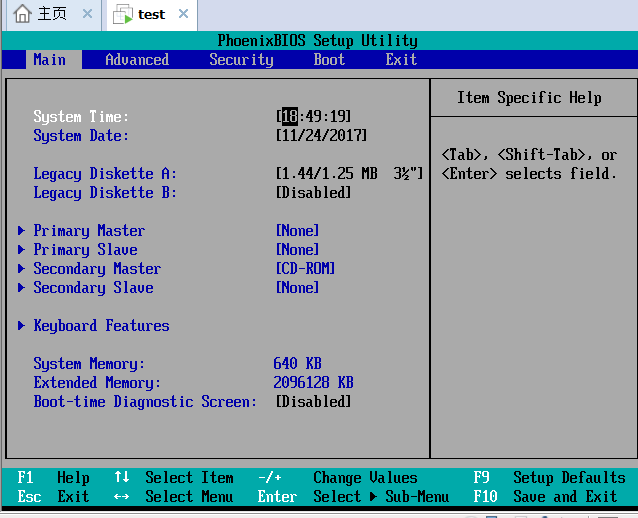
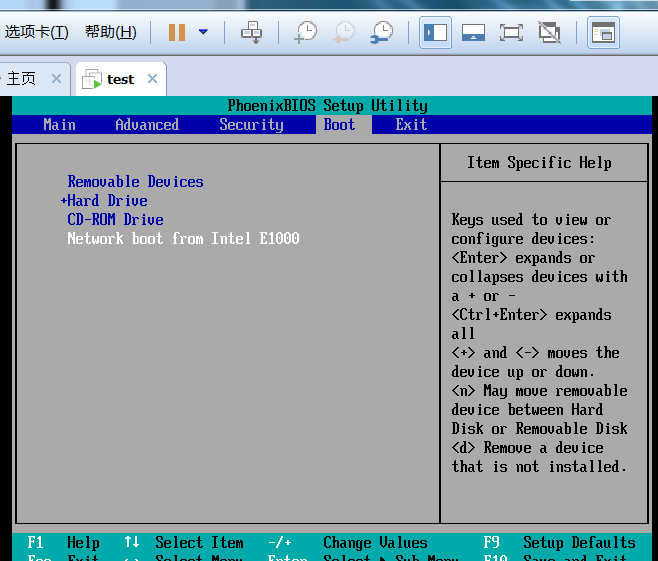
设置网卡启动 用加号控制 移到最上面 保存退出
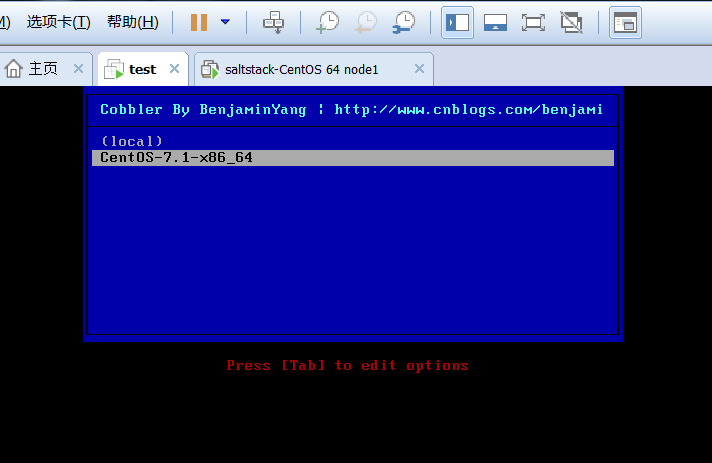
修改Cobbler提示
# vim /etc/cobbler/pxe/pxedefault.template

MENU TITLE Cobbler By BenjaminYang | http://www.cnblogs.com/benjamin77/
同步cobbler
# cobbler sync
cobbler部署安装的更多相关文章
- cobbler部署安装CentOS6.8
Linux运维:cobbler : 矮哥linux运维群:93324526 学习cobbler的话,必须先搞懂kickstart,原理不是,不懂如何排错. kickstart部署请点击这里 1. Co ...
- Cobbler自动化安装部署系统
自动化安装部署 https://www.cnblogs.com/nulige/p/6796593.html PXE+Kickstart工作原理 pxe+kickstart工作流程 网卡上的pxe芯片有 ...
- 末学者笔记--Centos7系统部署cobbler批量安装系统
[前言]: cobbler是一个可以实现批量安装系统的Linux应用程序.它有别于pxe+kickstart,cobbler可以实现同个服务器批量安装不同操作系统版本. 系统环境准备及其下载cob ...
- 基于CentOS7系统部署cobbler批量安装系统(week3_day5_part1)-技术流ken
前言 cobbler是一个可以实现批量安装系统的Linux应用程序.它有别于pxe+kickstart,cobbler可以实现同个服务器批量安装不同操作系统版本. 系统环境准备及其下载cobbler ...
- centos7系统部署cobbler批量安装系统
系统环境: 一.开启两个网卡.一个仅主机模式,一个桥接模式,主机模式对内提供cobbler服务 [root@localhost ~]# ip a 1: lo: <LOOPBACK,UP,LOWE ...
- 基于Centos7系统部署cobbler批量安装系统
前言 cobbler是一个可以实现批量安装系统的Linux应用程序.它有别于pxe+kickstart,cobbler可以实现同个服务器批量安装不同操作系统版本 系统环境的准备及下载cobbler 一 ...
- 006-(成功环境记录)基于Centos7系统部署cobbler批量安装系统
1.1 cobbler简介 Cobbler是一个Linux服务器安装的服务,可以通过网络启动(PXE)的方式来快速安装.重装物理服务器和虚拟机,同时还可以管理DHCP,DNS等. Cobbler可以使 ...
- Cobbler批量安装Ubuntu/CentOS系统
2013-07-25 一.安装和修改cobbler配置 1. Cobbler不在CentOS的基本源中,需要导入EPEL源升级软件包, 确保epel-release包的版本为最新,当前最新版本为 ...
- cobbler部署
1.cobbler介绍 Cobbler是一个快速网络安装linux的服务,而且在经过调整也可以支持网络安装windows.该工具使用python开发,小巧轻便(才15k行python代码),使用简单的 ...
随机推荐
- [整理]docker内部时区修改的两种方法
方法一 终端执行 date命令,查看宿主服务器的时区是否正确 如果正确: 执行 docker cp /etc/localtime 容器ID:/etc/localtime 将本地时间拷贝到docker内 ...
- sql between and 边界问题
1.不同的数据库对 BETWEEN...AND 操作符的处理方式是有差异的.需要自己测试 2.一般情况下.SQL Server中 between and是包括边界值的,not between不包括边界 ...
- ORACLE和SQL语法区别归纳
数据类型比较类型名称 Oracle SQLServer 比较字符数据类型 CHAR CHAR 都是固定长度字符资料但oracle里面最大度为2kb,SQLServer里面最大长度为8kb ...
- 基于JWT的无状态分布式授权【本文摘自智车芯官网】
简介 JWT是一种用于HTTP交互双方之间传递安全信息的简洁的.安全的表述性声明规范.JWT作为一个开发的标准,它定义了一种简洁的,自包含的方法用于通信双发之间以JSON形式安全传递.且因为数字证书的 ...
- 完全删除SQL server 2008
一.在控制面板卸载程序 二.点击删除 遇到这种情况则重新启动计算机,之后依次按步骤进行即可. 三.卸载一些相关组件,方法与之类似 四.删除磁盘里的默认文件(一般数据库默认安装在C盘) 路径:" ...
- 【历史】- .NET之父 - Anders Hejlsberg
简介 安德斯·海尔斯伯格(Anders Hejlsberg,1960.12~),丹麦人,Turbo Pascal编译器的主要作者,Delphi和.NET之父! 安德斯·海尔斯伯格曾在丹麦技术大学学习工 ...
- require.js 模块化
什么是模块化? 将若干功能进行封装,以备将来被重复使用. 为什么要前端模块化? 将公共功能进行封装实现复用 灵活解决依赖 解决全局变量污染 如何实现前端模块化? <!DOCTYPE html&g ...
- 【bzoj3997】[TJOI2015]组合数学 Dilworth定理结论题+dp
题目描述 给出一个网格图,其中某些格子有财宝,每次从左上角出发,只能向下或右走.问至少走多少次才能将财宝捡完.此对此问题变形,假设每个格子中有好多财宝,而每一次经过一个格子至多只能捡走一块财宝,至少走 ...
- [bzoj1052] [HAOI2007]覆盖问题
Description 某人在山上种了N棵小树苗.冬天来了,温度急速下降,小树苗脆弱得不堪一击,于是树主人想用一些塑料薄膜把这些小树遮盖起来,经过一番长久的思考,他决定用3个L * L的正方形塑料薄膜 ...
- BZOJ3295: [Cqoi2011]动态逆序对 莫队
这个用莫队做会被卡,但是我还是...... 收获在于树状数组维护后缀和以及双维排序...... 莫队的时间复杂度比想象中的要好一些.... 然而我还是被卡了...... #include<ios ...