
Installing Apache Spark on Ubuntu 16.04
Santosh Srinivas
on 07 Nov 2016, tagged onApache Spark, Analytics, Data Minin
I've finally got to a long pending to-do-item to play with Apache Spark.
The following installation steps worked for me on Ubuntu 16.04.
- Download the latest pre-built version from http://spark.apache.org/downloads.html
The below options worked for me:
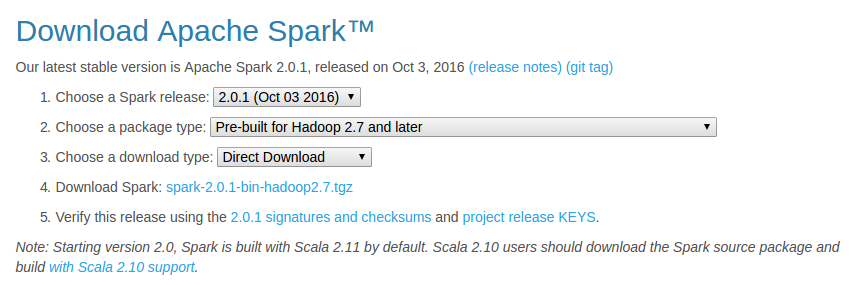 Download Apache Spark
- Unzip and move Spark
cd ~/Downloads/

tar xzvf spark-2.0.1-bin-hadoop2.7.tgz

mv spark-2.0.1-bin-hadoop2.7/ spark

sudo mv spark/ /usr/lib/
- Install SBT
As mentioned at sbt - Download
echo "deb https://dl.bintray.com/sbt/debian /" | sudo tee -a /etc/apt/sources.list.d/sbt.list

sudo apt-key adv --keyserver hkp://keyserver.ubuntu.com:80 --recv 2EE0EA64E40A89B84B2DF73499E82A75642AC823

sudo apt-get update

sudo apt-get install sbt
- Make sure Java is installed
If not, install java
sudo apt-add-repository ppa:webupd8team/java

sudo apt-get update

sudo apt-get install oracle-java8-installer
- Configure Spark
cd /usr/lib/spark/conf/

cp spark-env.sh.template spark-env.sh

vi spark-env.sh
Add the following lines
JAVA_HOME=/usr/lib/jvm/java-8-oracle

SPARK_WORKER_MEMORY=4g
- Configure IPv6
Basically, disable IPv6 using sudo vi /etc/sysctl.conf and add below lines
net.ipv6.conf.all.disable_ipv6 = 1

net.ipv6.conf.default.disable_ipv6 = 1

net.ipv6.conf.lo.disable_ipv6 = 1
- Configure .bashrc
I modified .bashrc in Sublime Text using subl ~/.bashrc and added the following lines
export JAVA_HOME=/usr/lib/jvm/java-8-oracle

export SBT_HOME=/usr/share/sbt-launcher-packaging/bin/sbt-launch.jar

export SPARK_HOME=/usr/lib/spark

export PATH=$PATH:$JAVA_HOME/bin

export PATH=$PATH:$SBT_HOME/bin:$SPARK_HOME/bin:$SPARK_HOME/sbin
- Configure fish (Optional - But I love the fish shell)
Modify config.fish using subl ~/.config/fish/config.fish and add the following lines
#Credit: http://fishshell.com/docs/current/tutorial.html#tut_startup

set -x PATH $PATH /usr/lib/spark

set -x PATH $PATH /usr/lib/spark/bin

set -x PATH $PATH /usr/lib/spark/sbin
- Test Spark (Should work both in fish and bash)
Run pyspark (this is available in /usr/lib/spark/bin/) and test out.
For example ....
>>> a = 5

>>> b = 3

>>> a+b

8

>>> print(“Welcome to Spark”)

Welcome to Spark

## type Ctrl-d to exit
Try also, the built in run-example using run-example org.apache.spark.examples.SparkPi
That's it! You are ready to rock on using Apache Spark!
Next, I plan to checkout analysis using R as mentioned inhttp://www.milanor.net/blog/wp-content/uploads/2016/11/interactiveDataAnalysiswithSparkR_v5.pdf
Installing Apache Spark on Ubuntu 16.04的更多相关文章
- Install and Configure Apache Kafka on Ubuntu 16.04
https://devops.profitbricks.com/tutorials/install-and-configure-apache-kafka-on-ubuntu-1604-1/ by hi ...
- Install LAMP Stack On Ubuntu 16.04
原文:http://www.unixmen.com/how-to-install-lamp-stack-on-ubuntu-16-04/ LAMP is a combination of operat ...
- Ubuntu 16.04 LAMP server tutorial with Apache 2.4, PHP 7 and MariaDB (instead of MySQL)
https://www.howtoforge.com/tutorial/install-apache-with-php-and-mysql-on-ubuntu-16-04-lamp/ This tut ...
- digitalocean --- How To Install Apache Tomcat 8 on Ubuntu 16.04
https://www.digitalocean.com/community/tutorials/how-to-install-apache-tomcat-8-on-ubuntu-16-04 Intr ...
- 安装Hadoop及Spark(Ubuntu 16.04)
安装Hadoop及Spark(Ubuntu 16.04) 安装JDK 下载jdk(以jdk-8u91-linux-x64.tar.gz为例) 新建文件夹 sudo mkdir /usr/lib/jvm ...
- 解决Ubuntu 16.04 上Android Studio2.3上面运行APP时提示DELETE_FAILED_INTERNAL_ERROR Error while Installing APKs的问题
本人工作环境:Ubuntu 16.04 LTS + Android Studio 2.3 AVD启动之后,运行APP,报错提示: DELETE_FAILED_INTERNAL_ERROR Error ...
- Installing Moses on Ubuntu 16.04
Installing Moses on Ubuntu 16.04 The process of installation To install requirements sudo apt-get in ...
- Installing Hyperledger Fabric v1.1 on Ubuntu 16.04 — Part I
There is an entire library of Blockchain APIs which you can select according to the needs that suffi ...
- 如何在Ubuntu 16.04上安装Apache Web服务器
转载自:https://www.howtoing.com/how-to-install-the-apache-web-server-on-ubuntu-16-04 介绍 Apache HTTP服务器是 ...
随机推荐
- 调整linux系统时区
cp /usr/share/zoneinfo/Asia/Shanghai /etc/localtime 好吧,使用tzselect又靠谱些,使用前把/etc/localtime删除了. 执行上 ...
- xshell连接不上linux问题
1.首先确定linux系统有网络. 使用ipconfig查看是否有ip地址,没有的话需要先配置. 2.打开sshd服务:service sshd start 3.关闭防火墙服务:service ipt ...
- Sqlite可视化工具sqliteman安装(转)
Sqlite可视化工具sqliteman安装 1.安装前准备 系统要求:RedHat 6.9 Qt库版本:4.2及以上 2.安装文件 采用源码方式安装 可用下面地址自行下载 https://s ...
- sublime text3安装Package Control和Vue Syntax Highlight
一.下载Sublime3 https://www.sublimetext.com/3 二.安装Package Control 在线安装: https://packagecontrol.io/insta ...
- 整理之DOM事件阶段、冒泡与捕获、事件委托、ie事件和dom模型事件、鼠标事件
整理之DOM事件阶段 本文主要解决的问题: 事件流 DOM事件流的三个阶段 先理解流的概念 在现今的JavaScript中随处可见.比如说React中的单向数据流,Node中的流,又或是今天本文所讲的 ...
- 最大子段和问题Java实现
最大子段和问题 一.问题描述 给定长度为n的整数序列,a[1...n], 求[1,n]某个子区间[i , j]使得a[i]+…+a[j]和最大. 例如(-2,11,-4,13,-5,2)的最大子段和为 ...
- Qt Quick快速入门之qml布局
Qml里面布局主要有两种,锚点布局.Grid布局. 锚点布局使用anchors附件属性将一个元素的边定位到另一个元素的边,从而确定元素的位置和大小.下面是示例 import QtQuick 2.3 i ...
- [BZOJ5291][BJOI2018]链上二次求和(线段树)
感觉自己做的麻烦了,但常数似乎不算差.(只是Luogu最慢的点不到2s本地要跑10+s) 感觉我的想法是最自然的,但不明白为什么网上似乎找不到这种做法.(不过当然所有的做法都是分类大讨论,而我的方法手 ...
- python 中__name__ = '__main__' 的作用,到底干嘛的?
python 中__name__ = 'main' 的作用,到底干嘛的? 有句话经典的概括了这段代码的意义: "Make a script both importable and execu ...
- JAVA基础(一) ——— static 关键字
1. 静态代码块 保证只创建一次,提升属性的级别为类变量.初始化后独自占用一块内存 2. 静态代码块执行触发条件 (1).当创建这个类的实例 (2).当调用这个类的静态变量 (3).当调用这个类的 ...