
Salesforce LWC学习(四十一) If:true 即将弃用?
本篇参考:
https://developer.salesforce.com/docs/component-library/documentation/en/lwc/lwc.reference_directives
https://developer.salesforce.com/docs/component-library/documentation/en/lwc/lwc.create_conditional
基于条件的组件渲染在我们实际项目中100%的使用,所以做过 lwc的项目的人,对 if:true/ if:false的使用了如指掌。先以一个demo看一下 lwc中的 基于条件渲染的 if:true / if:false的使用
Demo.html
<template>

    <template if:true={testVariable}>

        show true

    </template>

    <template if:false={testVariable}>

        show false

    </template>

</template>
Demo.js
import { LightningElement, track, wire } from 'lwc';

export default class demo extends LightningElement {

    get testVariable() {

        console.log('execute this');

        return true;

    }

}
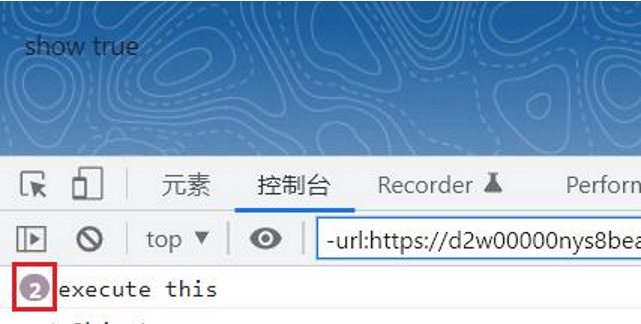
当系统解析 if:true / if:false时,会调用这个变量的get方法,并且不管 if:true还是 if:false,都会执行,所以上述的demo中,console的内容为执行两次。
lwc在Spring23的开发文档中,声明使用 lwc:if / lwc:elseif / lwc:else来替换以前的 if:true / if:false. 原话内容为
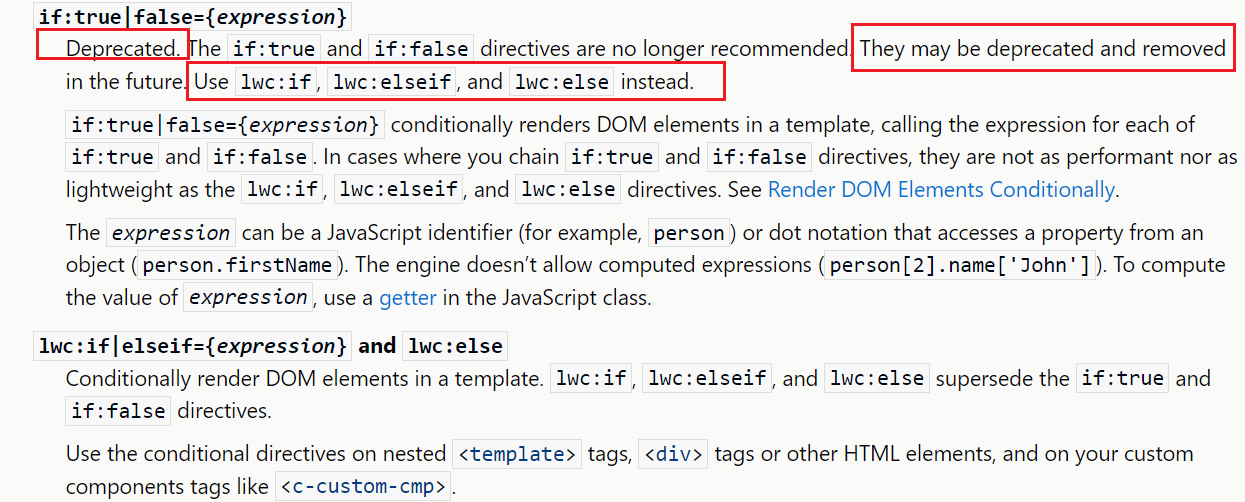
这里说几点 lwc:if 和 if:true的区别:
1. lwc:if 如果搭配 lwc:elseif以及lwc:else情况下,变量只会调用一次,然而 if:true/if:false每次都需要调用变量 get方法;
2. Lwc:if可以用于好多的元素上,比如 template / div / 自定义lwc组件等,if:true仅能用于 template上;
3. Lwc:if支持 lwc:elseif这种多层级判定,if:true / if:false只支持两层;
4. 不能在lwc:elseif或lwc:else之前添加文本或其他元素, if:true 和 if:false是允许的。
注:目前 lwc:if只能用于sandbox,现在是 sandbox preview阶段,后续正式release以后,dev开发环境才允许使用。
我们以一个例子更好的了解 lwc:if
demo.html:demo中使用 lwc:if / elseif作为一个demo,我们可以看到组件中使用的是 h1而不是template,因为 lwc:if支持在这些html标签中使用。
<template>

    <h1 lwc:if={renderedWrapper.section1}>

        show section1

    </h1>

    <h1 lwc:elseif={renderedWrapper.section2}>

        show section2

    </h1>

    <h1 lwc:elseif={renderedWrapper.section3}>

        show section3

    </h1>

    <h1 lwc:elseif={renderedWrapper.section4}>

        show section4

    </h1>

    <lightning-button-group>

        <lightning-button label="Show section1" value="section1" onclick={handleButtonEvent}></lightning-button>

        <lightning-button label="Show section2" value="section2" onclick={handleButtonEvent}></lightning-button>

        <lightning-button label="Show section3" value="section3" onclick={handleButtonEvent}></lightning-button>

        <lightning-button label="Show section4" value="section4" onclick={handleButtonEvent}></lightning-button>

    </lightning-button-group>

</template>
demo.js
import { LightningElement, track, wire } from 'lwc';

export default class demo extends LightningElement {

    @track renderedWrapper = {

        section1 : false,

        section2 : false,

        section3 : false,

        section4 : false

    };

    handleButtonEvent(event) {

        if(event.target.value === 'section1') {

            this.renderedWrapper.section1 = true;

            this.renderedWrapper.section2 = false;

            this.renderedWrapper.section3 = false;

            this.renderedWrapper.section4 = false;

        } else if(event.target.value === 'section2') {

            this.renderedWrapper.section1 = false;

            this.renderedWrapper.section2 = true;

            this.renderedWrapper.section3 = false;

            this.renderedWrapper.section4 = false;

        } else if(event.target.value === 'section3') {

            this.renderedWrapper.section1 = false;

            this.renderedWrapper.section2 = false;

            this.renderedWrapper.section3 = true;

            this.renderedWrapper.section4 = false;

        } else if(event.target.value === 'section4') {

            this.renderedWrapper.section1 = false;

            this.renderedWrapper.section2 = false;

            this.renderedWrapper.section3 = false;

            this.renderedWrapper.section4 = true;

        }

    }

}
尽管官方说有可能删除,我不建议直接废除,因为 lwc:if尽管优化了速度,直接替换还是有一些局限性。我们看下述的例子
Demo.html:上述demo中,if:true 和 if:false中间有一个文本内容,实际项目中也有几率存在某些组件内容。
<template>

    <template if:true={testVariable}>

        show true

    </template>

    <br/>

    test show other information

    <br/>

    <template if:false={testVariable}>

        show false

    </template>

</template>
下述的demo,如果按照官方的建议,就很麻烦,无法直接将 if:true和 if:false 替换成 lwc:if以及lwc:else,以下是错误案例
<template>

    <template lwc:if={testVariable}>

        show true

    </template>

    <br/>

    test show other information

    <br/>

    <template lwc:else>

        show false

    </template>

</template>
上述代码是错误案例,部署是会报错:'lwc:else' directive must be used immediately after an element with 'lwc:if' or 'lwc:elseif'
我也提了一个post关于不建议后续弃用或者删除 if:true的功能,因为针对已有项目的替换还会涉及到regression test或者UT test,上述场景也有改动风险,而且也增加了项目中不必要的开发测试成本。大家如果赞同,欢迎like顶一下。 https://trailhead.salesforce.com/trailblazer-community/feed/0D54S00000NG0rMSAT
总结:虽然 lwc:if增加了很多的灵活性,但是不建议官方直接将 if:true弃用或者直接删除,否则对既有系统影响还是过大。篇中有错误地方欢迎指出,有不懂欢迎留言,有不同看法的小伙伴欢迎讨论。
Salesforce LWC学习(四十一) If:true 即将弃用?的更多相关文章
- Salesforce LWC学习(四十) dynamic interaction 浅入浅出
本篇参考: Configure a Component for Dynamic Interactions in the Lightning App Builder - Salesforce Light ...
- Salesforce LWC学习(二十一) Error浅谈
本篇参考:https://developer.salesforce.com/docs/component-library/documentation/en/lwc/data_error https:/ ...
- Salesforce LWC学习(三十一) Quick Action适配
本篇参考:https://www.lightningdesignsystem.com/components/modals/ 随着salesforce lwc的优化,越来越多的项目从aura转到了lwc ...
- Salesforce LWC学习(四) 父子component交互 / component声明周期管理 / 事件处理
我们在上篇介绍了 @track / @api的区别.在父子 component中,针对api类型的变量,如果声明以后就只允许在parent修改,son component修改便会导致报错. sonIt ...
- Salesforce LWC学习(三十) lwc superbadge项目实现
本篇参考:https://trailhead.salesforce.com/content/learn/superbadges/superbadge_lwc_specialist 我们做lwc的学习时 ...
- Salesforce LWC学习(十七) 前端知识之 onclick & onblur & onmousedown
在Salesforce LWC学习(八) Look Up组件实现篇中,我们实现了公用的lookup组件,使用的过程中,会发现当我们输入内容以后,搜索出来的列表便无法被清空. 针对此种情况我们打算优化一 ...
- Salesforce LWC学习(三十九) lwc下quick action的recordId的问题和解决方案
本篇参考: https://developer.salesforce.com/docs/component-library/bundle/force:hasRecordId/documentation ...
- Salesforce LWC学习(三) import & export / api & track
我们使用vs code创建lwc 时,文件会默认生成包含 template作为头的html文件,包含了 import LightningElement的 js文件以及对应的.js-meta.xml文件 ...
- Salesforce LWC学习(十五) Async 以及 Picklist 公用方法的实现
本篇参考:salesforce 零基础学习(六十二)获取sObject中类型为Picklist的field values(含record type) https://developer.salesfo ...
- Salesforce LWC学习(三十六) Quick Action 支持选择 LWC了
本篇参考: https://developer.salesforce.com/docs/component-library/documentation/en/lwc/lwc.use_quick_act ...
随机推荐
- Python基础之模块:2、包的使用和软件开发目录规范及常用内置模块
目录 一.包的使用 1.什么是包 2.包的具体使用 1.常规导入 2.直接导入包名 二.编程思想转变 1.面条阶段 2.函数阶段 3.模块阶段 三.软件目录开发规范 1.bin 2.conf 3.co ...
- .Net 7里的函数.Ctor和.CCtor是干啥用的呢?你知道吗
楔子 有小伙伴被面试官问到这个问题,本篇彻底解析下这个问题. 为了彻底点,注意本篇是最底层的.Net 7 RC CLR运行模型(汇编)为基础进行全局剖析,局部业务分析. 如有疏漏,请斧正. 目的非手段 ...
- 详解从浏览器地址栏输入URL到页面显示的步骤
版本1(基础版本) 步骤1:浏览器根据请求的 URL 交给 DNS 域名解析,找到真实 IP ,向服务器发起请求: 步骤2:服务器交给后台处理完成后返回数据,浏览器接收⽂件( HTML.JS.CSS ...
- C++ undered_map哈希表用法——leetcode两数之和
undered_map 头文件:#include<undered_map> 创建表undered_map<key,value> Map_name; 插入元素 a[key]=va ...
- vs2019中使用Git,新建项目时总提示部分项目位于解决方案文件夹外
最终还是用Git工具传上去的. 小伙子,用Git Bush或者Git CMD 和Git GUI传吧 我是用Git GUI. Git GUI汉化.感谢大佬 https://blog.csdn.net/u ...
- 一个宁静祥和没有bug的下午和SqlSession的故事
1 背景 这是一个安静祥和没有bug的下午.作为一只菜鸡,时刻巩固一下基础还是很有必要的,如此的大好时机,就让我来学习学习mybatis如何使用. 这可和我看到的不一样啊,让我来看看项目里怎么写的. ...
- Springboot2.6集成Email
Springboot集成Email 老版本 这时候的JavaMailSender是受到Spring的托管的,我们只需要配置参数就行了 !如何判断是否是被Springboot托管的:以下代码IDEA会自 ...
- PP视频(PPTV聚力)web接口分析
前言 前几天我想看一个番剧, 正好搜索到了 PP视频,我才知道PP视频就是PPTV聚力,我想把番剧下载下来,结果发现视频竟然不是m3u8格式,而是多段mp4,所以简单的写了个脚本,可以在不登录的情况下 ...
- 数电第二周总结_by_yc
数电第二周总结_CC 重点: 模块实例化.仿真测试.数值表示.参数.表达式. 模块实例化端口连接方法: A.顺序端口连接:需严格按照模块定义时的顺序 B.明明端口连接:对端口信号顺序不做要求 Ex-1 ...
- postgresql函数:定期删除模式下指定天数前的表数据及分区物理表
一.现有函数-- 1.现有函数调用select ods.deletePartitionIfExists('fact_ship' || '_' || to_char(CURRENT_DATE - INT ...