
Android-表格布局 计算器 修改版
 <?xml version="1.0" encoding="utf-8"?>

 <TableLayout xmlns:android="http://schemas.android.com/apk/res/android"

     android:layout_width="match_parent"

     android:layout_height="match_parent"

     android:layout_row="4"

     android:stretchColumns="3">

     <EditText

         android:layout_width="387dp"

         android:layout_height="170dp"

         android:editable="true"

         android:inputType="number"

         android:textSize="30dp"

         android:background="#999">

     </EditText>

     <TableRow>

         <Button

             android:layout_width="0dp"

             android:layout_height="70dp"

             android:text="CE"

             android:textSize="40dp"

             android:background="#990"

             android:textColor="#FFF"

             android:layout_weight="1"/>

         <Button

             android:layout_width="0dp"

             android:layout_height="70dp"

             android:text="C"

             android:textSize="40dp"

             android:background="#990"

             android:textColor="#FFF"

             android:layout_weight="1"/>

         <Button

             android:layout_width="0dp"

             android:layout_height="70dp"

             android:textSize="40dp"

             android:background="#990"

             android:textColor="#FFF"

             android:text="()"

             android:layout_weight="1"/>

         <Button

             android:layout_width="0dp"

             android:layout_height="70dp"

             android:text="+"

             android:textSize="40dp"

             android:background="#990"

             android:textColor="#FFF"

             android:layout_weight="1"/>

     </TableRow>

     <TableRow>

         <Button

             android:layout_width="0dp"

             android:layout_height="70dp"

             android:text="7"

             android:textSize="40dp"

             android:background="#999"

             android:textColor="#FFF"

             android:layout_weight="1"/>

         <Button

             android:layout_width="0dp"

             android:layout_height="70dp"

             android:text="8"

             android:textSize="40dp"

             android:background="#999"

             android:textColor="#FFF"

             android:layout_weight="1"/>

         <Button

             android:layout_width="0dp"

             android:layout_height="70dp"

             android:text="9"

             android:textSize="40dp"

             android:background="#999"

             android:textColor="#FFF"

             android:layout_weight="1"/>

         <Button

             android:layout_width="0dp"

             android:layout_height="70dp"

             android:text="-"

             android:textSize="40dp"

             android:background="#990"

             android:textColor="#FFF"

             android:layout_weight="1"/>

     </TableRow>

     <TableRow>

         <Button

             android:layout_width="0dp"

             android:layout_height="70dp"

             android:text="4"

             android:textSize="40dp"

             android:background="#999"

             android:textColor="#FFF"

             android:layout_weight="1"/>

         <Button

             android:layout_width="0dp"

             android:layout_height="70dp"

             android:text="5"

             android:textSize="40dp"

             android:background="#999"

             android:textColor="#FFF"

             android:layout_weight="1"/>

         <Button

             android:layout_width="0dp"

             android:layout_height="70dp"

             android:text="6"

             android:textSize="40dp"

             android:background="#999"

             android:textColor="#FFF"

             android:layout_weight="1"/>

         <Button

             android:layout_width="0dp"

             android:layout_height="70dp"

             android:text="*"

             android:textSize="40dp"

             android:background="#990"

             android:textColor="#FFF"

             android:layout_weight="1"/>

     </TableRow>

     <TableRow>

         <Button

             android:layout_width="0dp"

             android:layout_height="70dp"

             android:text="1"

             android:textSize="40dp"

             android:background="#999"

             android:textColor="#FFF"

             android:layout_weight="1"/>

         <Button

             android:layout_width="0dp"

             android:layout_height="70dp"

             android:text="2"

             android:textSize="40dp"

             android:background="#999"

             android:textColor="#FFF"

             android:layout_weight="1"/>

         <Button

             android:layout_width="0dp"

             android:layout_height="70dp"

             android:text="3"

             android:textSize="40dp"

             android:background="#999"

             android:textColor="#FFF"

             android:layout_weight="1"/>

         <Button

             android:layout_width="0dp"

             android:layout_height="70dp"

             android:text="÷"

             android:textSize="40dp"

             android:background="#990"

             android:textColor="#FFF"

             android:layout_column="3"

             android:layout_weight="1"/>

     </TableRow>

     <TableRow>

         <Button

             android:layout_width="0dp"

             android:layout_height="70dp"

             android:text="0"

             android:textSize="40dp"

             android:background="#999"

             android:textColor="#FFF"

             android:layout_weight="1"/>

         <Button

             android:layout_width="0dp"

             android:layout_height="70dp"

             android:text="00"

             android:textSize="40dp"

             android:background="#999"

             android:textColor="#FFF"

             android:layout_weight="1"/>

         <Button

             android:layout_width="0dp"

             android:layout_height="70dp"

             android:text="."

             android:textSize="40dp"

             android:background="#999"

             android:textColor="#FFF"

             android:layout_weight="1"/>

         <Button

             android:layout_width="0dp"

             android:layout_height="70dp"

             android:text="="

             android:textSize="40dp"

             android:background="#990"

             android:textColor="#FFF"

             android:layout_weight="1"/>

     </TableRow>

 </TableLayout>
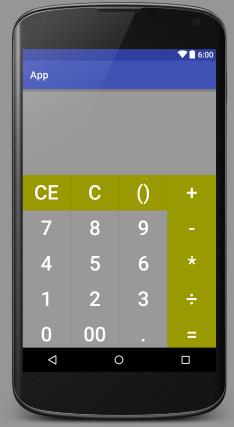
Android-表格布局 计算器 修改版的更多相关文章
- Android表格布局(Table Layout)
Android表格布局(Table Layout) 先来看布局管理器之间继承关系图: 图1 可知TableLayout继承了LinearLayout,所以表格布局本质上依然是线性管理器. 表格布局采用 ...
- Android表格布局之设置边框
Android表格布局本身没有边框,不过可以通过背景色的设置可以实现表格边框的显示. 首先可以设置TableRow的背景色,然后设置内容的背景色.根据它们的颜色差就出现了边框.只要微调Content与 ...
- Android 表格布局<TableLayout>
表格布局即,tableLayout,表格布局通过行.列的形式来管理UI组件,TablelLayout并不需要明确地声明包含多少行.多少列,而是通过TableRow,以及其他组件来控制表格的行数和列数, ...
- [android] 表格布局和绝对布局
/*****************2016年4月28日 更新*************************************/ 知乎:为什么Android没有像iOS一样提供autolay ...
- Android 表格布局 TableLayout
属性介绍 stretchColumns:列被拉伸 shrinkColumns:列被收缩 collapseColumns:列被隐藏 举例测试 <TableLayout android:id=&qu ...
- Android 网格布局 计算器
<GridLayout xmlns:android="http://schemas.android.com/apk/res/android" xmlns:tools=&quo ...
- Android 线性布局 计算器
<?xml version="1.0" encoding="utf-8"?> <LinearLayout xmlns:android=&quo ...
- 案例:TableLayout表格布局——迷你计算器
计算器可以常用线性布局(LinearLayout)和表格布局(tableLayout).Gridlayout 今天我用的是表格布局 效果如下: 代码如下: <TableLayout xmlns: ...
- Android 仿美团网,大众点评购买框悬浮效果之修改版
转帖请注明本文出自xiaanming的博客(http://blog.csdn.net/xiaanming/article/details/17761431),请尊重他人的辛勤劳动成果,谢谢! 我之前写 ...
随机推荐
- RMAN命令
一.启动.关闭数据库 在RMAN中执行关闭和启动数据库的命令与SQL环境下一模一样.当然,在执行之前,你需要先连接到目标数据库,如例: C:\Documents and Settings\Admini ...
- oracle的索引维护
索引重建 Alter index idx_name rebuild partition index_partition_name [online nologging] 需要对每个分区索引做rebuil ...
- 利用API 建立Dependent Value Set
. 建立SET fnd_flex_val_api.create_valueset_independent(v_set_name ,v_description ,v_security ,v_enable ...
- GitHub Desktop for Win 安装不上
采用了ClickOnce部署方式,网速不给力,安装过程经常断线,要是有离线安装包就好了.
- c#中 ==与equals有什么区别【转】
转至http://www.zybang.com/question/2263895f201ffec6c68b6c304ac4cd61.html 对于值类型.引用类型来说比较过程怎样的?using Sys ...
- sql server 数据库模型 备份 恢复 总结 备份脚本
事务日志是可以基于时间点恢复的,必须在full或bulk_logged模式下 Alter database [DBName] set recover bulk_logged , then the fo ...
- AndroidUI自动化测试工具-UIautomator
转自:http://www.cnblogs.com/rexmzk/archive/2012/12/26/2834380.html 最近公司在开展Android的自动化测试,美国那边的开发人员利用And ...
- 杭电1003 MAX SUN
Problem Description Given a sequence a[1],a[2],a[3]......a[n], your job is to calculate the max sum ...
- Delphi Xe 中如何把日期格式统一处理,玩转 TDatetime
日期格式的处理总是会很复杂,因为不同的环境日 期格式也不一样.为了程序统一处理, 最好把格式给统一了: 可以在程序的初始化段: FormatSettings.ShortDateFormat := ' ...
- 获取url中的参数\+发送ajax请求根路径|+获取复选框的值
//获取url中的参数function getUrlParam(name) { var reg = new RegExp("(^|&)" + name + "=( ...