
RadioButton实现多选一
RadioButton实现多选一
一、简介
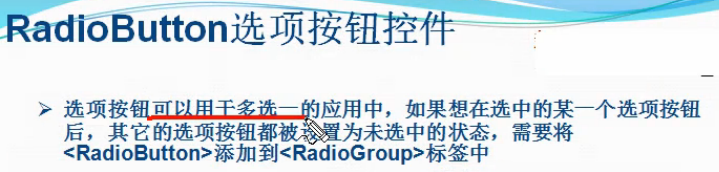
二、RadioButton实现多选一方法
1、将多个RadioButton放在一个RadioGroup里面
     <RadioGroup

         android:id="@+id/radioGroup1"

         android:layout_width="match_parent"

         android:layout_height="wrap_content" >

         <RadioButton

             android:layout_width="wrap_content"

             android:layout_height="wrap_content"

             android:text="男"

             android:textColor="#FFFFFF" />

         <RadioButton

             android:layout_width="wrap_content"

             android:layout_height="wrap_content"

             android:text="女"

             android:textColor="#FFFFFF" />

     </RadioGroup>
2、在RadioGroup里面取出每个RadioButton
 public void onClick(View v) {

                 // TODO Auto-generated method stub

                 int len = radioGroup1.getChildCount();

                 for (int i = 0; i < len; i++) {

                     RadioButton radio = (RadioButton) radioGroup1.getChildAt(i);                 }

             }
3、检查每个RadioButton是否被选取
 if (radio.isChecked()) {

                         break;

                     }
4、取出被选取的那个RadioButton里面的值
 Toast.makeText(Activity01.this, radio.getText(),

                                 Toast.LENGTH_LONG).show();
三、代码实例
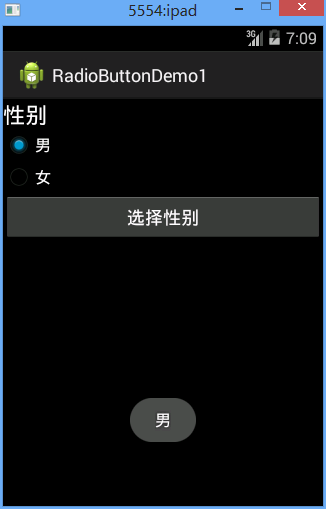
效果图:
代码:
fry.Activity01
 package fry;

 import com.example.RadioButtonDemo1.R;

 import android.app.Activity;

 import android.os.Bundle;

 import android.view.View;

 import android.view.View.OnClickListener;

 import android.widget.Button;

 import android.widget.RadioButton;

 import android.widget.RadioGroup;

 import android.widget.TextView;

 import android.widget.Toast;

 public class Activity01 extends Activity {

     private Button btn_chooseGender;

     private RadioGroup radioGroup1;

     private TextView tv_answer;

     @Override

     protected void onCreate(Bundle savedInstanceState) {

         // TODO Auto-generated method stub

         super.onCreate(savedInstanceState);

         setContentView(R.layout.activity01);

         btn_chooseGender = (Button) findViewById(R.id.btn_chooseGender);

         radioGroup1 = (RadioGroup) findViewById(R.id.radioGroup1);

         tv_answer = (TextView) findViewById(R.id.tv_answer);

         /*

          * RadioButton实现多选一方法

          * 1、将多个RadioButton放在一个RadioGroup里面

          * 2、在RadioGroup里面取出每个RadioButton

          * 3、检查每个RadioButton是否被选取

          * 4、取出被选取的那个RadioButton里面的值

          */

         btn_chooseGender.setOnClickListener(new OnClickListener() {

             @Override

             public void onClick(View v) {

                 // TODO Auto-generated method stub

                 int len = radioGroup1.getChildCount();

                 for (int i = 0; i < len; i++) {

                     RadioButton radio = (RadioButton) radioGroup1.getChildAt(i);

                     if (radio.isChecked()) {

                         Toast.makeText(Activity01.this, radio.getText(),

                                 Toast.LENGTH_LONG).show();

                         break;

                     }

                 }

             }

         });

     }

 }
/RadioButtonDemo1/res/layout/activity01.xml
 <?xml version="1.0" encoding="utf-8"?>

 <LinearLayout xmlns:android="http://schemas.android.com/apk/res/android"

     android:layout_width="match_parent"

     android:layout_height="match_parent"

     android:background="@android:color/black"

     android:orientation="vertical" >

     <TextView

         android:layout_width="match_parent"

         android:layout_height="wrap_content"

         android:text="性别"

         android:textAppearance="?android:attr/textAppearanceLarge"

         android:layout_gravity="center_horizontal"

         android:textColor="#FFFFFF" />

     <RadioGroup

         android:id="@+id/radioGroup1"

         android:layout_width="match_parent"

         android:layout_height="wrap_content" >

         <RadioButton

             android:layout_width="wrap_content"

             android:layout_height="wrap_content"

             android:text="男"

             android:textColor="#FFFFFF" />

         <RadioButton

             android:layout_width="wrap_content"

             android:layout_height="wrap_content"

             android:text="女"

             android:textColor="#FFFFFF" />

     </RadioGroup>

     <Button

         android:id="@+id/btn_chooseGender"

         android:layout_width="match_parent"

         android:layout_height="wrap_content"

         android:text="选择性别"

         android:textColor="#FFFFFF" />

         />

     <TextView

         android:id="@+id/tv_answer"

         android:layout_width="match_parent"

         android:layout_height="wrap_content"

         android:text=""

         android:textAppearance="?android:attr/textAppearanceLarge"

         android:layout_gravity="center_horizontal"

         android:textColor="#FFFFFF" />

 </LinearLayout>
四、收获
1、
android:textColor="#FFFFFF"
设置颜色,直接用#FFFFFF
2、
android:layout_gravity="center_horizontal"
文字居中显示
3、
RadioButton在RadioGroup里面实现多选一
4、
android:background="@android:color/black"
设置黑色,系统自带颜色
5、
int len = radioGroup1.getChildCount();
RadioGroup获取孩子数量
6、
RadioButton radio = (RadioButton) radioGroup1.getChildAt(i);
RadioGroup获取孩子
7、
if (radio.isChecked())
判断RadioButton是否被选取
8、
Toast.makeText(Activity01.this, radio.getText(),Toast.LENGTH_LONG).show();
吐司
RadioButton实现多选一的更多相关文章
- 可分组的选择框控件(MVVM下)(Toggle样式 仿造单选框RadioButton,复选框CheckBox功能)
原地址: http://www.cnblogs.com/yk250/p/5660340.html 效果图如下:支持分组的单选框,复选框样式和MVVM下功能的实现.这是项目中一个快捷键功能的扩展. 1, ...
- 使用RadioGroup与RadioButton实现多选一
RadioGroup是RadioButton的集合, RadioGroup里面可以包含很多RadioButton,提供多选一机制,只能选择其中一个 RadioGroup的orientation(方向) ...
- 安卓开发:UI组件-RadioButton和复选框CheckBox
2.5RadioButton 为用户提供由两个及以上互斥的选项组成的选项集. 2.5.1精简代码 在按钮变多之后,多次重复书写点击事件有些繁琐,我们在这里创建一个事件OnClick,每次点击时调用该事 ...
- Android 单选按钮(RadioButton)和复选框(CheckBox)的使用
1.RadioButton (1)介绍 (2)单选按钮点击事件的用法 (3)RadioButton与RadioGroup配合使用实现单选题功能 (4)xml布局及使用 <?xml version ...
- Qt Quick 常用元素:RadioButton(单选框),CheckBox(复选框) 与 GroupBox(分组框)
先介绍一下 ExclusiveGroup. ExclusiveGroup (互斥分组)本身是不可见元素,用于将若干个可选择元素组合在一起, 供用户选择其中的一个选项.你可以在 ExclusiveGro ...
- Android的RadioButton和checkBox的用法-android学习之旅(十九)
RadioButton和checkBox简介 单选按钮(RadioButton)和复选框(CheckBox)都继承了Button,因此属性的设置和Button差不多,只是加了一个android:che ...
- Android开发:文本控件详解——RadioButton和CheckBox(一)基本属性
一.RadioButton和RadioGroup: RadioButton是单个的圆形单选框,而RadioGroup是可以容纳多个RadioButton存在的容器,因此RadioButton和Radi ...
- Android笔记——Android自定义控件
目录: 1.自定义控件概述 01_什么是自定义控件 Android系统中,继承Android系统自带的View或者ViewGroup控件或者系统自带的控件,并在这基础上增加或者重新组合成我们想要的效果 ...
- ASP.net 常用服务器控件
新人初学,有错请指,大神轻喷. .net中有HTML控件和标准服务器控件. 老师教学用的是vs2010是这样分的,不知道15里是不是这样. 如果使用HTML控件我们就会发现页面中加载了原本HTML代码 ...
随机推荐
- 《挑战程序设计竞赛》2.3 动态规划-进阶 POJ1065 1631 3666 2392 2184(5)
POJ1065: Description There is a pile of n wooden sticks. The length and weight of each stick are kno ...
- Vmware VsPhere下的VM安装Hyper-v服务
问题:Vmware VsPhere下的VM无法安装Hyper-v服务 解决方案:打开vmware vm的安装目录,然后找到.vmx的文件,然后进行修改 打开w-c-w2012.vmx文件 添加如下 h ...
- Learning PHP Design Patterns
Learning PHP Design Patterns CHAPTER 1 Algorithms handle speed of operations, and design patterns ha ...
- Set 接口常用子类及其特点
Set 集合中元素不可重复,是无序的(存入和取出的顺序是不一样的), Set 接口中的方法和 Collection 接口一致. 常用子类: HashSet : 内部数据结构是哈希表, 是不同步的 Li ...
- Java中堆内存与栈内存分配浅析
Java把内存划分成两种:一种是栈内存,另一种是堆内存.在函数中定义的一些基本类型的变量和对象的引用变量都是在函数的栈内存中分配,当在一段代码块定义一个变量时,Java就在栈中为这个变量分配内存空间, ...
- ugui中实现圆形按钮
实现圆形按钮,原本是使用 alphHitTestMinimumThreshold 改成重载IsRaycastLocationValid来实现,直接贴代码 using UnityEngine; usin ...
- Linux命令之pip
使用pip进行install,sudo pip install xxx 使用pip进行update,sudo pip install --update xxx 使用pip设置超时时间,sudo pip ...
- JSP--JSP语法--指令--include(动态包含/静态包含)--九大隐式对象--四大域对象--JSP内置标签--JavaBean的动作元素--MVC三层架构
一.JSP 原理:JSP其实就是一个servlet. Servlet负责业务逻辑处理,JSP只负责显示.开发中,JSP中不能有一行JAVA代码 二.JSP语法 1. JSP模板元素:JSP中HT ...
- SQL CHECK sql server免费监控单实例工具
SQL Check 阅读目录 SQL Check? 主要特点 说说不足 下载地址 小结 一款实时性能监测工具 回到目录 SQL Check? 一款实时监测SQL数据库性能.实时排查的问题的免费工具. ...
- C语言自带快速排序对比插入排序
#include <stdio.h> #include <stdlib.h> #include <time.h> void getRandomArr (int ar ...