
吴裕雄 python 神经网络——TensorFlow 自定义损失函数
import tensorflow as tf

from numpy.random import RandomState

batch_size = 8

x = tf.placeholder(tf.float32, shape=(None, 2), name="x-input")

y_ = tf.placeholder(tf.float32, shape=(None, 1), name='y-input')

w1= tf.Variable(tf.random_normal([2, 1], stddev=1, seed=1))

y = tf.matmul(x, w1)

# 定义损失函数使得预测少了的损失大,于是模型应该偏向多的方向预测。

loss_less = 10

loss_more = 1

loss = tf.reduce_sum(tf.where(tf.greater(y, y_), (y - y_) * loss_more, (y_ - y) * loss_less))

train_step = tf.train.AdamOptimizer(0.001).minimize(loss)

rdm = RandomState(1)

X = rdm.rand(128,2)

Y = [[x1+x2+(rdm.rand()/10.0-0.05)] for (x1, x2) in X]

with tf.Session() as sess:

    init_op = tf.global_variables_initializer()

    sess.run(init_op)

    STEPS = 5000

    for i in range(STEPS):

        start = (i*batch_size) % 128

        end = (i*batch_size) % 128 + batch_size

        sess.run(train_step, feed_dict={x: X[start:end], y_: Y[start:end]})

        if i % 1000 == 0:

            print("After %d training step(s), w1 is: " % (i))

            print sess.run(w1), "\n"

    print "Final w1 is: \n", sess.run(w1)
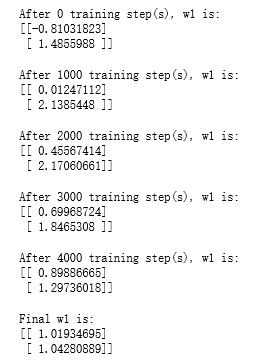
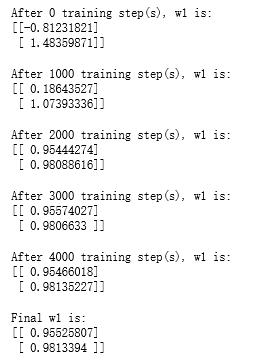
loss_less = 1

loss_more = 10

loss = tf.reduce_sum(tf.where(tf.greater(y, y_), (y - y_) * loss_more, (y_ - y) * loss_less))

train_step = tf.train.AdamOptimizer(0.001).minimize(loss)

with tf.Session() as sess:

    init_op = tf.global_variables_initializer()

    sess.run(init_op)

    STEPS = 5000

    for i in range(STEPS):

        start = (i*batch_size) % 128

        end = (i*batch_size) % 128 + batch_size

        sess.run(train_step, feed_dict={x: X[start:end], y_: Y[start:end]})

        if i % 1000 == 0:

            print("After %d training step(s), w1 is: " % (i))

            print sess.run(w1), "\n"

    print "Final w1 is: \n", sess.run(w1)
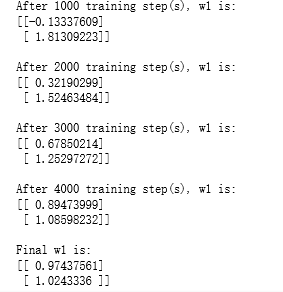
loss = tf.losses.mean_squared_error(y, y_)

train_step = tf.train.AdamOptimizer(0.001).minimize(loss)

with tf.Session() as sess:

    init_op = tf.global_variables_initializer()

    sess.run(init_op)

    STEPS = 5000

    for i in range(STEPS):

        start = (i*batch_size) % 128

        end = (i*batch_size) % 128 + batch_size

        sess.run(train_step, feed_dict={x: X[start:end], y_: Y[start:end]})

        if i % 1000 == 0:

            print("After %d training step(s), w1 is: " % (i))

            print sess.run(w1), "\n"

    print "Final w1 is: \n", sess.run(w1)
吴裕雄 python 神经网络——TensorFlow 自定义损失函数的更多相关文章
- 吴裕雄 python 神经网络——TensorFlow 循环神经网络处理MNIST手写数字数据集
#加载TF并导入数据集 import tensorflow as tf from tensorflow.contrib import rnn from tensorflow.examples.tuto ...
- 吴裕雄 python 神经网络——TensorFlow 使用卷积神经网络训练和预测MNIST手写数据集
import tensorflow as tf import numpy as np from tensorflow.examples.tutorials.mnist import input_dat ...
- 吴裕雄 python 神经网络——TensorFlow 训练过程的可视化 TensorBoard的应用
#训练过程的可视化 ,TensorBoard的应用 #导入模块并下载数据集 import tensorflow as tf from tensorflow.examples.tutorials.mni ...
- 吴裕雄 python 神经网络TensorFlow实现LeNet模型处理手写数字识别MNIST数据集
import tensorflow as tf tf.reset_default_graph() # 配置神经网络的参数 INPUT_NODE = 784 OUTPUT_NODE = 10 IMAGE ...
- 吴裕雄 python 神经网络——TensorFlow 数据集高层操作
import tempfile import tensorflow as tf train_files = tf.train.match_filenames_once("E:\\output ...
- 吴裕雄 python 神经网络——TensorFlow 输入数据处理框架
import tensorflow as tf files = tf.train.match_filenames_once("E:\\MNIST_data\\output.tfrecords ...
- 吴裕雄 python 神经网络——TensorFlow 花瓣分类与迁移学习(2)
import glob import os.path import numpy as np import tensorflow as tf from tensorflow.python.platfor ...
- 吴裕雄 python 神经网络——TensorFlow 花瓣识别2
import glob import os.path import numpy as np import tensorflow as tf from tensorflow.python.platfor ...
- 吴裕雄 python 神经网络——TensorFlow训练神经网络:不使用滑动平均
import tensorflow as tf from tensorflow.examples.tutorials.mnist import input_data INPUT_NODE = 784 ...
随机推荐
- 题解【2.23考试T2】str
2. str [题目描述] 这是一道传统题,源代码的文件名为 str.cpp/c/pas. 构造 n 个 01 字符串 S1...Sn,使得对于任意 i≠j,Si 不是 Sj 的前缀.在最小化串长和的 ...
- MySQL5.7的参数优化
https://www.cnblogs.com/zhjh256/p/9260636.html query_cache_size = 0query_cache_type=0innodb_undo_tab ...
- HDU 6740 kmp最小循环节
题意:给一个无线循环小数的前几位,给n,m 选择其中一种出现在前几位的循环节方式(a个数),循环节的长度b 使得n*a-m*b最大 样例: 2 1 12.1212 输出 6 选择2,2*1-1*1=1 ...
- linux系统下如何打开端口
1)vi /etc/sysconfig/iptables 2)-A INPUT -m state --state NEW -m tcp -p tcp --dport xxxxxxxxxx -j ACC ...
- vue-cli 3 脚手架搭建(create)
地址:https://cli.vuejs.org/zh/guide/ 安装步骤: 提示:node 版本要 8.9+ 两种方式: (1) npm install -g @vue/cli (2) yarn ...
- UltraEdit设置打开的文件类型,怎么打开大文本文件
点击高级,配置,选择文件处理下的临时文件,设置如图即可打开超大文本文件. 补充:视图——显示行号.
- c++调用自己编写的静态库(通过eclipse)
转:https://blog.csdn.net/hao5335156/article/details/80282829 参考:https://blog.csdn.net/u012707739/arti ...
- Docker - CentOS 7 安装
1. 概述 安装 docker markdown 显示有点问题 代码块里的 后面应该跟一个换行, 但是没有跟 这样会导致部分命令直接执行没有反应 2. 环境 os CentOS7 用户 root 3 ...
- Linux shell sed 命令详解
详细的sed命令详解,请参考https://my.oschina.net/u/3908182/blog/1921761 sed命令常见用途 查找关键词做全局替换 查找某行的关键词做替换 查找关键字所在 ...
- 每天进步一点点------Sobel算子(2)
转载 http://blog.csdn.net/tianhai110 索贝尔算子(Sobel operator)主要用作边缘检测,在技术上,它是一离散性差分算子,用来运算图像亮度函数的灰度之近似值. ...