
SyncTrayzor -- Windows tray utility / filesystem watcher / launcher for syncthing
SyncTrayzor is a little tray utility for Syncthing on Windows.
It hosts and wraps Syncthing, making it behave more like a native Windows application
and less like a command-line utility with a web browser interface.
Features include:
- Has a built-in web browser, so you don't need to fire up an external browser.
- Optionally starts on login, so you don't need to set up Syncthing as a service.
- Can watch your folders for changes, so you don't have to poll them frequently:
- Syncthing on its own has to poll your folders, in order to see if any files have changed.
- SyncTrayzor will watch your folders for changes, and alert Syncthing the second anything changes.
- This means you can increase the polling interval in Syncthing, avoiding the resource usage of high-frequency polling, but still have any changes propagated straight away.
- Folder watching respects the ignores configured in Syncthing.
- Tray icon indicates when synchronization is occurring.
- Optional tray messages when folders have finished syncing.
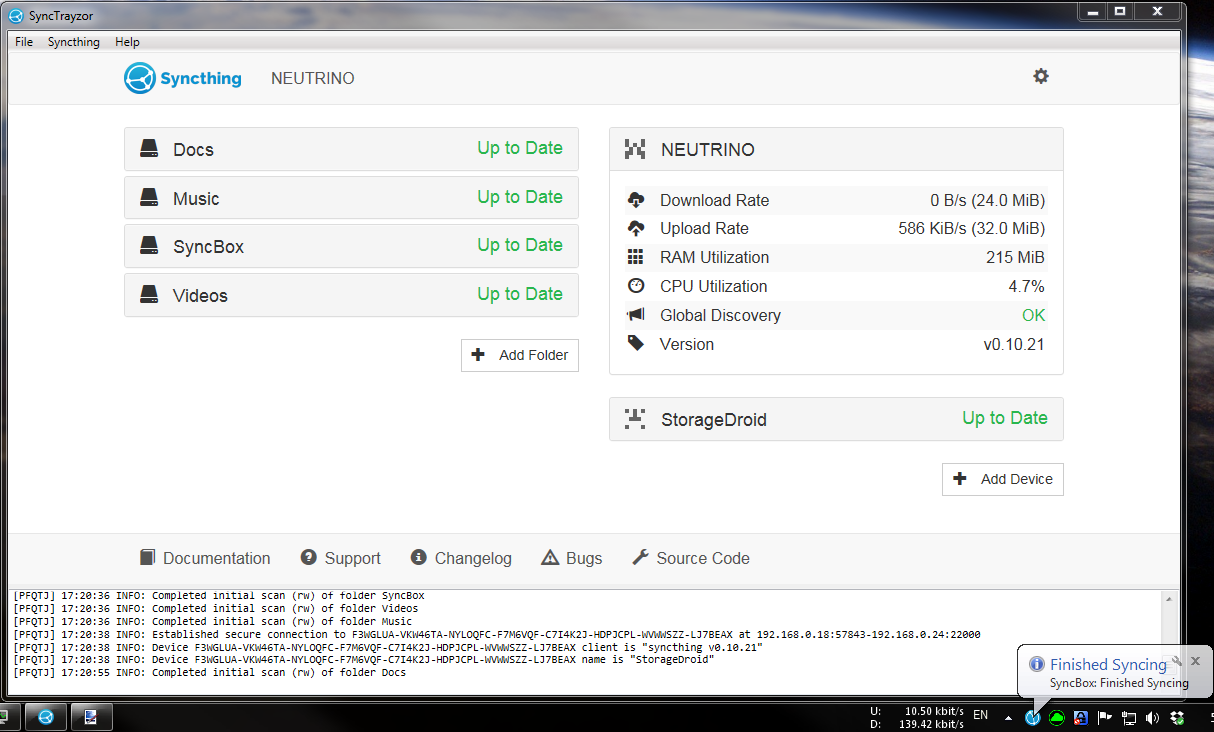
Version 1.0.18
v1.0.18 was released hours after v1.0.17 in order to fix an issue. v1.0.17's changelog is as follows:
- Fix crash when renaming a file whose path exceeds the Windows path length limit (#72)
- Fix 'Open Folder' button in Syncthing UI (#65)
- Ensure that folder list in Settings does not exceed screen height (#76)
- Start minimized after automatic upgrade (#59)
- Add italian translation (thanks stukdev)
- Improve text in icon context menu (#71)
- Console will scroll to end after resize (#67)
Downloads
- SyncTrayzorPortable-x64.zip
- SyncTrayzorPortable-x86.zip
- SyncTrayzorSetup-x64.exe
- SyncTrayzorSetup-x86.exe
- Source code (zip)
- Source code (tar.gz)
What will SyncTrayzor do to my system?
Good question. The answer depends on whether you installed SyncTrayzor using the installer, or are running it standalone.
Installer
SyncTrayzor will install itself into
C:\Program Files\SyncTrayzor.
By default, SyncTrayzor will put its own configuration in
C:\Users\<You>\AppData\Roaming\SyncTrayor, and let Syncthing use its default folder for its database, which is
C:\Users\<You>\AppData\Local\Syncthing.
It will also create a registry key at
HKEY_CURRENT_USER\Software\Microsoft\Windows\CurrentVersion\Run\SyncTrayzor
the first time that it is run, which will let it start when you log in.
You can delete this registry key by unchecking "Automatically start on login" in the settings.
If you check "Use custom home directory or Syncthing" in the settings, then SyncTrayzor will tell Syncthing to use
C:\Users\<You>\AppData\Local\SyncTrayzor\syncthing
for its database.
This is useful if you want to keep the copy of Syncthing managed by SyncTrayzor separate from another copy running on your machine.
The auto-update mechanism may download updates to
%TEMP%\SyncTrayzor.
This location is periodically cleared out (once every few days).
Standalone
SyncTrayzor will put its own configuration in
SyncTrayzorPortable\data,
and tell Syncthing to use
SyncTrayzorPortable\data\syncthing
for its database.
This means that, when upgrading, you can simply move the 'data' folder over to move all your settings, and database.
If you uncheck "Use custom home directory or Syncthing" in the settings, then Syncthing will use its default folder for its database, which is
C:\Users\<You>\AppData\Local\Syncthing.
The portable version won't start on login by default.
If you check "Automatically start on login" in the settings, then a registry key will be created at
HKEY_CURRENT_USER\Software\Microsoft\Windows\CurrentVersion\Run\SyncTrayzor.
SyncTrayzor -- Windows tray utility / filesystem watcher / launcher for syncthing的更多相关文章
- .netcore跨平台 之 windows上编译,ubuntu上运行
1 下载并安装netcore sdk 下载地址 https://github.com/dotnet/cli 选取合适的版本下载安装即可 打开 CMD ,输入dotnet,出现以下信息说明已安装好 ...
- 利用SSH Filesystem实现远程文件系统
远程文件系统的访问有很多种不同的实现方式,一些常见的连接方式比其它特定情况下的更有用.最著名的一个例子就是微软的通用互联网文件系统(CIFS),它可以容许微软Windows"映射网 ...
- 关于Windows常用命令
本文引用自:http://ylbook.com/cms/computer/mingling.htm Windows Run命令: calc———–启动计算器certmgr.msc—-证书管理实用程序c ...
- Professional C# 6 and .NET Core 1.0 - Chapter 39 Windows Services
本文内容为转载,供学习研究.如有侵权,请联系作者删除. 转载请注明本文出处:Professional C# 6 and .NET Core 1.0 - Chapter 39 Windows Servi ...
- SyncthingTray -- Syncthing wrapper for Windows
SyncthingTray Syncthing wrapper for Windows. Includes a small interface to configure start on boot a ...
- How to Run Syncthing 24/7 as a Windows Service with AlwaysUp
http://www.coretechnologies.com/products/AlwaysUp/Apps/RunSyncthingAsAWindowsService.html Automatica ...
- WINDOWS 的 MKLINK : 硬链接,符号链接 : 文件符号链接, 目录符号链接 : 目录联接
玩转WIN7的MKLINK 引言: 换了新电脑,终于再次使用上啦WIN7 ,经过一个周每天重装N次系统,... ... ... ... 在xp系统下,junction命令要用微软开发的小程序 junc ...
- Windows学习总结(12)——Windows 10系统开始运行-cmd命令大全
gpedit.msc-----组策略 sndrec32-------录音机 Nslookup-------IP地址侦测器 explorer-------打开资源管理器 logoff---------注 ...
- 【nodejs代理服务器三】nodejs注册windows服务
node-windows I no longer have enough time to properly maintain this project and am seeking a new pri ...
随机推荐
- python面向对象(四)之抽象类与接口
学过java的应该知道java有抽象类和接口的那么python呢?(以前写的关于java抽象类的笔记java抽象类与接口) python作为一个动态语言,没有强类型的检查,而是以鸭子类型的方式提现 ...
- node练习笔记
一.用http模块实现客户端 1. 这个错误的原因是:客户端http_client.js里面的端口和服务端里面的端口不一样 2.querystring.stringify 字符串转换成对象 q ...
- 基于gRpc的远程服务框架
作为一个新搭建的软件团队,底层技术尤为重要.为了以后更好的面向不同的项目需求,满足不断变化的需求,决定着手搭建一套RPC系统.为了更好的兼容以后部门其他语言的使用,选择了开源框架gRpc. gRpc ...
- P2733 家的范围 Home on the Range
又是一校内模拟赛见的题 不知道为什么出题人怎么这么喜欢USACO的Farmer John的他的牛... 感觉这道题不是特别的难,但也不很水 同机房的神仙们都说这个题是一道二维前缀和的裸题,但我当时的确 ...
- HDU 3360 National Treasures(最小点覆盖)
题目链接:http://acm.hdu.edu.cn/showproblem.php?pid=3360 题目大意: 在一个n*m的格子中,每个格子有一个数值,-1表示空,其余表示财宝.每个财宝的数值转 ...
- 删除数据库所有存储过程的SQL语句
--/第1步**********删除所有表的外键约束*************************/ DECLARE c1 cursor for select 'alter table ['+ o ...
- Jenkins的授权和访问控制
默认的Jenkins不包含任何的安全检查,任何人可以修改Jenkins设置,job和启动build等.显然地在大规模的公司需要多个部门一起协调工作的时候,没有任何安全检查会带来很多的问题. 在系统管理 ...
- 解决mysql不能远程登入的问题
mysql远程不能登入,问题就在于当时设置的账号只限制本地访问,mysql默认也只是本地访问. 之前的设置: 通过命令行登录管理MySQL服务器(提示输入密码时直接回车): mysql> /us ...
- WepE
1. 计算机管理 第一个主:1024MB FAT32 活动,主分区 第二个主: * exFAT 主分区 都分配盘符2. WePE安装包 安装到移动硬盘 双启导 指定指一个主分区
- loadrunner 脚本中文乱码
loadrunner 脚本中文乱码 1.新建脚本--->选择协议(Http)-->选项-->高级-->选择“支持字符集”并点选“UTF-8”: 2.在回放脚本之前:Vuser- ...