
Entity Framework Code-First(4):Simple Code First Example
Simple Code First Example:
Let's assume that we want to create a simple application for XYZ School. Users of this School application should be able to add or update Students, Standard (Grade), Teacher, and Course information.
Instead of designing database tables first, let's start creating classes for our school domain, as and when needed. First, we will create two simple Student and Standard classes where every Student is associated with one Standard as shown below.
public class Student

{

    public Student()

    {

    }

    public int StudentID { get; set; }

    public string StudentName { get; set; }

    public DateTime? DateOfBirth { get; set; }

    public byte[]  Photo { get; set; }

    public decimal Height { get; set; }

    public float Weight { get; set; }

    public Standard Standard { get; set; }

}
The Standard (Grade) class should be able to accommodate multiple Students as shown below.
public class Standard

{

    public Standard()

    {

    }

    public int StandardId { get; set; }

    public string StandardName { get; set; }

    public ICollection<Student> Students { get; set; }

 }
Now, we are done with the initial domain classes for our school application. Code-First approach also requires context class which should be derived from DbContext as we have created in the basic tutorials section using Database-First approach. Visit DbContext for more information.
Create a context class as shown below, which derives from DBContext class and exposes DbSet properties for the types that you want to be part of the model, e.g. Student and Standard class, in this case. DbSet is a collection of entity classes (aka entity set), so we have given property name as plural of entity name like Students and Standards.
namespace EF_Code_First_Tutorials

{

    public class SchoolContext: DbContext

    {

        public SchoolContext(): base()

        {

        }

        public DbSet<Student> Students { get; set; }

        public DbSet<Standard> Standards { get; set; }

    }

}
Now, we are done with the required classes for the code-first approach. We will now add student using context class as shown below.
class Program

{

    static void Main(string[] args)

    {

        using (var ctx = new SchoolContext())

        {

            Student stud = new Student() { StudentName = "New Student" };

            ctx.Students.Add(stud);

            ctx.SaveChanges();

        }

    }

}
If you run the application, you will be surprised to see that the application runs successfully and one student is successfully inserted into the database.
But, where is the database and what are the tables and its columns?
This is the beauty of Code-First APIs of Entity Framework. It creates the database based on parameter passed in the base constructor of your context class. Since we have not passed any parameter in the constructor of our context class, it created "EF_Code_First_Tutorials.SchoolContext" database in the local SQLEXPRESS database, as shown below. It also created two tables in this database, Students and Standards tables based on Student and Standard domain classes defined above.
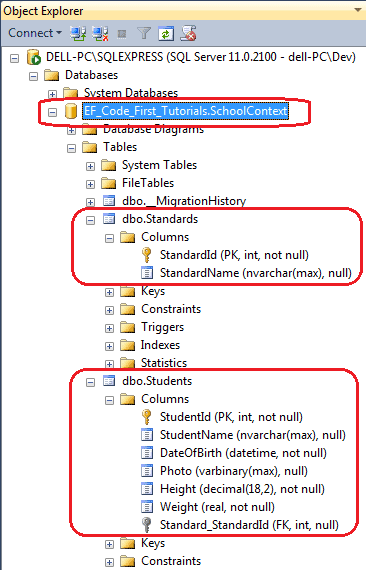
As you can see in the above figure, it has created Students and Standards tables and each table contains columns with appropriate datatype and length. The column names and datatype matches with the properties of the respective domain classes. It has also made StudentId and StandardId as PK (primary key) and Standard_StandardId column as FK (foreign key).
This way, without creating a database first, you can start writing an application that will eventually create the database from your domain classes.
You must be wondering how it has created columns with appropriate datatypes and lengh with PK & FK, right? The answer is, using code-first conventions.
Learn code-first conventions in the next section.
Entity Framework Code-First(4):Simple Code First Example的更多相关文章
- Entity Framework Tutorial Basics(1):Introduction
以下系列文章为Entity Framework Turial Basics系列 http://www.entityframeworktutorial.net/EntityFramework5/enti ...
- Entity Framework Tutorial Basics(11):Code First
Code First development with Entity Framework: Entity Framework supports three different development ...
- Entity Framework Tutorial Basics(37):Lazy Loading
Lazy Loading: One of the important functions of Entity Framework is lazy loading. Lazy loading means ...
- Entity Framework Tutorial Basics(36):Eager Loading
Eager Loading: Eager loading is the process whereby a query for one type of entity also loads relate ...
- Entity Framework Tutorial Basics(32):Enum Support
Enum in Entity Framework: You can now have an Enum in Entity Framework 5.0 onwards. EF 5 should targ ...
- Entity Framework Tutorial Basics(29):Stored Procedure in Entity Framework
Stored Procedure in Entity Framework: Entity Framework has the ability to automatically build native ...
- Entity Framework Tutorial Basics(28):Concurrency
Concurrency in Entity Framework: Entity Framework supports Optimistic Concurrency by default. In the ...
- Entity Framework Tutorial Basics(27):Update Entity Graph
Update Entity Graph using DbContext: Updating an entity graph in disconnected scenario is a complex ...
- Entity Framework Tutorial Basics(22):Disconnected Entities
Disconnected Entities: Before we see how to perform CRUD operation on disconnected entity graph, let ...
随机推荐
- SrpingCloud 之SrpingCloud config分布式配置中心搭建
1.搭建git环境 目的:持久化存储配置文件信息 采用码云 创建后 继续创建文件夹 用来区分不同的项目 下面就是git上存放配置文件了.环境的区分 dev sit pre prd 开发 ...
- HIVE- 大数据运维之hive管理
我现在在一家公司负责大数据平台(CDH平台)的运维管理,最常遇见的问题我总结出来,并且继续在下面更新.希望方便自己以后trouble shooting以及方便各位同行解决问题与学习. 关于做运维有几个 ...
- ubantu卸载软件
参考:https://blog.csdn.net/luckydog612/article/details/80877179 https://blog.csdn.net/get_set/article/ ...
- php数组转换成js可用的数组的两种方式
1.如果你理解JSON数据格式的话,这个问题就异常简单: <?php $a =array('1','2','3'); ?> <script language="javasc ...
- 创建第一个Servlet并定制Sevlet模板
我们已经为eclipse配好了Tomcat服务器,创建了Web工程,现在是时候该创建一个Servlet向世界问好了! 第一步:创建一个Web工程,选中”src“文件夹 -->单击右键,鼠标移到” ...
- php判断是否是微信浏览器
php判断是否是微信浏览器 直接上代码: <?PHP function is_wechat_browser(){ $user_agent = $_SERVER['HTTP_USER_AGENT' ...
- codeforces 680D D. Bear and Tower of Cubes(dfs+贪心)
题目链接: D. Bear and Tower of Cubes time limit per test 2 seconds memory limit per test 256 megabytes i ...
- codeforces 655B B. Mischievous Mess Makers(贪心)
题目链接: B. Mischievous Mess Makers time limit per test 1 second memory limit per test 256 megabytes in ...
- leetcode 226. Invert Binary Tree(递归)
Invert a binary tree. 4 / \ 2 7 / \ / \ 1 3 6 9 to 4 / \ 7 2 / \ / \ 9 6 3 1 Trivia:This problem was ...
- Java中常见的几个乱码问题以及解决方法
1.ajax--URL中的参数含中文,后台接受的参数出现乱码 解决方法: 第一步:在javascript中,对url进行两次编码 url = "http://localhost:8080/M ...