
Entity Framework Tutorial Basics(29):Stored Procedure in Entity Framework
Stored Procedure in Entity Framework:
Entity Framework has the ability to automatically build native commands for the database based on your LINQ to Entities or Entity SQL queries, as well as, build the commands for inserting, updating, or deleting data. You may want to override these steps and use your own predefined stored procedures. You can use stored procedures either to get the data or to add/update/delete the records to one or multiple database tables.
Stored procedures and user-defined functions (UDFs) in the database are represented as functions in entity framework. EDM won't have any entity for the stored procedures in the EDM designer.
Here, we will add the following stored procedure GetCoursesByStudentId into EDM. This procedure returns all the courses assigned to a particular student:
CREATE PROCEDURE [dbo].[GetCoursesByStudentId]

    -- Add the parameters for the stored procedure here

    @StudentId int = null

AS

BEGIN

    -- SET NOCOUNT ON added to prevent extra result sets from

    -- interfering with SELECT statements.

    SET NOCOUNT ON;

    -- Insert statements for procedure here

select c.courseid, c.coursename,c.Location, c.TeacherId

from student s

left outer join studentcourse sc on sc.studentid = s.studentid

left outer join course c on c.courseid = sc.courseid

where s.studentid = @StudentId

END
First, create a new ADO.Net Entity Data Model using EF Designer from database.
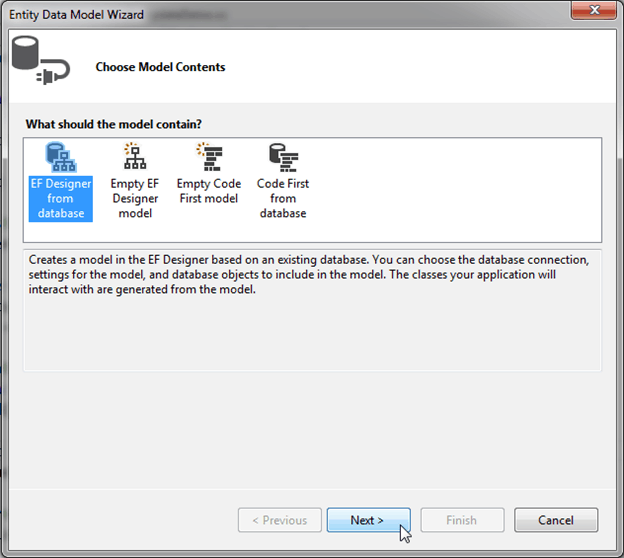
Select GetCoursesByStudentId. Make sure that the Import selected stored procedures and functions into the entity model checkbox is selected and then click Finish.
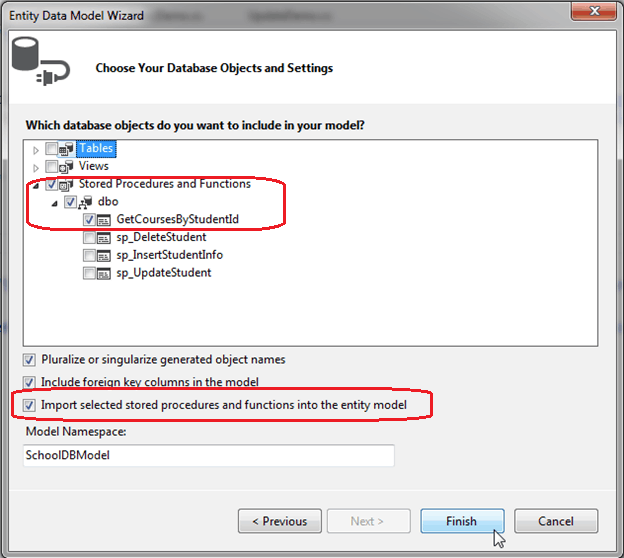
You will see GetCoursesByStudentId added in Function Imports with new complex type GetCoursesByStudentId_Result in the Model Browser. Whenever you import a stored procedure into a model, it creates a new complex type with the name {sp name}_Result by default.
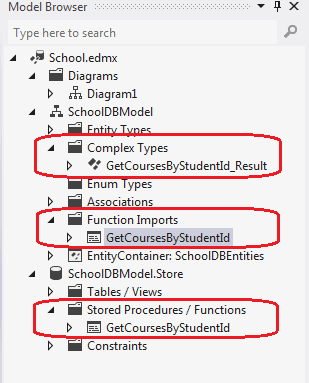
GetCoursesByStudentId returns the same fields defined in Course entity. So we don't need to add a new complex type for the returned data from GetCoursesByStudentId. You can change it by right clicking on GetCoursesByStudentId in function imports and selecting Edit. Check Entities and select Course from dropdown in popup window as shown below:
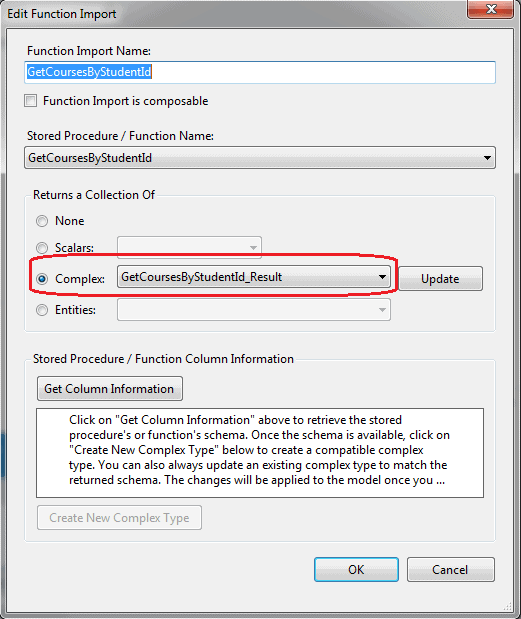
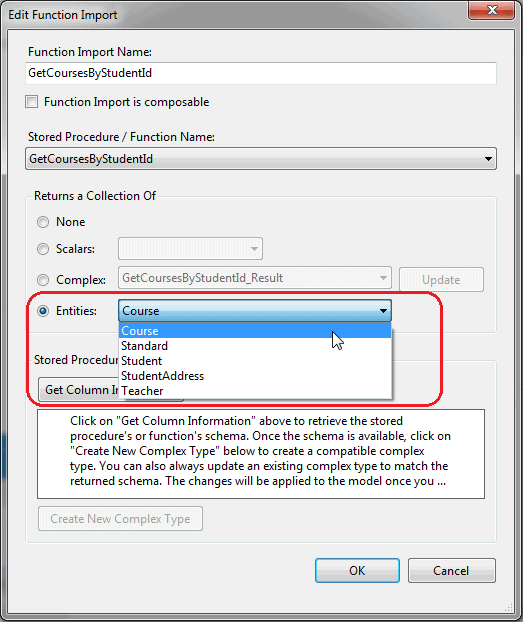
You will see the function in the context class for GetCoursesByStudentId as shown below:
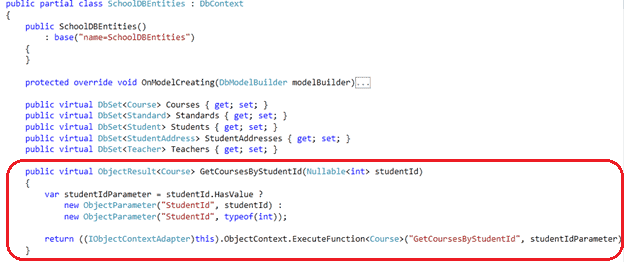
Now, GetCoursesByStudentId can be called and the result shown below will be returned:
using (var context = new SchoolDBEntities())

{

    var courses = context.GetCoursesByStudentId();

    foreach (Course cs in courses)

        Console.WriteLine(cs.CourseName);

}
The code shown above will execute the following statement:
exec [dbo].[GetCoursesByStudentId] @StudentId=1
You will learn how to use stored procedures for CUD operation in the next chapter.
Entity Framework Tutorial Basics(29):Stored Procedure in Entity Framework的更多相关文章
- Entity Framework Tutorial Basics(1):Introduction
以下系列文章为Entity Framework Turial Basics系列 http://www.entityframeworktutorial.net/EntityFramework5/enti ...
- Entity Framework Tutorial Basics(42):Colored Entity
Colored Entity in Entity Framework 5.0 You can change the color of an entity in the designer so that ...
- Entity Framework Tutorial Basics(41):Multiple Diagrams
Multiple Diagrams in Entity Framework 5.0 Visual Studio 2012 provides a facility to split the design ...
- Entity Framework Tutorial Basics(34):Table-Valued Function
Table-Valued Function in Entity Framework 5.0 Entity Framework 5.0 supports Table-valued functions o ...
- Entity Framework Tutorial Basics(32):Enum Support
Enum in Entity Framework: You can now have an Enum in Entity Framework 5.0 onwards. EF 5 should targ ...
- Entity Framework Tutorial Basics(27):Update Entity Graph
Update Entity Graph using DbContext: Updating an entity graph in disconnected scenario is a complex ...
- Entity Framework Tutorial Basics(22):Disconnected Entities
Disconnected Entities: Before we see how to perform CRUD operation on disconnected entity graph, let ...
- Entity Framework Tutorial Basics(13):Database First
Database First development with Entity Framework: We have seen this approach in Create Entity Data M ...
- Entity Framework Tutorial Basics(8):Types of Entity in Entity Framework
Types of Entity in Entity Framework: We created EDM for existing database in the previous section. A ...
随机推荐
- python中join函数用法
str.join(list/tuple/dict/string) str = "-"; seq = ("a", "b", "c&q ...
- 3.16 draw 3.17 更新函数
3.16 draw virtual void draw(); void HelloWorld::draw() { CCSize size = CCDirector::sharedDirector()- ...
- Rebranding(字母代换)
个人心得:题目意思就是每次给出可以互换的字母,如果每次命令的时候就执行的话一定会超时. 所以我就是将输入的字母从a到z的数目和路径依次保存,再建立一个book数组表示字母现在所指的字母 ,一开始就直接 ...
- notepad++怎么显示项目的目录树?
转:http://www.jcodecraeer.com/a/anzhuokaifa/androidkaifa/2014/1013/1762.html
- jsp有哪些内置对象?作用分别是什么?
JSP共有以下9种基本内置组件 1.request对象 客户端请求,此请求会包含来自GET/POST请求的参数通过它才能了解到客户的需求,然后做出响应. 2.response对象 响应客户请求的有关信 ...
- python数据类型,int,str,bool
一,python中的int() int在python中主要用来运算,对字符串的转化,用int(str)表示,并且需要str.isdigit为真. 在int()中二进制的转换如下: #bit_lengt ...
- linux下查找命令两则
由于本人不会阅读man手册,因此需要几下两个常用的查找命令: (1)在某个目录及其子目录查找某个文件并打印完整路径: find ./ -name "assertions.h" -e ...
- Hibernate检索方式(转载)
我们在项目应用中对数据进行最多的操作就是查询,数据的查询在所有ORM框架中也占有极其重要的地位. 那么,如何利用Hibernate查询数据呢?Hibernate为我们提供了多种数据查询的方式,又称为H ...
- WPF案例:如何设计历史记录查看UI
(CSDN博客目前不支持外链, 只能纯文字) 设计WPF的UI,一般遵循下面的步骤: 1.首先分析数据结构 2.根据数据结构选择合理控件 3.定制外观 具体对于历史记录查看UI, 我们可以得知: 1. ...
- Azure VMSS ---- PowerShell创建自定义镜像的VMSS集群
前面一篇文章介绍了如何用PowerShell创建标准镜像的VMSS集群.http://www.cnblogs.com/hengwei/p/7391178.html 本文将介绍,如何用PowerShel ...