
Python实例---爬去酷狗音乐
项目一:获取酷狗TOP 100
http://www.kugou.com/yy/rank/home/1-8888.html
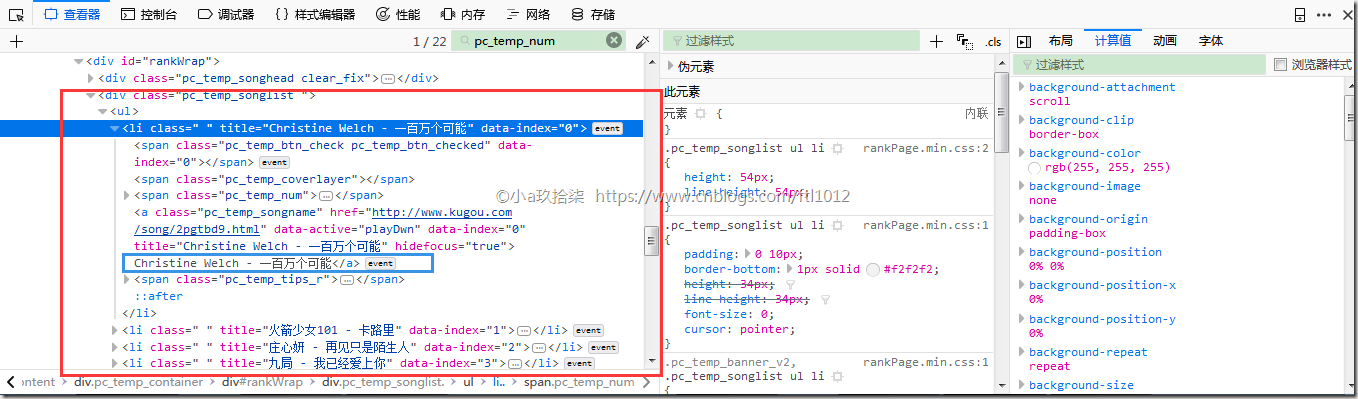
排名

文件&&歌手
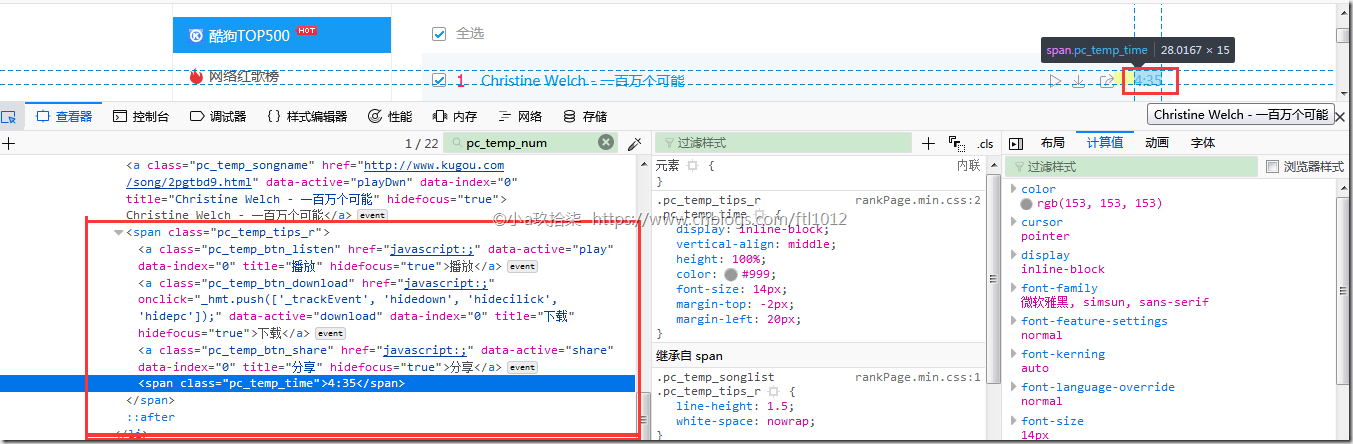
时长
效果:

附源码:
import time

import json

from bs4 import BeautifulSoup

import requests

class Kugou(object):

    def __init__(self):

        self.header = {

            "User-Agent": 'Mozilla/5.0 (Windows NT 10.0; Win64; x64; rv:60.0) Gecko/20100101 Firefox/60.0'

        }

    def getInfo(self, url):

        html = requests.get(url, headers=self.header)

        soup = BeautifulSoup(html.text, 'html.parser')

        # print(soup.prettify())

        ranks = soup.select('.pc_temp_num')

        titles = soup.select('.pc_temp_songlist > ul > li > a')  # 层层标签查找

        times = soup.select('.pc_temp_time')

        for rank, title, songTime in zip(ranks, titles, times):

            data = {

                # rank 全打印就是带HTML标签的

                'rank': rank.get_text().strip(),

                'title': title.get_text().split('-')[1].strip(),

                'singer': title.get_text().split('-')[0].strip(),

                'songTime': songTime.get_text().strip()

            }

            s = str(data)

            print('rank:%2s\t' % data['rank'], 'title:%2s\t' % data['title'], 'singer:%2s\t' %data['singer'], 'songTime:%2s\t' % data['songTime'])

            with open('hhh.txt', 'a', encoding='utf8') as f:

               f.writelines(s + '\n')

if __name__ == '__main__':

    urls = [

        'http://www.kugou.com/yy/rank/home/{}-8888.html'.format(str(i)) for i in range(30)

    ]

    kugou = Kugou()

    for url in urls:

        kugou.getInfo(url)

        time.sleep(1)
部分代码解析
--------------------------------------------------------------------

urls = ['http://www.kugou.com/yy/rank/home/{}-8888.html'.format(str(i)) for i in range(1, 5)]

for i in urls:

    print(i)

结果打印:

	http://www.kugou.com/yy/rank/home/1-8888.html

	http://www.kugou.com/yy/rank/home/2-8888.html

	http://www.kugou.com/yy/rank/home/3-8888.html

	http://www.kugou.com/yy/rank/home/4-8888.html

--------------------------------------------------------------------

for rank, title, songTime in zip(ranks, titles, times):

    data = {

        # rank 全打印就是带HTML标签的

        'rank': rank.get_text().strip(),

        'title': title.get_text().split('-')[0].strip(),

        'singer': title.get_text().split('-')[1].strip(),

        'songTime': songTime.get_text()

    }

    print(data['rank'])

    print(data['title'])

    print(data['singer'])

    print(data['songTime'])

结果打印:

    1

    飞驰于你

    许嵩

    4: 04

--------------------------------------------------------------------

for rank, title, songTime in zip(ranks, titles, times):

	data = {

		# rank 全打印就是带HTML标签的

		'rank': rank,

		'title': title,

		'songTime': songTime

	}

	print(data['rank'])

	print(data['title'])

	print(data['songTime'])

结果打印:

<span class="pc_temp_num">

	<strong>1</strong>

</span>

<a class="pc_temp_songname" data-active="playDwn" data-index="0" hidefocus="true" href="http://www.kugou.com/song/pjn5xaa.html" title="许嵩 - 飞驰于你">许嵩 - 飞驰于你</a>

<span class="pc_temp_time">	4:04 </span>
项目二:搜索曲目获取URL
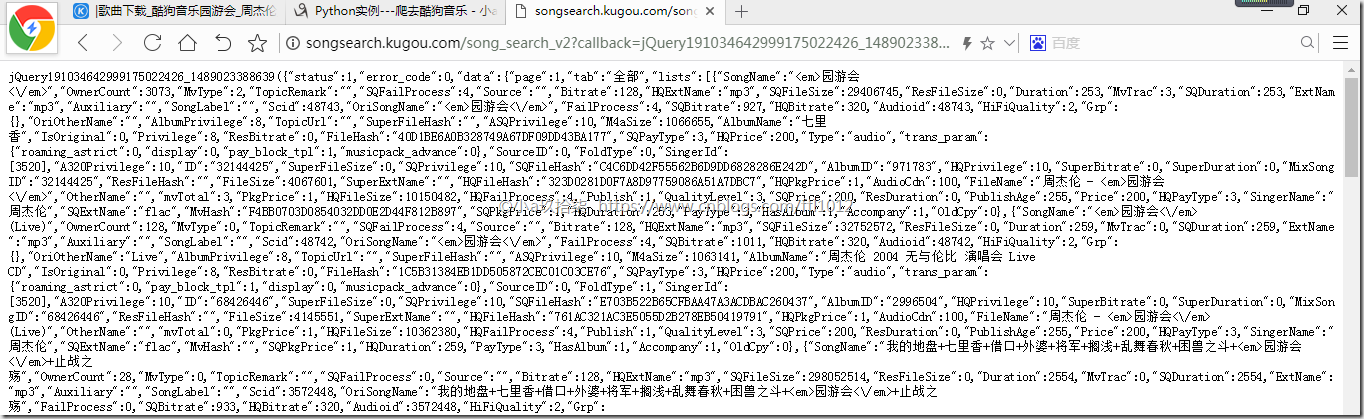
根据关键字搜索后的结果:
# encoding=utf-8

# Time    : 2018/4/27

# Email   : z2615@163.com

# Software: PyCharm

# Language: Python 3

import requests

import json

class KgDownLoader(object):

    def __init__(self):

        self.search_url = 'http://songsearch.kugou.com/song_search_v2?callback=jQuery191034642999175022426_1489023388639&keyword={}&page=1&pagesize=30&userid=-1&clientver=&platform=WebFilter&tag=em&filter=2&iscorrection=1&privilege_filter=0&_=1489023388641'

        # .format('园游会')

        self.play_url = 'http://www.kugou.com/yy/index.php?r=play/getdata&hash={}'

        self.song_info = {

            '歌名': None,

            '演唱者': None,

            '专辑': None,

            'filehash': None,

            'mp3url': None

        }

    def get_search_data(self, keys):

        search_file = requests.get(self.search_url.format(keys))

        search_html = search_file.content.decode().replace(')', '').replace(

            'jQuery191034642999175022426_1489023388639(', '')

        views = json.loads(search_html)

        for view in views['data']['lists']:

            song_name = view['SongName'].replace('<em>', '').replace('</em>', '')

            album_name = view['AlbumName'].replace('<em>', '').replace('</em>', '')

            sing_name = view['SingerName'].replace('<em>', '').replace('</em>', '')

            file_hash = view['FileHash']

            new_info = {

                '歌名': song_name,

                '演唱者': sing_name,

                '专辑': album_name if album_name else None,

                'filehash': file_hash,

                'mp3url': None

            }

            self.song_info.update(new_info)

            yield self.song_info

    def get_mp3_url(self, filehash):

        mp3_file = requests.get(self.play_url.format(filehash)).content.decode()

        mp3_json = json.loads(mp3_file)

        real_url = mp3_json['data']['play_url']

        self.song_info['mp3url'] = real_url

        yield self.song_info

    def save_mp3(self, song_name, real_url):

        with open(song_name + ".mp3", "wb")as fp:

            fp.write(requests.get(real_url).content)

if __name__ == '__main__':

    kg = KgDownLoader()

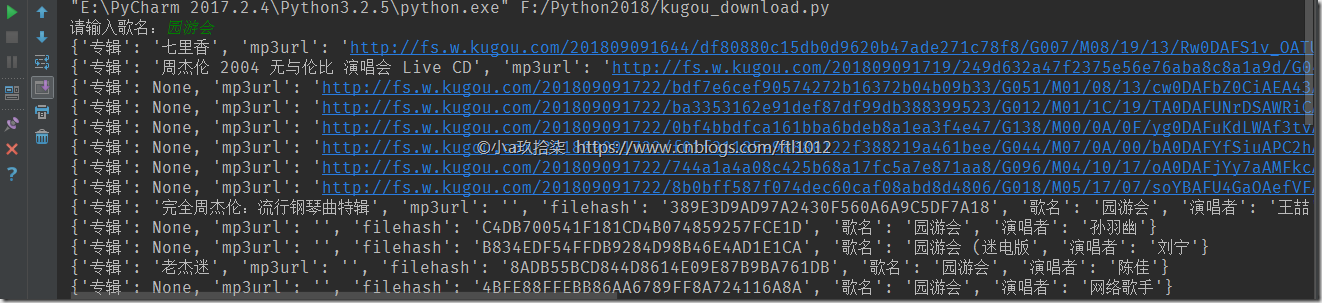
    mp3_info = kg.get_search_data(input('请输入歌名:'))

    for x in mp3_info:

        mp3info = kg.get_mp3_url(x['filehash'])

        for i in mp3info:

            print(i)
项目三:搜索下载歌曲
代码仅供学习参考
from selenium import webdriver

from bs4 import BeautifulSoup

import urllib.request

from selenium.webdriver.common.action_chains import ActionChains

input_string = input('>>>please input the search key:')

#input_string="你就不要想起我"

driver = webdriver.Chrome()

driver.get('http://www.kugou.com/')

a=driver.find_element_by_xpath('/html/body/div[1]/div[1]/div[1]/div[1]/input') #输入搜索内容/html/body/div[1]/div[1]/div[1]/div[1]/input

a.send_keys(input_string)

driver.find_element_by_xpath('/html/body/div[1]/div[1]/div[1]/div[1]/div/i').click() #点击搜索/html/body/div[1]/div[1]/div[1]/div[1]/div/i

for handle in driver.window_handles:#方法二,始终获得当前最后的窗口,所以多要多次使用

    driver.switch_to_window(handle)

#result_url = driver.current_url

#driver = webdriver.Firefox()

#driver.maximize_window()

#driver.get(result_url)

#j=driver.find_element_by_xpath('/html/body/div[4]/div[1]/div[2]/ul[2]/li[2]/div[1]/a').get_attribute('title')测试

#print(j)

soup = BeautifulSoup(driver.page_source,'lxml')

PageAll = len(soup.select('ul.list_content.clearfix > li'))

print(PageAll)

for i in range(1,PageAll+1):

    j=driver.find_element_by_xpath('/html/body/div[4]/div[1]/div[2]/ul[2]/li[%d]/div[1]/a'%i).get_attribute('title')

    print('%d.'%i + j)

choice=input("请输入你要下载的歌曲(输入序号):")

#global mname

#mname=driver.find_element_by_xpath('/html/body/div[4]/div[1]/div[2]/ul[2]/li[%d]/div[1]/a'%choice).get_attribute('title')#歌曲名

a=driver.find_element_by_xpath('/html/body/div[4]/div[1]/div[2]/ul[2]/li[%s]/div[1]/a'%choice)#定位

b=driver.find_element_by_xpath('/html/body/div[4]/div[1]/div[2]/ul[2]/li[%s]/div[1]/a'%choice).get_attribute('title')

actions=ActionChains(driver)#selenium中定义的一个类

actions.move_to_element(a)#将鼠标移动到指定位置

actions.click(a)#点击

actions.perform()

#wait(driver)?

#driver = webdriver.Firefox()

#driver.maximize_window()

#driver.get(result_url)

#windows = driver.window_handles

#driver.switch_to.window(windows[-1])

#handles = driver.window_handles

for handle in driver.window_handles:#方法二,始终获得当前最后的窗口,所以多要多次使用

    driver.switch_to_window(handle)

Local=driver.find_element_by_xpath('//*[@id="myAudio"]').get_attribute('src')

print(driver.find_element_by_xpath('//*[@id="myAudio"]').get_attribute('src'))

def cbk(a, b, c):

    per = 100.0 * a * b / c

    if per > 100:

        per = 100

    print('%.2f%%' % per)

soup=BeautifulSoup(b)

name=soup.get_text()

path='D:\%s.mp3'%name

urllib.request.urlretrieve(Local, path, cbk)

print('finish downloading %s.mp3' % name + '\n\n')
【更多参考】https://blog.csdn.net/abc_123456___/article/details/81101845
Python实例---爬去酷狗音乐的更多相关文章
- python爬取酷狗音乐排行榜
本文为大家分享了python爬取酷狗音乐排行榜的具体代码,供大家参考,具体内容如下
- Java爬虫系列之实战:爬取酷狗音乐网 TOP500 的歌曲(附源码)
在前面分享的两篇随笔中分别介绍了HttpClient和Jsoup以及简单的代码案例: Java爬虫系列二:使用HttpClient抓取页面HTML Java爬虫系列三:使用Jsoup解析HTML 今天 ...
- python使用beautifulsoup4爬取酷狗音乐
声明:本文仅为技术交流,请勿用于它处. 小编经常在网上听一些音乐但是有一些网站好多音乐都是付费下载的正好我会点爬虫技术,空闲时间写了一份,截止4月底没有问题的,会下载到当前目录,只要按照bs4库就好, ...
- Python 应用爬虫下载酷狗音乐
应用爬虫下载酷狗音乐 首先我们需要进入到这个界面 想要爬取这些歌曲链接,然而这个是一个假的网站,虽然单机右键进行检查能看到这些歌曲的链接,可进行爬取时,却爬取不到这些信息. 这个时候我们就应该换一种思 ...
- python爬取酷狗音乐
url:https://www.kugou.com/yy/html/rank.html 我们随便访问一个歌曲可以看到url有个hash https://www.kugou.com/song/#hash ...
- 【Python】【爬虫】爬取酷狗音乐网络红歌榜
原理:我的上篇博客 import requests import time from bs4 import BeautifulSoup def get_html(url): ''' 获得 HTML ' ...
- 使用scrapy 爬取酷狗音乐歌手及歌曲名并存入mongodb中
备注还没来得及写,共爬取八千多的歌手,每名歌手平均三十首歌曲算,大概二十多万首歌曲 run.py #!/usr/bin/env python # -*- coding: utf-8 -*- __aut ...
- 爬去酷狗top500的数据
import requests from bs4 import BeautifulSoup import time headers={ #'User-Agent':'Nokia6600/1.0 (3. ...
- 【Python】【爬虫】爬取酷狗TOP500
好啦好啦,那我们来拉开我们的爬虫之旅吧~~~ 这一只小爬虫是爬取酷狗TOP500的,使用的爬取手法简单粗暴,目的是帮大家初步窥探爬虫长啥样,后期会慢慢变得健壮起来的. 环境配置 在此之前需要下载一个谷 ...
随机推荐
- 关于LVS+Nginx为什么会被同时使用的思考
最初的理解 (也可以每个nginx都挂在上所有的应用服务器) nginx大家都在用,估计也很熟悉了,在做负载均衡时很好用,安装简单.配置简单.相关材料也特别多. lvs是国内的章文嵩博士的大作,比ng ...
- Unity主线程和子线程跳转调用(1)
Unity除了一些基本的数据类型,几乎所有的API都不能在非unity线程中调用,如果项目中有一段很耗时操作,unity可能会出现“假死”.如果这段操作是和unity无关的,我们可以把这个耗时的操作放 ...
- MVC的使用
演示产品源码下载地址:http://www.jinhusns.com
- vscode 自动提示Threejs
转自:https://blog.csdn.net/github_39125824/article/details/82633993 1.首先,你要安装Node.js 2.在vscode的 查看-> ...
- MYSQL查询优化:Limit
Limit语法: SELECT * FROM table LIMIT [offset,] rows | rows OFFSET offset LIMIT子句可以被用于强制 SELECT 语句返回指定的 ...
- Eclipse中导入外部jar包步骤
昨天,学习了Jar包的打包过程,现在打算记录一下,如何在Eclipse中导入外部Jar包. 第一步:在项目中鼠标右键>>New>>点击Folder. 第二步:在弹出窗口将Fol ...
- Java代码优化笔记
指定类.方法的final修饰符 为类指定final修饰符可以让类不可以被继承,为方法指定final修饰符可以让方法不可以被重写.如果指定了一个类为final,则该类所有的方法都是final的.Java ...
- Android - ANR小结
Application Not Responding 在Android上,如果你的应用程序有一段时间响应不够灵敏,系统会向用户显示一个对话框,这个对话框称作应用程序无响应(ANR:Applicatio ...
- element ui 的Notification通知如何加 a 标签和按钮,并弹多个
前言:工作中需要在页面右下角弹出很多个提醒框,提醒框上有一个可点击的a标签,并有一个按钮,同时还需要一次性关闭所有的弹出框.转载请注明出处:https://www.cnblogs.com/yuxiao ...
- C++ auto 关键字的使用
C++98 auto 早在C++98标准中就存在了auto关键字,那时的auto用于声明变量为自动变量,自动变量意为拥有自动的生命期,这是多余的,因为就算不使用auto声明,变量依旧拥有自动的生命期: ...