
ASP.NET Core Cookie-based认证实现
using Microsoft.AspNetCore.Authorization;

using Microsoft.AspNetCore.Mvc;

namespace HelloCore2.Controllers

{

    [Authorize]

    public class AdminController : Controller

    {

        public IActionResult Index()

        {

            return View();

        }

    }

}
using Microsoft.AspNetCore.Authentication;

using Microsoft.AspNetCore.Authentication.Cookies;

using Microsoft.AspNetCore.Mvc;

using System.Collections.Generic;

using System.Security.Claims;

namespace HelloCore2.Controllers

{

    public class AccountController : Controller

    {

        public IActionResult Login()

        {

            var claims = new List<Claim>()

            {

                new Claim(ClaimTypes.Name,"wolf"),

                new Claim(ClaimTypes.Role,"admin"),

            };

            var claimidentity = new ClaimsIdentity(claims,CookieAuthenticationDefaults.AuthenticationScheme);

            HttpContext.SignInAsync(CookieAuthenticationDefaults.AuthenticationScheme,

                new ClaimsPrincipal(claimidentity));

            return Ok("Login");

        }

        public IActionResult LogOut()

        {

            HttpContext.SignOutAsync(CookieAuthenticationDefaults.AuthenticationScheme);

            return Ok("LogOut");

        }

    }

}
using Microsoft.AspNetCore.Authentication.Cookies;

using Microsoft.AspNetCore.Builder;

using Microsoft.AspNetCore.Hosting;

using Microsoft.Extensions.Configuration;

using Microsoft.Extensions.DependencyInjection;

namespace HelloCore2

{

    public class Startup

    {

        public Startup(IConfiguration configuration)

        {

            Configuration = configuration;

        }

        public IConfiguration Configuration { get; }

        // This method gets called by the runtime. Use this method to add services to the container.

        public void ConfigureServices(IServiceCollection services)

        {

            //配置1

            services.AddAuthentication(CookieAuthenticationDefaults.AuthenticationScheme)

                .AddCookie(options =>

                {

                    //跳转登录页面

                    options.LoginPath = "/Account/login";

                });

            services.AddMvc();

        }

        // This method gets called by the runtime. Use this method to configure the HTTP request pipeline.

        public void Configure(IApplicationBuilder app, IHostingEnvironment env)

        {

            if (env.IsDevelopment())

            {

                app.UseBrowserLink();

                app.UseDeveloperExceptionPage();

            }

            else

            {

                app.UseExceptionHandler("/Home/Error");

            }

            app.UseStaticFiles();

            //配置2

            app.UseAuthentication();

            app.UseMvc(routes =>

            {

                routes.MapRoute(

                    name: "default",

                    template: "{controller=Home}/{action=Index}/{id?}");

            });

        }

    }

}
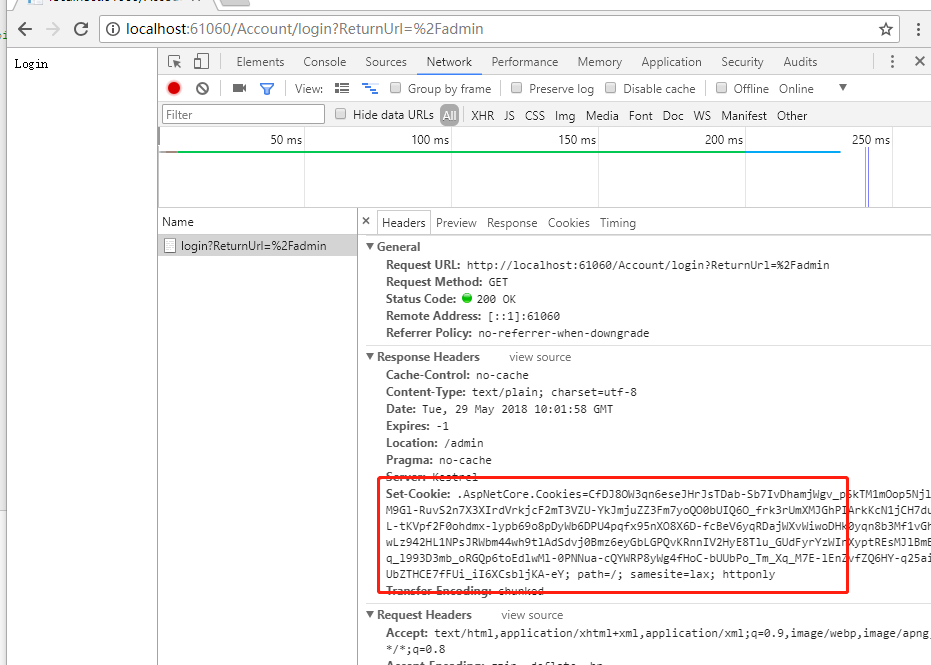
登录成功
ASP.NET Core Cookie-based认证实现的更多相关文章
- asp.net core 2.1认证
asp.net core 2.1认证 这篇文章基于asp.net core的CookieAuthenticationHandler来讲述. 认证和授权很相似,他们的英文也很相似,一个是Authenti ...
- ASP.NET Core的身份认证框架IdentityServer4--入门
ASP.NET Core的身份认证框架IdentityServer4--入门 2018年08月11日 10:09:00 qq_42606051 阅读数 4002 https://blog.csdn ...
- Asp.Net Core基于JWT认证的数据接口网关Demo
近日,应一位朋友的邀请写了个Asp.Net Core基于JWT认证的数据接口网关Demo.朋友自己开了个公司,接到的一个升级项目,客户要求用Aps.Net Core做数据网关服务且基于JWT认证实现对 ...
- asp.net core 登录身份认证(Cookie)
asp.net core 2最简单的登录功能 源代码在此 创建asp.net core Web Mvc项目 配置下选项 项目目录结构 在Models文件夹下新建两个实体类 public class T ...
- ASP.NET Core的身份认证框架IdentityServer4(9)-使用OpenID Connect添加用户认证
OpenID Connect OpenID Connect 1.0是OAuth 2.0协议之上的一个简单的身份层. 它允许客户端基于授权服务器执行的身份验证来验证最终用户的身份,以及以可互操作和类似R ...
- ASP.NET Core的身份认证框架IdentityServer4--(4)添加第三方快捷登录
添加对外部认证的支持 接下来我们将添加对外部认证的支持.这非常简单,因为你真正需要的是一个兼容ASP.NET Core的认证处理程序. ASP.NET Core本身也支持Google,Facebook ...
- ASP.NET Core的身份认证框架IdentityServer4--入门【转】
原文地址 Identity Server 4是IdentityServer的最新版本,它是流行的OpenID Connect和OAuth Framework for .NET,为ASP.NET Cor ...
- Asp.Net Core Cookie使用,Asp.net Core Cookie操作失效
注:本文主要介绍Asp.net Core 3.0后增加cookie代理功能. 默认是增加了的. 默认增加的这个有些问题所在, 1.原来设置cookie方式将不可用,需要按照代理方式设置 2.对于ses ...
- ASP.NET Core的身份认证框架IdentityServer4(7)- 使用客户端证书控制API访问
前言 今天(2017-9-8,写于9.8,今天才发布)一口气连续把最后几篇IdentityServer4相关理论全部翻译完了,终于可以进入写代码的过程了,比较累.目前官方的文档和Demo以及一些相关组 ...
- ASP.NET Core的身份认证框架IdentityServer4--(2)API跟WEB端配置
API配置 可以使用ASP.NET Core Web API模板.同样,我们建议您控制端口并使用与之前一样的方法来配置Kestrel和启动配置文件.端口配置为http://localhost:5001 ...
随机推荐
- 3. SpringBoot ——自动配置原理浅析
SpringBoot的功能之所以强大,离不开它的自动配置这一大特色.但估计很多人只是知其然而不知其所以然.下面本人对自动配置原理做一个分析: 在使用SpringBoot时我们通过引入不同的Starte ...
- Linux DTS(Device Tree Source)设备树详解之二(dts匹配及发挥作用的流程篇)【转】
转自:https://blog.csdn.net/radianceblau/article/details/74722395 版权声明:本文为博主原创文章,未经博主允许不得转载.如本文对您有帮助,欢迎 ...
- camera理论基础和工作原理【转】
转自:http://www.cnblogs.com/fjutacm/p/220631977df995512d136e4dbd411951.html 写在前面的话,本文是因为工作中需要编写摄像头程序,因 ...
- 待解决close
关于close语句放在哪里,貌似会对结果产生影响 #include <iostream> #include <fstream> using namespace std; int ...
- python中input和raw_input函数
python input() 相等于 eval(raw_input(prompt)) ,用来获取控制台的输入. raw_input() 将所有输入作为字符串看待,返回字符串类型.而 input() 在 ...
- GetCheckProxy
@echo off setlocal enabledelayedexpansion set infile=free.txt set url=https://www.google.com/?gws_rd ...
- QPainter
1.QPainter使用save()函数来保存QPainter的状态,并且用restore()函数来使他们回退. void MainWindow::paintEvent(QPaintEvent *ev ...
- ssdb主从及双主模型配置和简单管理
ssdb主从及双主模型配置和简单管理 levelDB是一个key->value 的数据存储库,其只能在本地保存数据,支持持久化,并且支持保存非常大的数据,单机redis在保存较大数据的时候数十G ...
- java对图片进行透明化处理
package utils; import java.awt.Graphics2D; import java.awt.image.BufferedImage; import java.io.File; ...
- mariadb:SQL日常使用总结
1.关联删除 DELETE T_Base_Resource_Action FROM T_Base_Resource_Action INNER JOIN T_Base_Resource ON T_Ba ...