
SpringBoot整合elasticsearch(三)
Docker安装elasticsearch
启动注意2点,1是内存,2是线程数(此处进行简单安装,后面会详细补充es文档)
 [root@topcheer ~]# docker images

 REPOSITORY                TAG                 IMAGE ID            CREATED             SIZE

 elasticsearch             latest              874179f19603        12 days ago         771 MB

 springbootdemo4docker     latest              cd13bc7f56a0        2 weeks ago         678 MB

 docker.io/tomcat          latest              ee48881b3e82        4 weeks ago         506 MB

 docker.io/rabbitmq        latest              a00bc560660a        4 weeks ago         147 MB

 docker.io/centos          latest              67fa590cfc1c        7 weeks ago         202 MB

 docker.io/redis           latest              f7302e4ab3a8        8 weeks ago         98.2 MB

 docker.io/rabbitmq        3.7.16-management   3f92e6354d11        2 months ago        177 MB

 docker.io/elasticsearch   6.8.0               d0b291d7093b        4 months ago        895 MB

 docker.io/hello-world     latest              fce289e99eb9        9 months ago        1.84 kB

 docker.io/java            8                   d23bdf5b1b1b        2 years ago         643 MB

 [root@topcheer ~]# docker run -e ES_JAVA_OPTS="-Xms256m -Xmx256m" -d -p 9200:9200 -p 9300:9300 --name myES d0b291d7093b

 5c4e5ffac1630f57260f739d200050535daf3ab10b1256441400a04fef70434b

 [root@topcheer ~]# docker ps -l

 CONTAINER ID        IMAGE               COMMAND                  CREATED             STATUS              PORTS                                            NAMES

 5c4e5ffac163        d0b291d7093b        "/usr/local/bin/do..."   6 seconds ago       Up 5 seconds        0.0.0.0:9200->9200/tcp, 0.0.0.0:9300->9300/tcp   myES

 [root@topcheer ~]# docker ps -l

 CONTAINER ID        IMAGE               COMMAND                  CREATED              STATUS                       PORTS               NAMES

 5c4e5ffac163        d0b291d7093b        "/usr/local/bin/do..."   About a minute ago   Exited (78) 34 seconds ago                       myES

 [root@topcheer ~]# docker logs -tf --tail 200 5c4e5ffac163

 2019-10-11T15:33:21.335717000Z OpenJDK 64-Bit Server VM warning: Option UseConcMarkSweepGC was deprecated in version 9.0 and will likely be removed in a future release.
发现ES容器停止了
 2019-10-11T15:34:04.379276000Z [2019-10-11T15:34:04,372][INFO ][o.e.t.TransportService   ] [om43m7F] publish_address {172.17.0.4:9300}, bound_addresses {[::]:9300}

 2019-10-11T15:34:04.432432000Z [2019-10-11T15:34:04,393][INFO ][o.e.b.BootstrapChecks    ] [om43m7F] bound or publishing to a non-loopback address, enforcing bootstrap checks

 2019-10-11T15:34:04.441501000Z ERROR: [1] bootstrap checks failed

 2019-10-11T15:34:04.441844000Z [1]: max virtual memory areas vm.max_map_count [65530] is too low, increase to at least [262144]

 2019-10-11T15:34:04.497725000Z [2019-10-11T15:34:04,454][INFO ][o.e.n.Node               ] [om43m7F] stopping ...

 2019-10-11T15:34:04.559075000Z [2019-10-11T15:34:04,557][INFO ][o.e.n.Node               ] [om43m7F] stopped

 2019-10-11T15:34:04.559461000Z [2019-10-11T15:34:04,557][INFO ][o.e.n.Node               ] [om43m7F] closing ...

 2019-10-11T15:34:04.580693000Z [2019-10-11T15:34:04,577][INFO ][o.e.n.Node               ] [om43m7F] closed

 2019-10-11T15:34:04.584525000Z [2019-10-11T15:34:04,581][INFO ][o.e.x.m.p.NativeController] [om43m7F] Native controller process has stopped - no new native processes can be started
解决:
在宿主机执行:
sysctl -w vm.max_map_count=262144
原因:
vm.max_map_count参数,是允许一个进程在VMAs拥有最大数量(VMA:虚拟内存地址, 一个连续的虚拟地址空间),当进程占用内存超过时, 直接OOM。
elasticsearch占用内存较高。官方要求max_map_count需要配置到最小262144。
重新启动:
http://192.168.180.113:9200/_cat/health?v

epoch      timestamp cluster        status node.total node.data shards pri relo init unassign pending_tasks max_task_wait_time active_shards_percent

1570808429 15:40:29  docker-cluster green           1         1      0   0    0    0        0             0                  -                100.0%
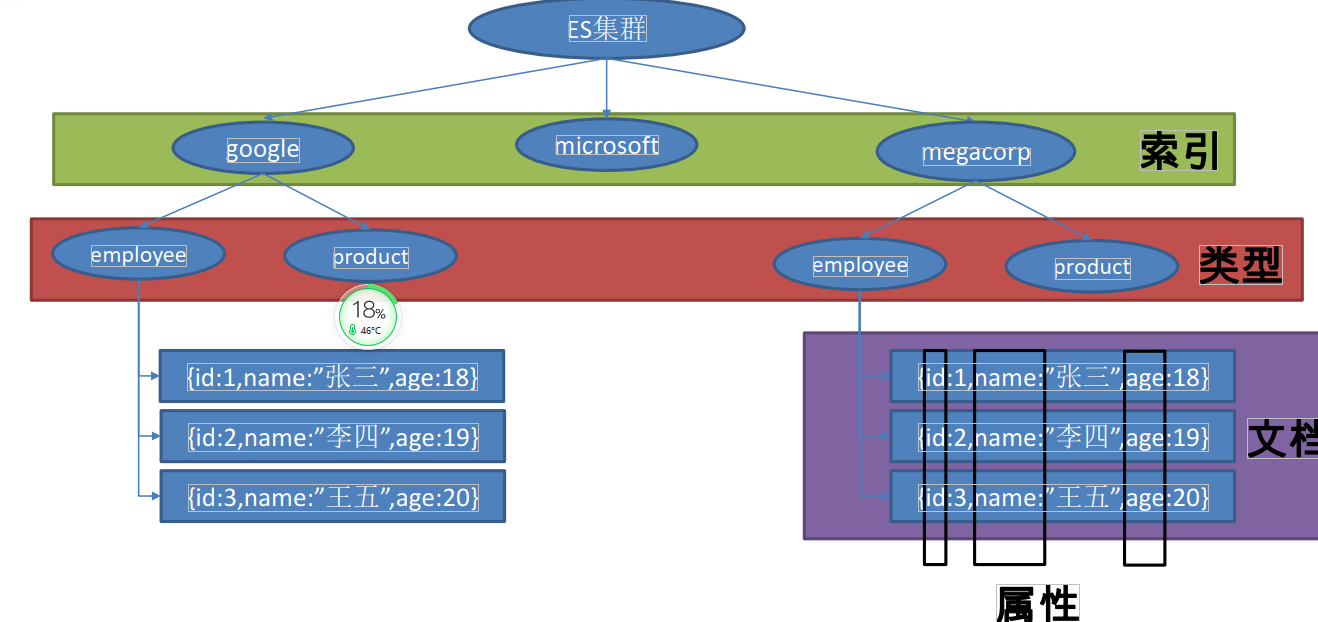
Springboot整合
pom.xml
        <dependency>

            <groupId>org.springframework.boot</groupId>

            <artifactId>spring-boot-starter-data-elasticsearch</artifactId>

        </dependency>
配置文件
 spring

     data:

     elasticsearch:

       cluster-nodes: 192.168.180.113:9300

       cluster-name: docker-cluster
启动类(采用第二种)
/**
* SpringBoot默认支持两种技术来和ES交互;
* 1、Jest(默认不生效)
* 需要导入jest的工具包(io.searchbox.client.JestClient)
* 2、SpringData ElasticSearch【ES版本有可能不合适】
* 版本适配说明:https://github.com/spring-projects/spring-data-elasticsearch
* 如果版本不适配:2.4.6
* 1)、升级SpringBoot版本
* 2)、安装对应版本的ES
*
* 1)、Client 节点信息clusterNodes;clusterName
* 2)、ElasticsearchTemplate 操作es
* 3)、编写一个 ElasticsearchRepository 的子接口来操作ES;
* 两种用法:https://github.com/spring-projects/spring-data-elasticsearch
* 1)、编写一个 ElasticsearchRepository
*/
@SpringBootApplication
public class Springboot03ElasticApplication {
public static void main(String[] args) {
SpringApplication.run(Springboot03ElasticApplication.class, args);
}
}
发现启动项目报错:
nested exception is java.lang.IllegalStateException: availableProcessors is already set to [4], rejecting [4]
我网上查询了一下,有人是是因为整合了Redis的原因。但是我把Redis相关的配置去掉后,问题还是没有解决,最后有人说是因为netty冲突的问题。 也有人给出了解决方式就是在项目初始化钱设置一下一个属性。在初始化之前加上System.setProperty("es.set.netty.runtime.available.processors", "false");
 @Configuration

 public class ElasticSearchConfig {

     @PostConstruct

     void init() {

         System.setProperty("es.set.netty.runtime.available.processors", "false");

     }

 }
Bo类
@Document(indexName = "topcheer",type = "book" )
@Slf4j
@Data
@Builder
public class Book implements Serializable {
private Integer id;
private String name;
private String author;
public Book(String name, String author) {
this.name = name;
this.author = author;
}
public Book(Integer id, String name, String author) {
this.id = id;
this.name = name;
this.author = author;
}
public Book() {
}
}
Repository类
public interface BookRepository extends ElasticsearchRepository<Book,Integer> {
//参照
// https://docs.spring.io/spring-data/elasticsearch/docs/3.0.6.RELEASE/reference/html/
public List<Book> findByNameLike(String name);
}
测试类:
@Autowired
BookRepository bookRepository;
@Test
public void test02() {
Book book = new Book();
book.setId(1);
book.setName("西游记");
book.setAuthor("吴承恩");
bookRepository.index(book);
for (Book book1 : bookRepository.findByNameLike("游")) {
System.out.println(book1);
};
}
结果:
 2019-10-12 00:27:03.827  INFO --- [           main] Oss6ApplicationTests : Started Oss6ApplicationTests in 17.532 seconds (JVM running for 19.428)

 2019-10-12 00:27:03.829 DEBUG --- [           main] ls.restart.Restarter : Creating new Restarter for thread Thread[main,5,main]

 Book(id=1, name=西游记, author=吴承恩)

 2019-10-12 00:27:04.851 DEBUG --- [       Thread-3] ebApplicationContext : Closing org.springframework.web.context.support.GenericWebApplicationContext@20f5281c, started on Sat Oct 12 00:26:47 CST 2019

 2019-10-12 00:27:04.859  INFO --- [       Thread-3] ageListenerContainer : Waiting for workers to finish.

 http://192.168.180.113:9200/topcheer/book/_search

 {"took":7,"timed_out":false,"_shards":{"total":5,"successful":5,"skipped":0,"failed":0},"hits":{"total":1,"max_score":1.0,"hits":[{"_index":"topcheer","_type":"book","_id":"1","_score":1.0,"_source":{"id":1,"name":"西游记","author":"吴承恩"}}]}}
SpringBoot整合elasticsearch(三)的更多相关文章
- SpringBoot整合Elasticsearch详细步骤以及代码示例(附源码)
准备工作 环境准备 JAVA版本 java version "1.8.0_121" Java(TM) SE Runtime Environment (build 1.8.0_121 ...
- Springboot整合ElasticSearch进行简单的测试及用Kibana进行查看
一.前言 搜索引擎还是在电商项目.百度.还有技术博客中广泛应用,使用最多的还是ElasticSearch,Solr在大数据量下检索性能不如ElasticSearch.今天和大家一起搭建一下,小编是看完 ...
- SpringBoot整合ElasticSearch实现多版本的兼容
前言 在上一篇学习SpringBoot中,整合了Mybatis.Druid和PageHelper并实现了多数据源的操作.本篇主要是介绍和使用目前最火的搜索引擎ElastiSearch,并和Spring ...
- ElasticSearch(2)---SpringBoot整合ElasticSearch
SpringBoot整合ElasticSearch 一.基于spring-boot-starter-data-elasticsearch整合 开发环境:springboot版本:2.0.1,elast ...
- springboot整合elasticsearch入门例子
springboot整合elasticsearch入门例子 https://blog.csdn.net/tianyaleixiaowu/article/details/72833940 Elastic ...
- Springboot整合elasticsearch以及接口开发
Springboot整合elasticsearch以及接口开发 搭建elasticsearch集群 搭建过程略(我这里用的是elasticsearch5.5.2版本) 写入测试数据 新建索引book( ...
- Springboot整合Elasticsearch报错availableProcessors is already set to [4], rejecting [4]
Springboot整合Elasticsearch报错 今天使用SpringBoot整合Elasticsearch时候,相关的配置完成后,启动项目就报错了. nested exception is j ...
- 😊SpringBoot 整合 Elasticsearch (超详细).md
SpringBoot 整合 Elasticsearch (超详细) 注意: 1.环境搭建 安装es Elasticsearch 6.4.3 下载链接 为了方便,环境使用Windows 配置 解压后配置 ...
- SpringBoot整合elasticsearch
在这一篇文章开始之前,你需要先安装一个ElasticSearch,如果你是mac或者linux可以参考https://www.jianshu.com/p/e47b451375ea,如果是windows ...
随机推荐
- 性能优化:虚拟列表,如何渲染10万条数据的dom,页面同时不卡顿
列表大概有2万条数据,又不让做成分页,如果页面直接渲染2万条数据,在一些低配电脑上可能会照成页面卡死,基于这个需求,我们来手写一个虚拟列表 思路 列表中固定只显示少量的数据,比如60条 在列表滚动的时 ...
- Python基础(十五)
今日主要内容 模块初识 模块导入 模块路径 自定义模块 内置模块(标准库) time datetime random sys os funtools 一.模块初识 (一)什么是模块 其实我们创建的每一 ...
- DP动态规划———LCS最长公共子序列
递推公式: ]==b[j-]) { dp[i][j]=dp[i-][j-]+; } else { dp[i][j]=max(dp[i-][j],dp[i][j-]); } 完整模板代码: int LC ...
- Scala Try Catch Finally
Scala Try Catch Finally: 在Java中返回值优先级顺序:finally最高, try,catch 选其一,try中抛异常,返回catch,不抛异常,返回try,. public ...
- 快学Scala 第六课 (类getter和setter)
类getter和setter 如果字段定义是private[this], 字段是私有的,但不生成getter和setter方法. class Counter { private[this] var v ...
- Kafka常用运维操作
创建主题kafka-topics.sh --zookeeper localhost:2181 --create --topic my-topic --replication-factor 3 --pa ...
- ZGC gc策略及回收过程-源码分析
源码文件:/src/hotspot/share/gc/z/zDirector.cpp 一.回收策略 main入口函数: void ZDirector::run_service() { // Main ...
- 第一天 hello world 启程
#include<stdio.h> int main() { printf(" Hello world"); return 0; }
- 超实用的mysql分库分表策略,轻松解决亿级数据问题
一.分库分表的背景 在数据爆炸的年代,单表数据达到千万级别,甚至过亿的量,都是很常见的情景.这时候再对数据库进行操作就是非常吃力的事情了,select个半天都出不来数据,这时候业务已经难以维系.不得已 ...
- Mycat读写分离(一主一从)
Mycat读写分离(一主一从) 我们一共使用2个虚拟机,每个机器的作用如下: 主机名 IP地址 任务角色 数据库 node1 192.168.1.121 Mycat, master MySQL nod ...