
Android物联网应用程序开发(智慧园区)—— 图片预览界面
效果图:
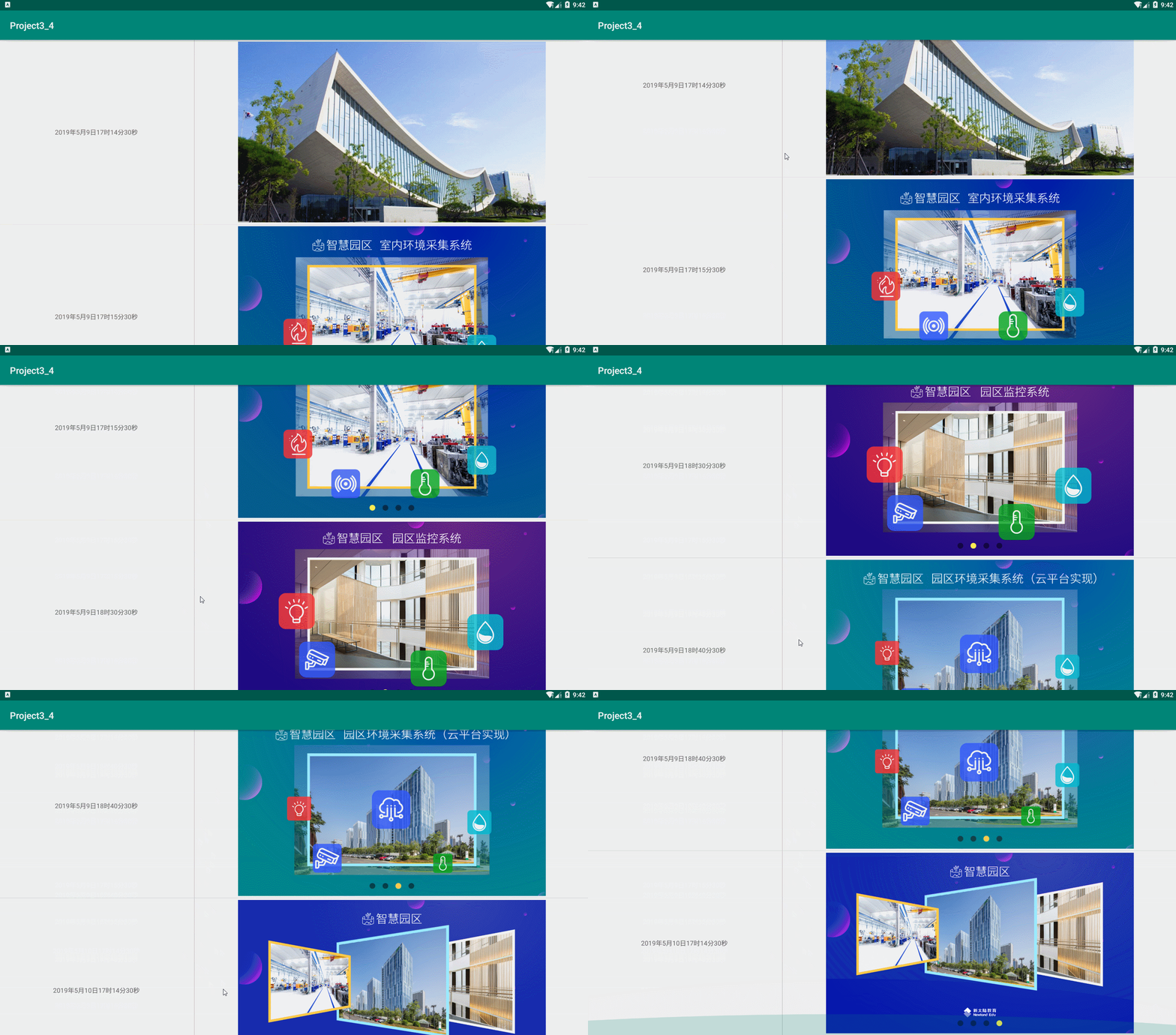
实现步骤:
1、首先在 build.gradle 文件中引入 RecycleView
implementation 'com.android.support:recyclerview-v7:28.0.0'
添加完成后,在右上角有一个同步Sync Now的提示,点击进行同步构建,接下来修改activity_main.xml的代码
2、在 activity_main.xml 布局文件中加入RecyclerView
<?xml version="1.0" encoding="utf-8"?>

<LinearLayout xmlns:android="http://schemas.android.com/apk/res/android"

    android:layout_width="match_parent"

    android:layout_height="match_parent"

    android:orientation="vertical">

    <android.support.v7.widget.RecyclerView

        android:id="@+id/recycler_view"

        android:layout_width="match_parent"

        android:layout_height="match_parent">

    </android.support.v7.widget.RecyclerView>

</LinearLayout>
接着创建RecyclerView的列表项布局

<?xml version="1.0" encoding="utf-8"?>

<LinearLayout xmlns:android="http://schemas.android.com/apk/res/android"

    android:layout_width="match_parent"

    android:layout_height="400dp"

    android:gravity="center">

    <TextView

        android:id="@+id/time"

        android:layout_width="0dp"

        android:layout_height="wrap_content"

        android:layout_weight="1"

        android:gravity="center" />

    <View

        android:layout_width="1dp"

        android:layout_height="fill_parent"

        android:background="#c0c0c0" />

    <ImageView

        android:id="@+id/image"

        android:layout_width="0dp"

        android:layout_height="match_parent"

        android:layout_margin="4dp"

        android:layout_weight="2"

        android:scaleType="fitCenter"

        android:src="@drawable/image1" />

</LinearLayout>
3、然后创建 RecyclerView 的数据适配器
package com.newland.project3_4;

import android.support.annotation.NonNull;

import android.support.v7.widget.RecyclerView;

import android.view.LayoutInflater;

import android.view.View;

import android.view.ViewGroup;

import android.widget.ImageView;

import android.widget.TextView;

public class MonitorAdapter extends RecyclerView.Adapter<MonitorAdapter.ViewHolder> {

    private String[] times = {"2019年5月9日17时14分30秒", "2019年5月9日17时15分30秒", "2019年5月9日18时30分30秒", "2019年5月9日18时40分30秒", "2019年5月10日17时14分30秒"};

    private int[] imageIds = {R.drawable.image1,R.drawable.image2,R.drawable.image3,R.drawable.image4,R.drawable.image5};

    @NonNull

    @Override

    public ViewHolder onCreateViewHolder(@NonNull ViewGroup parent, int viewType) {

        View view = LayoutInflater.from(parent.getContext()).inflate(R.layout.recyclerview_item, parent, false);

        ViewHolder holder = new ViewHolder(view);

        return holder;

    }

    @Override

    public void onBindViewHolder(@NonNull ViewHolder holder, int position) {

        holder.image.setImageResource(imageIds[position]);

        holder.time.setText(times[position]);

    }

    @Override

    public int getItemCount() {

        return times.length;

    }

    static class ViewHolder extends RecyclerView.ViewHolder {

        private ImageView image;//图片

        private TextView time;//时间

        public ViewHolder(View v) {

            super(v);

            image = v.findViewById(R.id.image);

            time = v.findViewById(R.id.time);

        }

    }

}
最后设置 RecyclerView 的适配器
package com.newland.project3_4;

import android.support.v7.app.AppCompatActivity;

import android.os.Bundle;

import android.support.v7.widget.DividerItemDecoration;

import android.support.v7.widget.LinearLayoutManager;

import android.support.v7.widget.RecyclerView;

public class MainActivity extends AppCompatActivity {

    private RecyclerView recyclerView;

    @Override

    protected void onCreate(Bundle savedInstanceState) {

        super.onCreate(savedInstanceState);

        setContentView(R.layout.activity_main);

        recyclerView = findViewById(R.id.recycler_view);

        //创建线性布局管理器,方向垂直

        LinearLayoutManager linearLayoutManager = new LinearLayoutManager(this, LinearLayoutManager.VERTICAL, false);

        //recyclerView设置布局管理器

        recyclerView.setLayoutManager(linearLayoutManager);

        MonitorAdapter adapter = new MonitorAdapter();

        //添加Android自带的分割线

        recyclerView.addItemDecoration(new DividerItemDecoration(this, DividerItemDecoration.VERTICAL));

        //设置适配器

        recyclerView.setAdapter(adapter);

    }

}
Android物联网应用程序开发(智慧园区)—— 图片预览界面的更多相关文章
- (干货)微信小程序之上传图片和图片预览
这几天一直负责做微信小程序这一块,也可以说是边做边学习吧,把自己做的微信小程序的一些功能分享出来,与大家探讨一下,相互学习相互进步. 先看下效果图 只写了一下效果样式的话希望大家不要太在意,下面马路杀 ...
- 微信小程序之上传图片和图片预览
这几天一直负责做微信小程序这一块,也可以说是边做边学习吧,把自己做的微信小程序的一些功能分享出来,与大家探讨一下,相互学习相互进步. 先看下效果图 只写了一下效果样式的话希望大家不要太在意,下面马路杀 ...
- 微信小程序开发之真机预览
1:真机预览时上传组件的坑: 当在真机里面使用上传组件,当进入选择相片或者拍照的时候,小程序会进入后台,调用APP onHide()方法,选择完返回小程序是会调用App Onshow()方法,然后调用 ...
- Android物联网应用程序开发(智慧园区)—— 设置传感器阈值对话框界面
效果图: 自定义对话框布局: <?xml version="1.0" encoding="utf-8"?> <LinearLayout xml ...
- Android物联网应用程序开发(智慧园区)—— 园区监控系统界面
效果图: 布局代码: <?xml version="1.0" encoding="utf-8"?> <LinearLayout xmlns:a ...
- Android物联网应用程序开发(智慧园区)—— 登录界面开发
效果: 布局代码: <?xml version="1.0" encoding="utf-8"?> <LinearLayout xmlns:an ...
- Android物联网应用程序开发(智慧城市)—— 摄像头监控界面开发
效果: 布局代码: <?xml version="1.0" encoding="utf-8"?> <RelativeLayout xmlns: ...
- Android物联网应用程序开发(智慧城市)—— 查询购物信息界面开发
效果: 布局代码: <RelativeLayout xmlns:android="http://schemas.android.com/apk/res/android" xm ...
- Android物联网应用程序开发(智慧城市)—— 用户注册界面开发
效果: 布局代码: <?xml version="1.0" encoding="utf-8"?> <RelativeLayout xmlns: ...
随机推荐
- MySQL(2):数据管理
一. 外键概念: 如果公共关键字在一个关系中是主关键字,那么这个公共关键字被称为另一个关系的外键.由此可见,外键表示了两个关系之间的相关联系.以另一个关系的外键作主关键字的表被称为主表,具有此外键的表 ...
- mysql 执行报错:Error querying database. Cause: java.sql.SQLSyntaxErrorException:which is not functionally dependent on columns in GROUP BY clause; this is incompatible with sql_mode=only_full_group_by
1.这个错误发生在mysql 5.7 版本及以上版本会出现的问题: mysql 5.7版本默认的sql配置是:sql_mode="ONLY_FULL_GROUP_BY",这个配置严 ...
- linux 磁盘满了,vim 编辑文件时无法保存
早上来发现 redis 不能用,报 MISCONF Redis is configured to save RDB snapshots, but it is currently not able to ...
- python初探——pandas使用
一.简介 pandas 是基于NumPy 的一种工具,该工具是为了解决数据分析任务而创建的.Pandas 纳入了大量库和一些标准的数据模型,提供了高效地操作大型数据集所需的工具.pandas提供了大量 ...
- 强化学习实战 | 表格型Q-Learning玩井字棋(四)游戏时间
在 强化学习实战 | 表格型Q-Learning玩井字棋(三)优化,优化 中,我们经过优化和训练,得到了一个还不错的Q表格,这一节我们将用pygame实现一个有人机对战,机机对战和作弊功能的井字棋游戏 ...
- 远程调用RPC
一.简介 RPC,就是Remote Procedure Call的简称呀,翻译成中文就是远程过程调用. 本地调用,就好比你现在在家里,你要想洗碗,那你直接把碗放进洗碗机,打开洗碗机开关就可以洗了.这就 ...
- pipeline parameters指令
目录 一.简介 二.类型 参数类型 多参数 一.简介 参数化pipeline是指通过传参来决定pipeline的行为.参数化让写pipeline就像写函数,而函数意味着可重用.更抽象.所以,通常使用参 ...
- 【划重点】Python xlwt简介和用法
一.导入xlwt包,并初始化创建一个工作簿 import xlwt workbook=xlwt.Workbook() # 初始化创建一个工作簿 二.创建表单 sheet1=workbook.add_s ...
- ciscn_2019_s_3 一道收获很多的题(进步大只能说明基础差)
32位与64位 系统调用的区别: 1. 传参方式不同 2. 系统调用号 不同 3. 调用方式 不同 32位: 传参方式:首先将系统调用号 传入 eax,然后将参数 从左到右 依次存入 ebx,ecx, ...
- Table.Group分组…Group(Power Query 之 M 语言)
数据源: 10列55行数据,其中包括含有重复项的"部门"列和可求和的"金额"列. 目标: 按"部门"列进行分组,显示各部门金额小计. 操作过 ...