
Android物联网应用程序开发(智慧城市)—— 用户注册界面开发
效果:
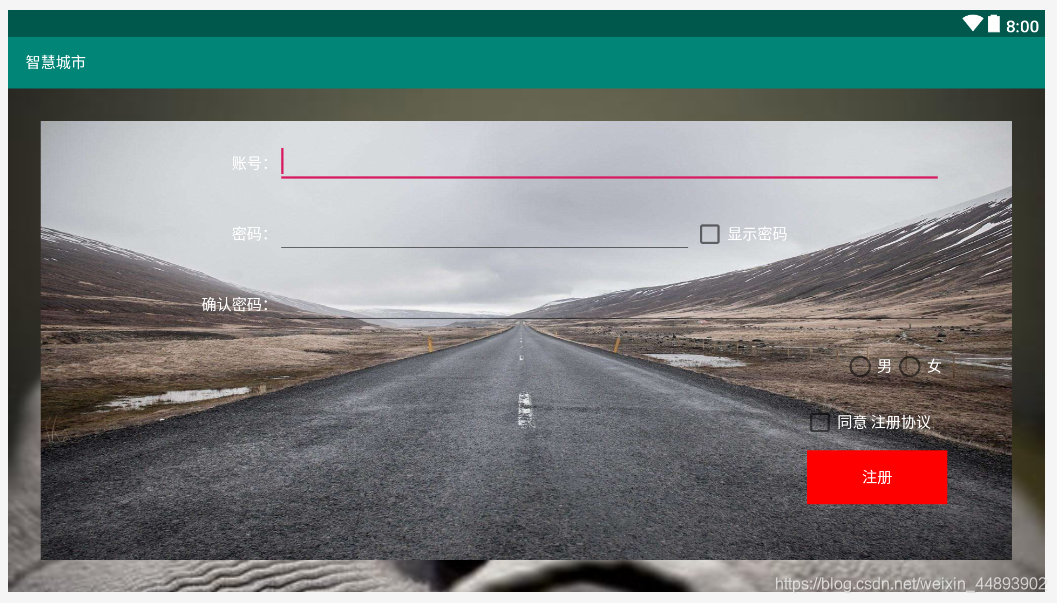
布局代码:
<?xml version="1.0" encoding="utf-8"?>

<RelativeLayout xmlns:android="http://schemas.android.com/apk/res/android"

    xmlns:app="http://schemas.android.com/apk/res-auto"

    xmlns:tools="http://schemas.android.com/tools"

    android:layout_width="fill_parent"

    android:layout_height="fill_parent"

    tools:context=".UserRegistration">

    <LinearLayout

        android:layout_width="match_parent"

        android:layout_height="match_parent"

        android:layout_margin="30dp"

        android:background="@drawable/bg_environment"

        android:gravity="center_horizontal"

        android:orientation="vertical"

        android:padding="15dp">

        <!--账号-->

        <LinearLayout

            android:layout_width="match_parent"

            android:layout_height="wrap_content"

            android:layout_marginLeft="50dp"

            android:layout_marginRight="50dp">

            <TextView

                android:layout_width="0.0dp"

                android:layout_height="wrap_content"

                android:layout_weight="2"

                android:gravity="right"

                android:text="账号:"

                android:textColor="@color/white"/>

            <EditText

                android:layout_width="0.0dp"

                android:layout_height="wrap_content"

                android:layout_weight="8"

                android:ems="10">

                <requestFocus />

            </EditText>

        </LinearLayout>

        <!--密码-->

        <LinearLayout

            android:layout_width="match_parent"

            android:layout_height="wrap_content"

            android:layout_marginLeft="50dp"

            android:layout_marginRight="50dp"

            android:layout_marginTop="20dp">

            <TextView

                android:layout_width="0.0dp"

                android:layout_height="wrap_content"

                android:layout_weight="2"

                android:gravity="right"

                android:text="密码:"

                android:textColor="@color/white"/>

            <EditText

                android:layout_width="0.0dp"

                android:layout_height="wrap_content"

                android:layout_weight="5"

                android:ems="10">

            </EditText>

            <CheckBox

                android:layout_width="0.0dp"

                android:layout_height="wrap_content"

                android:layout_weight="3"

                android:text="显示密码"

                android:textColor="@color/white"/>

        </LinearLayout>

        <!--确认密码-->

        <LinearLayout

            android:layout_width="match_parent"

            android:layout_height="wrap_content"

            android:layout_marginLeft="50dp"

            android:layout_marginRight="50dp"

            android:layout_marginTop="20dp">

            <TextView

                android:layout_width="0.0dp"

                android:layout_height="wrap_content"

                android:layout_weight="2"

                android:gravity="right"

                android:text="确认密码:"

                android:textColor="@color/white"/>

            <EditText

                android:layout_width="0.0dp"

                android:layout_height="wrap_content"

                android:layout_weight="8"

                android:ems="10">

            </EditText>

        </LinearLayout>

        <!--男女-->

        <LinearLayout

            android:layout_width="match_parent"

            android:layout_height="wrap_content"

            android:layout_marginLeft="50dp"

            android:layout_marginRight="50dp"

            android:layout_marginTop="20dp">

            <RadioGroup

                android:layout_width="match_parent"

                android:layout_height="wrap_content"

                android:orientation="horizontal"

                android:gravity="right">

                <RadioButton

                    android:layout_width="wrap_content"

                    android:layout_height="wrap_content"

                    android:textColor="@color/white"

                    android:text="男"

                    android:layout_marginRight="0dp"/>

                <RadioButton

                    android:layout_width="wrap_content"

                    android:layout_height="wrap_content"

                    android:textColor="@color/white"

                    android:text="女"/>

            </RadioGroup>

        </LinearLayout>

        <CheckBox

            android:layout_width="wrap_content"

            android:layout_height="wrap_content"

            android:text="同意 注册协议"

            android:textColor="@color/white"

            android:layout_gravity="right"

            android:gravity="center_vertical"

            android:layout_marginRight="60dp"

            android:layout_marginTop="20dp"/>

        <Button

            android:layout_width="130dp"

            android:layout_height="50dp"

            android:textColor="@color/white"

            android:text="注册"

            android:layout_gravity="right"

            android:layout_marginRight="45dp"

            android:layout_marginTop="10dp"

            android:background="@color/red"/>

    </LinearLayout>

</RelativeLayout>
Android物联网应用程序开发(智慧城市)—— 用户注册界面开发的更多相关文章
- 【可视化大屏教程】用Python开发智慧城市数据分析大屏!
目录 一.开发背景 二.讲解代码 2.1 大标题+背景图 2.2 各区县交通事故统计图-系列柱形图 2.3 图书馆建设率-水球图 2.4 当年城市空气质量aqi指数-面积图 2.5 近7年人均生产总值 ...
- Android物联网应用程序开发(智慧城市)—— 查询购物信息界面开发
效果: 布局代码: <RelativeLayout xmlns:android="http://schemas.android.com/apk/res/android" xm ...
- Android物联网应用程序开发(智慧城市)—— 摄像头监控界面开发
效果: 布局代码: <?xml version="1.0" encoding="utf-8"?> <RelativeLayout xmlns: ...
- Android物联网应用程序开发(智慧城市)—— 火焰监控界面开发
效果: 布局代码: <?xml version="1.0" encoding="utf-8"?> <RelativeLayout xmlns: ...
- Android物联网应用程序开发(智慧城市)—— 购物信息的存储界面开发
效果: 布局代码: <?xml version="1.0" encoding="utf-8"?> <LinearLayout xmlns:an ...
- Android物联网应用程序开发(智慧城市)—— 环境状态值范围设置界面开发
效果图: 代码: 布局: <?xml version="1.0" encoding="utf-8"?> <LinearLayout xmlns ...
- Android物联网应用程序开发(智慧园区)—— 图片预览界面
效果图: 实现步骤: 1.首先在 build.gradle 文件中引入 RecycleView implementation 'com.android.support:recyclerview-v7: ...
- Android物联网应用程序开发(智慧园区)—— 设置传感器阈值对话框界面
效果图: 自定义对话框布局: <?xml version="1.0" encoding="utf-8"?> <LinearLayout xml ...
- Android物联网应用程序开发(智慧园区)—— 园区监控系统界面
效果图: 布局代码: <?xml version="1.0" encoding="utf-8"?> <LinearLayout xmlns:a ...
随机推荐
- collection映射
讲了manyToOne和oneToMany,下面来看看get方法.在之前已经说过,如果是映射单对象,直接使用association来映射.而如果关系 是一个集合,则需要使用collection来描述. ...
- proguard 混淆工具的用法 (适用于初学者参考)
一. ProGuard简介 附:proGuard官网 因为Java代码是非常容易反编码的,况且Android开发的应用程序是用Java代码写的,为了很好的保护Java源代码,我们需要对编译好后的cla ...
- iOS调用系统电话、浏览器、地图、邮件等
- (IBAction)openMaps { //打开地图 NSString*addressText = @"beijing"; //@"1Infinite Loop, ...
- Java设计模式—Proxy动态代理模式
代理:设计模式 代理是一种常用的设计模式,其目的就是为其他对象提供一个代理以控制对某个对象的访问.代理类负责为委托类预处理消息,过滤消息并转发消息,以及进行消息被委托类执行后的后续处理. 图 1. 代 ...
- java职业路线图
- 【Linux】【Basis】进程
1. 维基百科:https://zh.wikipedia.org/wiki/%E8%A1%8C%E7%A8%8B 进程的类型: 终端:硬件设备,关联一个用户接口 与终端相关:通过终端启动 与终端无关: ...
- IM即时通讯设计 高并发聊天服务:服务器 + qt客户端(附源码)
来源:微信公众号「编程学习基地」 目录 IM即时通信程序设计 IM即时通讯 设计一款高并发聊天服务需要注意什么 如何设计可靠的消息处理服务 什么是粘包 什么是半包 解决粘包和半包 IM通信协议 应用层 ...
- C#.NET编程小考30题错题纠错
1)以下关于序列化和反序列化的描述错误的是( C). a) 序列化是将对象的状态存储到特定存储介质中的过程 b) 二进制格式化器的Serialize()和Deserialize()方法可以分别用来实现 ...
- Python解释器下载安装
一.简介 吉多·范罗苏姆(Guido van Rossum)在1989年的圣诞节期间,编写能够解释Python语言语法的解释器. 解释器版本 第一个数字是大版本号 数字不同功能上可能会有很大差异 py ...
- [BUUCTF]REVERSE——[GWCTF 2019]pyre
[GWCTF 2019]pyre 附件 步骤: 1.附件是pyc文件,用python打不开,百度后得知用python反编译工具打开,分享一个python反编译在线网站 反编译后是这段代码 #!/usr ...