
Android物联网应用程序开发(智慧园区)—— 设置传感器阈值对话框界面
效果图:
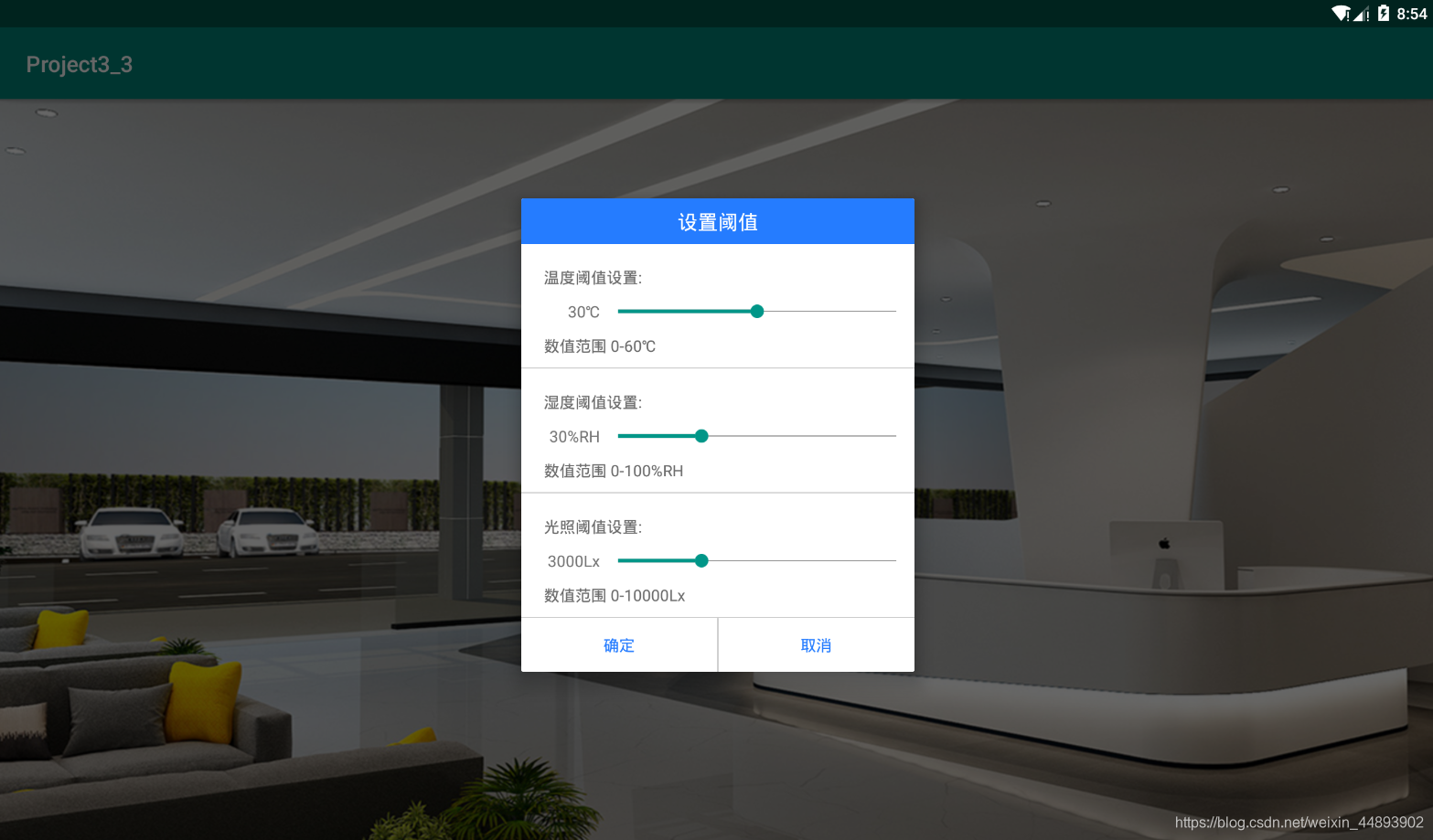
自定义对话框布局:

<?xml version="1.0" encoding="utf-8"?>

<LinearLayout xmlns:android="http://schemas.android.com/apk/res/android"

              android:layout_width="350dp"

              android:layout_height="wrap_content"

              android:background="@android:color/white"

              android:orientation="vertical">

    <!--自定义对话框,线性布局水平方向-->

    <!--第一部分标题栏-->

    <TextView

        android:id="@+id/tvTitle"

        android:layout_width="match_parent"

        android:layout_height="wrap_content"

        android:background="#257CFF"

        android:gravity="center"

        android:paddingBottom="8dp"

        android:paddingTop="8dp"

        android:text="设置阈值"

        android:textColor="@android:color/white"

        android:textSize="18sp"/>

    <!--设置温度阈值-->

    <TextView

        android:layout_width="wrap_content"

        android:layout_height="wrap_content"

        android:layout_marginLeft="20dp"

        android:layout_marginTop="20dp"

        android:text="温度阈值设置:"

        android:textColor="#6C6C6C"/>

    <!--设置阈值-->

    <LinearLayout

        android:layout_width="match_parent"

        android:layout_height="wrap_content"

        android:layout_marginTop="5dp"

        android:gravity="center"

        android:orientation="horizontal">

        <LinearLayout

            android:layout_width="0dp"

            android:layout_height="wrap_content"

            android:gravity="right"

            android:layout_weight="1">

            <TextView

                android:id="@+id/tv_tempValue"

                android:layout_width="wrap_content"

                android:layout_height="match_parent"

                android:text="30"/>

            <TextView

                android:layout_width="wrap_content"

                android:layout_height="match_parent"

                android:text="℃"

                />

        </LinearLayout>

        <SeekBar

            android:id="@+id/sb_temp"

            android:layout_width="0dp"

            android:layout_height="wrap_content"

            android:layout_weight="4"

            android:max="60"

            android:progress="30"/>

    </LinearLayout>

    <TextView

        android:layout_width="match_parent"

        android:layout_height="wrap_content"

        android:layout_marginLeft="20dp"

        android:layout_marginTop="5dp"

        android:text="数值范围 0-60℃"

        android:textColor="#6C6C6C"/>

    <!--分割线-->

    <View

        android:layout_width="match_parent"

        android:layout_height="1dp"

        android:layout_marginTop="10dp"

        android:background="#cccccc"></View>

    <!--设置湿度阈值-->

    <TextView

        android:layout_width="wrap_content"

        android:layout_height="wrap_content"

        android:layout_marginLeft="20dp"

        android:layout_marginTop="20dp"

        android:text="湿度阈值设置:"

        android:textColor="#6C6C6C"/>

    <!--设置阈值-->

    <LinearLayout

        android:layout_width="match_parent"

        android:layout_height="wrap_content"

        android:layout_marginTop="5dp"

        android:gravity="center"

        android:orientation="horizontal">

        <LinearLayout

            android:layout_width="0dp"

            android:layout_height="wrap_content"

            android:gravity="right"

            android:layout_weight="1">

            <TextView

                android:id="@+id/tv_humiValue"

                android:layout_width="wrap_content"

                android:layout_height="wrap_content"

                android:focusable="false"

                android:text="30"/>

            <TextView

                android:layout_width="wrap_content"

                android:layout_height="wrap_content"

                android:text="%RH"

                />

        </LinearLayout>

        <SeekBar

            android:id="@+id/sb_humi"

            android:layout_width="0dp"

            android:layout_height="wrap_content"

            android:layout_weight="4"

            android:max="100"

            android:progress="30"/>

    </LinearLayout>

    <TextView

        android:layout_width="match_parent"

        android:layout_height="wrap_content"

        android:layout_marginLeft="20dp"

        android:layout_marginTop="5dp"

        android:text="数值范围 0-100%RH"

        android:textColor="#6C6C6C"/>

    <!--分割线-->

    <View

        android:layout_width="match_parent"

        android:layout_height="1dp"

        android:layout_marginTop="10dp"

        android:background="#cccccc"></View>

    <!--设置光照阈值-->

    <TextView

        android:layout_width="wrap_content"

        android:layout_height="wrap_content"

        android:layout_marginLeft="20dp"

        android:layout_marginTop="20dp"

        android:text="光照阈值设置:"

        android:textColor="#6C6C6C"/>

    <!--设置阈值-->

    <LinearLayout

        android:layout_width="match_parent"

        android:layout_height="wrap_content"

        android:layout_marginTop="5dp"

        android:gravity="center"

        android:orientation="horizontal">

        <LinearLayout

            android:layout_width="0dp"

            android:layout_height="wrap_content"

            android:gravity="right"

            android:layout_weight="1">

            <TextView

                android:id="@+id/tv_lightValue"

                android:layout_width="wrap_content"

                android:layout_height="wrap_content"

                android:focusable="false"

                android:text="3000"/>

            <TextView

                android:layout_width="wrap_content"

                android:layout_height="wrap_content"

                android:text="Lx"/>

        </LinearLayout>

        <SeekBar

            android:id="@+id/sb_light"

            android:layout_width="0dp"

            android:layout_height="wrap_content"

            android:layout_weight="4"

            android:max="10000"

            android:progress="3000"/>

    </LinearLayout>

    <TextView

        android:layout_width="match_parent"

        android:layout_height="wrap_content"

        android:layout_marginLeft="20dp"

        android:layout_marginTop="5dp"

        android:text="数值范围 0-10000Lx"

        android:textColor="#6C6C6C"/>

    <View

        android:layout_width="match_parent"

        android:layout_height="1dp"

        android:layout_marginTop="10dp"

        android:background="#cccccc"></View>

    <!--确定,取消按钮-->

    <LinearLayout

        android:layout_width="match_parent"

        android:layout_height="wrap_content"

        android:orientation="horizontal">

        <Button

            android:id="@+id/btn_confirm"

            android:layout_width="wrap_content"

            android:layout_height="wrap_content"

            android:layout_weight="1"

            android:background="@android:color/white"

            android:paddingBottom="10dp"

            android:paddingTop="10dp"

            android:text="确定"

            android:textColor="#257CFF"/>

        <!--分割线-->

        <View

            android:layout_width="1dp"

            android:layout_height="match_parent"

            android:background="#cccccc"></View>

        <Button

            android:id="@+id/btn_cancel"

            android:layout_width="wrap_content"

            android:layout_height="wrap_content"

            android:layout_weight="1"

            android:background="@android:color/white"

            android:paddingBottom="10dp"

            android:paddingTop="10dp"

            android:text="取消"

            android:textColor="#257CFF"/>

    </LinearLayout>

</LinearLayout>
自定义对话框实现类:
package com.newland.project3_3;

import android.app.Dialog;

import android.content.Context;

import android.support.annotation.NonNull;

import android.view.View;

import android.widget.Button;

import android.widget.SeekBar;

import android.widget.TextView;

/**

 * 设置阈值对话框

 */

public class SettingThresholdDialog extends Dialog {

    private TextView tvTempValue,tvHumiValue,tvLightValue;

    private Button btnCancel;

    private Button btnConfirm;

    private SeekBar sbTemp,sbHumi,sbLight;

    public SettingThresholdDialog(@NonNull Context context) {

        super(context,R.style.Dialog);

        //关联布局文件

        this.setContentView(R.layout.dialog_setting_threshold);

        //初始化组件

        initView();

        addListener();

    }

    private void initView() {

        sbTemp =  findViewById(R.id.sb_temp);

        sbHumi =  findViewById(R.id.sb_humi);

        sbLight =  findViewById(R.id.sb_light);

        tvTempValue = findViewById(R.id.tv_tempValue);

        tvHumiValue = findViewById(R.id.tv_humiValue);

        tvLightValue = findViewById(R.id.tv_lightValue);

        btnCancel = findViewById(R.id.btn_cancel);

        btnConfirm =  findViewById(R.id.btn_confirm);

    }

    private void addListener() {

        //温度SeekBar状态改变监听

        sbTemp.setOnSeekBarChangeListener(new SeekBar.OnSeekBarChangeListener() {

            @Override

            public void onProgressChanged(SeekBar seekBar, int progress, boolean fromUser) {

                //SeekBar进度显示到TextView上

                tvTempValue.setText(String.valueOf(progress));

            }

            @Override

            public void onStartTrackingTouch(SeekBar seekBar) {

            }

            @Override

            public void onStopTrackingTouch(SeekBar seekBar) {

            }

        });

        //湿度SeekBar状态改变监听

        sbHumi.setOnSeekBarChangeListener(new SeekBar.OnSeekBarChangeListener() {

            @Override

            public void onProgressChanged(SeekBar seekBar, int progress, boolean fromUser) {

                //SeekBar进度显示到TextView上

                tvHumiValue.setText(String.valueOf(progress));

            }

            @Override

            public void onStartTrackingTouch(SeekBar seekBar) {

            }

            @Override

            public void onStopTrackingTouch(SeekBar seekBar) {

            }

        });

        //光照SeekBar状态改变监听

        sbLight.setOnSeekBarChangeListener(new SeekBar.OnSeekBarChangeListener() {

            @Override

            public void onProgressChanged(SeekBar seekBar, int progress, boolean fromUser) {

                //SeekBar进度显示到TextView上

                tvLightValue.setText(String.valueOf(progress));

            }

            @Override

            public void onStartTrackingTouch(SeekBar seekBar) {

            }

            @Override

            public void onStopTrackingTouch(SeekBar seekBar) {

            }

        });

        //设置确定点击事件

        btnConfirm.setOnClickListener(new View.OnClickListener() {

            @Override

            public void onClick(View v) {

                //对话框消失

                SettingThresholdDialog.this.dismiss();

            }

        });

        //设置取消点击事件

        btnCancel.setOnClickListener(new View.OnClickListener() {

            @Override

            public void onClick(View v) {

                //对话框消失

                SettingThresholdDialog.this.dismiss();

            }

        });

    }

}
在主类中创建对话框并显示:
package com.newland.project3_3;

import android.support.v7.app.AppCompatActivity;

import android.os.Bundle;

public class MainActivity extends AppCompatActivity {

    @Override

    protected void onCreate(Bundle savedInstanceState) {

        super.onCreate(savedInstanceState);

        setContentView(R.layout.activity_main);

        //创建对话框并显示

        SettingThresholdDialog dialog = new SettingThresholdDialog(this);

        dialog.show();

    }

}
Android物联网应用程序开发(智慧园区)—— 设置传感器阈值对话框界面的更多相关文章
- Android物联网应用程序开发(智慧园区)—— 图片预览界面
效果图: 实现步骤: 1.首先在 build.gradle 文件中引入 RecycleView implementation 'com.android.support:recyclerview-v7: ...
- Android物联网应用程序开发(智慧城市)—— 环境状态值范围设置界面开发
效果图: 代码: 布局: <?xml version="1.0" encoding="utf-8"?> <LinearLayout xmlns ...
- Android物联网应用程序开发(智慧园区)—— 园区监控系统界面
效果图: 布局代码: <?xml version="1.0" encoding="utf-8"?> <LinearLayout xmlns:a ...
- Android物联网应用程序开发(智慧园区)—— 登录界面开发
效果: 布局代码: <?xml version="1.0" encoding="utf-8"?> <LinearLayout xmlns:an ...
- Android物联网应用程序开发(智慧城市)—— 查询购物信息界面开发
效果: 布局代码: <RelativeLayout xmlns:android="http://schemas.android.com/apk/res/android" xm ...
- Android物联网应用程序开发(智慧城市)—— 用户注册界面开发
效果: 布局代码: <?xml version="1.0" encoding="utf-8"?> <RelativeLayout xmlns: ...
- Android物联网应用程序开发(智慧城市)—— 摄像头监控界面开发
效果: 布局代码: <?xml version="1.0" encoding="utf-8"?> <RelativeLayout xmlns: ...
- Android物联网应用程序开发(智慧城市)—— 火焰监控界面开发
效果: 布局代码: <?xml version="1.0" encoding="utf-8"?> <RelativeLayout xmlns: ...
- Android物联网应用程序开发(智慧城市)—— 购物信息的存储界面开发
效果: 布局代码: <?xml version="1.0" encoding="utf-8"?> <LinearLayout xmlns:an ...
随机推荐
- MySQL自我保护参数
上文(MySQL自我保护工具--pt-kill )提到用pt-kill工具来kill相关的会话,来达到保护数据库的目的,本文再通过修改数据库参数的方式达到阻断长时间运行的SQL的目的. 1.参数介绍 ...
- 【leetocode】55. Jump Game
You are given an integer array nums. You are initially positioned at the array's first index, and ea ...
- 容器之分类与各种测试(三)——slist的用法
slist和forward_list的不同之处在于其所在的库 使用slist需要包含 #include<ext\list> 而使用forward_list则需要包含 #include< ...
- Docker学习(六)——Dockerfile文件详解
Docker学习(六)--Dockerfile文件详解 一.环境介绍 1.Dockerfile中所用的所有文件一定要和Dockerfile文件在同一级父目录下,可以为Dockerfile父目录的子目录 ...
- docker配置国内阿里云镜像源
使用docker默认镜像源下载镜像会很慢,因此很多情况下,我们在安装完docker以后都会修改为国内的镜像,这样在下载镜像的时候就不用等那么长时间了. 配置docker的镜像为阿里云镜像 方法一 $ ...
- JavaBean的命名规则
JavaBean的命名规则Sun 推荐的命名规范1 ,类名要首字母大写,后面的单词首字母大写2 ,方法名的第一个单词小写,后面的单词首字母大写3 ,变量名的第一个单词小写,后面的单词首字母大写为了使 ...
- java实现文件压缩
java实现文件压缩:主要是流与流之间的传递 代码如下: package com.cst.klocwork.service.zip; import java.io.File; import java. ...
- @RestController和@Controller的区别与作用
在springMvc中controller层类上的要使用@Controller来注明该类属于控制层,在controller层常返回的数据形式有以下几种: 页面:静态页面 ModelAndView:返回 ...
- 【Matlab】abs不支持复整数
需要将uint8转换成double型数据才能计算 https://blog.csdn.net/lihe4151021/article/details/89372688 图像数据格式uint8与doub ...
- 【Office】【Excel】将多个工作薄合为一个工作薄
前提:工作薄首行不能有合并的单元格 准备工作:将要合并的工作簿放在一个文件夹里面,文件夹中不能有乱七八糟的东西,只能有你要合并的工作薄 操作步骤:在此文件夹下创建Excel表格并打开,按下alt+F1 ...