
scrapy 项目实战(一)----爬取雅昌艺术网数据
第一步:创建scrapy项目:
scrapy startproject Demo
第二步:创建一个爬虫
scrapy genspider demo http://auction.artron.net/result/pmh-0-0-2-0-1/
第三步:项目结构:
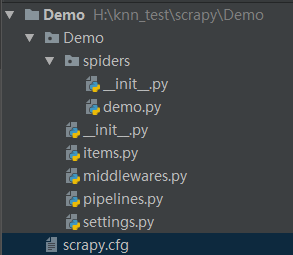
第四部:依次粘贴处各个文件的代码:
1. demo.py 文件验证码
# -*- coding: utf-8 -*-

import scrapy

from scrapy import Request

from Demo.items import *

from bs4 import BeautifulSoup

import time

# import sys

# reload(sys)

# sys.setdefaultencoding('utf-8')

import re

import hashlib


# 加密去重

def md5(str):

    m = hashlib.md5()

    m.update(str)

    return m.hexdigest()

#过滤注释信息,去掉换行

def replace(newline):

    newline = str(newline)

    newline = newline.replace('\r','').replace('\n','').replace('\t','').replace('   ','').replace('amp;','')

    re_comment = re.compile('<!--[^>]*-->')

    newlines = re_comment.sub('', newline)

    newlines = newlines.replace('<!--','').replace('-->','')

    return newlines

class DemoSpider(scrapy.Spider):

    name = 'demo'

    allowed_domains = ['http://auction.artron.net/result/']

    start_urls = ['http://auction.artron.net/result/pmh-0-0-2-0-1/',

                  'http://auction.artron.net/result/pmh-0-0-2-0-2/',

                  'http://auction.artron.net/result/pmh-0-0-2-0-4/',

                  'http://auction.artron.net/result/pmh-0-0-2-0-5/',

                  'http://auction.artron.net/result/pmh-0-0-2-0-6/',

                  'http://auction.artron.net/result/pmh-0-0-2-0-7/',

                  'http://auction.artron.net/result/pmh-0-0-2-0-8/',

                  'http://auction.artron.net/result/pmh-0-0-2-0-9/',

                  'http://auction.artron.net/result/pmh-0-0-2-0-10/',

                  'http://auction.artron.net/result/pmh-0-0-2-0-3/']

    def parse(self, response):

        html = response.text

        soup = BeautifulSoup(html,'html.parser')

        result_lists = soup.find_all('ul',attrs={"class":"dataList"})[0]

        result_lists_replace = replace(result_lists)

        result_lists_replace = result_lists_replace.decode('utf-8')

        result_list = re.findall('<ul><li class="name">(.*?)</span></li></ul></li>',result_lists_replace)

        for ii in result_list:

            item = DemoItem()

            auction_name_url = re.findall('<a alt="(.*?)" href="(.*?)" target="_blank" title',ii)[0]

            auction_name = auction_name_url[0]

            auction_url = auction_name_url[1]

            auction_url = "http://auction.artron.net" + auction_url

            aucr_name_spider = re.findall('<li class="company"><a href=".*?" target="_blank">(.*?)</a>',ii)[0]

            session_address_time = re.findall('<li class="city">(.*?)</li><li class="time">(.*?)</li></ul>',ii)[0]

            session_address = session_address_time[0]

            item_auct_time = session_address_time[1]

            hashcode = md5(str(auction_url))

            create_time = time.strftime("%Y-%m-%d %H:%M:%S", time.localtime(time.time()))

            item['auction_name'] = auction_name

            item['auction_url'] = auction_url

            item['aucr_name_spider'] = aucr_name_spider

            item['session_address'] = session_address

            item['item_auct_time'] = item_auct_time

            item['hashcode'] = hashcode

            item['create_time'] = create_time

            print item

            yield item
2. items.py 文件
# -*- coding: utf-8 -*-

import scrapy

class DemoItem(scrapy.Item):

    auction_name = scrapy.Field()

    auction_url = scrapy.Field()

    aucr_name_spider = scrapy.Field()

    session_address = scrapy.Field()

    item_auct_time = scrapy.Field()

    hashcode = scrapy.Field()

    create_time = scrapy.Field()
3. pipelines.py
# -*- coding: utf-8 -*-

# Define your item pipelines here

#

# Don't forget to add your pipeline to the ITEM_PIPELINES setting

# See: http://doc.scrapy.org/en/latest/topics/item-pipeline.html

import json

import MySQLdb

def insert_data(dbName,data_dict):

    try:

        data_values = "(" + "%s," * (len(data_dict)) + ")"

        data_values = data_values.replace(',)', ')')

        dbField = data_dict.keys()

        dataTuple = tuple(data_dict.values())

        dbField = str(tuple(dbField)).replace("'",'')

        conn = MySQLdb.connect(host="10.10.10.77", user="xuchunlin", passwd="ed35sdef456", db="epai_spider_2018", charset="utf8")

        cursor = conn.cursor()

        sql = """ insert into %s %s values %s """ % (dbName,dbField,data_values)

        params = dataTuple

        cursor.execute(sql, params)

        conn.commit()

        cursor.close()

        conn.close()

        print "=====  插入成功  ====="

        return 1

    except Exception as e:

        print "********                 插入失败                 ********"

        print e

        return 0

class DemoPipeline(object):

    def process_item(self, item, spider):

        dbName = "yachang_auction"

        data_dict= item

        insert_data(dbName, data_dict)
4. setting.py
# -*- coding: utf-8 -*-

# Scrapy settings for Demo project

#

# For simplicity, this file contains only settings considered important or

# commonly used. You can find more settings consulting the documentation:

#

#     http://doc.scrapy.org/en/latest/topics/settings.html

#     http://scrapy.readthedocs.org/en/latest/topics/downloader-middleware.html

#     http://scrapy.readthedocs.org/en/latest/topics/spider-middleware.html

BOT_NAME = 'Demo'

SPIDER_MODULES = ['Demo.spiders']

NEWSPIDER_MODULE = 'Demo.spiders'

# Crawl responsibly by identifying yourself (and your website) on the user-agent

#USER_AGENT = 'Demo (+http://www.yourdomain.com)'

# Obey robots.txt rules

ROBOTSTXT_OBEY = False

# Configure maximum concurrent requests performed by Scrapy (default: 16)

#CONCURRENT_REQUESTS = 32

# Configure a delay for requests for the same website (default: 0)

# See http://scrapy.readthedocs.org/en/latest/topics/settings.html#download-delay

# See also autothrottle settings and docs

#DOWNLOAD_DELAY = 3

# The download delay setting will honor only one of:

#CONCURRENT_REQUESTS_PER_DOMAIN = 16

#CONCURRENT_REQUESTS_PER_IP = 16

# Disable cookies (enabled by default)

#COOKIES_ENABLED = False

# Disable Telnet Console (enabled by default)

#TELNETCONSOLE_ENABLED = False

# Override the default request headers:

DEFAULT_REQUEST_HEADERS = {

    "Host":"auction.artron.net",

    # "Connection":"keep-alive",

    # "Upgrade-Insecure-Requests":"1",

    "User-Agent":"Mozilla/5.0 (Windows NT 6.1; Win64; x64) AppleWebKit/537.36 (KHTML, like Gecko) Chrome/61.0.3163.91 Safari/537.36",

    "Accept":"text/html,application/xhtml+xml,application/xml;q=0.9,image/webp,image/apng,*/*;q=0.8",

    "Referer":"http://auction.artron.net/result/pmh-0-0-2-0-2/",

    "Accept-Encoding":"gzip, deflate",

    "Accept-Language":"zh-CN,zh;q=0.8",

    "Cookie":"td_cookie=2322469817; gr_user_id=84f865e6-466f-4386-acfb-e524e8452c87;
gr_session_id_276fdc71b3c353173f111df9361be1bb=ee1eb94e-b7a9-4521-8409-439ec1958b6c; gr_session_id_276fdc71b3c353173f111df9361be1bb_ee1eb94e-b7a9-4521-8409-
439ec1958b6c=true; _at_pt_0_=2351147; _at_pt_1_=A%E8%AE%B8%E6%98%A5%E6%9E%97; _at_pt_2_=e642b85a3cf8319a81f48ef8cc403d3b;
 Hm_lvt_851619594aa1d1fb8c108cde832cc127=1533086287,1533100514,1533280555,1534225608; Hm_lpvt_851619594aa1d1fb8c108cde832cc127=1534298942",

}

# Enable or disable spider middlewares

# See http://scrapy.readthedocs.org/en/latest/topics/spider-middleware.html

#SPIDER_MIDDLEWARES = {

#    'Demo.middlewares.DemoSpiderMiddleware': 543,

#}

# Enable or disable downloader middlewares

# See http://scrapy.readthedocs.org/en/latest/topics/downloader-middleware.html

#DOWNLOADER_MIDDLEWARES = {

#    'Demo.middlewares.MyCustomDownloaderMiddleware': 543,

#}

# Enable or disable extensions

# See http://scrapy.readthedocs.org/en/latest/topics/extensions.html

#EXTENSIONS = {

#    'scrapy.extensions.telnet.TelnetConsole': None,

#}

# Configure item pipelines

# See http://scrapy.readthedocs.org/en/latest/topics/item-pipeline.html

ITEM_PIPELINES = {

   'Demo.pipelines.DemoPipeline': 300,

}

# Enable and configure the AutoThrottle extension (disabled by default)

# See http://doc.scrapy.org/en/latest/topics/autothrottle.html

#AUTOTHROTTLE_ENABLED = True

# The initial download delay

#AUTOTHROTTLE_START_DELAY = 5

# The maximum download delay to be set in case of high latencies

#AUTOTHROTTLE_MAX_DELAY = 60

# The average number of requests Scrapy should be sending in parallel to

# each remote server

#AUTOTHROTTLE_TARGET_CONCURRENCY = 1.0

# Enable showing throttling stats for every response received:

#AUTOTHROTTLE_DEBUG = False

# Enable and configure HTTP caching (disabled by default)

# See http://scrapy.readthedocs.org/en/latest/topics/downloader-middleware.html#httpcache-middleware-settings

#HTTPCACHE_ENABLED = True

#HTTPCACHE_EXPIRATION_SECS = 0

#HTTPCACHE_DIR = 'httpcache'

#HTTPCACHE_IGNORE_HTTP_CODES = []

#HTTPCACHE_STORAGE = 'scrapy.extensions.httpcache.FilesystemCacheStorage'
5. 爬虫数据库表格:
CREATE TABLE `yachang_auction` (

  `key_id` int(255) NOT NULL AUTO_INCREMENT,

  `auction_name` varchar(255) DEFAULT NULL,

  `auction_url` varchar(255) DEFAULT NULL,

  `aucr_name_spider` varchar(255) DEFAULT NULL,

  `session_address` varchar(255) DEFAULT NULL,

  `item_auct_time` varchar(255) DEFAULT NULL,

  `hashcode` varchar(255) DEFAULT NULL,

  `create_time` varchar(255) DEFAULT NULL,

  PRIMARY KEY (`key_id`),

  UNIQUE KEY `hashcode` (`hashcode`) USING BTREE

) ENGINE=InnoDB AUTO_INCREMENT=230 DEFAULT CHARSET=utf8;
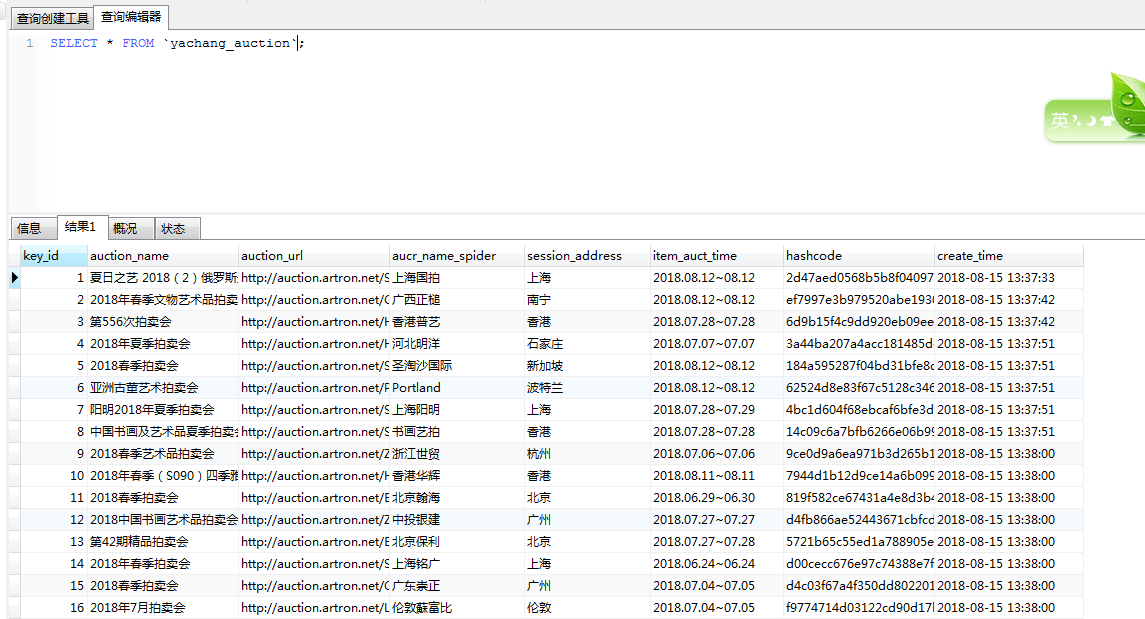
6.数据展示
scrapy 项目实战(一)----爬取雅昌艺术网数据的更多相关文章
- Java爬虫系列之实战:爬取酷狗音乐网 TOP500 的歌曲(附源码)
在前面分享的两篇随笔中分别介绍了HttpClient和Jsoup以及简单的代码案例: Java爬虫系列二:使用HttpClient抓取页面HTML Java爬虫系列三:使用Jsoup解析HTML 今天 ...
- scrapy项目5:爬取ajax形式加载的数据,并用ImagePipeline保存图片
1.目标分析: 我们想要获取的数据为如下图: 1).每本书的名称 2).每本书的价格 3).每本书的简介 2.网页分析: 网站url:http://e.dangdang.com/list-WY1-dd ...
- scrapy项目4:爬取当当网中机器学习的数据及价格(CrawlSpider类)
scrapy项目3中已经对网页规律作出解析,这里用crawlspider类对其内容进行爬取: 项目结构与项目3中相同如下图,唯一不同的为book.py文件 crawlspider类的爬虫文件book的 ...
- scrapy项目3:爬取当当网中机器学习的数据及价格(spider类)
1.网页解析 当当网中,人工智能数据的首页url如下为http://category.dangdang.com/cp01.54.12.00.00.00.html 点击下方的链接,一次观察各个页面的ur ...
- scrapy项目2:爬取智联招聘的金融类高端岗位(spider类)
---恢复内容开始--- 今天我们来爬取一下智联招聘上金融行业薪酬在50-100万的职位. 第一步:解析解析网页 当我们依次点击下边的索引页面是,发现url的规律如下: 第1页:http://www. ...
- scrapy项目1:爬取某培训机构老师信息(spider类)
1.scrapy爬虫的流程,可简单该括为以下4步: 1).新建项目---->scrapy startproject 项目名称(例如:myspider) >>scrapy.cfg为项目 ...
- Scrapy爬虫框架之爬取校花网图片
Scrapy Scrapy是一个为了爬取网站数据,提取结构性数据而编写的应用框架. 其可以应用在数据挖掘,信息处理或存储历史数据等一系列的程序中.其最初是为了页面抓取 (更确切来说, 网络抓取 )所设 ...
- python爬虫---实现项目(一) Requests爬取HTML信息
上面的博客把基本的HTML解析库已经说完了,这次我们来给予几个实战的项目. 这次主要用Requests库+正则表达式来解析HTML. 项目一:爬取猫眼电影TOP100信息 代码地址:https://g ...
- 通过scrapy,从模拟登录开始爬取知乎的问答数据
这篇文章将讲解如何爬取知乎上面的问答数据. 首先,我们需要知道,想要爬取知乎上面的数据,第一步肯定是登录,所以我们先介绍一下模拟登录: 先说一下我的思路: 1.首先我们需要控制登录的入口,重写star ...
随机推荐
- windows10(64位)Anaconda3+Python3.6搭建Tensorflow(cpu版本)及keras
转自:windows10(64位)Anaconda3+Python3.6搭建Tensorflow(cpu版本)及keras 1.本来电脑安装的是anaconda3 5.3.1,但安装的python版本 ...
- VS2008+Windows DDK 7的环境配置
Mark offers some third party utilities. That's good, but I will show a more handy way (IMHO): how to ...
- 纯 html 以及 js 多域名跳转
<!--将以下的 endv.cn 改成要跳转的域名-->第一种:单域名的跳转 1:域名在服务器端跳转 Response.Redirect(http://endv.cn) Response. ...
- geoip+php演示样例:通过ip,获取国家名称和代码
GeoIP + PHP的使用 方法一: 下载 GeoIP 的 PHP 文件geoip.inc,保存为 geoip.inc.php http://sjolzy.cn/php/GeoIP/bak/geoi ...
- webpack entry和output配置属性
1.entry entry的三种配置方式: (1)传递字符串: 单个入口语法:传递一个字符串 entry: './src/js/main.js', (2)传递数组 将创建“多个主入口(multi-ma ...
- 继承Spring AbstractRoutingDataSource实现路由切换
继承Spring AbstractRoutingDataSource实现路由切换 原创 2016年05月11日 16:50:08 标签: mybatis / AbstractRoutingDataS ...
- tomcat 热部署、热加载 精析
1.前言 找了很多篇文章,没有一篇文章讲的清晰.明了,很多人只是会用,但不是能真正说明白,这年头找个懂理论的,真难! 2.热部署 原定义:tomcat处于运行状态时,能够监测webapps下的 ...
- 函数式编程工具:filter和reduce
# -*- coding: utf-8 -*- #python 27 #xiaodeng #函数式编程工具:filter和reduce #python内置函数中,map函数是用来进行函数式编程这类工具 ...
- Redis学习(7)-通用命令
keys pattern: 获取所有与pattern匹配的key,返回所有与该key匹配的keys. 通配符: *表示任意一个或多个字符串. ?表示一个字符. 例如: 查询所有的key:keys * ...
- AIX查看系统安装时间和运行时长
$ lslpp -h bos.mp* --AIX系统的安装时间,可以通过bos.mp和bos.mp64文件集的安装时间得知 Fileset Level Action Status Date Time ...