
[Python爬虫] 之二十:Selenium +phantomjs 利用 pyquery通过搜狗搜索引擎数据
一、介绍
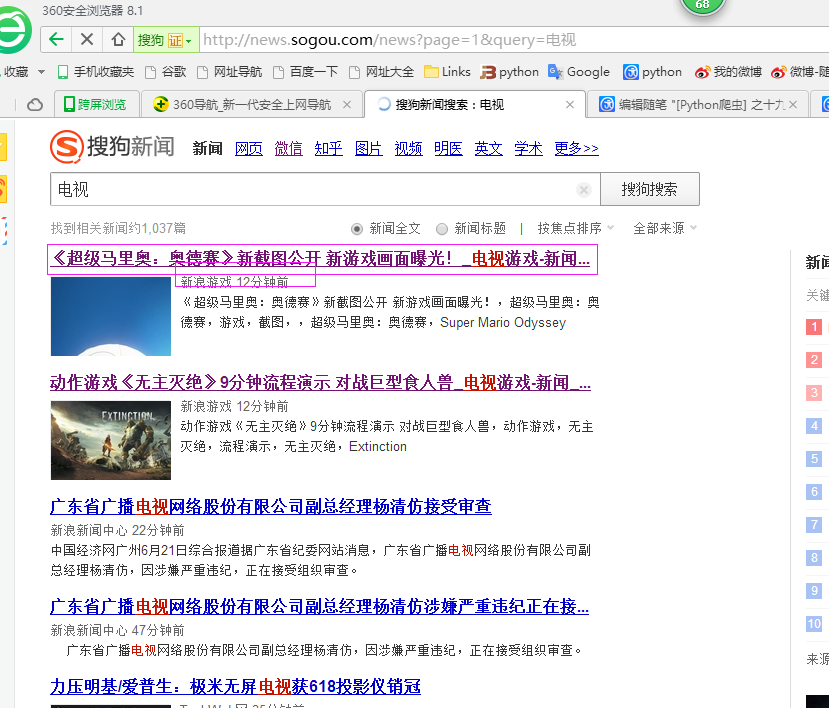
本例子用Selenium +phantomjs 利用 pyquery通过搜狗搜索引擎数据()的资讯信息,输入给定关键字抓取资讯信息。
给定关键字:数字;融合;电视
抓取信息内如下:
1、资讯标题
2、资讯链接
3、资讯时间
4、资讯来源
二、网站信息

三、数据抓取
针对上面的网站信息,来进行抓取
1、首先抓取信息列表
抓取代码:Elements = doc('div[class="news151102"]')
2、抓取标题
抓取代码:title = element('h3[class="vrTitle"]').find('a').text().encode('utf8').strip()
3、抓取链接
抓取代码:url = element('h3[class="vrTitle"]').find('a').attr('href')
4、抓取日期
抓取代码:strdate = element('p[class="news-from"]').text().encode('utf8').strip()
5、抓取来源
抓取代码:strSources = dochtml('span[class="wzof"]').text().encode('utf8').strip().split(':')
四、完整代码
# coding=utf-8

import os

import re

from selenium import webdriver

import selenium.webdriver.support.ui as ui

import time

from datetime import datetime

import IniFile

# from threading import Thread

from pyquery import PyQuery as pq

import LogFile

import mongoDB

import urllib

class sogouSpider(object):

    def __init__(self):

        logfile = os.path.join(os.path.dirname(os.getcwd()), time.strftime('%Y-%m-%d') + '.txt')

        self.log = LogFile.LogFile(logfile)

        configfile = os.path.join(os.path.dirname(os.getcwd()), 'setting.conf')

        cf = IniFile.ConfigFile(configfile)

        self.webSearchUrl_list = cf.GetValue("sogou", "webSearchUrl").split(';')

        self.keyword_list = cf.GetValue("section", "information_keywords").split(';')

        self.db = mongoDB.mongoDbBase()

        self.start_urls = []

        for word in self.keyword_list:

            keyword = urllib.quote(word)

            for url in self.webSearchUrl_list:

                self.start_urls.append(url + keyword)

        self.driver = webdriver.PhantomJS()

        self.wait = ui.WebDriverWait(self.driver, 2)

        self.driver.maximize_window()

    def Comapre_to_days(self,leftdate, rightdate):

        '''

        比较连个字符串日期,左边日期大于右边日期多少天

        :param leftdate: 格式:2017-04-15

        :param rightdate: 格式:2017-04-15

        :return: 天数

        '''

        l_time = time.mktime(time.strptime(leftdate, '%Y-%m-%d'))

        r_time = time.mktime(time.strptime(rightdate, '%Y-%m-%d'))

        result = int(l_time - r_time) / 86400

        return result

    def date_isValid(self, strDateText):

        '''

        判断日期时间字符串是否合法:如果给定时间大于当前时间是合法,或者说当前时间给定的范围内

        :param strDateText: 四种格式 '慧聪网 7小时前'; '新浪游戏 29分钟前' ; '中国行业研究网 2017-6-13'

        :return: True:合法;False:不合法

        '''

        currentDate = time.strftime('%Y-%m-%d')

        source = strDateText.split(' ')[0]

        if strDateText.find('分钟前') > 0:

            return True, source, currentDate

        elif strDateText.find('小时前') > 0:

            datePattern = re.compile(r'\d{1,2}')

            ch = int(time.strftime('%H'))  # 当前小时数

            strDate = re.findall(datePattern, strDateText)

            if len(strDate) == 1:

                if int(strDate[0]) <= ch:  # 只有小于当前小时数,才认为是今天

                    return True, source, currentDate

        else:

            datePattern = re.compile(r'\d{4}-\d{1,2}-\d{1,2}')

            strDate = re.findall(datePattern, strDateText)

            if len(strDate) == 1:

                if self.Comapre_to_days(currentDate, strDate[0]) == 0:

                    return True, source, currentDate

        return False, '', ''

    def log_print(self, msg):

        '''

        #         日志函数

        #         :param msg: 日志信息

        #         :return:

        #         '''

        print '%s: %s' % (time.strftime('%Y-%m-%d %H-%M-%S'), msg)

    def scrapy_date(self):

        strsplit = '------------------------------------------------------------------------------------'

        for link in self.start_urls:

            self.driver.get(link)

            selenium_html = self.driver.execute_script("return document.documentElement.outerHTML")

            doc = pq(selenium_html)

            infoList = []

            self.log.WriteLog(strsplit)

            self.log_print(strsplit)

            Elements = doc('div[class="news151102"]')

            for element in Elements.items():

                strdate = element('p[class="news-from"]').text().encode('utf8').strip()

                flag, source, date = self.date_isValid(strdate)

                if flag:

                    title = element('h3[class="vrTitle"]').find('a').text().encode('utf8').strip()

                    for keyword in self.keyword_list:

                        if title.find(keyword) > -1:

                            url = element('h3[class="vrTitle"]').find('a').attr('href')

                            dictM = {'title': title, 'date': date,

                             'url': url, 'keyword': keyword, 'introduction': title, 'source': source}

                            infoList.append(dictM)

                            self.log.WriteLog('title:%s' % title)

                            self.log.WriteLog('url:%s' % url)

                            self.log.WriteLog('source:%s' % source)

                            self.log.WriteLog('kword:%s' % keyword)

                            self.log.WriteLog(strsplit)

                            self.log_print('title:%s' % dictM['title'])

                            self.log_print('url:%s' % dictM['url'])

                            self.log_print('date:%s' % dictM['date'])

                            self.log_print('source:%s' % dictM['source'])

                            self.log_print('kword:%s' % dictM['keyword'])

                            self.log_print(strsplit)

                            break

            if len(infoList)>0:

                self.db.SaveInformations(infoList)

        self.driver.close()

        self.driver.quit()

obj = sogouSpider()

obj.scrapy_date()
[Python爬虫] 之二十:Selenium +phantomjs 利用 pyquery通过搜狗搜索引擎数据的更多相关文章
- [Python爬虫] 之三十一:Selenium +phantomjs 利用 pyquery抓取消费主张信息
一.介绍 本例子用Selenium +phantomjs爬取央视栏目(http://search.cctv.com/search.php?qtext=消费主张&type=video)的信息(标 ...
- [Python爬虫] 之十七:Selenium +phantomjs 利用 pyquery抓取梅花网数据
一.介绍 本例子用Selenium +phantomjs爬取梅花网(http://www.meihua.info/a/list/today)的资讯信息,输入给定关键字抓取资讯信息. 给定关键字:数字: ...
- [Python爬虫] 之二十二:Selenium +phantomjs 利用 pyquery抓取界面网站数据
一.介绍 本例子用Selenium +phantomjs爬取界面(https://a.jiemian.com/index.php?m=search&a=index&type=news& ...
- [Python爬虫] 之二十五:Selenium +phantomjs 利用 pyquery抓取今日头条网数据
一.介绍 本例子用Selenium +phantomjs爬取今日头条(http://www.toutiao.com/search/?keyword=电视)的资讯信息,输入给定关键字抓取资讯信息. 给定 ...
- [Python爬虫] 之二十九:Selenium +phantomjs 利用 pyquery抓取节目信息信息
一.介绍 本例子用Selenium +phantomjs爬取节目(http://tv.cctv.com/epg/index.shtml?date=2018-03-25)的信息 二.网站信息 三.数据抓 ...
- [Python爬虫] 之二十八:Selenium +phantomjs 利用 pyquery抓取网站排名信息
一.介绍 本例子用Selenium +phantomjs爬取中文网站总排名(http://top.chinaz.com/all/index.html,http://top.chinaz.com/han ...
- [Python爬虫] 之二十六:Selenium +phantomjs 利用 pyquery抓取智能电视网站图片信息
一.介绍 本例子用Selenium +phantomjs爬取智能电视网站(http://www.tvhome.com/news/)的资讯信息,输入给定关键字抓取图片信息. 给定关键字:数字:融合:电视 ...
- [Python爬虫] 之二十四:Selenium +phantomjs 利用 pyquery抓取中广互联网数据
一.介绍 本例子用Selenium +phantomjs爬取中广互联网(http://www.tvoao.com/select.html)的资讯信息,输入给定关键字抓取资讯信息. 给定关键字:数字:融 ...
- [Python爬虫] 之二十一:Selenium +phantomjs 利用 pyquery抓取36氪网站数据
一.介绍 本例子用Selenium +phantomjs爬取36氪网站(http://36kr.com/search/articles/电视?page=1)的资讯信息,输入给定关键字抓取资讯信息. 给 ...
随机推荐
- 亮相SIGGRAPH 太极拳三维教学App制作揭秘
http://news.hxsd.com/CG-animation/201208/663303.html 编者按:<My Tai Chi>是一系列基于移动平台的三维互动产品,由北京七星汇工 ...
- 24式太极拳:3D动画演示(图文)
http://blog.sina.com.cn/s/blog_4be33b740102e9ae.html 24式太极拳:3D动画演示(图文) (2013-03-10 18:45:55) 转载▼ 标签: ...
- Atos cannot get symbols from dSYM of archived application
http://stackoverflow.com/questions/7675863/atos-cannot-get-symbols-from-dsym-of-archived-application ...
- Oracle基础 04 归档日志 archivelog
--查看归档模式archive log list select log_mode from v$database; --修改为归档模式(mount下)alter database archivelog ...
- Oracle基础 02 临时表空间 temp
--查看临时文件的使用/剩余空间 SQL> select * from v$temp_space_header; --查看SCOTT用户所属的临时表空间 SQL> select usern ...
- ajax邮箱、用户名唯一性验证
<script type="text/javascript"> $(function () { $("#txtEmail").blur(functi ...
- mysql 使用set names 解决乱码问题
引子: 最近查询公司线上表数据,返现在Xshell控制台打印的数据都是乱码,记得之前瞄过同事都是执行set names UTF8 , 解决的,特记录如下.
- 【hdoj_1049】Climbing Worm
题目:http://acm.hdu.edu.cn/showproblem.php?pid=1049 以 上升-下降 一次为一个周期,一个周期时间为2分钟,每个周期上升距离为(u-d).先只考虑上升,再 ...
- Linux下查看nginx、mysql、php的安装路径和编译参数
一:查看安装路径: 1.nginx安装路径: ps -ef | grep nginx 摁回车,将出现如下图片: master process 后面的就是 nginx的目录. 2.mysql安装路径: ...
- Laravel 中的 Many-To-Many
在实际的开发中,我们经常会接触到几种常见的对应关系模式: One-To-One //一对一 One-To-Many //一对多 Many-To-Many //多对多 在刚刚开始接触到这些概念的时候,其 ...