
[Python爬虫] 之三十一:Selenium +phantomjs 利用 pyquery抓取消费主张信息
一、介绍
本例子用Selenium +phantomjs爬取央视栏目(http://search.cctv.com/search.php?qtext=消费主张&type=video)的信息(标题,时间)
二、网站信息
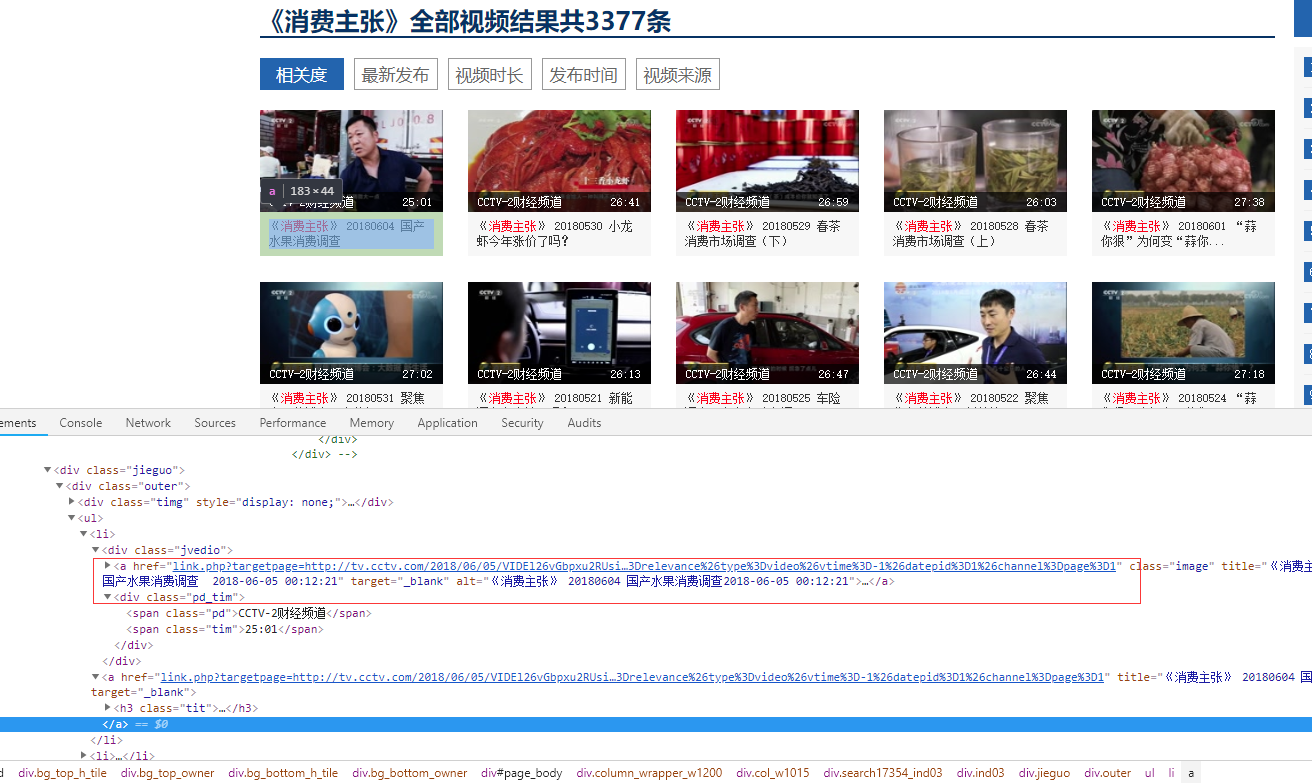
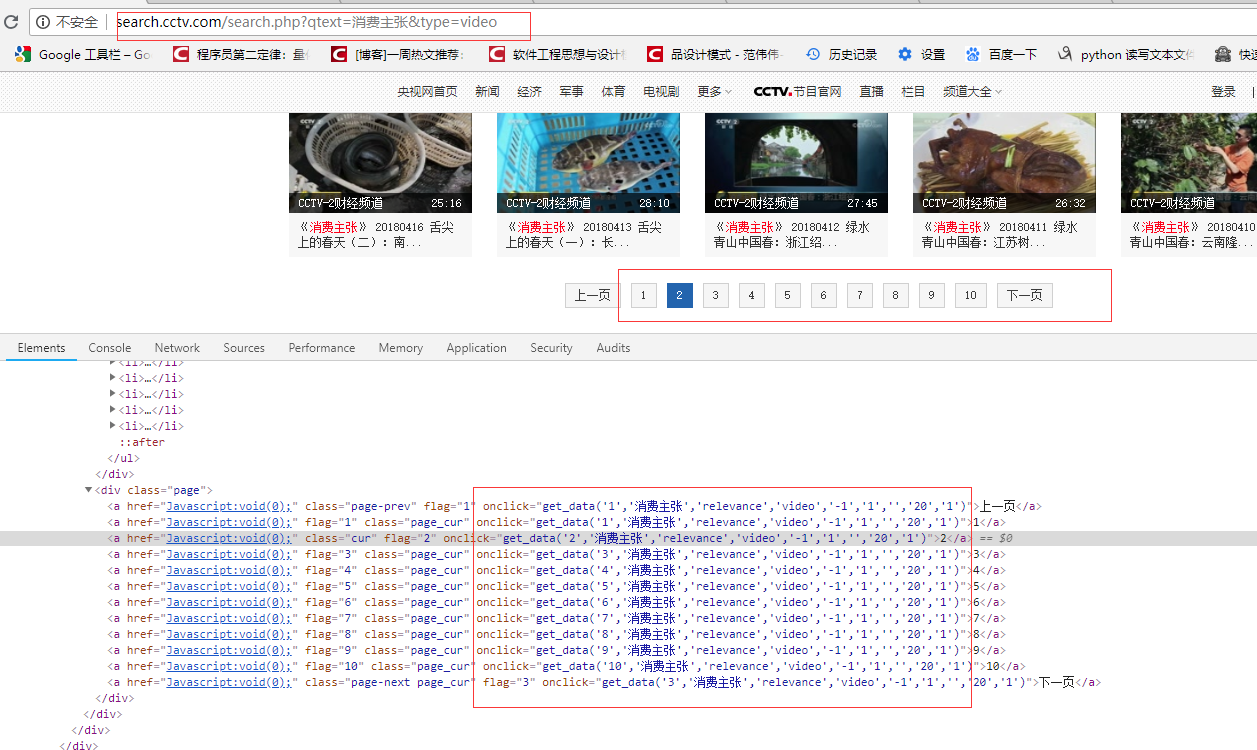
python 代码
# coding=utf-8

import os

import re

from selenium import webdriver

from datetime import datetime,timedelta

import time

from pyquery import PyQuery as pq

import re

import mongoDB

import datetime

class consumer:

    def __init__(self):

        #通过配置文件获取IEDriverServer.exe路径

        # IEDriverServer ='C:\Program Files\Internet Explorer\IEDriverServer.exe'

        # self.driver = webdriver.Ie(IEDriverServer)

        # self.driver.maximize_window()

        self.driver = webdriver.PhantomJS(service_args=['--load-images=false'])

        # self.driver = driver = webdriver.Chrome()

        self.driver.set_page_load_timeout(10)

        self.driver.maximize_window()

        self.db = mongoDB.mongoDbBase()

    def WriteLog(self, message,date):

        fileName = os.path.join(os.getcwd(), 'consumer/' + date  +   '.txt')

        with open(fileName, 'a') as f:

            f.write(message)

    # http://search.cctv.com/search.php?qtext=消费主张&type=video

    def CatchData(self,url='http://search.cctv.com/search.php?qtext=%E6%B6%88%E8%B4%B9%E4%B8%BB%E5%BC%A0&type=video'):

        error = ''

        try:

            self.driver.get(url)

            time.sleep(1)

            selenium_html = self.driver.execute_script("return document.documentElement.outerHTML")

            doc = pq(selenium_html)

            filename = datetime.datetime.now().strftime('%Y-%m-%d')

            message = '{0},{1}'.format( '标题', '时间')

            filename = datetime.datetime.now().strftime('%Y-%m-%d')

            self.WriteLog(message, filename)

            pages = doc("div[class='page']").find("a")

            # 2018-06-05 00:12:21

            pattern = re.compile("\d{4}-\d{2}-\d{2}\s\d{2}:\d{2}:\d{2}")

            for index in range(1,6):

                url = "get_data('{0}', '消费主张', 'relevance', 'video', '-1', '1', '', '20', '1')".format(index)

                self.driver.execute_script(url)

                selenium_html = self.driver.execute_script("return document.documentElement.outerHTML")

                doc = pq(selenium_html)

                Elements = doc("div[class='jvedio']").find("a")

                for sub in Elements.items():

                    title = sub.attr('title').encode('utf8')

                    ts = pattern.findall(title)

                    strtime = ''

                    if ts and len(ts) == 1:

                        strtime = ts[0]

                    if strtime:

                        index = title.index(strtime)

                        title = title[0:index]

                    title = '\n{0},{1}'.format(title,strtime)

                    self.WriteLog(title, filename)

        except Exception, e1:

            error = e1.message

    # def CatchData(self,url='http://search.cctv.com/search.php?qtext=%E6%B6%88%E8%B4%B9%E4%B8%BB%E5%BC%A0&type=video'):

    #     error = ''

    #     try:

    #         self.driver.get(url)

    #         time.sleep(1)

    #         selenium_html = self.driver.execute_script("return document.documentElement.outerHTML")

    #         doc = pq(selenium_html)

    #

    #         filename = datetime.datetime.now().strftime('%Y-%m-%d')

    #

    #         pages = doc("div[class='page']").find("a")

    #

    #         for element in pages.items():

    #             url = element.attr('onclick').encode('utf8')

    #             # get_data('1','消费主张','relevance','video','-1','1','','20','1')

    #             # get_data('2', '消费主张', 'relevance', 'video', '-1', '1', '', '20', '1')

    #             print url

    #             self.driver.execute_script(url)

    #             selenium_html = self.driver.execute_script("return document.documentElement.outerHTML")

    #             doc = pq(selenium_html)

    #

    #             Elements = doc("div[class='jvedio']").find("a")

    #             for sub in Elements.items():

    #                 title = sub.attr('title').encode('utf8')

    #                 print title

    #                 title = '\n{0}'.format(title)

    #                 self.WriteLog(title, filename)

    #     except Exception, e1:

    #         error = e1.message

obj = consumer()

obj.CatchData()

# obj.CatchContent('')

# obj.export('')
[Python爬虫] 之三十一:Selenium +phantomjs 利用 pyquery抓取消费主张信息的更多相关文章
- [Python爬虫] 之二十八:Selenium +phantomjs 利用 pyquery抓取网站排名信息
一.介绍 本例子用Selenium +phantomjs爬取中文网站总排名(http://top.chinaz.com/all/index.html,http://top.chinaz.com/han ...
- [Python爬虫] 之二十一:Selenium +phantomjs 利用 pyquery抓取36氪网站数据
一.介绍 本例子用Selenium +phantomjs爬取36氪网站(http://36kr.com/search/articles/电视?page=1)的资讯信息,输入给定关键字抓取资讯信息. 给 ...
- [Python爬虫] 之三十:Selenium +phantomjs 利用 pyquery抓取栏目
一.介绍 本例子用Selenium +phantomjs爬取栏目(http://tv.cctv.com/lm/)的信息 二.网站信息 三.数据抓取 首先抓取所有要抓取网页链接,共39页,保存到数据库里 ...
- [Python爬虫] 之十六:Selenium +phantomjs 利用 pyquery抓取一点咨询数据
本篇主要是利用 pyquery来定位抓取数据,而不用xpath,通过和xpath比较,pyquery效率要高. 主要代码: # coding=utf-8 import os import re fro ...
- [Python爬虫] 之二十五:Selenium +phantomjs 利用 pyquery抓取今日头条网数据
一.介绍 本例子用Selenium +phantomjs爬取今日头条(http://www.toutiao.com/search/?keyword=电视)的资讯信息,输入给定关键字抓取资讯信息. 给定 ...
- [Python爬虫] 之二十二:Selenium +phantomjs 利用 pyquery抓取界面网站数据
一.介绍 本例子用Selenium +phantomjs爬取界面(https://a.jiemian.com/index.php?m=search&a=index&type=news& ...
- [Python爬虫] 之二十九:Selenium +phantomjs 利用 pyquery抓取节目信息信息
一.介绍 本例子用Selenium +phantomjs爬取节目(http://tv.cctv.com/epg/index.shtml?date=2018-03-25)的信息 二.网站信息 三.数据抓 ...
- [Python爬虫] 之十七:Selenium +phantomjs 利用 pyquery抓取梅花网数据
一.介绍 本例子用Selenium +phantomjs爬取梅花网(http://www.meihua.info/a/list/today)的资讯信息,输入给定关键字抓取资讯信息. 给定关键字:数字: ...
- [Python爬虫] 之二十七:Selenium +phantomjs 利用 pyquery抓取今日头条视频
一.介绍 本例子用Selenium +phantomjs爬取今天头条视频(http://www.tvhome.com/news/)的信息,输入给定关键字抓取图片信息. 给定关键字:视频:融合:电视 二 ...
随机推荐
- 将 sublime test3 添加到鼠标右键的方法
将 sublime test3 添加到鼠标右键的方法 将 sublime_addright.inf 文件放到 sublime text 安装目录进行安装即可. 文件名:sublime_addright ...
- poj1040 Transportation(DFS)
题目链接 http://poj.org/problem?id=1040 题意 城市A,B之间有m+1个火车站,第一站A站的编号为0,最后一站B站的编号为m,火车最多可以乘坐n人.火车票的票价为票上终点 ...
- HDU 6188 Duizi and Shunzi
栈. 将数字排序后,一个一个压入栈.如果栈顶两个元素形成了对子,那么$ans+1$,弹出栈顶两个元素:如果栈顶三个元素形成了顺子,那么$ans+1$,弹出栈顶三个元素. #include<bit ...
- 洛谷P2323 [HNOI2006] 公路修建问题 [二分答案,生成树]
题目传送门 公路修建问题 题目描述 OI island是一个非常漂亮的岛屿,自开发以来,到这儿来旅游的人很多.然而,由于该岛屿刚刚开发不久,所以那里的交通情况还是很糟糕.所以,OIER Associa ...
- shell中的cat和文件分界符(<<EOF) (转)
原文地址: http://blog.csdn.net/mosesmo1989/article/details/51123257 在shell中,文件分界符(通常写成EOF,你也可以写成FOE或者其他任 ...
- codevs 1058 合唱队形 2004年NOIP全国联赛提高组
1058 合唱队形 2004年NOIP全国联赛提高组 时间限制: 1 s 空间限制: 128000 KB 题目等级 : 黄金 Gold 题目描述 Description N位同学站成一排,音 ...
- BZOJ2599 IOI2011Race
题目:一棵树,每条边有权.求一条路径,权值和等于K,且边的数量最小. 点分治,我们考虑经过根节点的路径,t[x]表示路径长为x时最少的边数,然后每次拿栈记下来清空. 注意先搜索再更新,这样可以避免同一 ...
- [BZOJ3676][APIO2014]回文串(Manacher+SAM)
3676: [Apio2014]回文串 Time Limit: 20 Sec Memory Limit: 128 MBSubmit: 3097 Solved: 1408[Submit][Statu ...
- [BZOJ4870][六省联考2017]组合数问题(组合数动规)
4870: [Shoi2017]组合数问题 Time Limit: 10 Sec Memory Limit: 512 MBSubmit: 748 Solved: 398[Submit][Statu ...
- 【最小表示法】BZOJ2882-工艺
[题目大意] 求一个循环数列的最小表示法. [思路] 最小表示法模板题.之前用SAM做的,MLE了hhhhh戳☆ #include<iostream> #include<cstdio ...