
[Python爬虫] 之二十二:Selenium +phantomjs 利用 pyquery抓取界面网站数据
一、介绍
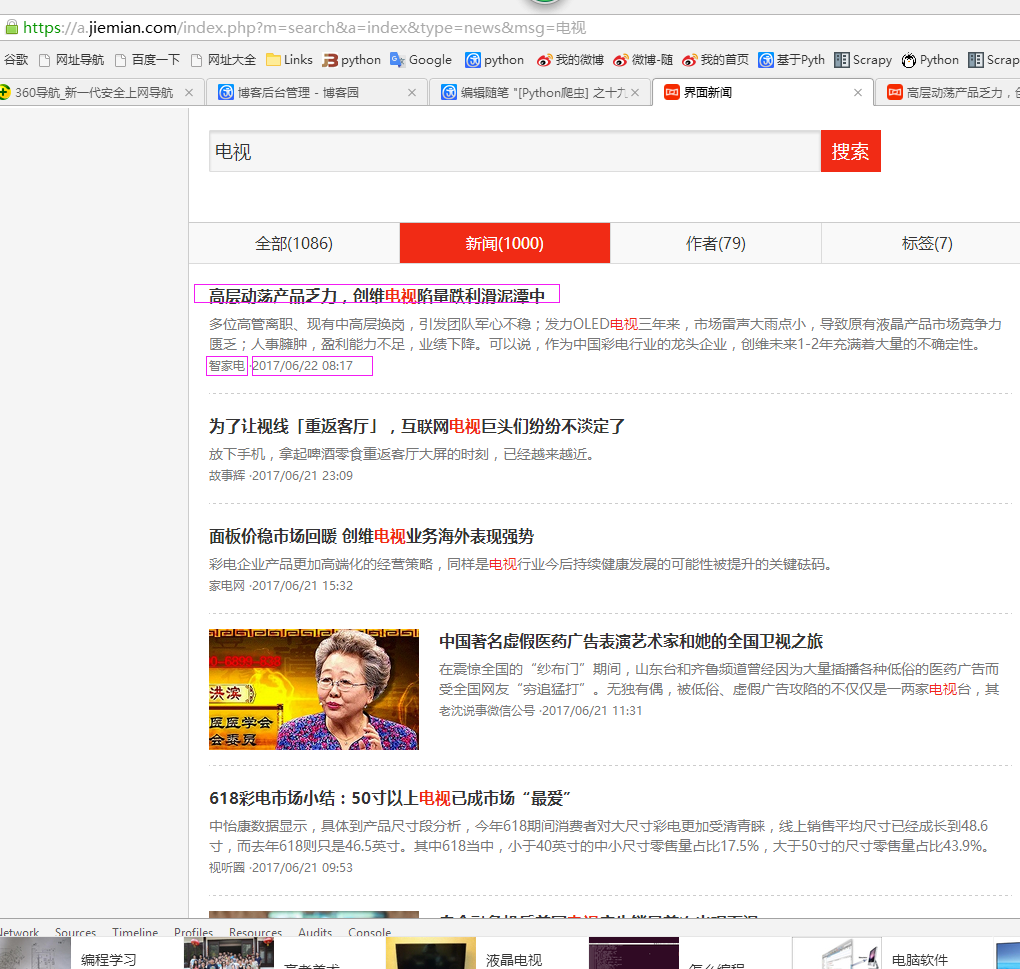
本例子用Selenium +phantomjs爬取界面(https://a.jiemian.com/index.php?m=search&a=index&type=news&msg=电视)的资讯信息,输入给定关键字抓取资讯信息。
给定关键字:数字;融合;电视
抓取信息内如下:
1、资讯标题
2、资讯链接
3、资讯时间
4、资讯来源
二、网站信息
三、数据抓取
针对上面的网站信息,来进行抓取
1、首先抓取信息列表
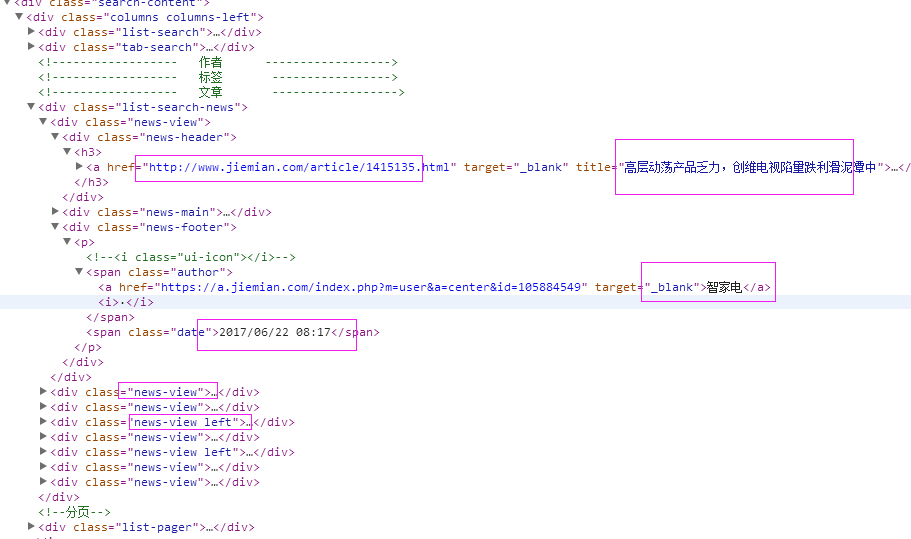
抓取代码:Elements = doc('div[class^="news-view"]')
2、抓取标题
抓取代码:title = element('div[class="news-header"]').find('h3').find('a').text().encode('utf8').replace(' ', '')
3、抓取链接
抓取代码:url = element('div[class="news-header"]').find('h3').find('a').attr('href')
4、抓取日期
抓取代码:strdate = element('div[class="news-footer"]').find('p').find('span').eq(1).text().encode('utf8')
5、抓取来源
抓取代码:source = element('div[class="news-footer"]').find('p').find('span').eq(0).find('a').text().encode('utf8').replace(' ', '')
四、完整代码
# coding=utf-8

import os

import re

from selenium import webdriver

import selenium.webdriver.support.ui as ui

import time

from datetime import datetime

import IniFile

# from threading import Thread

from pyquery import PyQuery as pq

import LogFile

import mongoDB

import urllib

class jiemianSpider(object):

    def __init__(self):

        logfile = os.path.join(os.path.dirname(os.getcwd()), time.strftime('%Y-%m-%d') + '.txt')

        self.log = LogFile.LogFile(logfile)

        configfile = os.path.join(os.path.dirname(os.getcwd()), 'setting.conf')

        cf = IniFile.ConfigFile(configfile)

        webSearchUrl_list = cf.GetValue("jiemian", "webSearchUrl")

        self.keyword_list = cf.GetValue("section", "information_keywords").split(';')

        self.db = mongoDB.mongoDbBase()

        self.start_urls = []

        for word in self.keyword_list:

            self.start_urls.append(webSearchUrl_list + urllib.quote(word))

        self.driver = webdriver.PhantomJS()

        self.wait = ui.WebDriverWait(self.driver, 2)

        self.driver.maximize_window()

    def scroll_foot(self):

        '''

                滚动条拉到底部

                :return:

                '''

        js = ""

        # 如何利用chrome驱动或phantomjs抓取

        if self.driver.name == "chrome" or self.driver.name == 'phantomjs':

            js = "var q=document.body.scrollTop=10000"

        # 如何利用IE驱动抓取

        elif self.driver.name == 'internet explorer':

            js = "var q=document.documentElement.scrollTop=10000"

        return self.driver.execute_script(js)

    def Comapre_to_days(self,leftdate, rightdate):

        '''

        比较连个字符串日期,左边日期大于右边日期多少天

        :param leftdate: 格式:2017-04-15

        :param rightdate: 格式:2017-04-15

        :return: 天数

        '''

        l_time = time.mktime(time.strptime(leftdate, '%Y-%m-%d'))

        r_time = time.mktime(time.strptime(rightdate, '%Y-%m-%d'))

        result = int(l_time - r_time) / 86400

        return result

    def date_isValid(self, strDateText):

        '''

        判断日期时间字符串是否合法:如果给定时间大于当前时间是合法,或者说当前时间给定的范围内

        :param strDateText: 四种格式 '慧聪网 7小时前'; '新浪游戏 29分钟前' ; '中国行业研究网 2017-6-13'

        :return: True:合法;False:不合法

        '''

        currentDate = time.strftime('%Y-%m-%d')

        datePattern = re.compile(r'\d{4}-\d{1,2}-\d{1,2}')

        dt = strDateText.replace('/', '-')

        strDate = re.findall(datePattern, dt)

        if len(strDate) == 1:

            if self.Comapre_to_days(currentDate, strDate[0]) == 0:

                return True, currentDate

        return False, ''

    def log_print(self, msg):

        '''

        #         日志函数

        #         :param msg: 日志信息

        #         :return:

        #         '''

        print '%s: %s' % (time.strftime('%Y-%m-%d %H-%M-%S'), msg)

    def scrapy_date(self):

        strsplit = '------------------------------------------------------------------------------------'

        for link in self.start_urls:

            self.driver.get(link)

            selenium_html = self.driver.execute_script("return document.documentElement.outerHTML")

            doc = pq(selenium_html)

            infoList = []

            self.log.WriteLog(strsplit)

            self.log_print(strsplit)

            Elements = doc('div[class^="news-view"]')

            for element in Elements.items():

                strdate = element('div[class="news-footer"]').find('p').find('span').eq(1).text().encode('utf8')

                flag, date = self.date_isValid(strdate)

                if flag:

                    title = element('div[class="news-header"]').find('h3').find('a').text().encode('utf8').replace(' ', '')

                    for keyword in self.keyword_list:

                        if title.find(keyword) > -1:

                            url = element('div[class="news-header"]').find('h3').find('a').attr('href')

                            source = element('div[class="news-footer"]').find('p').find('span').eq(0).find(

                                'a').text().encode('utf8').replace(' ', '')

                            dictM = {'title': title, 'date': date,

                             'url': url, 'keyword': keyword, 'introduction': title, 'source': source}

                            infoList.append(dictM)

                            # self.log.WriteLog('title:%s' % title)

                            # self.log.WriteLog('url:%s' % url)

                            # self.log.WriteLog('source:%s' % source)

                            # self.log.WriteLog('kword:%s' % keyword)

                            # self.log.WriteLog(strsplit)

                            self.log_print('title:%s' % dictM['title'])

                            self.log_print('url:%s' % dictM['url'])

                            self.log_print('date:%s' % dictM['date'])

                            self.log_print('source:%s' % dictM['source'])

                            self.log_print('kword:%s' % dictM['keyword'])

                            self.log_print(strsplit)

                            break

            if len(infoList)>0:

                self.db.SaveInformations(infoList)

        self.driver.close()

        self.driver.quit()

obj = jiemianSpider()

obj.scrapy_date()
[Python爬虫] 之二十二:Selenium +phantomjs 利用 pyquery抓取界面网站数据的更多相关文章
- [Python爬虫] 之二十三:Selenium +phantomjs 利用 pyquery抓取智能电视网数据
一.介绍 本例子用Selenium +phantomjs爬取智能电视网(http://news.znds.com/article/news/)的资讯信息,输入给定关键字抓取资讯信息. 给定关键字:数字 ...
- [Python爬虫] 之二十七:Selenium +phantomjs 利用 pyquery抓取今日头条视频
一.介绍 本例子用Selenium +phantomjs爬取今天头条视频(http://www.tvhome.com/news/)的信息,输入给定关键字抓取图片信息. 给定关键字:视频:融合:电视 二 ...
- [Python爬虫] 之二十一:Selenium +phantomjs 利用 pyquery抓取36氪网站数据
一.介绍 本例子用Selenium +phantomjs爬取36氪网站(http://36kr.com/search/articles/电视?page=1)的资讯信息,输入给定关键字抓取资讯信息. 给 ...
- [Python爬虫] 之三十:Selenium +phantomjs 利用 pyquery抓取栏目
一.介绍 本例子用Selenium +phantomjs爬取栏目(http://tv.cctv.com/lm/)的信息 二.网站信息 三.数据抓取 首先抓取所有要抓取网页链接,共39页,保存到数据库里 ...
- [Python爬虫] 之十六:Selenium +phantomjs 利用 pyquery抓取一点咨询数据
本篇主要是利用 pyquery来定位抓取数据,而不用xpath,通过和xpath比较,pyquery效率要高. 主要代码: # coding=utf-8 import os import re fro ...
- [Python爬虫] 之十七:Selenium +phantomjs 利用 pyquery抓取梅花网数据
一.介绍 本例子用Selenium +phantomjs爬取梅花网(http://www.meihua.info/a/list/today)的资讯信息,输入给定关键字抓取资讯信息. 给定关键字:数字: ...
- [Python爬虫] 之二十:Selenium +phantomjs 利用 pyquery通过搜狗搜索引擎数据
一.介绍 本例子用Selenium +phantomjs 利用 pyquery通过搜狗搜索引擎数据()的资讯信息,输入给定关键字抓取资讯信息. 给定关键字:数字:融合:电视 抓取信息内如下: 1.资讯 ...
- [Python爬虫] 之二十八:Selenium +phantomjs 利用 pyquery抓取网站排名信息
一.介绍 本例子用Selenium +phantomjs爬取中文网站总排名(http://top.chinaz.com/all/index.html,http://top.chinaz.com/han ...
- [Python爬虫] 之二十九:Selenium +phantomjs 利用 pyquery抓取节目信息信息
一.介绍 本例子用Selenium +phantomjs爬取节目(http://tv.cctv.com/epg/index.shtml?date=2018-03-25)的信息 二.网站信息 三.数据抓 ...
随机推荐
- 一次向svn中增加所有新增文件 svn add all new files【转】
以下摘自:<卓有成效的程序员>之自动化 转自:http://blog.csdn.net/spare_h/article/details/6677435 我经常会一次往Subversion里 ...
- EasyUI的tree展开所有的节点或者根据特殊的条件控制展示指定的节点
展示tree下的所有节点$(function(){ $('#t_funinfo_tree').tree({ checkbox: true, url:"<%=basePath %> ...
- 2.如何使用python连接hdfs
总所周知,python是一门很强大的语言,主要在于它有着丰富的第三方模块,当然连接hdfs的模块也不例外. 在python中有一个模块也叫hdfs,可以使用它连接hadoop的hdfs.直接pip i ...
- C#字节数组的常用解码处理方法
在某些情况下,比如说串口通信或者读取二进制的文件,通常会得到一个byte数组形式的数据. 然而对于这个数据处理常常令人苦恼,因为通常通信情况下,并不是一个字节代表一个字符或者某个数据,而是数据夹杂在字 ...
- tcpdump学习(1):安装
目前学习mysql,其中,提到使用tcpdump来进行query的抓包日志,那么,首先就要安装tcpdump. 在ubuntu中,tcpdump是缺省安装的,如果没有,则按照以下步骤做: 1)安装li ...
- Spring源码 之环境搭建
1.安装gitHub 在官网https://desktop.github.com/下载githubsetup.exe,在线安装总是出错,试了几次后不成功就放弃了.不知道是不是网络的原因. 后来在网上找 ...
- ros下xtion用法
xtion用openni2_launch openni2.launch就可以打开,但是在使用过程中有一些定制性问题: 首先弄清openni2_launch 中一些topic都是什么意思 http:// ...
- 虚拟机vmware下安装Ghost XP——正确的解决方案
http://hi.baidu.com/xjl456852/item/fd466e9935b2da8859146111 在虚拟机中启动系统,出现"Operating System not f ...
- 使用graphql和apollo client构建react web应用
graphql是一种用于 API 的查询语言(摘自官网). 我们为什么要用graphql? 相信大家在开发web应用的时候常常会遇到以下这些问题:后端更新了接口却没有通知前端,从而导致各种报错:后端修 ...
- 动态规划二:最长公共子序列(LCS)
1.两个子序列:X={x1,x2....xm},Y={y1,y2....yn},设Z={z1,z2...zk}. 2.最优子结构: 1)如果xm=yn ,则zk=xm=yn且Zk-1是Xm-1和Yn- ...