
Entity Framework Code-First(22):Code-based Migration
Code-based Migration:
Code-based migration is useful when you want more control on the migration, i.e. set default value of the column, etc.
Code-First has two commands for code based migration:
- Add-migration: It will scaffold the next migration for the changes you have made to your domain classes
- Update-database: It will apply pending changes to the database based on latest scaffolding code file you created using "Add-Migration" command
Assume that you have Student and Course entity classes initially and you want to use code-based migration for your application. Before running the commands above, you must enable migration for your application, by using the enable-migrations commands. These are in package manager that we used previously for automatic migration. This will create a configuration file, as was the case with automated migration. Also, you need to set the database initializer in the context class:
public class SchoolDBContext: DbContext

{

    public SchoolDBContext(): base("SchoolDBConnectionString")

    {

        Database.SetInitializer(new MigrateDatabaseToLatestVersion<SchoolDBContext, SchoolDataLayer.Migrations.Configuration>("SchoolDBConnectionString"));

    }

    public DbSet<Student> Students { get; set; }

    public DbSet<Course> Courses { get; set; }

    protected override void OnModelCreating(DbModelBuilder modelBuilder)

    {

        base.OnModelCreating(modelBuilder);

    }

}
Now, you have to create a scaffold code file which consists of your database requirement from your existing domain classes. You can do this by running the “add-migration" command in the package manager. (from Tools → Library Package Manager → Package Manager Console). You will have to pass the name parameter, which will be part of the code file name.

Add-Migration command Syntax:
    Add-Migration [-Name] <String> [-Force]

      [-ProjectName <String>] [-StartUpProjectName <String>]

      [-ConfigurationTypeName <String>] [-ConnectionStringName <String>]

      [-IgnoreChanges] [<CommonParameters>]

    Add-Migration [-Name] <String> [-Force]

      [-ProjectName <String>] [-StartUpProjectName <String>]

      [-ConfigurationTypeName <String>] -ConnectionString <String>

      -ConnectionProviderName <String> [-IgnoreChanges] [<Common Parameters>]
You can see that this command has created a new file in the Migration folder with the name of the parameter you passed to the command with a timestamp prefix:
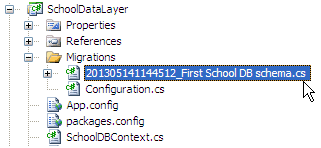
After creating the file above using the add-migration command, you have to update the database. You can create or update the database using the “update-database” command. You can use –verbose to see what's going on in the database:
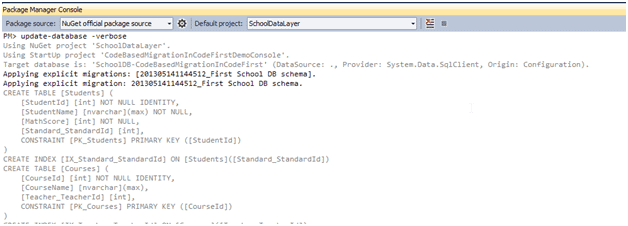
Update-Database command syntax:
Update-Database [-SourceMigration <String>]

    [-TargetMigration <String>] [-Script] [-Force] [-ProjectName <String>]

    [-StartUpProjectName <String>] [-ConfigurationTypeName <String>]

    [-ConnectionStringName <String>] [<CommonParameters>]

Update-Database [-SourceMigration <String>] [-TargetMigration <String>]

    [-Script] [-Force] [-ProjectName <String>] [-StartUpProjectName <String>]

    [-ConfigurationTypeName <String>] -ConnectionString <String>

    -ConnectionProviderName <String> [<CommonParameters>]
At this point, the database will be created or updated.
Now, suppose you added more domain classes. So before running the application, you have to create a scaffold file for new classes, by executing the "Add-Migration" command. Once it creates the file, update the database using the Update-Database command. In this way, you have to repeat the Add-Migration and Update-Database command each time you make any changes in your domain classes.
Rollback Database change:
Suppose you want to roll back the database schema to any of the previous states, then you can use "update-database" command with –TargetMigration parameter as shown below:
update-database -TargetMigration:"First School DB schema"
Use the "get-migration" command to see what migration has been applied.
Note: Use the "get-help" command for add-migration and update-database command in order to see what parameters can be passed with this command.
Entity Framework Code-First(22):Code-based Migration的更多相关文章
- Entity Framework Tutorial Basics(22):Disconnected Entities
Disconnected Entities: Before we see how to perform CRUD operation on disconnected entity graph, let ...
- Entity Framework Tutorial Basics(11):Code First
Code First development with Entity Framework: Entity Framework supports three different development ...
- Entity Framework Tutorial Basics(37):Lazy Loading
Lazy Loading: One of the important functions of Entity Framework is lazy loading. Lazy loading means ...
- Entity Framework Tutorial Basics(36):Eager Loading
Eager Loading: Eager loading is the process whereby a query for one type of entity also loads relate ...
- Entity Framework Tutorial Basics(32):Enum Support
Enum in Entity Framework: You can now have an Enum in Entity Framework 5.0 onwards. EF 5 should targ ...
- Entity Framework Tutorial Basics(29):Stored Procedure in Entity Framework
Stored Procedure in Entity Framework: Entity Framework has the ability to automatically build native ...
- Entity Framework Tutorial Basics(28):Concurrency
Concurrency in Entity Framework: Entity Framework supports Optimistic Concurrency by default. In the ...
- Entity Framework Tutorial Basics(27):Update Entity Graph
Update Entity Graph using DbContext: Updating an entity graph in disconnected scenario is a complex ...
- Entity Framework Tutorial Basics(19):Change Tracking
Change Tracking in Entity Framework: Here, you will learn how entity framework tracks changes on ent ...
- Entity Framework Tutorial Basics(15):Querying with EDM
Querying with EDM: We have created EDM, DbContext, and entity classes in the previous sections. Here ...
随机推荐
- LeetCode Beautiful Arrangement
原题链接在这里:https://leetcode.com/problems/beautiful-arrangement/description/ 题目: Suppose you have N inte ...
- jquery.tmpl的使用
jquery.tmpl是jQuery模板插件,http://plugins.jquery.com/tmpl/ (另外还有一个插件dot.js,不依赖与jquery,性能更佳,使用方法大同小异) 在网页 ...
- CentOS6.5 下MySQL傻瓜式安装
为了为服务器上装mysql我先在虚拟机上练习了一下特此记录并分享; 注:参考文章https://www.cnblogs.com/xiaoluo501395377/archive/2013/04/07/ ...
- MyEclipse启动tomcat增加内存配置
omcat增加内存在catalina.bat下 MyEclipse增加内存 设置Window->Preferences->Application Servers->Tomcat -- ...
- python 修改文件内容
python 修改文件内容 一.修改原文件方式 1 def alter(file,old_str,new_str): 2 """ 3 替换文件中的字符串 4 :param ...
- Java基础--对象克隆
对象拷贝用于在内存中复制对象,无需构造器便可创建对象. 需要注意的是 1.clone方法提供的只是简单的值拷贝和地址拷贝,若类中包含HashMap等类型时,需要手工编写拷贝过程 2.如果父类没有提供正 ...
- Django基础(二)—— models
六:Models示例 Django本身提供了非常强大易使用的ORM组件,并且支持多种数据库. 配置连接数据文件 在自己创建的project 目录下编辑settings.py DATABASES = { ...
- AngularJS:SQL
ylbtech-AngularJS:SQL 1.返回顶部 1. AngularJS SQL 在前面章节中的代码也可以用于读取数据库中的数据. 使用 PHP 从 MySQL 中获取数据 AngularJ ...
- 杂项:VS调试技巧之附加进程
ylbtech-杂项:VS调试技巧之附加进程 1. 摘录返回顶部 1. 用过VS一段时间的程序员们相信都有过这种调试经历:每次按下F5进行断点调试时,都要等待好长时间:先让解决方式编译通过,然后启动V ...
- Mysql数据库服务器配置文件/etc/my.cnf的详细配置
以下是 Mysql数 据库服务器配置文件 /etc/my.cnf的详细配置.应用场合是 InnoDB引擎, 4核 CPU, 32位SUSE. [client] port = 3306 ...