
Entity Framework Code-First(22):Code-based Migration
Code-based Migration:
Code-based migration is useful when you want more control on the migration, i.e. set default value of the column, etc.
Code-First has two commands for code based migration:
- Add-migration: It will scaffold the next migration for the changes you have made to your domain classes
- Update-database: It will apply pending changes to the database based on latest scaffolding code file you created using "Add-Migration" command
Assume that you have Student and Course entity classes initially and you want to use code-based migration for your application. Before running the commands above, you must enable migration for your application, by using the enable-migrations commands. These are in package manager that we used previously for automatic migration. This will create a configuration file, as was the case with automated migration. Also, you need to set the database initializer in the context class:
public class SchoolDBContext: DbContext

{

    public SchoolDBContext(): base("SchoolDBConnectionString")

    {

        Database.SetInitializer(new MigrateDatabaseToLatestVersion<SchoolDBContext, SchoolDataLayer.Migrations.Configuration>("SchoolDBConnectionString"));

    }

    public DbSet<Student> Students { get; set; }

    public DbSet<Course> Courses { get; set; }

    protected override void OnModelCreating(DbModelBuilder modelBuilder)

    {

        base.OnModelCreating(modelBuilder);

    }

}
Now, you have to create a scaffold code file which consists of your database requirement from your existing domain classes. You can do this by running the “add-migration" command in the package manager. (from Tools → Library Package Manager → Package Manager Console). You will have to pass the name parameter, which will be part of the code file name.

Add-Migration command Syntax:
    Add-Migration [-Name] <String> [-Force]

      [-ProjectName <String>] [-StartUpProjectName <String>]

      [-ConfigurationTypeName <String>] [-ConnectionStringName <String>]

      [-IgnoreChanges] [<CommonParameters>]

    Add-Migration [-Name] <String> [-Force]

      [-ProjectName <String>] [-StartUpProjectName <String>]

      [-ConfigurationTypeName <String>] -ConnectionString <String>

      -ConnectionProviderName <String> [-IgnoreChanges] [<Common Parameters>]
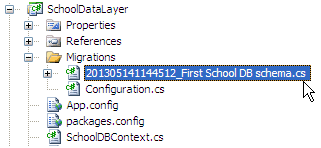
You can see that this command has created a new file in the Migration folder with the name of the parameter you passed to the command with a timestamp prefix:
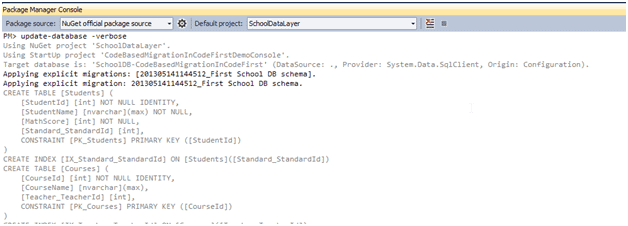
After creating the file above using the add-migration command, you have to update the database. You can create or update the database using the “update-database” command. You can use –verbose to see what's going on in the database:
Update-Database command syntax:
Update-Database [-SourceMigration <String>]

    [-TargetMigration <String>] [-Script] [-Force] [-ProjectName <String>]

    [-StartUpProjectName <String>] [-ConfigurationTypeName <String>]

    [-ConnectionStringName <String>] [<CommonParameters>]

Update-Database [-SourceMigration <String>] [-TargetMigration <String>]

    [-Script] [-Force] [-ProjectName <String>] [-StartUpProjectName <String>]

    [-ConfigurationTypeName <String>] -ConnectionString <String>

    -ConnectionProviderName <String> [<CommonParameters>]
At this point, the database will be created or updated.
Now, suppose you added more domain classes. So before running the application, you have to create a scaffold file for new classes, by executing the "Add-Migration" command. Once it creates the file, update the database using the Update-Database command. In this way, you have to repeat the Add-Migration and Update-Database command each time you make any changes in your domain classes.
Rollback Database change:
Suppose you want to roll back the database schema to any of the previous states, then you can use "update-database" command with –TargetMigration parameter as shown below:
update-database -TargetMigration:"First School DB schema"
Use the "get-migration" command to see what migration has been applied.
Note: Use the "get-help" command for add-migration and update-database command in order to see what parameters can be passed with this command.
Entity Framework Code-First(22):Code-based Migration的更多相关文章
- Entity Framework Tutorial Basics(22):Disconnected Entities
Disconnected Entities: Before we see how to perform CRUD operation on disconnected entity graph, let ...
- Entity Framework Tutorial Basics(11):Code First
Code First development with Entity Framework: Entity Framework supports three different development ...
- Entity Framework Tutorial Basics(37):Lazy Loading
Lazy Loading: One of the important functions of Entity Framework is lazy loading. Lazy loading means ...
- Entity Framework Tutorial Basics(36):Eager Loading
Eager Loading: Eager loading is the process whereby a query for one type of entity also loads relate ...
- Entity Framework Tutorial Basics(32):Enum Support
Enum in Entity Framework: You can now have an Enum in Entity Framework 5.0 onwards. EF 5 should targ ...
- Entity Framework Tutorial Basics(29):Stored Procedure in Entity Framework
Stored Procedure in Entity Framework: Entity Framework has the ability to automatically build native ...
- Entity Framework Tutorial Basics(28):Concurrency
Concurrency in Entity Framework: Entity Framework supports Optimistic Concurrency by default. In the ...
- Entity Framework Tutorial Basics(27):Update Entity Graph
Update Entity Graph using DbContext: Updating an entity graph in disconnected scenario is a complex ...
- Entity Framework Tutorial Basics(19):Change Tracking
Change Tracking in Entity Framework: Here, you will learn how entity framework tracks changes on ent ...
- Entity Framework Tutorial Basics(15):Querying with EDM
Querying with EDM: We have created EDM, DbContext, and entity classes in the previous sections. Here ...
随机推荐
- 通过 objc_setAssociatedObject alert 和 button关联 及传值
原文地址 http://blog.csdn.net/lengshengren/article/details/16886915 //唯一静态变量key static const char associ ...
- vector map迭代器失效解决方案
vector : iter = container.erase(iter); //erase的返回值是删除元素下一个元素的迭代器 vector<int>::iterator it = ...
- Java实现LSH(Locality Sensitive Hash )
在对大批量数据进行图像处理的时候,比如说我提取SIFT特征,数据集为10W张图片,一个SIFT特征点是128维,一张图片提取出500个特征点,这样我们在处理的时候就是对5000万个128维的数据进行处 ...
- windows下mysql提示Can't connect to MySQL server on 'localhost'
1.开cmd输入mysqld --defaults-file="c:\Program Files (x86)\MySQL\MySQL Server 5.6\my-default.ini&qu ...
- CodeForces - 650D:Zip-line (LIS & DP)
Vasya has decided to build a zip-line on trees of a nearby forest. He wants the line to be as long a ...
- MySQL下分页查询数据
-- 分页 -- 前两条 -- 启始位置从下标0开始,查询的是数据库中的第1条开始 -- 0:启始位置 2:一次性查询多少条 select * from account LIMIT 0,2; -- ...
- NET持续集成与自动化部署
https://www.cnblogs.com/hunternet/p/9590287.html 相信每一位程序员都经历过深夜加班上线的痛苦!而作为一个加班上线如家常便饭的码农,更是深感其痛.由于我们 ...
- Why getting this error “django.db.utils.OperationalError: (1050, ”Table 'someTable' already exists“)”
0down votefavorite I am getting error like django.db.utils.OperationalError: (1050, "Table 's ...
- 忘记Oracle System和Sys密码的解决方法
忘记Oracle System和Sys密码的方法 :Oracle提供两种验证方式,一种是OS验证,另一种密码文件验证方式,如果是第一种方式用以下方法修改密码: sqlplus /nolog; conn ...
- getParameter() getInputStream()和getReader() 区别
我们经常用servlet和jsp, 经常用request.getParameter() 来得到数据. request.getParameter() request.getInputStream() r ...