
[js高手之路] html5 canvas系列教程 - 文本样式(strokeText,fillText,measureText,textAlign,textBaseline)
接着上文线条样式[js高手之路] html5 canvas系列教程 - 线条样式(lineWidth,lineCap,lineJoin,setLineDash)继续.
canvas提供两种输出文本的方式:
strokeText:描边文本
fillText:填充文本
fillStyle配合fillText使用,strokeStyle配合strokeText使用
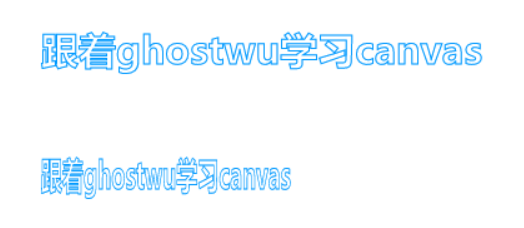
strokeText用法:
cxt.strokeText( text, x, y, [maxwidth] )
text:需要输出的文本内容
x:最左边的文本输出的横坐标位置
y:最左边的文本的 左下角的纵坐标
maxWidth:这个是可选参数,意思就是文本最多能占用maxWidth这么宽,如果文本的实际宽度比maxWidth宽,就会有一种压缩(被挤扁)的效果。
 <meta charset='utf-8' />

 <style>

 body {

     background: #000;

 }

 #canvas{

     background:white;

 }

 </style>

 <script>

 window.onload = function(){

     var oCanvas = document.querySelector( "#canvas" ),

         oGc = oCanvas.getContext( '2d' ),

         text = '跟着ghostwu学习canvas';

         oGc.font = 'bold 30px 微软雅黑';

         oGc.strokeStyle = '#09f';

         oGc.strokeText( text, 100, 100 );

         oGc.strokeText( text, 100, 200, 200 );

 }

 </script>

 </head>

 <body>

 <canvas id="canvas" width="600" height="300"></canvas>

 </body>
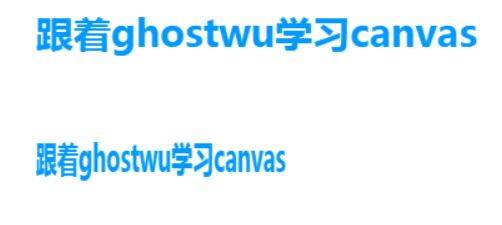
fillText:填充文本,参数跟strokeText一样
measureText:获取文本的宽度(长度),它返回的是一个对象,对象有一个属性width,就是文本的长度了.
cxt.measureText( text ).width
输出一段水平居中的文本
 <meta charset='utf-8' />

 <style>

 body {

     background: #000;

 }

 #canvas{

     background:white;

 }

 </style>

 <script>

 window.onload = function(){

     var oCanvas = document.querySelector( "#canvas" ),

         oGc = oCanvas.getContext( '2d' ),

         width = oCanvas.width,

         text = '跟着ghostwu学习canvas';

         oGc.font = 'bold 30px 微软雅黑';

         oGc.fillStyle = '#09f';

         oGc.fillText( text, ( width - oGc.measureText( text ).width ) / 2, 100 );

 }

 </script>

 </head>

 <body>

 <canvas id="canvas" width="600" height="300"></canvas>

 </body>

font属性跟css是一样的用法
cxt.font = "font-style font-weight font-size/line-height font-family"
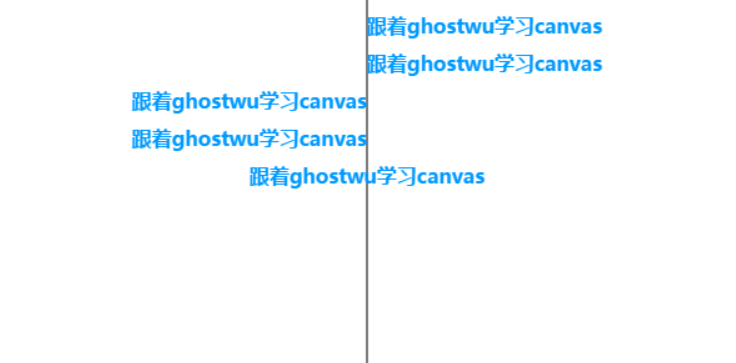
textAlign:文本水平对齐方式
cxt.textAlign = 'start/end/left/right/center';
start跟left差不多,end跟right差不多.
 <meta charset='utf-8' />

 <style>

 body {

     background: #000;

 }

 #canvas{

     background:white;

 }

 </style>

 <script>

 window.onload = function(){

     var oCanvas = document.querySelector( "#canvas" ),

         oGc = oCanvas.getContext( '2d' ),

         width = oCanvas.width,

         height = oCanvas.height,

         text = '跟着ghostwu学习canvas';

         oGc.font = 'bold 16px 微软雅黑';

         oGc.fillStyle = '#09f';

         var xPos = ( width ) / 2;

         oGc.moveTo( xPos, 0 );

         oGc.lineTo( xPos, height );

         oGc.stroke();

         oGc.textAlign = 'start';

         oGc.fillText( text, 300, 30 );

         oGc.textAlign = 'left';

         oGc.fillText( text, 300, 60 );

         oGc.textAlign = 'right';

         oGc.fillText( text, 300, 90 );

         oGc.textAlign = 'end';

         oGc.fillText( text, 300, 120 );

         oGc.textAlign = 'center';

         oGc.fillText( text, 300, 150 );

 }

 </script>

 </head>

 <body>

 <canvas id="canvas" width="600" height="300"></canvas>

 </body>
textBaseline:设置文本垂直方向的对齐方式
cxt.textBaseline = '属性值'
常见的属性值: alphabetic, top, middle, bottom等
跟上面的textAlign的用法差不多,这个不是很常用
[js高手之路] html5 canvas系列教程 - 文本样式(strokeText,fillText,measureText,textAlign,textBaseline)的更多相关文章
- [js高手之路] html5 canvas系列教程 - 线条样式(lineWidth,lineCap,lineJoin,setLineDash)
上文,写完弧度与贝塞尔曲线[js高手之路] html5 canvas系列教程 - arcTo(弧度与二次,三次贝塞尔曲线以及在线工具),本文主要是关于线条的样式设置 lineWidth: 设置线条的宽 ...
- [js高手之路] html5 canvas系列教程 - 图片操作(drawImage,clip,createPattern)
接着上文[js高手之路] html5 canvas系列教程 - 文本样式(strokeText,fillText,measureText,textAlign,textBaseline)继续,本文介绍的 ...
- [js高手之路] html5 canvas系列教程 - 掌握画直线图形的常用API
我们接着上文[js高手之路] html5 canvase系列教程 - 认识canvas以及基本使用方法继续. 一.直线的绘制 cxt.moveTo( x1, y1 ): 将画笔移动到x1, y1这个点 ...
- [js高手之路] html5 canvas系列教程 - arcTo(弧度与二次,三次贝塞尔曲线以及在线工具)
之前,我写了一个arc函数的用法:[js高手之路] html5 canvas系列教程 - arc绘制曲线图形(曲线,弧线,圆形). arcTo: cxt.arcTo( cx, cy, x2, y2, ...
- [js高手之路] html5 canvas系列教程 - arc绘制曲线图形(曲线,弧线,圆形)
绘制曲线,经常会用到路径的知识,如果你对路径有疑问,可以参考我的这篇文章[js高手之路] html5 canvas系列教程 - 开始路径beginPath与关闭路径closePath详解. arc:画 ...
- [js高手之路] html5 canvas系列教程 - 像素操作(反色,黑白,亮度,复古,蒙版,透明)
接着上文[js高手之路] html5 canvas系列教程 - 状态详解(save与restore),相信大家都应该玩过美颜功能,而我们今天要讲的就是canvas强大的像素处理能力,通过像素处理,实现 ...
- [js高手之路] html5 canvas系列教程 - 状态详解(save与restore)
本文内容与路径([js高手之路] html5 canvas系列教程 - 开始路径beginPath与关闭路径closePath详解)是canvas中比较重要的概念.掌握理解他们是做出复杂canvas动 ...
- [js高手之路] html5 canvas系列教程 - 线形渐变,径向渐变与阴影设置
接着上文[js高手之路] html5 canvas系列教程 - 像素操作(反色,黑白,亮度,复古,蒙版,透明)继续. 一.线形渐变 线形渐变指的是一条直线上发生的渐变. 用法: var linear ...
- [js高手之路] html5 canvas动画教程 - 实时获取鼠标的当前坐标
有了前面的canvas基础之后,现在开始就精彩了,后面写的canvas教程都是属于综合应用,前面已经写了常用的canvas基础知识,参考链接如下: [js高手之路] html5 canvas系列教程 ...
随机推荐
- Linux 常用性能工具简介
一.wget 文件下载 使用wget下载单个文件:wget URL 下载并以不同的文件名保存:wget -O wordpress.zip URL wget限速下载:wget --limit-rate= ...
- 7_linux下PHP、Apache、Mysql服务的安装
1.首先安装之前,要确保你的虚拟机能连上外网. Mysql: 1.yum -y install mysql 连接数据库命令行模式 2.yum install mysql-server 安装mys ...
- 部署和使用kibana
背景 上一篇介绍了在阿里云上部署ES,本文将主要介绍ELK的可视化工具Kibana的部署和使用.主要分为三个步骤来实现最终呈现: 1.导入数据到ES: 2.部署kibana并完成配置: 3.使用kib ...
- HTTP协议初级入门
Http = HyperText Transfer Protocol即超文本传输协议 HTTPS = Hyper Text Transfer Protocol over Secure Socket L ...
- hr用法
定义和用法 <hr> 标签在 HTML 页面中创建一条水平线. 水平分隔线(horizontal rule)可以在视觉上将文档分隔成各个部分. HTML 与 XHTML 之间的差异 在 H ...
- PhoneGap + Dreamweaver 5.5 无法在模拟器中打开的问题
版权声明:本文为博主原创文章,未经博主允许不得转载. 原博客地址为:http://blog.csdn.net/dupang/article/details/8248335 按照网上的教程搭建Dream ...
- java归并排序详解
归并排序 /** * 归并排序 * 简介:将两个(或两个以上)有序表合并成一个新的有序表 即把待排序序列分为若干个子序列,每个子序列是有序的.然后再把有序子序列合并为整体有序序列 * 时间 ...
- javascript实现jsp页面的打印预览
1.加载WebBrowser打印预览控件 <OBJECT classid="CLSID:8856F961-340A-11D0-A96B-00C04FD705A2" heigh ...
- Ext.grid.EditorGridPanel保存
用get方法传递编辑的数据会出现乱码,解决get乱码的方法就是encodeURI(param),然后在后台转码: String strJson = new String(request.getPar ...
- Maven生成可以直接运行的jar包的多种方式
Maven可以使用mvn package指令对项目进行打包,如果使用Java -jar xxx.jar执行运行jar文件,会出现"no main manifest attribute, in ...